
Group Pickup Details Report Overview
Parent Hub: 🤝 Sales, Groups & Events Reports
Category: 👥 Group Block
Target Roles: Group Sales Managers, Directors of Sales, Revenue Managers, Convention Services Managers, Hotel Controllers, General Managers
Key Value: Monitor daily group block pick-up velocity, evaluate contracted inventory utilization against release cutoff rules, track remaining unreserved block allocations, and optimize inventory management prior to cut-off dates.
Executive Summary
The Group Pickup Details Report is a vital group sales management, inventory control, and block pick-up tracking document within the 👥 Group Block category of the 🤝 Sales, Groups & Events Reports hub. Designed to provide clear daily visibility into block utilization and release parameters across active group contracts, it itemizes allocated room inventory, reserved pick-up counts, remaining unreserved rooms, and release rules over specified date windows.
-
By mapping master block profiles (
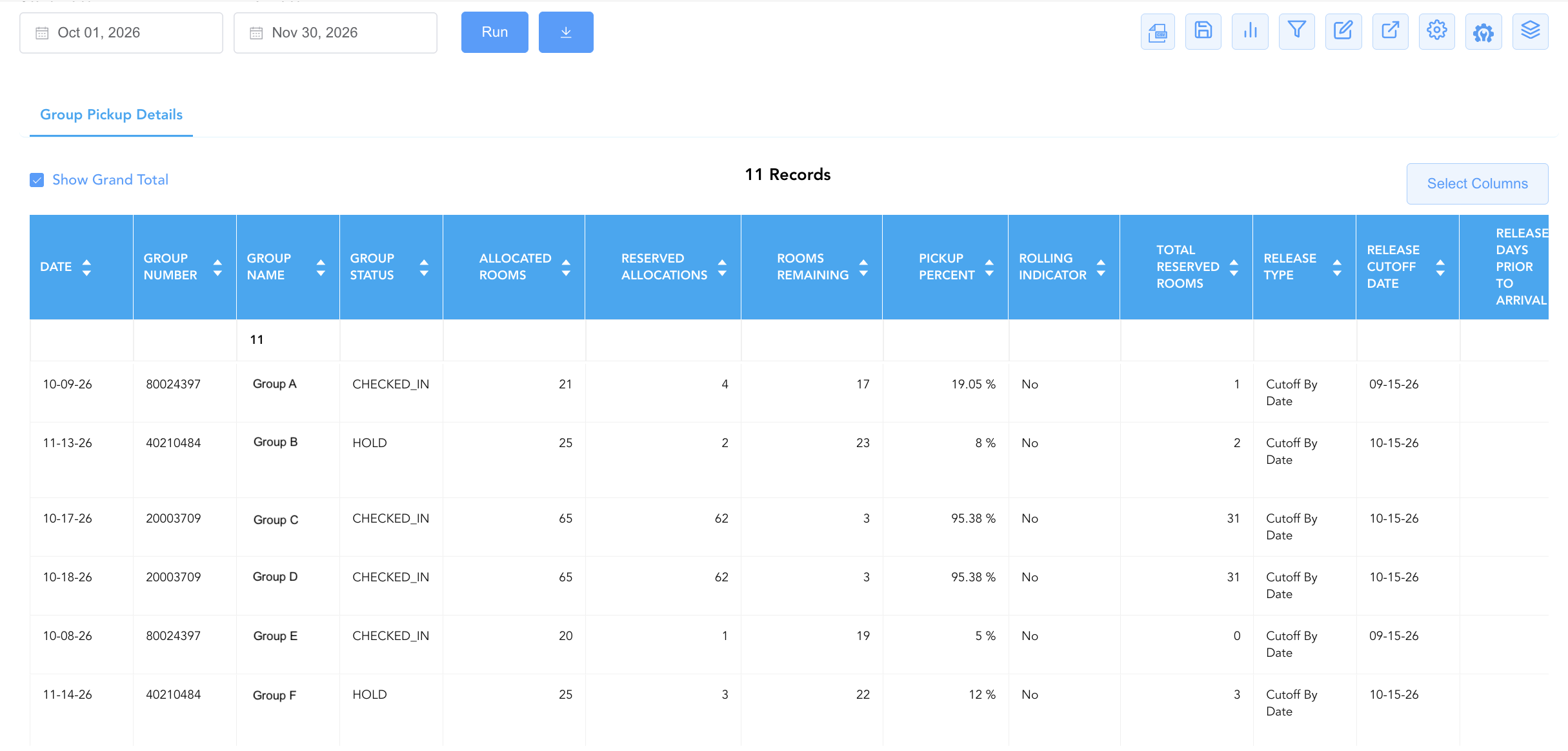
Group Number,Group Name,Group Status) and stay dates (Date) to contractual allocation counters (Allocated Rooms,Reserved Allocations,Rooms Remaining,Total Reserved Rooms), pick-up efficiency metrics (Pickup Percent), and automated release rules (Rolling Indicator,Release Type,Release Cutoff Date,Release Days Prior To Arrival), this report enables sales managers, revenue directors, and front office teams to monitor pick-up progress, manage cutoff dates effectively, release unneeded block allocations back to public inventory, and prevent revenue displacement.
Key Capabilities
-
Daily Block Pick-Up Velocity Audit: Tracks date-by-date room allocation fulfillment (
Reserved Allocations) against total contracted blocks (Allocated Rooms). -
Remaining Inventory & Wash Management: Calculates real-time unreserved block inventory (
Rooms Remaining) to evaluate block wash potential prior to cut-off dates. -
Pick-Up Percentage Benchmark Tracking: Computes exact pick-up realization ratios (
Pickup Percent, e.g., 5%, 19%, 30%, 95%) to measure attendee booking pace against historical trends. -
Contractual Release Rule Enforcement: Itemizes release cutoff terms (
Release Type,Release Cutoff Date,Release Days Prior To Arrival,Rolling Indicator) to automate or verify inventory release timelines. -
Total Block & Overflow Tracking: Measures overall group reservations (
Total Reserved Rooms) across primary allocations and out-of-block bookings.
Report Views & Functional Breakdown
The Group Pickup Details Report presents group block inventory and pick-up metrics in a unified single-table master matrix supporting three primary operational perspectives:
┌────────────────────────────────────────────────────────────────────────┐
│                    GROUP PICKUP DETAILS REPORT                         │
├────────────────────────────────────────────────────────────────────────┤
│                         Unified Matrix View                            │
├──────────────────────────┬──────────────────────────┬──────────────────┤
│ 1. Group Identity &      │ 2. Inventory Pick-Up &   │ 3. Cutoff &      │
│    Contract Status       │    Utilization Matrix    │    Release Rules │
└──────────────────────────┴──────────────────────────┴──────────────────┘
1. Group Identity & Contract Status
Monitors master group identification numbers, descriptive block titles, operational contract statuses, and target stay dates.
-
Primary Use: Scanning active group blocks on property and evaluating contract lifecycle standing.
-
Key Metrics: Date, Group Number, Group Name, Group Status.
2. Inventory Pick-Up & Utilization Matrix
Tracks allocated room counts, picked-up reservations, remaining unreserved inventory, and computed pick-up percentages.
-
Primary Use: Monitoring daily booking pace, identifying under-performing group blocks, and determining inventory available for release.
-
Key Metrics: Allocated Rooms, Reserved Allocations, Rooms Remaining, Pickup Percent, Total Reserved Rooms.
3. Cutoff & Release Rules
Audits automated and manual release mechanisms, cutoff dates, rolling release flags, and days prior to arrival requirements.
-
Primary Use: Managing inventory release schedules, verifying automated cutoff execution, and coordinating sales cut-off notifications with group contacts.
-
Key Metrics: Rolling Indicator, Release Type, Release Cutoff Date, Release Days Prior To Arrival, Date, Group Name.
Data Dictionary (Dynamic View Columns)
Customize your default view using the Configure (⚙️) icon on the report page. Below is the full data dictionary representing all 13 dynamic columns available in this report, sorted in alphabetical order by column name:
|
Column Name |
Description |
Data Source / System Mapping |
Includes Taxes & Fees? |
|
Allocated Rooms |
Total count of guest rooms contracted and allocated to the group block for the target date. |
Group Block Engine > Allocated Block |
N/A |
|
Date |
Calendar date within the group block stay window. |
PMS Calendar > Stay Date |
N/A |
|
Group Name |
Official descriptive name of the group or event block (e.g., |
Group Block Master > Block Name |
N/A |
|
Group Number |
Primary unique master identification number assigned to the group block in the PMS (e.g., |
Group Block Master > Group ID |
N/A |
|
Group Status |
Operational lifecycle state of the group block contract (e.g., |
Group Block Master > Status Code |
N/A |
|
Pickup Percent |
Calculated percentage ratio of allocated rooms picked up by attendee reservations (Reserved Allocations ÷ Allocated Rooms). |
Calculated: Utilization Ratio |
N/A |
|
Release Cutoff Date |
Specific calendar date on which unreserved group block allocations are released back to general property inventory. |
Group Block Master > Cutoff Date |
N/A |
|
Release Days Prior To Arrival |
Configured number of days prior to group arrival when unpicked-up block allocations automatically release. |
Group Block Master > Cutoff Days |
N/A |
|
Release Type |
Mechanism governing unpicked-up block releases (e.g., |
Group Block Master > Release Rule |
N/A |
|
Reserved Allocations |
Count of group block rooms picked up and reserved within the official block allocation. |
Group Res Engine > Picked Up Count |
N/A |
|
Rolling Indicator |
Flag indicating whether block releases execute on a rolling daily basis leading up to arrival (e.g., |
Group Block Master > Rolling Flag |
N/A |
|
Rooms Remaining |
Count of unreserved contracted rooms remaining in the group block allocation (Allocated Rooms -Reserved Allocations). |
Calculated: Available Allocation |
N/A |
|
Total Reserved Rooms |
Total cumulative count of reservations booked across all rate codes and allocations linked to the group block. |
Group Res Engine > Total Booked |
N/A |
Customization & Platform Features
User & Property Preferences
-
Personal Preference: Tailor your individual view by hiding or dragging columns. Your preferences save automatically for future sessions.
-
Property Defaults: System Admins can configure standard default layouts across all property users to streamline operational reporting. To maximize audit efficiency, group the columns into the below logical blocks:
-
Group Identity & Event Date (Cols 1–4):
Group Name|Group Number|Group Status|Date -
Block Allocation & Pickup KPIs (Cols 5–9):
Allocated Rooms|Reserved Allocations|Pickup Percent|Rooms Remaining|Total Reserved Rooms -
Inventory Release & Cutoff Parameters (Cols 10–13):
Release Type|Release Cutoff Date|Release Days Prior To Arrival|Rolling Indicator
-
Report Toolbar & Quick Actions
Use the top-right toolbar icons on the report page to manage and export your data view:
|
Icon |
Action / Feature |
Description |

|
Knowledge Article |
Opens the knowledge base article to learn how to interpret this report. |

|
Background Export |
Allows users to download up to 365 days of data directly to their computer in CSV format. |

|
Saved Views |
Saves your column filtering, sorting, and highlight preferences so you can easily reload your custom view later without reconfiguring the report. |

|
Filter |
Opens filter controls to isolate specific data within a column based on your selected criteria. |

|
Highlight |
Highlights column values in a designated color based on selected conditions. |

|
Export |
Exports and downloads the report in various formats (Excel, PDF, CSV) for offline analysis or printing. |

|
Configure |
Opens column selection controls to toggle visibility, reorder columns, or hide rows with all zeros. |

|
Additional Configuration |
Provides advanced report configuration and display formatting options to customize data presentation. |

|
Group By |
Summarize and group report data dynamically in real time. |
Interactive Visualizations & Grouping Controls
-
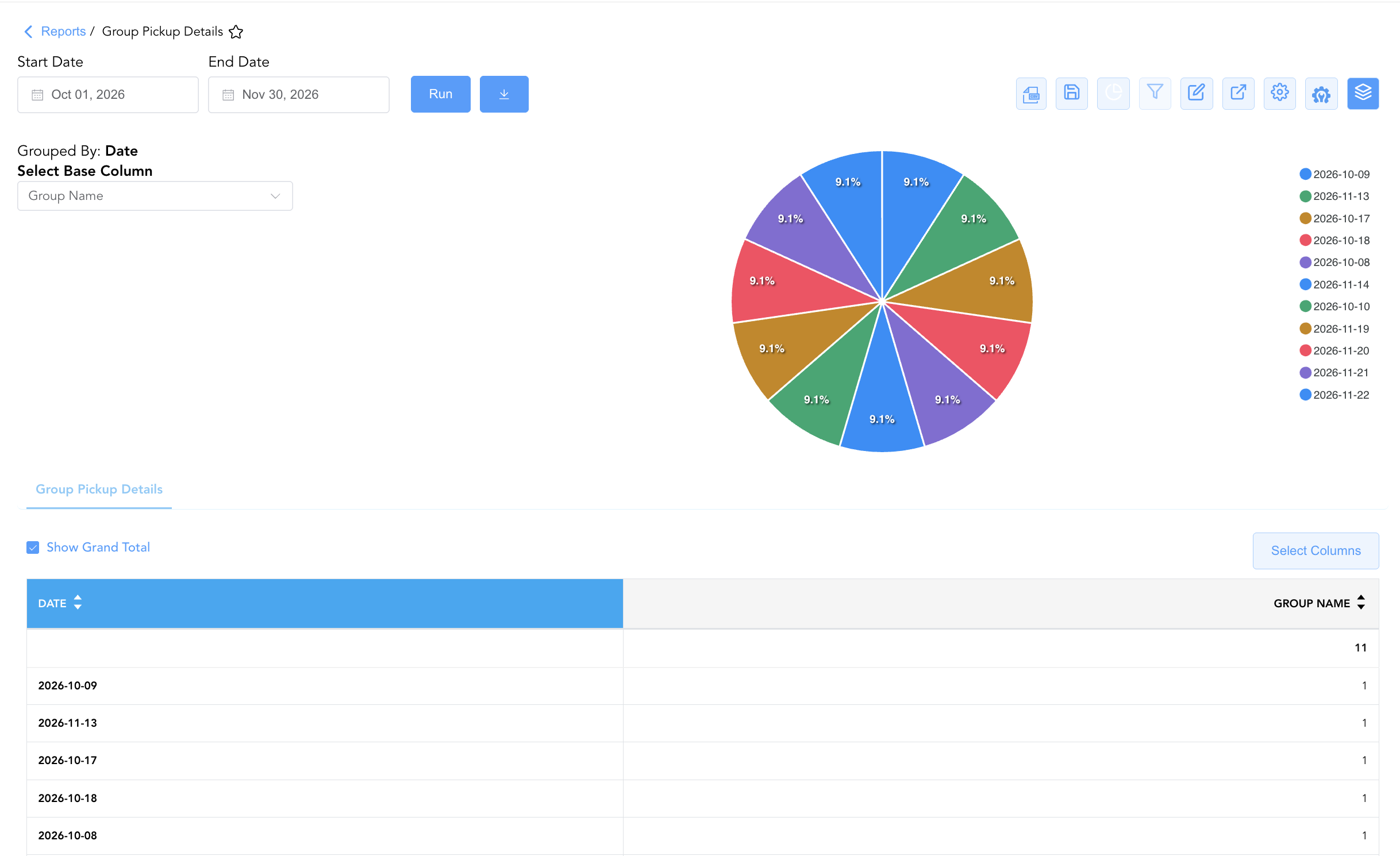
Group By & Pie Chart Visualization: The Group Pickup Details report features an interactive pie chart to help analyze group room block pick-up distributions and daily performance metrics. Users can group detail entries on the fly by Date to evaluate block performance, status-wise pick-up, or release rule distributions. By selecting Group Name from the Select Base Column dropdown menu, the chart dynamically renders percentage share breakdowns accompanied by an interactive color-coded legend.
Advanced Controls
-
Cut-Off Date Inventory Audits: Filter data by
Release Cutoff Datewithin the next 7 days to review under-picked blocks and make manual wash adjustments prior to automated release. -
Filtering: Filter by
Rooms Remaining > 10to highlight unreserved block inventory that can be reclaimed for high-demand dates. -
Highlighting (Conditional Formatting): Apply custom rules to automatically highlight low pick-up groups near cutoff (
Pickup Percent < 30%), high realization blocks (Pickup Percent > 90%), or impending cutoff dates.
🔗 Related Reports & Next Steps
Within 🤝 Sales, Groups & Events Reports & 👥 Group Block:
-
Group Activity Report – Two-section report tracking operational stay statistics and financial revenue production across group blocks.
-
Group Rooming List – Detailed attendee reservation list associated with active group blocks.
-
Group Master Ledger – Financial transaction ledger tracking master account charges, payments, and outstanding balances.
-
Group Reservation Details – Audit group block wash, review net versus gross revenue yield, evaluate shoulder dates, and verify master billing setup.
Cross-Pillar Deep Dives:
-
🛎️ Front Desk & Guest Services: Reconcile picked-up group reservations (
Reserved Allocations) with Today's Guests and Arrivals List to ensure seamless check-in handling. -
📊 Financial & Revenue Management: Cross-reference remaining block rooms (
Rooms Remaining) with occupancy forecast and history to optimize transient public pricing.