
Group Ledger Report Overview
Parent Hub: 💰 Finance & Accounting Reports
Category: ⚖️ Ledgers & Trial Balance / 👥 Group Blocks
Target Roles: Directors of Finance & Controllers, Group Rooms Coordinators, Catering & Event Managers, Night Auditors
Key Value: Maintain absolute financial control over active convention group accounts, weddings, and corporate master folios by tracking daily roll-forward balances—including opening balances, charges, payments, net changes, and closing balances—to prevent billing disputes and streamline master folio settlement.
Executive Summary
The Group Ledger Report is a specialized financial auditing tool within the ⚖️ Ledgers & Trial Balance and 👥 Group Blocks modules. Designed for group block accounting governance, it provides an itemized operational roll-forward of all active, in-house, and pre-settled group master accounts held in the PMS group ledger.
By tracking mathematical ledger continuity ($\text{Today's Opening Balance} + \text{Today's Net Change} = \text{Today's Ending Balance}$) for every group master account and pairing it with group metadata (Group Code, Group Name, Rate Plan, Group Contact Name, Company Name, Start Date, End Date), this report enables controllers, catering managers, and night auditors to audit daily master folio postings, monitor pre-paid event deposits, spot billing discrepancies, and finalize master invoice settlements prior to group departure.
Key Capabilities
-
Master Ledger Roll-Forward: Tracks strict mathematical continuity (Today's Opening Balance) + (Today's Net Change) = Today's Ending Balance across all group master folios.
-
Real-Time Group Activity Monitoring: Itemizes same-day banquet, room block, and ancillary charges (Today's Charges) alongside payments and deposit transfers (Today's Payments).
-
Deposit & Credit Exposure Control: Identifies negative group balances representing unapplied advance deposits or positive balances representing unbilled master charges.
Report Views & Functional Breakdown
The Group Ledger Report organizes group master account balances across three structured operational perspectives:
┌────────────────────────────────────────────────────────────────────────┐
│                        GROUP LEDGER REPORT                             │
├──────────────────────────┬──────────────────────────┬──────────────────┤
│ 1. Group Master          │ 2. Daily Activity &      │ 3. Group Credit  │
│    Directory             │    Net Change Audit      │    & Roll-Forward│
└──────────────────────────┴──────────────────────────┴──────────────────┘
1. Group Master Directory
Itemizes active group block profiles, linking event titles, rate structures, and key contacts to master account codes.
-
Primary Use: Identifying active group blocks in-house, verifying contracted event stay windows, and auditing group contact information.
-
Key Metrics: Group Code, Group Name, Rate Plan, Group Contact Name, Company Name, Start Date, End Date.
2. Daily Activity & Net Change Audit
Isolates same-day financial postings hitting group master folios during the current operational business day.
-
Primary Use: Auditing daily banquet postings, meeting room rentals, group F&B master charges, and applied payment deposits.
-
Key Metrics: Group Code, Today's Charges, Today's Payments, Today's Net Change.
3. Group Credit & Roll-Forward
Delivers a complete balance roll-forward verifying opening vs. ending master ledger positions for each group block.
-
Primary Use: Night audit trial balance verification, monitoring group deposit utilization, and enforcing master folio direct-bill limits.
-
Key Metrics: Today's Opening Balance, Today's Net Change, Today's Ending Balance.
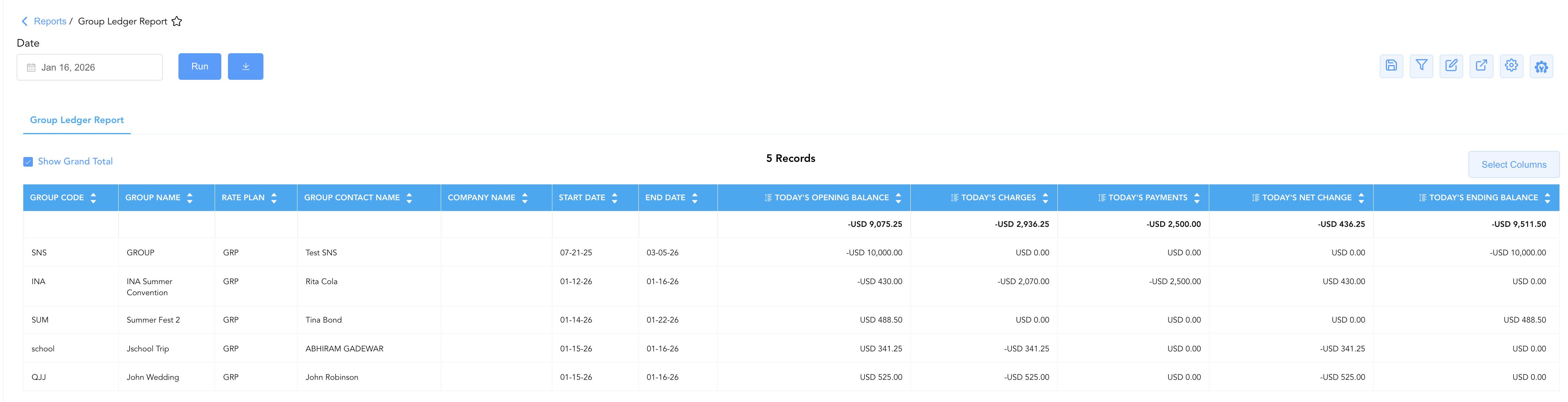
Data Dictionary (Dynamic View Columns)
Customize your default view using the Configure (⚙️) icon on the report page. Below is the full data dictionary available for this report:
💡 Tax Treatment Note: All monetary figures (Today's Charges, Today's Payments, Today's Opening Balance, Today's Net Change, and Today's Ending Balance) represent Gross Amounts (Includes Taxes & Fees) posted to group master folios.
|
Column Name |
Description |
Data Source / System Mapping |
Includes Taxes & Fees? |
|
Group Code |
Unique master identifier code assigned to the group block (e.g., |
|
N/A |
|
Group Name |
Official title of the convention, wedding, or corporate event (e.g., Summer Fest 2, JJ Wedding). |
|
N/A |
|
Rate Plan |
Rate plan code or pricing structure contracted for the group block (e.g., |
|
N/A |
|
Group Contact Name |
Primary client contact person responsible for the group master account. |
|
N/A |
|
Company Name |
Contracted corporate entity or organization sponsoring the group block. |
|
N/A |
|
Start Date |
Contracted opening date or official check-in date for the group block. |
|
N/A |
|
End Date |
Contracted closing date or official check-out date for the group block. |
|
N/A |
|
Today's Charges |
Total gross charges posted to the group master folio during the current operational day. |
|
🟢 Yes |
|
Today's Payments |
Total gross payments, wire receipts, or deposit applications applied during the day. |
|
🟢 Yes |
|
Today's Opening Balance |
Master folio balance carried forward at the start of the operational business day. |
Prior Business Day Closing Balance |
🟢 Yes |
|
Today's Net Change |
Net calculated financial movement occurring during the business day ( |
|
🟢 Yes |
|
Today's Ending Balance |
Final calculated balance on the group master folio at business day close. |
|
🟢 Yes |
Customization & Platform Features
User & Property Preferences
-
Personal Preference: Tailor your individual view by hiding or dragging columns. Your preference saves automatically for future sessions.
-
Property Defaults: System Admins can configure standard default layouts across all property users to streamline operational reporting. To maximize audit efficiency, group the columns into 3 logical blocks:
-
Group Identifiers (Cols 1–3):
Group Code|Group Name|Rate Plan -
Account Context & Stay Window (Cols 4–7):
Group Contact Name|Company Name|Start Date|End Date -
Daily Balance Flow & Reconciliation (Cols 8–12):
Today's Opening Balance|Today's Charges|Today's Payments|Today's Net Change|Today's Ending Balance
-
Report Toolbar & Quick Actions
Use the top-right toolbar icons on the report page to manage and export your data view:
|
Icon |
Action / Feature |
Description |

|
Knowledge Article |
Opens the knowledge base article to learn how to interpret this report. |

|
Saved Views |
Saves your column filtering, sorting, and highlight preferences so you can easily reload your custom view later without reconfiguring the report. |

|
Filter |
Opens filter controls to isolate specific data within a column based on your selected criteria. |

|
Highlight |
Highlights column values in a designated color based on selected conditions. |

|
Export |
Exports and downloads the report in various formats (Excel, PDF, CSV) for offline analysis or printing. |

|
Configure |
Opens column selection controls to toggle visibility, reorder columns, or hide rows with all zeros. |

|
Additional Configuration |
Provides advanced report configuration and display formatting options to customize data presentation. |
Advanced Controls
-
Exporting & Audit Delivery: Download in Excel or PDF format to attach to group master billing packets, catering tie-outs, or night audit documentation.
-
Filtering: Filter data by specific Group Code, Company Name, or non-zero Today's Net Change entries.
-
Highlighting (Conditional Formatting): Apply custom rules to automatically highlight high-value master charges (
Today's Charges > $1,000) or group master accounts with unexpected credit/debit balances.
🔗 Related Reports & Next Steps
Within ⚖️ Ledgers & Trial Balance & 👥 Group Blocks:
-
In House Guest Folio Balances – Track daily financial shifts and balances for active in-house guest stays.
-
Closed Folio Balances – Track post-settlement charges, payments, and net changes on closed group master accounts.
-
House Account Folio Balance – Audit daily roll-forward balances for internal non-guest master folios.
-
Balance Details – Detailed roll-forward tracking starting balances, credits, debits, and ending balances per category.
Cross-Pillar Deep Dives:
-
📬 Billing & Receivables (AR): To inspect group master folios transferred to city ledger billing, review Direct Bill Reconciliation or Direct Bill Ledger Details.
-
💳 Payments & Transactions: To audit advance wire deposits or credit card prepayments posted to group accounts, cross-reference Payment Activity.
-
📈 Forward Revenue & Analytics: Looking for forward-facing group block pickup or revenue projections? Please visit the 📈 Revenue & Analytics reporting hub.