
Currency Exchange Transactions Report Overview
Parent Hub: 💰 Finance & Accounting Reports
Category: 💳 Payments & Transactions
Target Roles: Directors of Finance & Controllers, Night Auditors, Front Office Managers, Cashiers & Foreign Exchange Accounting Staff
Key Value: Maintain complete foreign currency conversion governance by tracking tendered foreign currencies, exchange conversion rates, converted local currency amounts, and cashier processing attributions.
Executive Summary
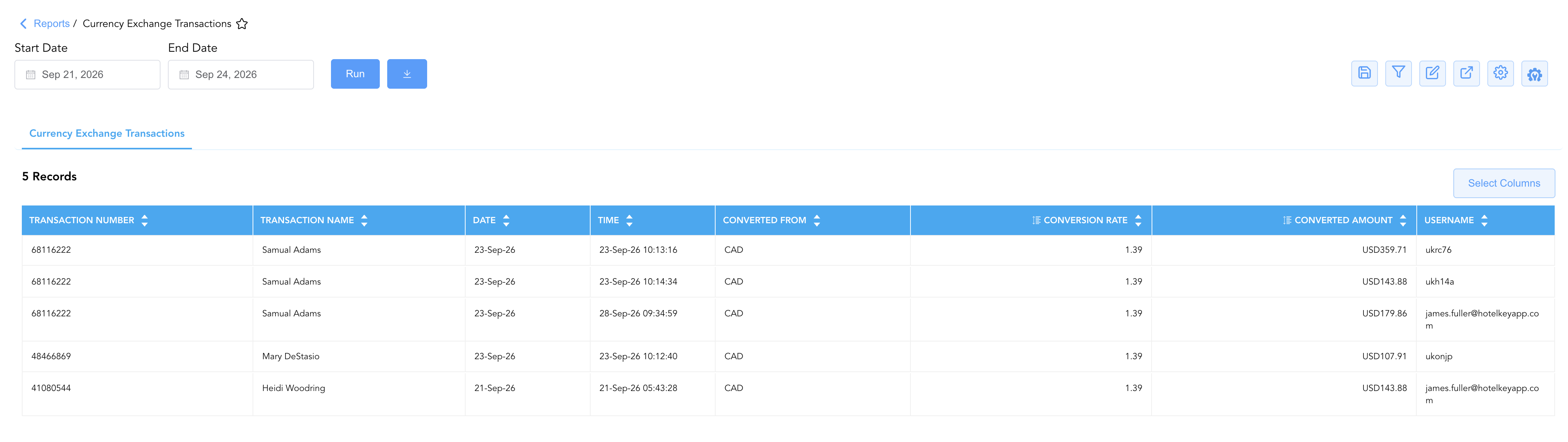
The Currency Exchange Transactions Report is a primary foreign currency audit and cash governance tool within the 💳 Payments & Transactions category of the 💰 Finance & Accounting Reports suite. Designed for multi-currency property operations and foreign exchange reconciliation, it provides an itemized audit trail of every foreign currency tender processed and converted at the front desk or cash register.
By capturing key exchange parameters—including tendered currency codes (Converted From), operational exchange multipliers (Conversion Rate), converted local base currency totals (Converted Amount), guest/folio identifiers (Transaction Number, Transaction Name), and staff attributions (Username, Date, Time)—this report enables controllers, night auditors, and front desk supervisors to verify exchange rate accuracy, reconcile foreign cash drawer drops, and ensure strict compliance with foreign currency accounting standards.
Key Capabilities
-
Foreign Currency Audit Trail: Logs every foreign currency transaction converted into local property base currency.
-
Exchange Rate Verification: Displays the exact exchange rate multiplier (Conversion Rate) applied at the moment of tender.
-
Cashier & Shift Accountability: Attributes each exchange directly to the processing staff member (Username) and captures precise system timestamps (Date, Time).
Report Views & Functional Breakdown
The Currency Exchange Transactions Report presents foreign exchange activity in a unified single-table ledger that supports three distinct analytical perspectives:
┌────────────────────────────────────────────────────────────────────────┐
│               CURRENCY EXCHANGE TRANSACTIONS REPORT                    │
├────────────────────────────────────────────────────────────────────────┤
│                       Unified Transaction Ledger                       │
├──────────────────────────┬──────────────────────────┬──────────────────┤
│ 1. Foreign Currency      │ 2. Rate Variance &       │ 3. Cashier & Shift│
│    Tender Audit          │    Exchange Compliance   │    Accountability│
└──────────────────────────┴──────────────────────────┴──────────────────┘
1. Foreign Currency Tender Audit
Tracks foreign currency payments accepted across guest folios and front desk cash drawers.
-
Primary Use: Reconciling foreign cash receipts, verifying tendered currency ISO codes (
CAD,EUR,GBP), and auditing converted local base amounts. -
Key Metrics: Transaction Number, Transaction Name, Converted From, Converted Amount.
2. Rate Variance & Exchange Compliance
Audits exchange multipliers applied during foreign tender processing against official daily property exchange boards.
-
Primary Use: Verifying exchange rate accuracy, auditing authorized rate overrides, and evaluating foreign currency conversion gains or fee margins.
-
Key Metrics: Date, Converted From, Conversion Rate, Converted Amount.
3. Cashier & Shift Accountability
Attributes foreign currency conversion entries directly to specific staff members and time slots.
-
Primary Use: Balancing cashier shift drawers, investigating currency exchange variances, and verifying user posting attributions during night audit.
-
Key Metrics: Date, Time, Username, Transaction Number, Converted Amount.
Data Dictionary (Dynamic View Columns)
Customize your default view using the Configure (⚙️) icon on the report page. Below is the full data dictionary representing every column available in this report:
💡 Monetary Treatment Note: Converted Amount represents the Local Base Currency Value (Gross Amount) calculated and credited to the folio or cash drawer after applying the exchange rate multiplier.
|
Column Name |
Description |
Data Source / System Mapping |
Includes Taxes & Fees? |
|
Date |
Official date when the foreign currency exchange transaction was processed. |
Transaction Timestamp |
N/A |
|
Transaction Number |
Unique reference identifier assigned to the reservation, folio, or payment transaction. |
System Transaction ID |
N/A |
|
Transaction Name |
Full name of the primary guest or account holder executing the currency exchange. |
|
N/A |
|
Converted From |
Original foreign currency ISO code tendered by the guest (e.g., |
Currency Exchange Engine |
N/A |
|
Conversion Rate |
Operational exchange rate multiplier applied to convert foreign tender to local base currency. |
Exchange Rate Configuration |
N/A |
|
Converted Amount |
Final calculated monetary amount credited in local base property currency. |
|
🟢 Yes |
|
Time |
Exact system timestamp when the currency conversion entry was processed. |
Transaction Timestamp |
N/A |
|
Username |
System ID or staff email of the employee who processed the foreign currency exchange. |
System Audit Log |
N/A |
Customization & Platform Features
User & Property Preferences
-
Personal Preference: Tailor your individual view by hiding or dragging columns. Your preferences save automatically for future sessions.
-
Property Defaults: System Admins can configure standard default layouts across all property users to streamline operational reporting. To maximize audit efficiency, group the columns into the below logical blocks:
-
Transaction & Account Context (Cols 1–4):
Transaction Number|Transaction Name|Date|Time -
Currency Exchange & Conversion Flow (Cols 5–7):
Converted From|Conversion Rate|Converted Amount -
Audit & User Attribution (Col 8):
Username
-
Report Toolbar & Quick Actions
Use the top-right toolbar icons on the report page to manage and export your data view:
|
Icon |
Action / Feature |
Description |

|
Knowledge Article |
Opens the knowledge base article to learn how to interpret this report. |

|
Saved Views |
Saves your column filtering, sorting, and highlight preferences so you can easily reload your custom view later without reconfiguring the report. |

|
Filter |
Opens filter controls to isolate specific data within a column based on your selected criteria. |

|
Highlight |
Highlights column values in a designated color based on selected conditions. |

|
Export |
Exports and downloads the report in various formats (Excel, PDF, CSV) for offline analysis or printing. |

|
Configure |
Opens column selection controls to toggle visibility, reorder columns, or hide rows with all zeros. |

|
Additional Configuration |
Provides advanced report configuration and display formatting options to customize data presentation. |
Interactive Visualizations & Grouping Controls
-
Dynamic Section Grouping: Group transaction entries on the fly by Converted From currency code (
CAD,EUR), Username, or Date to evaluate currency tender volumes. -
Visual Chart Display: Switch view modes to render Pie Charts (visualizing foreign currency tender share by country ISO code) or Bar Charts (comparing total converted amounts per cashier shift) for executive briefings.
Advanced Controls
-
Exporting & Cashier Tie-Outs: Download in Excel or PDF format to support daily foreign cash drawer envelope auditing and bank deposit reconciliations.
-
Filtering: Filter data by specific Converted From currency code, Username, or date ranges.
-
Highlighting (Conditional Formatting): Apply custom rules to automatically highlight high-value foreign currency exchanges or non-standard conversion rates.
🔗 Related Reports & Next Steps
Within 💳 Payments & Transactions & ⚖️ Ledgers & Trial Balance:
-
All Payments – Complete transaction ledger logging all cash, check, credit card, and foreign tender payment receipts.
-
Control Report – Audit cashier shift drops, foreign currency drops, cash drawers, and paid-outs.
-
Authorized Payments – Audit credit card pre-authorizations, capture approvals, and card refund processing.
-
Day End Summary – Review consolidated daily revenue, tax, payment, and currency conversion blueprints at business date close.
Cross-Pillar Deep Dives:
-
🏛️ Taxes & Expenses: To audit employee paid-outs or cash drawer float balances, review Paid Out Activity.
-
📬 Billing & Receivables (AR): To inspect corporate direct-bill foreign currency settlements, review Direct Bill Ledger Details.