
AR Invoice Aging Report Overview
Parent Hub: 💰 Finance & Accounting Reports
Category: 📬 Billing & Receivables (AR)
Target Roles: Directors of Finance & Controllers, Accounting Managers & Clerks, Night Auditors
Key Value: Automatically categorize outstanding invoice balances based on elapsed aging days, track direct-bill credit limits, and switch between granular invoice-level and high-level account views to optimize cash conversion.
Executive Summary
The AR Invoice Aging Report is a comprehensive accounts receivable tool within the 📬 Billing & Receivables (AR) module. Designed for proactive credit control and cash flow management, it automatically categorizes uncollected invoice balances into standardized aging buckets based on the days elapsed since invoice generation.
By aggregating open receivables across corporate accounts and direct-bill clients, this report empowers controllers and accounting managers to monitor credit limit utilization, track payments on account, audit unbilled transactions, and streamline collection workflows before balances become severely overdue.
Key Capabilities
-
Flexible Granularity: Switch seamlessly between line-item invoice details, high-level corporate account rollups, and account-type breakdowns.
-
Credit Risk Controls: Cross-reference real-time accounts receivable balances directly against assigned Credit Limits and Available Credit Limits.
-
Unbilled & On-Account Visibility: Track unbilled direct-bill charges, generated invoices (
OPEN/VOID), and unapplied prepayments (Payment On Account) in a single consolidated ledger.
Report Views & Functional Breakdown
The AR Invoice Aging Report organizes outstanding receivables across three structured operational sections:
┌────────────────────────────────────────────────────────────────────────┐
│                        AR INVOICE AGING REPORT                         │
├──────────────────────────┬──────────────────────────┬──────────────────┤
│ 1. AR Aging Details      │ 2. AR Aging Summary      │ 3. AR Aging      │
│    (Transaction Ledger)  │    (Company Rollup)      │    Account Type  │
│                          │                          │    Summary       │
└──────────────────────────┴──────────────────────────┴──────────────────┘
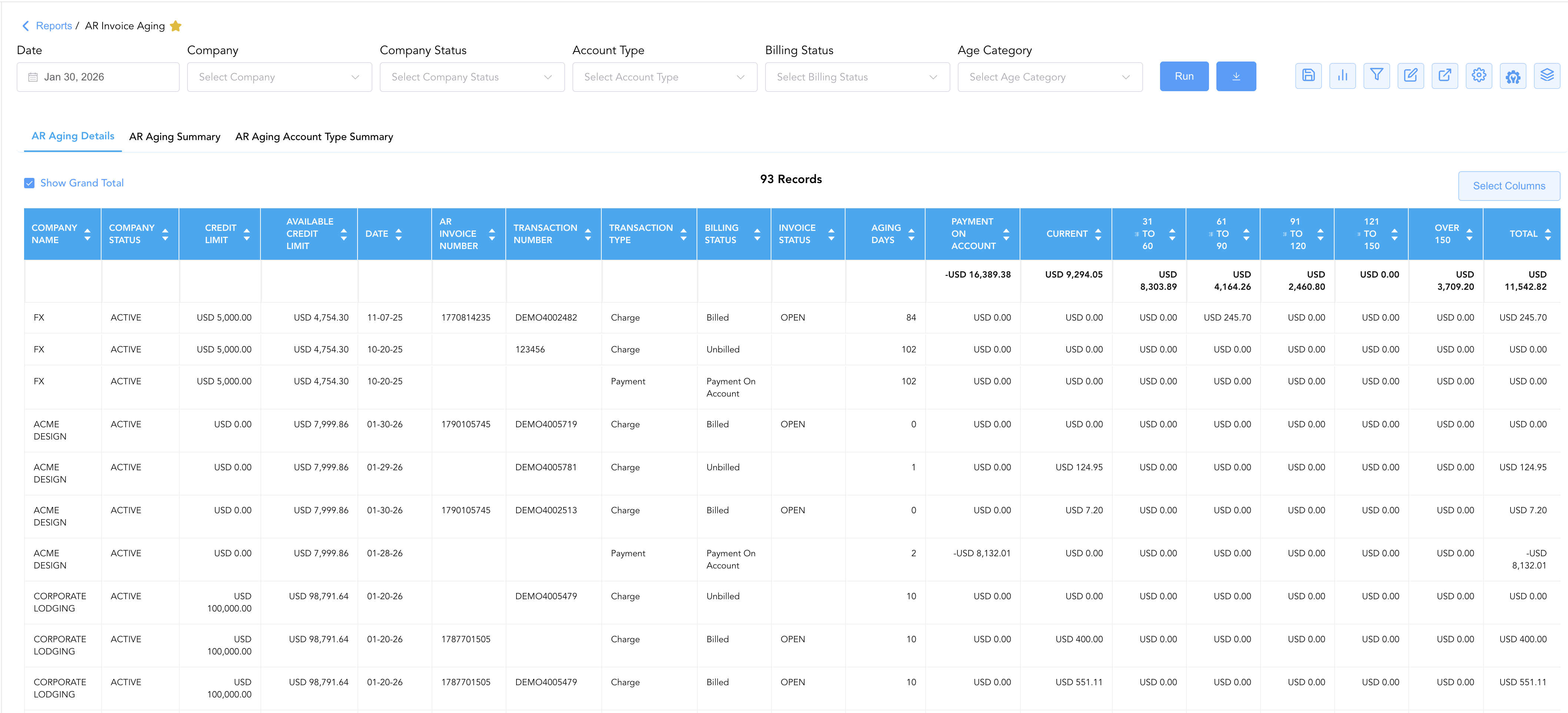
1. AR Aging Details
Provides a line-item transaction ledger mapping individual invoices, guest folios, unbilled charges, and prepayments directly to guest names and stay dates.
-
Primary Use: Reconciling invoice numbers against fiscal tax credentials, auditing billing statuses (
Billed,Unbilled,Payment On Account), and investigating individual transaction line items. -
Key Metrics: AR Invoice Number, FD Tax Invoice Number, Fiscal Invoice Number, PO Number, Transaction Type, Guest Name, Room Number, Billing Status, Invoice Status, Username.
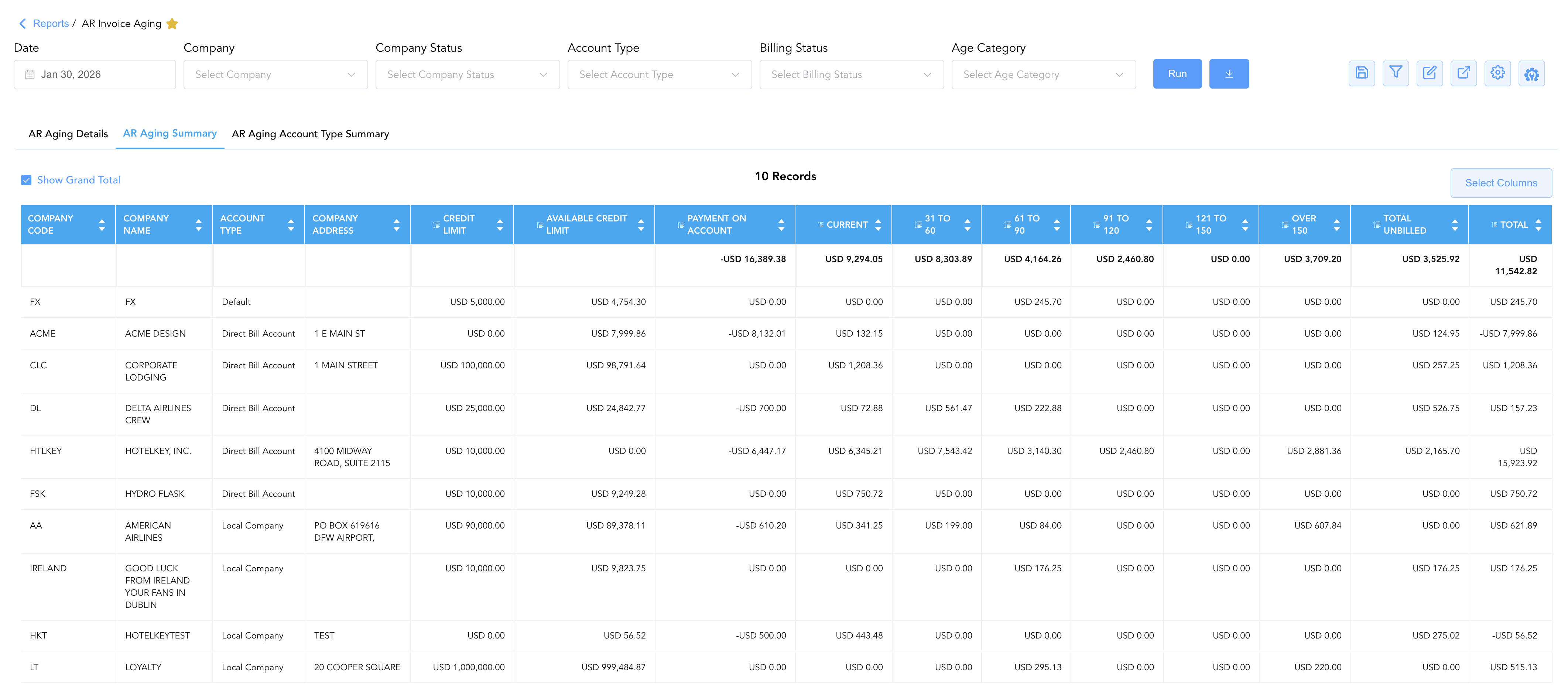
2. AR Aging Summary
Aggregates total open balances and aging distribution at the individual corporate account level, cross-referencing account balances with credit limits.
-
Primary Use: Enforcing corporate credit limits, tracking unapplied prepayments (
Payment On Account), and prioritizing outreach for high-balance corporate accounts. -
Key Metrics: Company Name, Company Code, Company Address, Payment On Account, Credit Limit, Available Credit Limit, Total Unbilled, Over 30 / 60 / 90 / 120 Days.
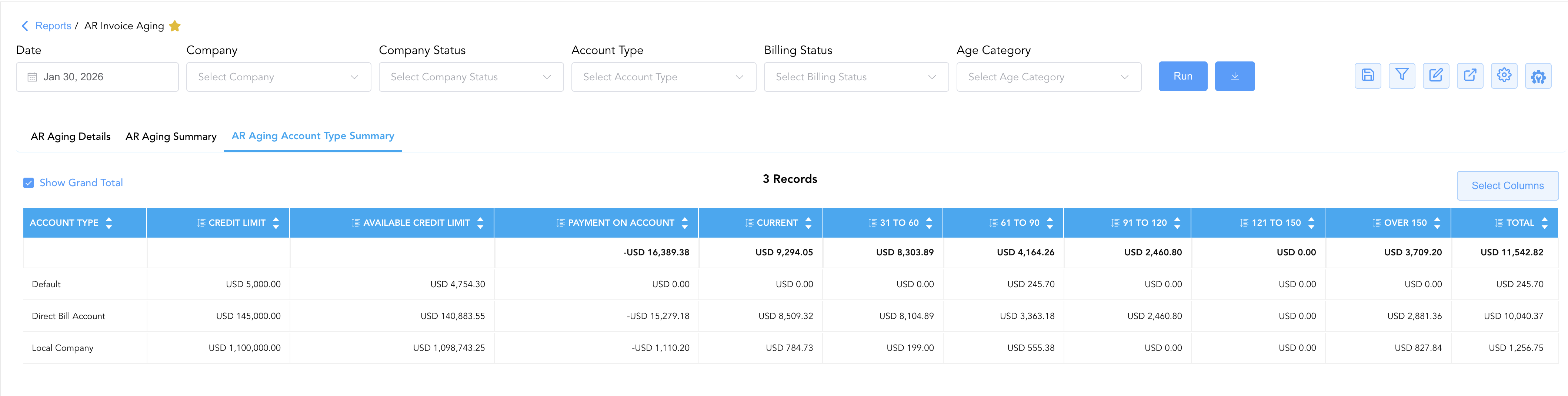
3. AR Aging Account Type Summary
Delivers a macro-level executive rollup categorized strictly by account classification (Direct Bill Account, Local Company, Default, etc.).
-
Primary Use: Portfolio-level financial reporting, assessing broad credit tier exposure, and evaluating overall accounts receivable health during executive reviews.
-
Key Metrics: Account Type, Payment On Account, Current, 31 to 60, 61 to 90, 91 to 120, 121 to 150, Over 150, Total, Credit Limit, Available Credit Limit.
Data Dictionary (Dynamic View Columns)
Customize your default view using the Configure (⚙️) icon on the report page. Below is the full data dictionary available for this report:
💡 Tax Treatment Note: All aging bucket figures (Current through Over 150) and the Total balance field represent Gross Amounts (Includes Taxes and Fees) transferred from the originating guest folios or city ledger invoices.
|
Column Name |
Description |
Data Source / Calculation Formula |
Includes Taxes & Fees? |
|---|---|---|---|
|
Account Type |
Classification of the corporate account (e.g., Direct Bill Account, Local Company, Default). |
|
N/A |
|
Company Name |
Name of the contracted corporate entity or agency. |
|
N/A |
|
Company Code |
Unique identifier code assigned to the company profile. |
|
N/A |
|
Company Address |
Primary physical or billing address of the corporate client. |
|
N/A |
|
Date |
Posting date of the invoice or direct-bill transaction. |
Invoice Generation Timestamp |
N/A |
|
AR Invoice Number |
Unique system reference code assigned to the city ledger invoice. |
System Generated |
N/A |
|
FD Tax Invoice Number |
Front desk tax invoice reference code. |
Front Desk Tax Engine |
N/A |
|
Fiscal Invoice Number |
Certified government or PAC fiscal invoice reference number. |
Fiscal Integration Log |
N/A |
|
PO Number |
Client Purchase Order number linked to the invoice. |
|
N/A |
|
Payment On Account |
Unapplied prepayments or unallocated credit deposits held for the account. |
|
🟢 Yes |
|
Current |
Outstanding gross balance within the 0–30 day aging window. |
System Aging Calculation (0–30 Days) |
🟢 Yes |
|
31 to 60 |
Outstanding gross balance within the 31–60 day aging window. |
System Aging Calculation (31–60 Days) |
🟢 Yes |
|
61 to 90 |
Outstanding gross balance within the 61–90 day aging window. |
System Aging Calculation (61–90 Days) |
🟢 Yes |
|
91 to 120 |
Outstanding gross balance within the 91–120 day aging window. |
System Aging Calculation (91–120 Days) |
🟢 Yes |
|
121 to 150 |
Outstanding gross balance within the 121–150 day aging window. |
System Aging Calculation (121–150 Days) |
🟢 Yes |
|
Over 150 |
Outstanding gross balance exceeding 150 days. |
System Aging Calculation (> 150 Days) |
🟢 Yes |
|
Total |
Cumulative gross outstanding balance across all aging buckets. |
|
🟢 Yes |
|
Aging Days |
Number of calendar days elapsed since invoice generation. |
|
N/A |
|
Credit Limit |
Maximum direct-bill credit authorized for the company. |
|
N/A |
|
Available Credit Limit |
Remaining authorized credit available for new direct-bill bookings. |
|
N/A |
|
Transaction Type |
Entry classification ( |
Ledger Transaction Tag |
N/A |
|
Transaction Number |
Underlying reservation confirmation code or folio reference. |
System Reference ID |
N/A |
|
Transaction Description |
Itemized ledger memo, guest stay details, or payment method description. |
System Description |
N/A |
|
First Name |
First name of the primary guest associated with the charge. |
|
N/A |
|
Last Name |
Last name of the primary guest associated with the charge. |
|
N/A |
|
Room Number |
Assigned physical room number during the stay. |
|
N/A |
|
Folio No |
System folio number where the transaction originated. |
|
N/A |
|
Company Status |
Account lifecycle state ( |
|
N/A |
|
Billing Status |
Processing state of the charge ( |
System Ledger State |
N/A |
|
Invoice Status |
Lifecycle status of the generated invoice ( |
Invoice State |
N/A |
|
Username |
User email of the staff member who posted or billed the entry. |
System Audit Log |
N/A |
Customization & Platform Features
User & Property Preferences
-
Personal Preference: Tailor your individual view by hiding or dragging columns. Your preference saves automatically for future sessions.
-
Property Defaults: System Admins can configure standard default layouts across all property users to streamline operational reporting. To maximize audit efficiency, group the columns into the below logical blocks:
-
Section 1: AR Aging Details
-
Company & Account Context (Cols 1–7):
Company Code|Company Name|Account Type|Company Status|Company Address|Credit Limit|Available Credit Limit -
Invoice & Transaction Identifiers (Cols 8–18):
Date|AR Invoice Number|Fiscal Invoice Number|FD Tax Invoice Number|PO Number|Folio No|Transaction Number|Transaction Type|Billing Status|Invoice Status|Aging Days -
Guest & Stay Details (Cols 19–22):
First Name|Last Name|Room Number|Transaction Description -
Financial Aging Breakdown & Balances (Cols 23–30):
Payment On Account|Current|31 to 60|61 to 90|91 to 120|121 to 150|Over 150|Total|Username
-
-
Section 2: AR Aging Summary
-
Company & Credit Context (Cols 1–6):
Company Code|Company Name|Account Type|Company Address|Credit Limit|Available Credit Limit -
Financial Aging Breakdown & Totals (Cols 7–19):
Payment On Account|Current|31 to 60|61 to 90|91 to 120|121 to 150|Over 150|Over 30|Over 60|Over 90|Over 120 Days|Total Unbilled|Total
-
-
Section 3: AR Aging Account Type Summary
-
Account Classification & Credit Facility (Cols 1–3):
Account Type|Credit Limit|Available Credit Limit -
Aggregate Portfolio Aging & Balances (Cols 4–15):
Payment On Account|Current|31 to 60|61 to 90|91 to 120|121 to 150|Over 150|Over 30|Over 60|Over 90|Over 120 Days|Total
-
-
Report Toolbar & Quick Actions
Use the top-right toolbar icons on the report page to manage and export your data view:
|
Icon |
Action / Feature |
Description |

|
Knowledge Article |
Opens the knowledge base article to learn how to interpret this report. |

|
Saved Views |
Saves your column filtering, sorting, and highlight preferences so you can easily reload your custom view later without reconfiguring the report. |

|
Bar Chart |
Displays report data in a visual bar chart format. |

|
Filter |
Opens filter controls to isolate specific data within a column based on your selected criteria. |

|
Highlight |
Highlights column values in a designated color based on selected conditions. |

|
Export |
Exports and downloads the report in various formats (Excel, PDF, CSV) for offline analysis or printing. |

|
Configure |
Opens column selection controls to toggle visibility, reorder columns, or hide rows with all zeros. |

|
Additional Configuration |
Provides advanced report configuration and display formatting options to customize data presentation. |

|
Group By |
Summarize and group report data dynamically in real time. |
Interactive Visualizations & Grouping Controls
-
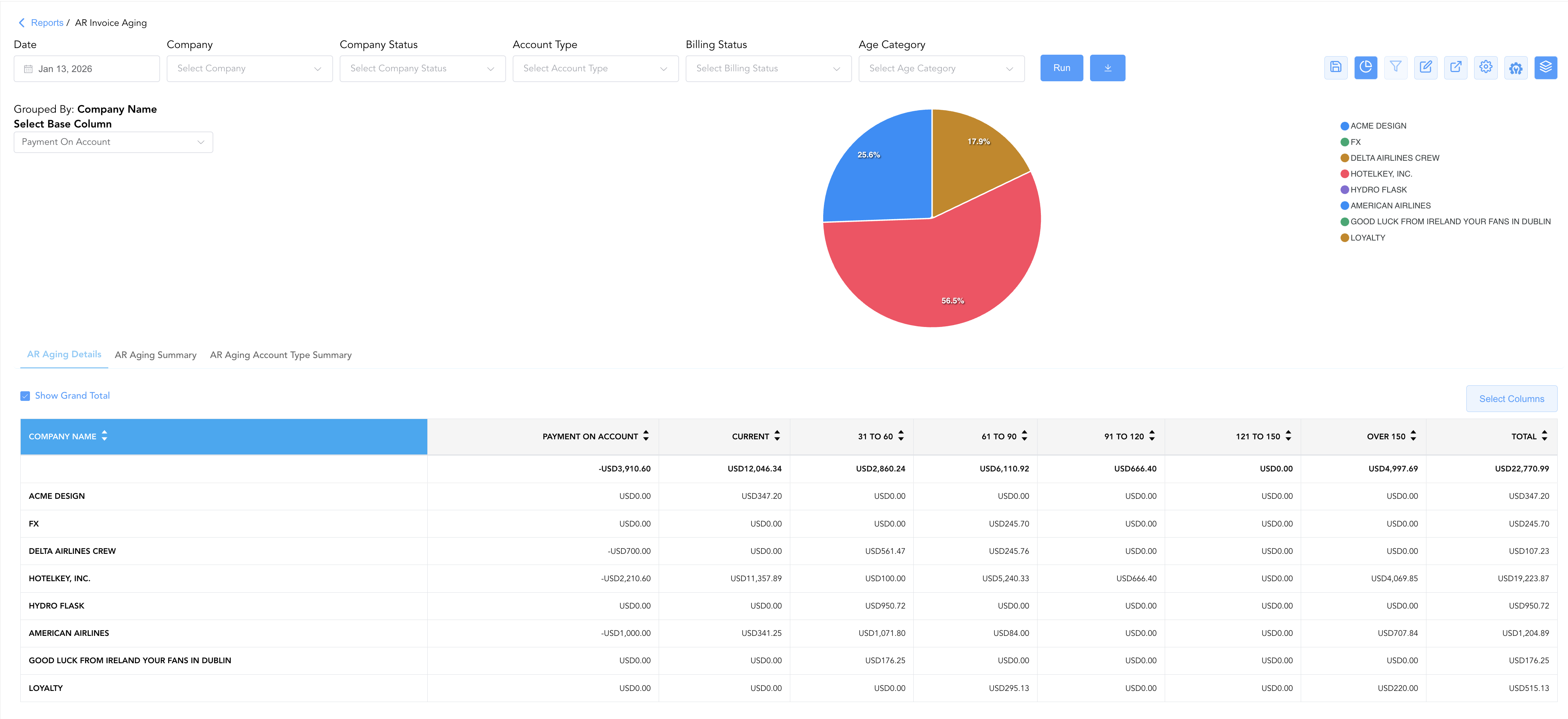
Group By & Pie Chart Visualization: The AR Invoice Aging report features an interactive pie chart to help analyze aging invoice distributions across corporate accounts. Aggregate receivables on the fly using the Group By feature. Group your data by Company Name, Transaction Type, Date, or Transaction Status to review high-level summaries alongside detailed line items. By selecting a metric from the Select Base Column dropdown menu—such as Payment On Account, total Total balances, or specific aging brackets (Current, 31 to 60, Over 150)—the chart dynamically renders percentage share breakdowns accompanied by an interactive color-coded legend across all report sub-tabs.
-
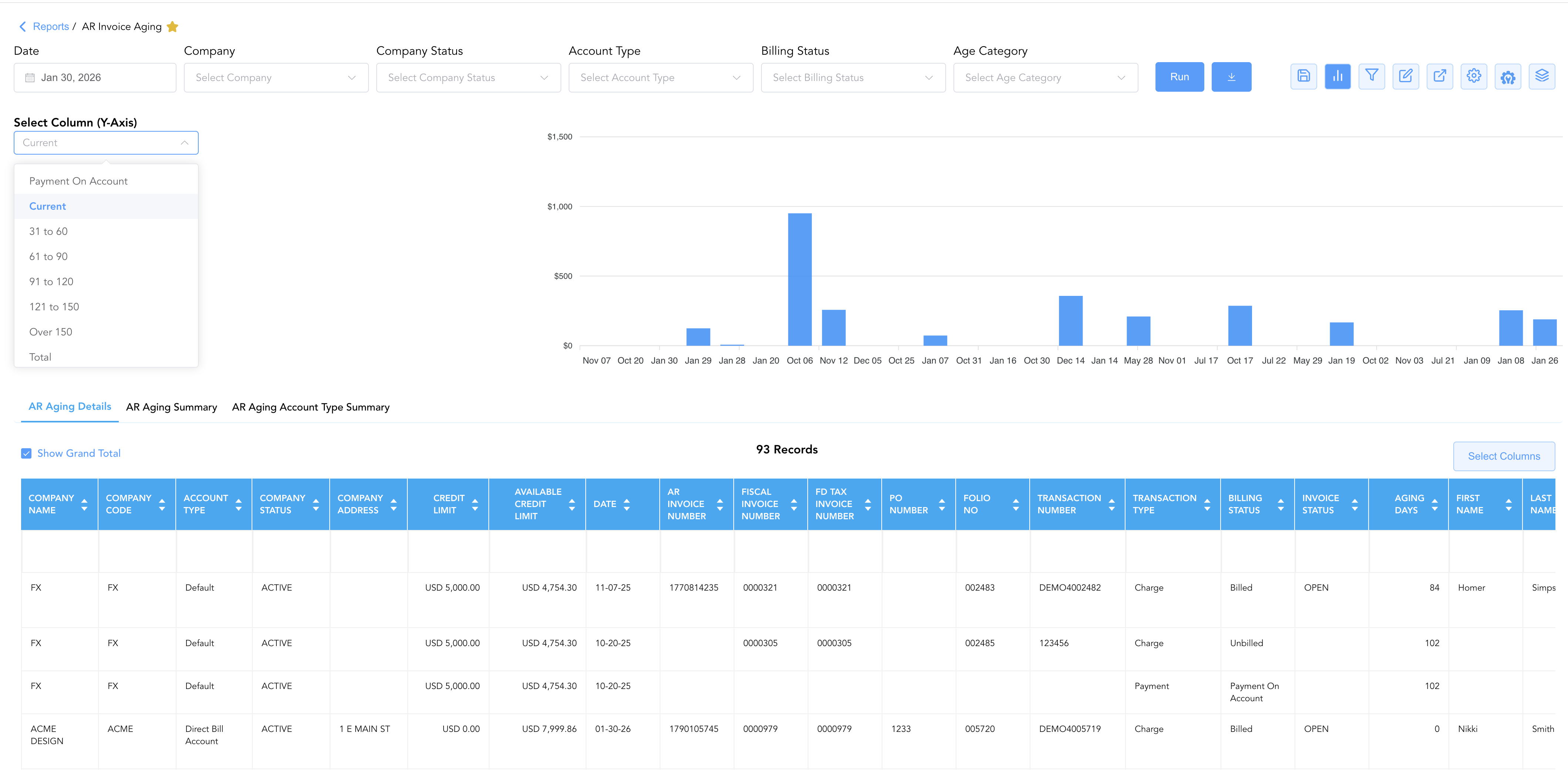
Bar Chart Visualizer: The AR Invoice Aging report includes a customizable bar chart to help visualize outstanding invoice balances and aging exposure chronologically. By selecting options from the Select Column (Y-Axis) dropdown menu, users can switch the chart view to display net balance totals (Total), unallocated payments (Payment On Account), or specific aging brackets (Current, 31 to 60, 61 to 90, 91 to 120, 121 to 150, Over 150) alongside the detailed transaction table across the AR Aging Details, AR Aging Summary, and AR Aging Account Type Summary sub-tabs.
Advanced Controls
-
Exporting: Download reports in Excel or PDF format for offline distribution, collection packets, or audit reviews.
-
Filtering: Filter data by specific Company Name, Billing Status (
Billedvs.Unbilled), or Invoice Status (OPEN,VOID). -
Highlighting (Conditional Formatting): Apply custom rules to automatically highlight accounts approaching their credit limit threshold or overdue balances exceeding 60 days.
🔗 Related Reports & Next Steps
Within 📬 Billing & Receivables (AR):
-
Accounts Receivable Activity – Audit every detailed line-item transaction hitting the AR ledger.
-
Company Accounts – Evaluate corporate profiles, assigned direct-bill privileges, and overall stay production.
-
Direct Bill Aging – Segment outstanding corporate debt across Accounts Receivable, Invoices, and Settlements.
-
Direct Bill Reconciliation – Identify payment gaps, verify guarantee statuses, and finalize corporate direct bills.
-
Invoice Details – Analyze line-item invoice lifecycles including settled and unsettled amounts.
Cross-Pillar Deep Dives:
-
⚖️ Ledgers & Trial Balance: To reconcile city ledger balances against general ledger accounts, review Direct Bill Ledger Details.
-
💳 Payments & Transactions: To inspect corporate checks, credit card settlements, or client prepayments, cross-reference Payment Activity.
-
📈 Forward Revenue & Analytics: Looking for forward-facing revenue projections or macro performance metrics (like RevPAR or ADR)? Please visit the 📈 Revenue & Analytics reporting hub.