
Active Taxes & Charge Types Overview
Parent Hub: 💰 Finance & Accounting Reports
Category: 🏛️ Taxes & Expenses
Target Roles: Directors of Finance & Controllers, Night Auditors, Accounting Managers, System Administrators
Key Value: Maintain regulatory tax compliance and posting accuracy by reviewing all active property tax definitions, percentage rates, flat fee rules, and charge code tax-inclusivity mappings in a single configuration reference.
Executive Summary
The Active Taxes & Charge Types Report is a core configuration and compliance audit tool within the 🏛️ Taxes & Expenses section of the 💰 Finance & Accounting Reports suite. Designed to provide total transparency into property tax setups, it itemizes all active statutory taxes, municipal assessments, service charges, and transaction posting codes configured within the PMS.
By dividing system settings into two structured operational perspectives—master tax definitions (Tax Types) and charge code tax-inclusivity rules (Charge Types)—this report enables controllers, night auditors, and system administrators to verify tax rate accuracy (Tax Percentage, Tax Amount), audit charge-to-tax mappings (Associated Charge Type Codes, Associated Tax Type Codes), and review invoice presentation rules (Tax/Fee Inclusive, Inclusive for Display, Combined on Invoices).
Key Capabilities
-
Dual-View Configuration Audit: Explicitly separates master tax rules (Tax Types) from individual transaction charge mappings (Charge Types).
-
Tax Rate & Rule Governance: Tracks percentage-based taxes (Tax Percentage), fixed flat-fee assessments (Tax Amount), and tiered threshold rules (Tax Range, Tax Range Details).
-
Charge Inclusivity & Invoice Formatting: Audits whether charge codes post tax-inclusive or tax-exclusive pricing, and how tax breakdowns render on guest folios and city ledger invoices.
Report Views & Functional Breakdown
The Active Taxes & Charge Types Report presents property tax structures across two core sections:
┌────────────────────────────────────────────────────────────────────────┐
│                 ACTIVE TAXES & CHARGE TYPES REPORT                     │
├────────────────────────────────────────┬───────────────────────────────┤
│ 1. Tax Types                           │ 2. Charge Types               │
│    (Master Tax Rules & Mappings)       │    (Posting Codes & Display)   │
└────────────────────────────────────────┴───────────────────────────────┘
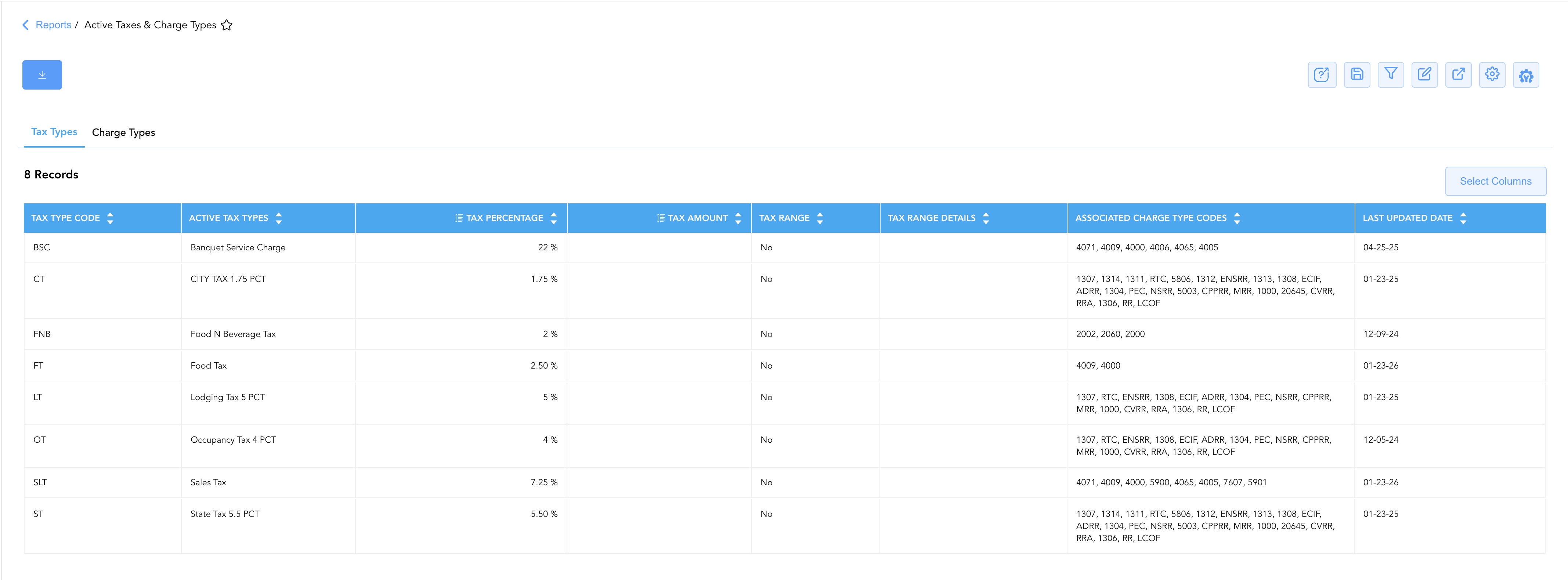
1. Tax Types
Itemizes every active tax, assessment, and service charge configured at the property level, displaying rate structures and all associated charge codes.
-
Primary Use: Verifying current tax rates before date rolls, auditing state/city tax compliance updates, and reviewing which charge codes trigger specific taxes.
-
Key Metrics: Active Tax Types, Tax Type Code, Last Updated Date, Tax Percentage, Tax Amount, Tax Range, Tax Range Details, Associated Charge Type Codes.
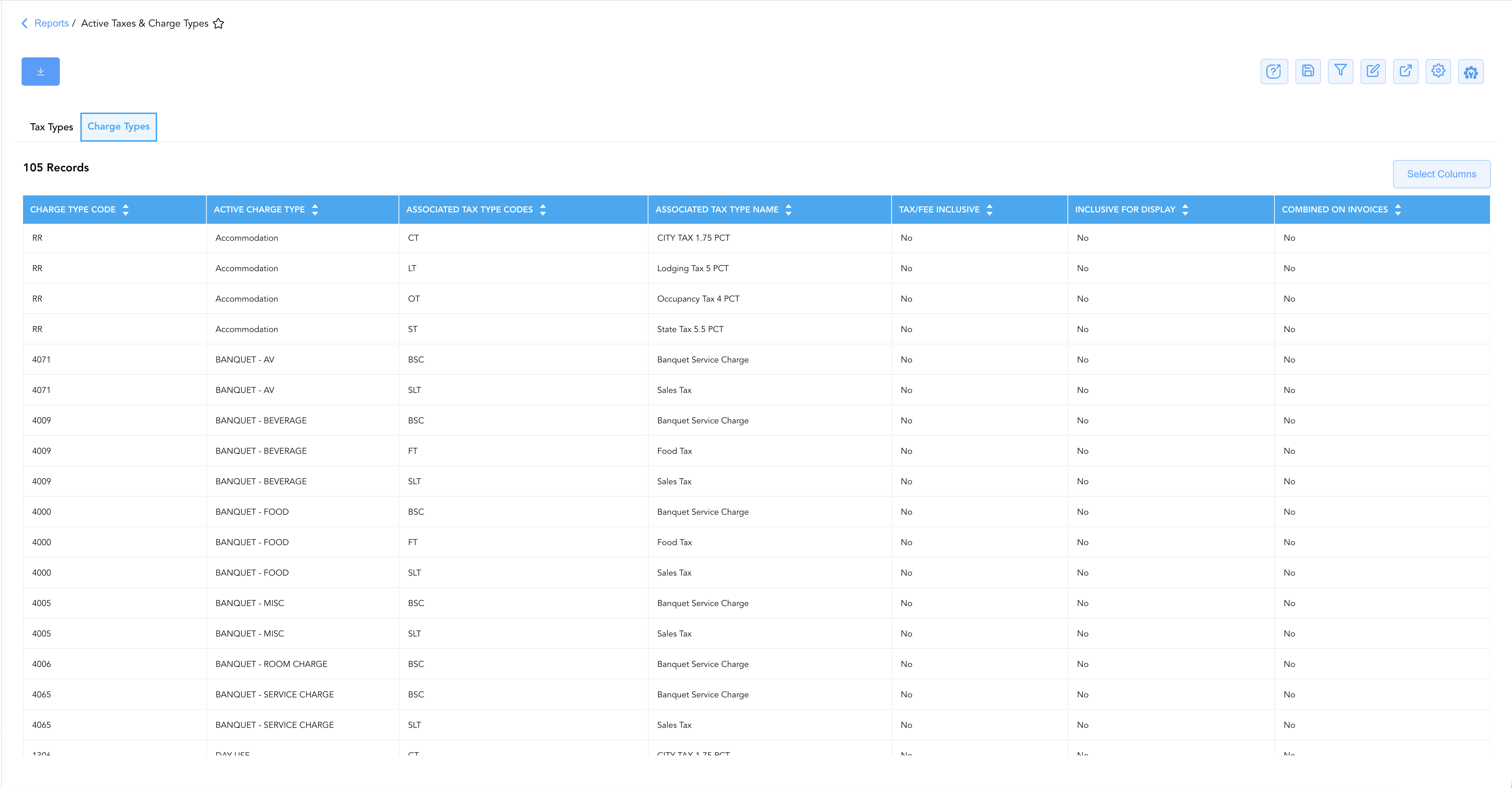
2. Charge Types
Maps individual revenue and fee posting transaction codes directly to their corresponding tax obligations and display rules.
-
Primary Use: Auditing new transaction code setups, verifying tax-inclusive pricing logic, and controlling tax line-item display on guest invoices.
-
Key Metrics: Active Charge Type, Charge Type Code, Associated Tax Type Codes, Associated Tax Type Name, Tax/Fee Inclusive, Inclusive for Display, Combined on Invoices.
Data Dictionary (Comprehensive Column Mapping)
Customize your default view using the Configure (⚙️) icon on the report page. Below is the full data dictionary representing every column across both sections of this report:
💡 Tax Calculation Note: Tax Percentage is stored as a decimal rate (e.g.,
0.055represents 5.5%,0.0725represents 7.25%). Tax Amount applies to flat-fee fixed charges (e.g., per-night room fees) where percentage rates do not apply.
|
Column Name |
Section(s) Where Column Appears |
Description |
Data Source / System Mapping |
Includes Taxes & Fees? |
|
Active Tax Types |
Tax Types |
Human-readable title of the statutory or local tax definition (e.g., State Tax 5.5 PCT, Lodging Tax 5 PCT). |
Tax Engine Configuration |
N/A |
|
Tax Type Code |
Tax Types |
Unique alphanumeric system code assigned to the tax rule (e.g., |
Tax Engine Configuration |
N/A |
|
Last Updated Date |
Tax Types |
Timestamp indicating when the tax rate or rule was last modified in system settings. |
Configuration Audit Log |
N/A |
|
Tax Percentage |
Tax Types |
Statutory percentage rate applied to applicable revenue postings (expressed as a decimal). |
Tax Engine Configuration |
N/A |
|
Tax Amount |
Tax Types |
Fixed monetary tax amount applied per transaction instance (if flat-fee based). |
Tax Engine Configuration |
N/A |
|
Tax Range |
Tax Types |
Indicates whether tiered pricing or rate-based tax threshold rules apply ( |
Tax Engine Configuration |
N/A |
|
Tax Range Details |
Tax Types |
Detailed criteria or rate boundaries governing tiered tax calculations. |
Tax Engine Configuration |
N/A |
|
Associated Charge Type Codes |
Tax Types |
Comma-separated list of transaction codes linked to and calculated by this tax rule. |
Tax-to-Charge Mapping Log |
N/A |
|
Active Charge Type |
Charge Types |
Human-readable name of the revenue or fee transaction code (e.g., Accommodation, Parking, BANQUET - FOOD). |
Transaction Code Setup |
N/A |
|
Charge Type Code |
Charge Types |
Unique system transaction code used when posting charges to folios (e.g., |
Transaction Code Setup |
N/A |
|
Associated Tax Type Codes |
Charge Types |
Alphanumeric code of the specific tax rule triggered when this charge code is posted. |
Tax-to-Charge Mapping Log |
N/A |
|
Associated Tax Type Name |
Charge Types |
Human-readable title of the specific tax rule triggered by this charge code. |
Tax Engine Configuration |
N/A |
|
Tax/Fee Inclusive |
Charge Types |
Indicates if posted charge amounts already include tax within the face value ( |
Transaction Code Setup |
🟢 Yes (if set to Yes) |
|
Inclusive for Display |
Charge Types |
Controls whether tax amounts are embedded into the base charge line item on guest views. |
Folio Formatting Engine |
N/A |
|
Combined on Invoices |
Charge Types |
Controls whether multiple tax line items collapse into a single combined tax total on printed invoices. |
Invoice Formatting Engine |
N/A |
Customization & Platform Features
User & Property Preferences
-
Personal Preference: Tailor your individual view by hiding or reordering columns. Your preferences save automatically for future sessions.
-
Property Defaults: System Admins can configure standard default layouts across all property users to streamline operational reporting. To maximize audit efficiency, group the columns into the below logical blocks:
-
Section 1: Tax Types
-
Tax Identifiers & Rates (Cols 1–4):
Tax Type Code|Active Tax Types|Tax Percentage|Tax Amount -
Tax Logic & Mappings (Cols 5–7):
Tax Range|Tax Range Details|Associated Charge Type Codes -
Audit Metadata (Col 8):
Last Updated Date
-
-
Section 2: Charge Types
-
Charge Identifiers (Cols 1–2):
Charge Type Code|Active Charge Type -
Associated Tax Rule (Cols 3–4):
Associated Tax Type Codes|Associated Tax Type Name -
Billing & Display Rules (Cols 5–7):
Tax/Fee Inclusive|Inclusive for Display|Combined on Invoices
-
-
Report Toolbar & Quick Actions
Use the top-right toolbar icons on the report page to manage and export your data view:
|
Icon |
Action / Feature |
Description |

|
Knowledge Article |
Opens the knowledge base article to learn how to interpret this report. |

|
Saved Views |
Saves your column filtering, sorting, and highlight preferences so you can easily reload your custom view later without reconfiguring the report. |

|
Filter |
Opens filter controls to isolate specific data within a column based on your selected criteria. |

|
Highlight |
Highlights column values in a designated color based on selected conditions. |

|
Export |
Exports and downloads the report in various formats (Excel, PDF, CSV) for offline analysis or printing. |

|
Configure |
Opens column selection controls to toggle visibility, reorder columns, or hide rows with all zeros. |

|
Additional Configuration |
Provides advanced report configuration and display formatting options to customize data presentation. |
Advanced Controls
-
Exporting & Audit Delivery: Download in Excel or PDF format to support corporate tax compliance audits, accountant end-of-year reviews, or new software onboarding.
-
Filtering: Filter data by specific Tax Type Code, Charge Type Code, or Tax/Fee Inclusive status (
Yes/No). -
Highlighting (Conditional Formatting): Apply custom rules to automatically highlight unmapped charge codes or taxes with recent configuration changes.
🔗 Related Reports & Next Steps
Within 🏛️ Taxes & Expenses:
-
Tax Summary Overview – Review daily, M-T-D, and Y-T-D accrued tax liabilities collected across all active tax codes.
-
Tax Report – Track tax-exempt guest reservations, organizational exemption IDs, and uncollected tax write-offs.
Cross-Pillar Deep Dives:
-
⚖️ Ledgers & Trial Balance: To verify how active taxes post into daily general ledger liability accounts, review Trial Balance Report or Day End Summary Report.
-
💳 Payments & Transactions: To inspect tax reversals applied during rate corrections or refunds, cross-reference Adjustments & Refunds Activity Report.