
In-House Guest Folio Balances Report Overview
Parent Hub: 💰 Finance & Accounting Reports
Category: ⚖️ Ledgers & Trial Balance
Target Roles: Directors of Finance & Controllers, Night Auditors, Front Office Managers, General Cashiers & Revenue Accounting Staff
Key Value: Maintain strict in-house sub-ledger balance control and night audit compliance by tracking daily posted charges, payment credits, opening/ending balances, and net financial movement across transient guest folios and active group master accounts.
Executive Summary
The In-House Guest Folio Balances Report is a primary sub-ledger trial balance and audit tool within the ⚖️ Ledgers & Trial Balance category of the 💰 Finance & Accounting Reports suite. Designed for night audit balancing and real-time folio balance monitoring, it provides a comprehensive accounting roll-forward of all financial activity posted to currently registered guests and active in-house group blocks.
By organizing sub-ledger activity across four explicit operational sections (Reservations, Groups, Net Totals, and Balances), this report itemizes daily folio movements—including beginning balances (Today's Opening Balance), daily debits (Today's Charges), daily credits (Today's Payments), net daily shifts (Today's Net Change), and ending liability/asset positions (Today's Ending Balance). This enables controllers and night auditors to detect credit limit breaches, verify daily posting charges against cashier drops, and ensure zero-variance trial balance reconciliation during date rolls.
Key Capabilities
-
Four-Section Sub-Ledger Audit: Fully itemizes active balances across transient stay folios (Reservations), group master accounts (Groups), consolidated subtotals (Net Totals), and master sub-ledger roll-forwards (Balances).
-
Strict Roll-Forward Mathematical Governance: Enforces mathematical continuity Opening Balance + Today's Net Change = Ending Balance for transient guest and group master sub-ledgers.
-
Real-Time Credit & Exposure Control: Monitors daily debit/credit postings alongside guest settlement instruments (Payment Method) and contracted room rates (Rate Plan).
Report Views & Functional Breakdown (All 4 Sections)
The In-House Guest Folio Balances Report presents financial sub-ledger data across four structured operational sections:
┌────────────────────────────────────────────────────────────────────────┐
│               IN-HOUSE GUEST FOLIO BALANCES REPORT                     │
├──────────────────────────┬──────────────────────────┬──────────────────┤
│ 1. Reservations          │ 2. Groups                │ 3. Net Totals    │
│    (Transient Guests)    │    (In-House Blocks)     │    (Consolidated)│
├──────────────────────────┴──────────────────────────┴──────────────────┤
│ 4. Balances (Sub-Ledger Trial Balance Roll-Forward)                    │
└────────────────────────────────────────────────────────────────────────┘
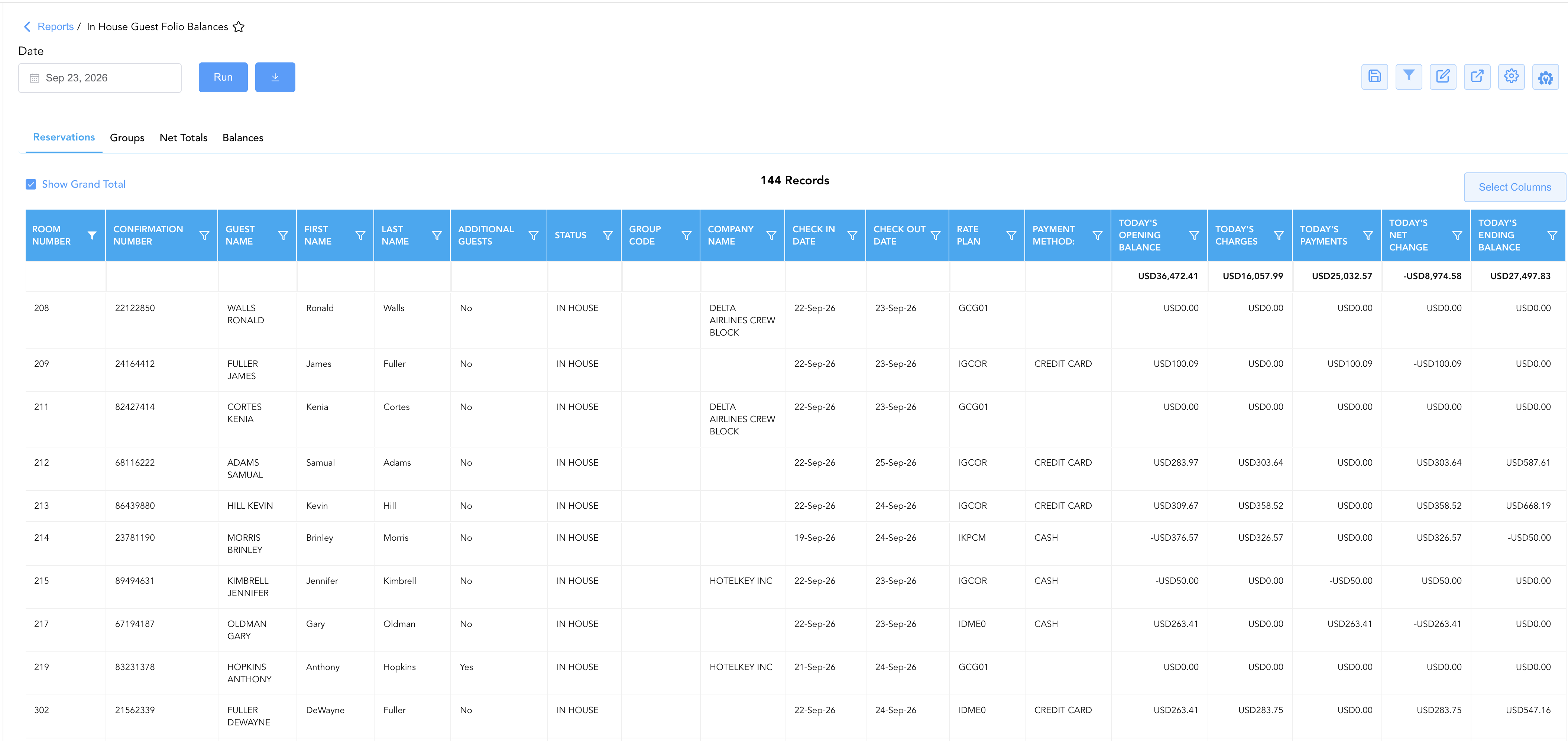
1. Reservations
Itemizes individual in-house transient guest folios, mapping confirmation numbers, room assignments, guest demographics, payment methods, and daily financial posting movements.
-
Primary Use: Auditing individual guest folio balances, monitoring high-balance guest limits, and verifying daily debit/credit postings before checkout.
-
Key Metrics: Confirmation Number, Group Code, Room Number, Guest Name, First Name, Last Name, Additional Guests, Company Name, Check In Date, Check Out Date, Rate Plan, Payment Method, Status, Today's Charges, Today's Payments, Today's Opening Balance, Today's Net Change, Today's Ending Balance.
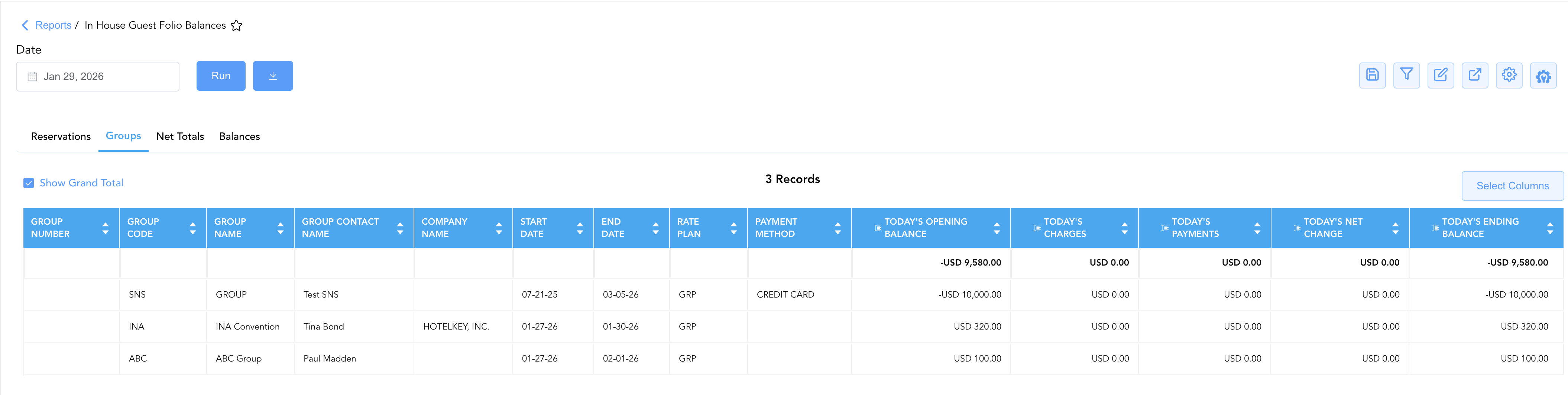
2. Groups
Isolates active in-house group master folios, convention blocks, and corporate event accounts receiving master billing charges or group deposit credits.
-
Primary Use: Tracking group master billing accruals, verifying master folio payments, and auditing group block financial exposure prior to departure.
-
Key Metrics: Group Number, Group Code, Group Name, Group Contact Name, Company Name, Start Date, End Date, Rate Plan, Payment Method, Today's Charges, Today's Payments, Today's Opening Balance, Today's Net Change, Today's Ending Balance.
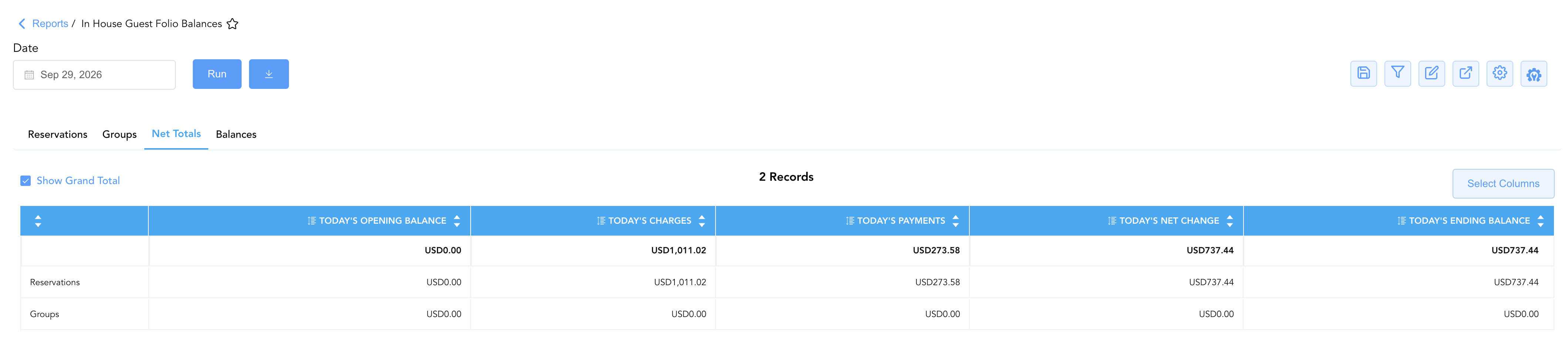
3. Net Totals
Consolidates today's charges, today's payments, opening balances, net shifts, and ending balances into aggregate summary rows for transient reservations and group masters.
-
Primary Use: Rapid night audit verification of total daily financial movements across both in-house sub-ledgers.
-
Key Metrics: Category subtotals for Reservations and Groups across Today's Charges, Today's Payments, Today's Opening Balance, Today's Net Change, and Today's Ending Balance.
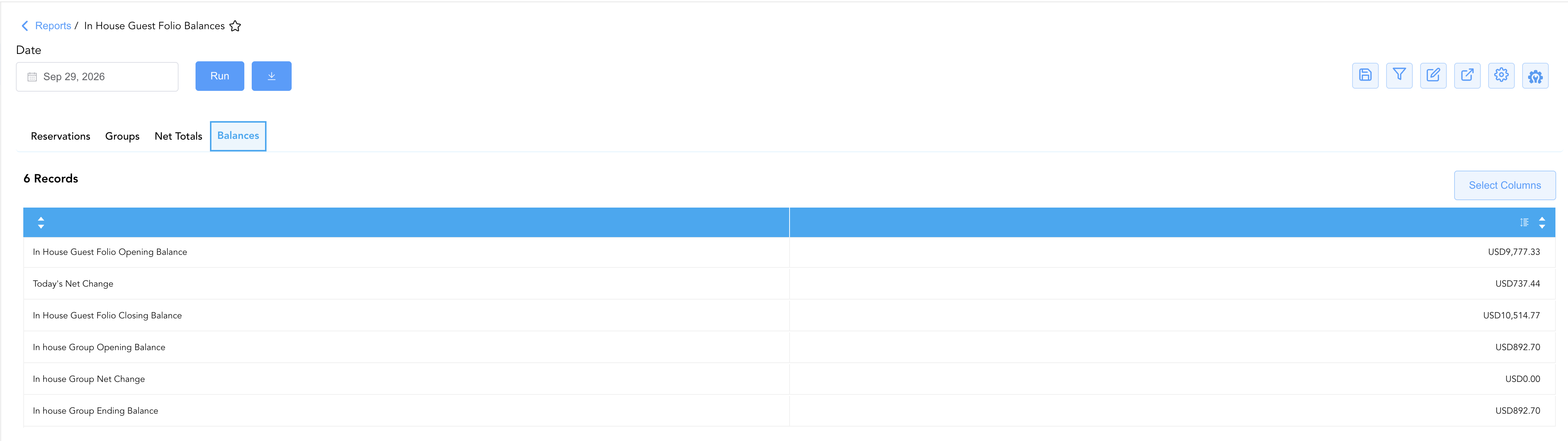
4. Balances
Delivers a macro-level trial balance roll-forward establishing strict closing balance continuity for both the In House Guest Folio and In House Group sub-ledgers.
-
Primary Use: Finalizing night audit trial balance verification and confirming that guest and group sub-ledger balances tie directly into General Ledger control accounts.
-
Key Metrics: In House Guest Folio Opening Balance, Today's Net Change, In House Guest Folio Closing Balance, In house Group Opening Balance, In house Group Net Change, In house Group Ending Balance.
Data Dictionary (Dynamic View Columns Across All 4 Sections)
Customize your default view using the Configure (⚙️️) icon on the report page. Below is the full data dictionary representing every column available across all four sections of this report:
💡 Tax & Balance Treatment Note: Today's Charges, Today's Payments, Today's Opening Balance, Today's Net Change, and Today's Ending Balance / Closing Balance represent Gross Financial Amounts (Includes Taxes & Fees). A positive ending balance indicates net guest liability owed to the property, while a negative balance indicates a pre-paid credit or advance deposit hold.
|
Column Name |
Section(s) Where Column Appears |
Description |
Data Source / System Mapping |
Includes Taxes & Fees? |
|
Confirmation Number |
Reservations |
Unique reference identifier assigned to the transient guest reservation. |
System Reservation ID |
N/A |
|
Group Number |
Groups |
Unique master folio number assigned to the in-house group block. |
System Group Block ID |
N/A |
|
Group Code |
Reservations, Groups |
Alphanumeric master identifier code assigned to the convention group block (e.g., |
|
N/A |
|
Group Name |
Groups |
Official name or event title of the in-house group block. |
|
N/A |
|
Group Contact Name |
Groups |
Primary client or tour leader responsible for the group master account. |
|
N/A |
|
Room Number |
Reservations |
Physical room number occupied by the in-house guest. |
|
N/A |
|
Guest Name |
Reservations |
Combined full primary guest name ( |
|
N/A |
|
First Name / Last Name |
Reservations |
Individual guest first name and last name. |
|
N/A |
|
Additional Guests |
Reservations |
Indicates whether additional registered occupants are attached to the stay. |
|
N/A |
|
Company Name |
Reservations, Groups |
Contracting corporate account or agency sponsoring the reservation or group block. |
|
N/A |
|
Check In Date / Start Date |
Reservations, Groups |
Contracted or actual arrival date for guest stays or group blocks. |
|
N/A |
|
Check Out Date / End Date |
Reservations, Groups |
Contracted departure date for guest stays or group blocks. |
|
N/A |
|
Rate Plan |
Reservations, Groups |
Contracted rate code or pricing structure assigned to the folio (e.g., |
Rate Engine Configuration |
N/A |
|
Payment Method ( |
Reservations, Groups |
Primary tender instrument backing the folio (CASH, CREDIT CARD, BILL TO COMPANY). |
Payment Gateway / Tender Engine |
N/A |
|
Status |
Reservations |
Current operational state of the reservation ( |
System Reservation Engine |
N/A |
|
Today's Charges |
Reservations, Groups, Net Totals |
Gross monetary value of debits and room revenue posted to the folio during the current day. |
|
🟢 Yes |
|
Today's Payments |
Reservations, Groups, Net Totals |
Gross monetary value of payment credits, advance deposits, or settlements applied today. |
|
🟢 Yes |
|
Today's Opening Balance |
Reservations, Groups, Net Totals, Balances |
Sub-ledger balance carried forward from the close of the previous business day. |
Prior Business Day Closing Balance |
🟢 Yes |
|
Today's Net Change |
Reservations, Groups, Net Totals, Balances |
Net financial movement occurring on the folio today ( |
|
🟢 Yes |
|
Today's Ending Balance / Closing Balance |
Reservations, Groups, Net Totals, Balances |
Calculated gross balance at business date close ( |
|
🟢 Yes |
Customization & Platform Features
User & Property Preferences
-
Personal Preference: Tailor your individual view by hiding or dragging columns. Your preferences save automatically for future sessions.
-
Property Defaults: System Admins can configure standard default layouts across all property users to streamline operational reporting. To maximize audit efficiency, group the columns into the below logical blocks:
-
Section 1: Reservations
-
Room & Guest Identifiers (Cols 1–7):
Room Number|Confirmation Number|Guest Name|First Name|Last Name|Additional Guests|Status -
Account & Stay Context (Cols 8–13):
Group Code|Company Name|Check In Date|Check Out Date|Rate Plan|Payment Method -
Balance Flow & Activity (Cols 14–18):
Today's Opening Balance|Today's Charges|Today's Payments|Today's Net Change|Today's Ending Balance
-
-
Section 2: Groups
-
Group Identifiers (Cols 1–4):
Group Number|Group Code|Group Name|Group Contact Name -
Account Context & Stay Window (Cols 5–9):
Company Name|Start Date|End Date|Rate Plan|Payment Method -
Balance Flow & Activity (Cols 10–14):
Today's Opening Balance|Today's Charges|Today's Payments|Today's Net Change|Today's Ending Balance
-
-
Section 3: Net Totals
-
Module Classification (Col 1):
Module Type -
Aggregate Balance Flow (Cols 2–6):
Today's Opening Balance|Today's Charges|Today's Payments|Today's Net Change|Today's Ending Balance
-
-
Section 4: Balance
-
Ledger Item & Amount (Cols 1–2):
Balance Item Description|Amount
-
-
Report Toolbar & Quick Actions
Use the top-right toolbar icons on the report page to manage and export your data view:
|
Icon |
Action / Feature |
Description |

|
Knowledge Article |
Opens the knowledge base article to learn how to interpret this report. |

|
Saved Views |
Saves your column filtering, sorting, and highlight preferences so you can easily reload your custom view later without reconfiguring the report. |

|
Filter |
Opens filter controls to isolate specific data within a column based on your selected criteria. |

|
Highlight |
Highlights column values in a designated color based on selected conditions. |

|
Export |
Exports and downloads the report in various formats (Excel, PDF, CSV) for offline analysis or printing. |

|
Configure |
Opens column selection controls to toggle visibility, reorder columns, or hide rows with all zeros. |

|
Additional Configuration |
Provides advanced report configuration and display formatting options to customize data presentation. |
Advanced Controls
-
Exporting & Night Audit Delivery: Download in Excel or PDF format to support daily trial balance tie-outs, credit limit monitoring, or general ledger balancing.
-
Filtering: Filter data by specific Payment Method, Rate Plan, or high Ending Balance thresholds.
-
Highlighting (Conditional Formatting): Apply custom rules to automatically highlight high-balance guest folios exceeding credit limits or negative balance positions.
🔗 Related Reports & Next Steps
Within ⚖️ Ledgers & Trial Balance & 💳 Payments & Transactions:
-
Trial Balance – Translate in-house guest and group sub-ledger closing balances into formal General Ledger asset and liability control accounts.
-
Day End Summary – Verify consolidated daily revenue, tax, payment, and deposit blueprints at business date close.
-
All Payments – Audit line-item cash, check, and card payment receipts posted across in-house folios.
-
Adjustments & Refunds Activity – Review charge write-offs and payment reversals applied to in-house guest folios.
Cross-Pillar Deep Dives:
-
🛎️ Front Desk & Guest Services: Cross-reference active room occupation with In-House Guest to verify guest stay details and departure schedules.
-
📬 Billing & Receivables (AR): To inspect corporate direct-bill balances transferred from checked-out guest folios, review Direct Bill Ledger Details.