
Scheduled Advance Deposits By Arrival Report Overview
Parent Hub: 💰 Finance & Accounting Reports
Category: 💳 Payments & Transactions
Target Roles: Directors of Finance & Controllers, Night Auditors, Front Office Managers, Cashiers & Reservations Staff
Key Value: Ensure advance deposit compliance and eliminate pre-arrival credit exposure by tracking required advance deposits, collected prepayments, uncollected deposit balances, and cancellation deadlines organized by guest arrival schedule.
Executive Summary
The Scheduled Advance Deposits By Arrival Report is a primary financial control and pre-arrival revenue management tool within the 💳 Payments & Transactions category of the 💰 Finance & Accounting Reports suite. Designed to enforce advance purchase rate rules, group deposit schedules, and reservation guarantee compliance, it provides a line-item operational log of all scheduled advance deposits due for arriving guest reservations.
By pairing guest profile details (Confirmation Number, Guest Name, First Name, Last Name, Room Number, Loyalty/Local Details) with stay parameters (Check In Date, Nights, Room Type, Rate Plan, Group Code/Name, Company Name), payment guarantee metrics (Due Date, Cancel Due By, Payment Type, Source Code/Name, Deposit Status, Action Required), and monetary ledger positions (Total Deposit Required, Deposit Collected, Remaining Balance), this report enables controllers, night auditors, and front office teams to identify unpaid advance deposits prior to check-in, initiate guest payment follow-ups, and enforce automatic cancellation rules for non-compliant bookings.
Key Capabilities
-
Pre-Arrival Deposit Audit: Items all required advance deposits organized by guest arrival schedule (Check In Date).
-
Deposit Compliance Tracking: Monitors deposit collection progress across operational states (Deposit Status
PAID,UNPAID,UNUSED,FAILEDorPARTIALLY PAID) and flags non-compliant bookings (Action Required =Yes/No). -
Financial Position & Exposure Monitoring: Calculates net deposit balances Remaining Balance = Total Deposit Required - Deposit Collected to isolate uncollected credit risk.
-
Cancellation & Deadline Governance: Tracks exact deposit due dates (Due Date) and cancellation policy deadlines (Cancel Due By) to protect property revenue policies.
Report Views & Functional Breakdown
The Scheduled Advance Deposits By Arrival Report presents advance deposit data in a unified single-table ledger that supports three distinct analytical perspectives:
┌────────────────────────────────────────────────────────────────────────┐
│         SCHEDULED ADVANCE DEPOSITS BY ARRIVAL REPORT                   │
├────────────────────────────────────────────────────────────────────────┤
│                       Unified Operational Ledger                       │
├──────────────────────────┬──────────────────────────┬──────────────────┤
│ 1. Pre-Arrival Deposit   │ 2. Outstanding Balance   │ 3. Booking Source│
│    Collection Audit      │    & Action Oversight    │    & Policy Rules│
└──────────────────────────┴──────────────────────────┴──────────────────┘
1. Pre-Arrival Deposit Collection Audit
Monitors scheduled advance deposits due for arriving reservations to verify prepayment completion prior to guest check-in.
-
Primary Use: Reviewing upcoming arrivals (
Check In Date), confirming deposit settlement (Deposit Status = PAID), and ensuring front desk agents check in guaranteed bookings without delay. -
Key Metrics: Confirmation Number, Check In Date, Guest Name, Room Number, Total Deposit Required, Deposit Collected, Remaining Balance, Deposit Status.
2. Outstanding Balance & Action Oversight
Isolates reservations with uncollected deposit balances or overdue prepayment deadlines requiring immediate front office intervention.
-
Primary Use: Identifying unpaid advance deposits (Remaining Balance > $0.00), dispatching digital payment links, following up with guests, and flagging action-required reservations (
Action Required = Yes). -
Key Metrics: Confirmation Number, Guest Name, Due Date, Cancel Due By, Action Required, Total Deposit Required, Deposit Collected, Remaining Balance.
3. Booking Source & Policy Rules
Evaluates advance deposit compliance across distribution channels, rate plans, corporate accounts, and group blocks.
-
Primary Use: Auditing advance purchase rate code compliance (
Rate Plan), verifying group block deposit holds (Group Code,Group Name), and reviewing OTA/direct booking sources (Source Name,Sub Source Name). -
Key Metrics: Confirmation Number, Source Name, Rate Plan, Group Code, Group Name, Company Name, Payment Type, Cancel Due By.
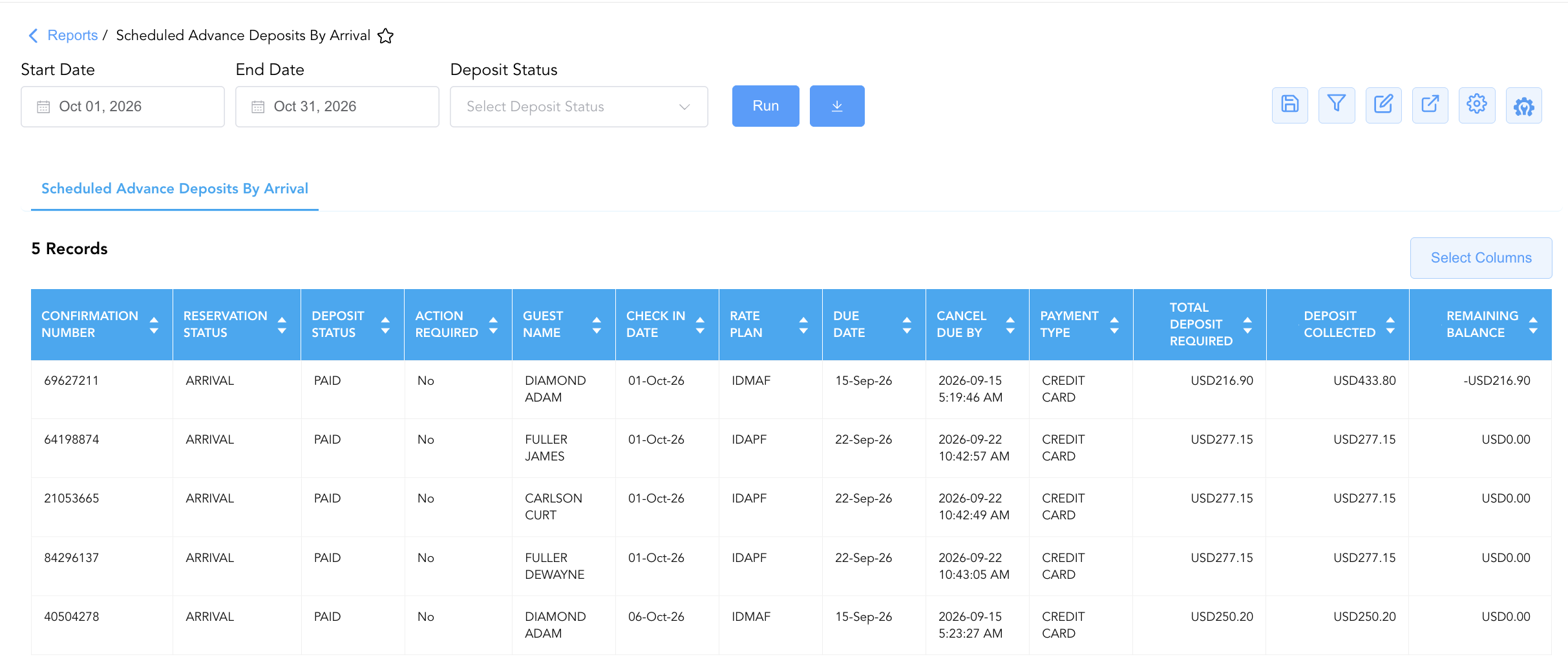
Data Dictionary (Dynamic View Columns)
Customize your default view using the Configure (⚙️) icon on the report page. Below is the full data dictionary representing every column available in this report:
💡 Monetary Treatment Note: Total Deposit Required, Deposit Collected, and Remaining Balance represent Gross Financial Amounts (Includes Taxes & Fees). Remaining Balance is calculated as Remaining Balance = Total Deposit Required - Deposit Collected, where a positive value indicates unpaid deposit liabilities and a negative value indicates overcollected credit holds.
|
Column Name |
Description |
Data Source / System Mapping |
Includes Taxes & Fees? |
|
Guest Name |
Combined full primary guest name ( |
|
N/A |
|
First Name / Last Name |
Individual guest first name and last name registered on the reservation. |
|
N/A |
|
Room Number |
Physical room number assigned to the arriving guest ( |
|
N/A |
|
Reservation Status |
Current operational state of the reservation (e.g., |
System Reservation Engine |
N/A |
|
Deposit Status |
Current processing state of the required deposit (e.g., |
Deposit Engine State |
N/A |
|
Source Name / Source Code |
Primary booking channel name and origin code (e.g., PHONE / |
Distribution Engine |
N/A |
|
Due Date |
Official deadline date by which the required advance deposit must be posted. |
Deposit Schedule Config |
N/A |
|
Payment Type |
Tender instrument configured for deposit collection (e.g., CREDIT CARD). |
Payment Gateway Setup |
N/A |
|
Action Required |
Indicates whether staff intervention is required due to uncollected deposits or missed deadlines ( |
System Compliance Engine |
N/A |
|
Total Deposit Required |
Gross advance deposit amount mandated by the reservation rate plan or group agreement. |
Deposit Schedule Calculation |
🟢 Yes |
|
Deposit Collected |
Gross monetary deposit amount actually processed and credited to the reservation folio. |
Folio Ledger Engine |
🟢 Yes |
|
Remaining Balance |
Net uncollected deposit amount remaining ( |
|
🟢 Yes |
|
Check In Date |
Scheduled arrival date of the guest reservation. |
|
N/A |
|
Nights |
Total stay duration calculated in nights. |
|
N/A |
|
Room Type |
Contracted room category code assigned to the booking (e.g., |
Room Type Configuration |
N/A |
|
Confirmation Number |
Unique system reference code assigned to the reservation. |
System Reservation ID |
N/A |
|
Group Code / Group Name |
Master identifier code and title for linked convention group blocks. |
|
N/A |
|
Rate Plan |
Rate plan code assigned to the reservation governing pricing and deposit rules (e.g., |
Rate Code Configuration |
N/A |
|
Company Name |
Contracting corporate account name associated with the booking. |
|
N/A |
|
Local First Name / Last Name |
Guest first and last name rendered in local language script. |
|
N/A |
|
Sub Source Code / Sub Source Name |
Secondary distribution channel or partner source code and name. |
Distribution Engine |
N/A |
|
Cancel Due By |
Exact timestamp deadline after which an unpaid reservation is eligible for policy cancellation. |
Cancellation Policy Engine |
N/A |
Customization & Platform Features
User & Property Preferences
-
Personal Preference: Tailor your individual view by hiding or dragging columns. Your preferences save automatically for future sessions.
-
Property Defaults: System Admins can configure standard default layouts across all property users to streamline operational reporting. To maximize audit efficiency, group the columns into the below logical blocks:
-
Reservation & Account Anchors (Cols 1–5):
Confirmation Number|Room Number|Reservation Status|Deposit Status|Action Required -
Guest & Group Identification (Cols 6–13):
Guest Name|First Name|Last Name|Local First Name|Local Last Name|Group Code|Group Name|Company Name -
Stay Window & Booking Metadata (Cols 14–21):
Check In Date|Nights|Room Type|Rate Plan|Source Name|Source Code|Sub Source Code|Sub Source Name -
Deposit Schedules & Due Dates (Cols 22–24):
Due Date|Cancel Due By|Payment Type -
Financial Deposit Balances (Cols 25–27):
Total Deposit Required|Deposit Collected|Remaining Balance
-
Report Toolbar & Quick Actions
Use the top-right toolbar icons on the report page to manage and export your data view:
|
Icon |
Action / Feature |
Description |

|
Knowledge Article |
Opens the knowledge base article to learn how to interpret this report. |

|
Saved Views |
Saves your column filtering, sorting, and highlight preferences so you can easily reload your custom view later without reconfiguring the report. |

|
Filter |
Opens filter controls to isolate specific data within a column based on your selected criteria. |

|
Highlight |
Highlights column values in a designated color based on selected conditions. |

|
Export |
Exports and downloads the report in various formats (Excel, PDF, CSV) for offline analysis or printing. |

|
Configure |
Opens column selection controls to toggle visibility, reorder columns, or hide rows with all zeros. |

|
Additional Configuration |
Provides advanced report configuration and display formatting options to customize data presentation. |
Advanced Controls
-
Exporting & Front Office Action Lists: Download in Excel or PDF format to support pre-arrival payment call sheets, reservation policy audits, and front desk check-in preparation.
-
Filtering: Filter data by specific Check In Date ranges, Deposit Status, Action Required (
Yes), or positive Remaining Balance thresholds ($\text{Remaining Balance} > \$0.00$). -
Highlighting (Conditional Formatting): Apply custom rules to automatically highlight overdue unpaid deposits (
Remaining Balance > $0.00andDue Date < Today) or reservations approaching cancellation deadlines (Cancel Due By).
🔗 Related Reports & Next Steps
Within 💳 Payments & Transactions & ⚖️ Ledgers & Trial Balance:
-
Payment Link Details – Dispatch digital remote payment links to guests with outstanding advance deposit balances.
-
Declined Payments – Review failed automated advance deposit charges and credit card processing errors.
-
Authorized Payments Overview – Audit credit card pre-authorization holds, capture approvals, and card refund processing.
-
All Payments – Complete transaction ledger logging all cash, check, credit card, and direct-bill payment receipts.
-
Advance Deposit Activity – Reconcile advance deposit sub-ledger balances against general ledger liability accounts.
Cross-Pillar Deep Dives:
-
🛎️ Front Desk & Guest Services: To cross-reference arriving guest reservations needing payment method updates, review Arrivals List.