
Credit Card Surcharge Details Report Overview
Parent Hub: 💰 Finance & Accounting Reports
Category: 💳 Payments & Transactions
Target Roles: Directors of Finance & Controllers, Night Auditors, Front Office Managers, Cashiers & Revenue Accounting Staff
Key Value: Maintain complete oversight of credit card processing fee assessments, fee waiver overrides, card brand surcharge variations, and total payment collection tie-outs.
Executive Summary
The Credit Card Surcharge Details Report is a primary merchant fee governance and payment audit tool within the 💳 Payments & Transactions category of the 💰 Finance & Accounting Reports suite. Designed for merchant processing fee recovery and staff override auditing, it provides a line-item audit trail of every credit card payment transaction subject to surcharge fee rules.
By tracking the primary transaction identifier (Transaction Number), transaction timestamp (Date), card brand (Card Type), base payment amount (Base Payment Amount), surcharge rate setup (Surcharge Value, Surcharge Type), generated surcharge fee (Calculated Surcharge Amount), and final collected sum (Total Payment Amount), alongside staff override tracking (Waived, Username), this report enables controllers, night auditors, and front desk supervisors to verify surcharge calculation accuracy, audit fee waivers, and reconcile merchant processing cost recovery.
Key Capabilities
-
Surcharge Calculation & Fee Recovery: Audits percentage or fixed fee surcharges calculated on credit card transactions to ensure accurate merchant processing cost recovery.
-
Fee Waiver & Staff Exception Auditing: Tracks waived surcharge fees (Waived = Yes) and attributes them directly to the processing user (Username) for internal control enforcement.
-
Multi-Brand Card Analysis: Itemizes fee assessments across all major credit card networks (Card Type like VISA, MASTER, AMEX).
Report Views & Functional Breakdown
The Credit Card Surcharge Details Report presents fee assessment activity in a unified single-table ledger supporting three analytical perspectives:
┌────────────────────────────────────────────────────────────────────────┐
│               CREDIT CARD SURCHARGE DETAILS REPORT                     │
├────────────────────────────────────────────────────────────────────────┤
│                       Unified Transaction Ledger                       │
├──────────────────────────┬──────────────────────────┬──────────────────┤
│ 1. Surcharge Calculation │ 2. Fee Waiver & Staff    │ 3. Total Payment │
│    & Rate Audit          │    Override Control      │    Collection    │
│                          │                          │    Reconciliation│
└──────────────────────────┴──────────────────────────┴──────────────────┘
1. Surcharge Calculation & Rate Audit
Monitors surcharge rates and fee calculations applied to base credit card payments.
-
Primary Use: Verifying that configured surcharge rates (Surcharge Value, Surcharge Type) accurately generate expected fee amounts (Calculated Surcharge Amount) across different card brands.
-
Key Metrics: Transaction Number, Date, Card Type, Base Payment Amount, Surcharge Value, Surcharge Type, Calculated Surcharge Amount.
2. Fee Waiver & Staff Override Control
Identifies transactions where credit card surcharge fees were bypassed or waived by staff members.
-
Primary Use: Auditing staff compliance, reviewing unauthorized surcharge waivers, and tracking total uncollected surcharge revenue due to manual overrides[cite: 1].
-
Key Metrics: Transaction Number, Base Payment Amount, Calculated Surcharge Amount, Waived, Username.
3. Total Payment Collection Reconciliation
Reconciles base payment amounts and added surcharge fees against gross payment receipts.
-
Primary Use: Tying out total credit card payment collections (Total Payment Amount) against daily merchant processing settlement batches.
-
Key Metrics: Base Payment Amount, Calculated Surcharge Amount, Total Payment Amount, Waived.
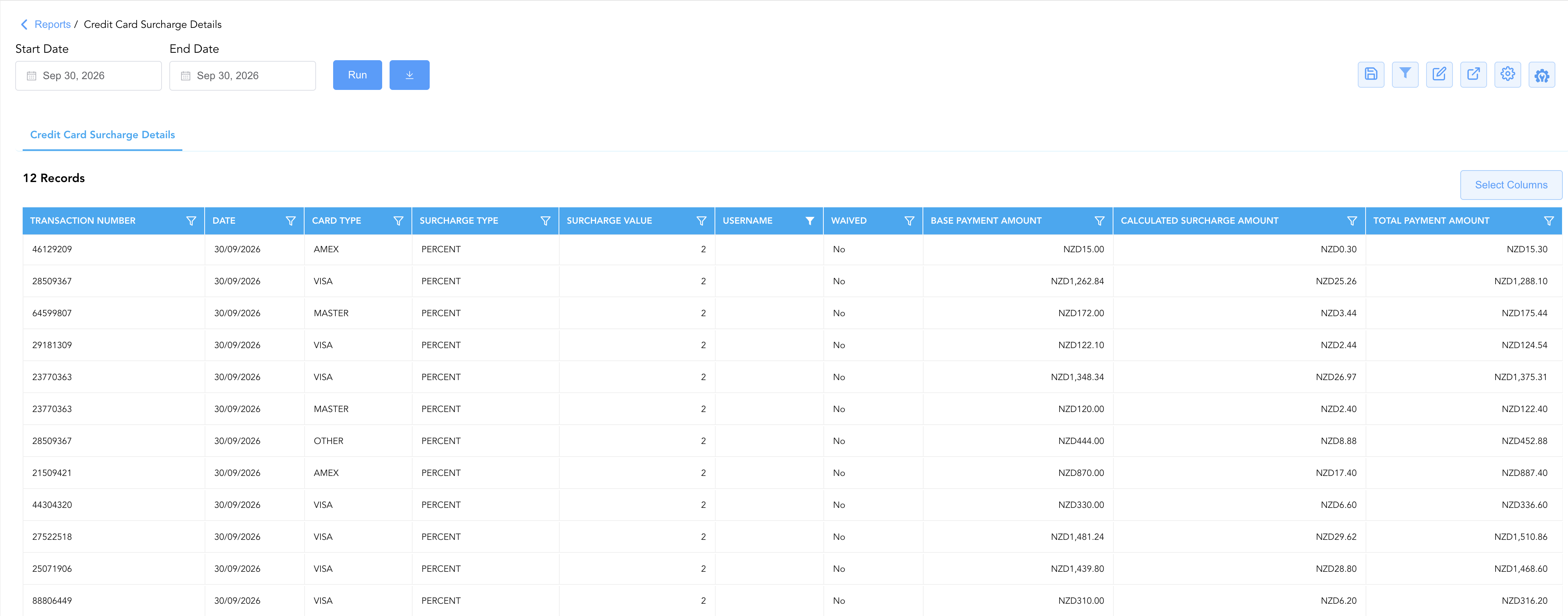
Data Dictionary (Dynamic View Columns)
Customize your default view using the Configure (⚙️) icon on the report page[cite: 1]. Below is the full data dictionary representing every column available in this report:
💡 Monetary Treatment Note: Base Payment Amount, Calculated Surcharge Amount, and Total Payment Amount represent Gross Monetary Values (Includes Taxes & Fees) processed through the payment gateway.
|
Column Name |
Description |
Data Source / System Mapping |
Includes Taxes & Fees? |
|
Transaction Number |
Unique system reference identifier assigned to the payment transaction. |
System Transaction ID |
N/A |
|
Date |
Official date when the payment transaction and surcharge were processed. |
Transaction Timestamp |
N/A |
|
Card Type |
Credit card brand network used for the payment (VISA, MASTER, AMEX). |
Payment Gateway Engine |
N/A |
|
Base Payment Amount |
Principal transaction amount before adding surcharge fees. |
Transaction Ledger Engine |
🟢 Yes |
|
Surcharge Value |
Numeric value of the surcharge rule applied (e.g., |
Surcharge Configuration |
N/A |
|
Surcharge Type |
Calculation model used for the surcharge ( |
Surcharge Configuration |
N/A |
|
Calculated Surcharge Amount |
Calculated surcharge fee generated for the transaction ( |
Surcharge Engine ( |
🟢 Yes |
|
Total Payment Amount |
Final collected sum ( |
Transaction Ledger Engine |
🟢 Yes |
|
Waived |
Indicates whether the surcharge fee was manually waived by staff ( |
Transaction Override Flag |
N/A |
|
Username |
System ID or username of the staff member who processed or waived the surcharge. |
System Audit Log |
N/A |
Customization & Platform Features
User & Property Preferences
-
Personal Preference: Tailor your individual view by hiding or dragging columns. Your preferences save automatically for future sessions.
-
Property Defaults: System Admins can configure standard default layouts across all property users to streamline operational reporting. To maximize audit efficiency, group the columns into the below logical blocks:
-
Transaction & Card Context (Cols 1–3):
Transaction Number|Date|Card Type -
Surcharge Calculation Rule (Cols 4–5):
Surcharge Type|Surcharge Value -
Waiver Audit & User Attribution (Cols 6–7):
Waived|Username -
Payment Settlement & Surcharge Totals (Cols 8–10):
Base Payment Amount|Calculated Surcharge Amount|Total Payment Amount
-
Report Toolbar & Quick Actions
Use the top-right toolbar icons on the report page to manage and export your data view:
|
Icon |
Action / Feature |
Description |

|
Knowledge Article |
Opens the knowledge base article to learn how to interpret this report. |

|
Saved Views |
Saves your column filtering, sorting, and highlight preferences so you can easily reload your custom view later without reconfiguring the report. |

|
Filter |
Opens filter controls to isolate specific data within a column based on your selected criteria. |

|
Highlight |
Highlights column values in a designated color based on selected conditions. |

|
Export |
Exports and downloads the report in various formats (Excel, PDF, CSV) for offline analysis or printing. |

|
Configure |
Opens column selection controls to toggle visibility, reorder columns, or hide rows with all zeros. |

|
Additional Configuration |
Provides advanced report configuration and display formatting options to customize data presentation. |
Advanced Controls
-
Exporting & Gateway Reconciliation: Download in Excel or PDF format to support daily merchant gateway batch tie-outs and merchant processing fee audits.
-
Filtering: Filter data by specific Waived status (
Yes/No), Card Type, Username, or date ranges. -
Highlighting (Conditional Formatting): Apply custom rules to automatically highlight waived surcharge transactions (
Waived = Yes) or high-value surcharge fees.
🔗 Related Reports & Next Steps
Within 💳 Payments & Transactions & ⚖️ Ledgers & Trial Balance:
-
Authorized Payments – Audit credit card authorization holds, capture approvals, and card refund processing.
-
All Payments – Complete transaction ledger logging all cash, check, credit card, and direct-bill payment receipts.
-
Control Report – Audit cashier shift drops, cash drawers, paid-outs, and credit card processing gateway batches.
-
Payment Activity – Technical transaction log focusing specifically on card pre-authorizations and settlement tokens.
-
Adjustments & Refunds Activity – Track rate write-offs, charge adjustments, and cash/card refund transactions.
Cross-Pillar Deep Dives:
-
🏛️ Taxes & Expenses: To audit statutory taxes calculated on charges subject to surcharges, review Tax Summary.
-
📬 Billing & Receivables (AR): To inspect corporate direct-bill settlements and merchant fee allocations, review Direct Bill Ledger Details.