
Credit Limit Overage Report Overview
Parent Hub: 💰 Finance & Accounting Reports
Category: 💳 Payments & Transactions
Target Roles: Hotel Controllers, Credit Managers, Night Auditors, Front Office Managers, Accounts Receivable Managers, Directors of Finance
Key Value: Audit governance over credit limit bypasses, monitoring authorized and manual folio credit limit overrides, tracking employee user accountability, reviewing justification remarks, and preventing unauthorized accounts receivable or guest ledger credit exposures.
Date Parameter: Date Range Selector (Start / End Date) | Past Only | Maximum Range: 94 Days
Executive Summary
The Credit Limit Overage Report is an essential internal financial control, risk management, and cashiering audit document within the 💳 Payments & Transactions category of the 💰 Finance & Accounting Reports hub. Designed to enforce strict credit limit compliance across guest folios, group master accounts, and house accounts, it captures every operational instance where a front desk clerk, night auditor, or manager posted charges exceeding established credit thresholds or manually increased/overrode an account's authorized credit ceiling.
-
Centered on financial auditability through the unified Credit Limit Overage Report matrix, this report correlates the target entity (
Transaction Description, e.g., guest name, group block title) and unique identifier (Transaction Code, e.g., reservation confirmation number or group booking ID) with the timestamped calendar event (Credit Limit Override Date), the monetary variance or overridden sum (Amount), the operator's digital signature (Username), and mandatory managerial justifications (Remarks). This focused visibility equips controllers and finance leadership to detect security policy circumventions, identify runaway guest charging privileges, evaluate employee training needs, and mitigate bad debt exposure before guests depart or group accounts close.
Key Capabilities
-
Credit Policy Circumvention Auditing: Identifies all transactions where a posting bypassed automated system credit limit checks, highlighting non-standard cashiering activity.
-
Strict Operator Accountability: Logs the login email credentials of the specific clerk, auditor, or supervisor who executed the limit override (
Username), establishing an indisputable digital audit trail. -
Override Justification Tracking: Preserves the operational reasoning inputted by staff at the time of the override prompt (
Remarks), enabling controllers to review whether overrides followed standard operating procedures. -
Exposure Valuation & Totaling: Quantifies the monetary scale of each override event (
Amount) alongside a cumulative portfolio overage total, measuring the property's total extended risk. -
Multi-Entity Folio Traceability: Accommodates individual guest reservations, group blocks, and test accounts, linking each entry directly to its underlying reservation or master confirmation ID (
Transaction Code).
Report Views & Functional Breakdown
The Credit Limit Overage Report structures financial override data into a unified master matrix supporting three primary operational perspectives:
┌────────────────────────────────────────────────────────────────────────┐
│                      CREDIT LIMIT OVERAGE REPORT                       │
├────────────────────────────────────────────────────────────────────────┤
│                         Unified Matrix View                            │
├──────────────────────────┬──────────────────────────┬──────────────────┤
│ 1. Account & Booking     │ 2. Override Financials & │ 3. User Audit &  │
│    Identification        │    Overage Valuation     │    Justification │
└──────────────────────────┴──────────────────────────┴──────────────────┘
1. Account & Booking Identification
Identifies the affected guest, corporate entity, or group master along with its system reservation code.
-
Primary Use: Locating the affected guest folio or group master in the PMS to review live room charges and credit card pre-authorizations.
-
Key Metrics: Transaction Description, Transaction Code.
2. Override Financials & Overage Valuation
Logs the chronological date and monetary amount associated with the credit limit override.
-
Primary Use: Measuring total unauthorized credit extension, tracking daily overage volumes, and reconciling folio balance variances.
-
Key Metrics: Credit Limit Override Date, Amount.
3. User Audit & Justification
Details operator credentials and operational remarks entered during the override workflow.
-
Primary Use: Verifying management authorization, auditing employee cashiering habits, and enforcing remark standards.
-
Key Metrics: Username, Remarks.
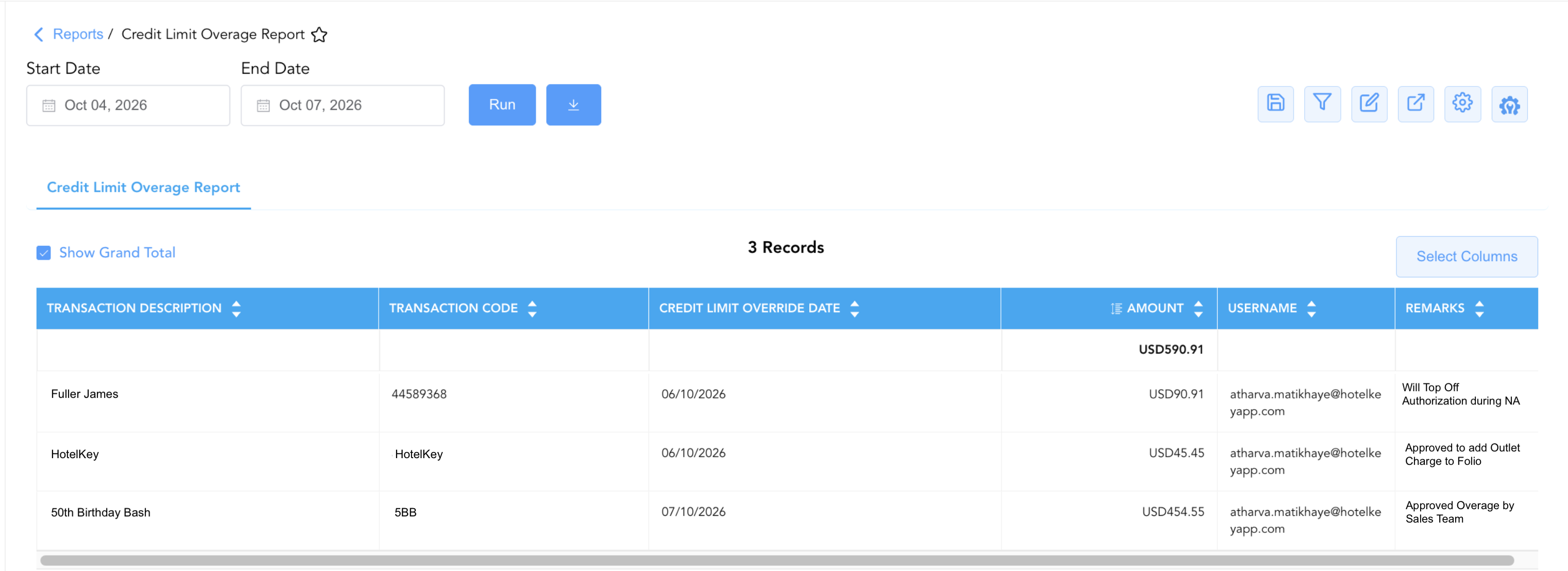
Data Dictionary (Dynamic View Columns)
Customize your default view using the Configure (⚙️) icon on the report page. Below is the full data dictionary representing all 6 exact dynamic columns available in this report, sorted in alphabetical order by column name:
💳 Credit Limit & Audit Logic:
Amount: Reflects the monetary sum posted beyond the pre-set credit limit, or the new adjusted threshold authorized during the override action.
Report Grand Total: The summary row represents the cumulative monetary value of all credit limit overrides executed during the specified date window (Amount).
|
Column Name |
Description |
Data Source / System Mapping |
Includes Taxes & Fees? |
|
Amount |
Monetary value of the charge exceeding the credit limit, or the incremental credit ceiling authorized during the override. |
Cashiering / Audit Trail > Override Value |
🟢 Yes |
|
Credit Limit Override Date |
Calendar date on which the credit limit override or over-limit posting was executed in the system. |
Audit Trail > Transaction Timestamp |
N/A |
|
Remarks |
Mandatory or optional text justification entered by the operator explaining why the credit limit was bypassed or increased. |
Override Prompt > Operator Remarks |
N/A |
|
Transaction Code |
Unique system confirmation number, reservation ID, or group code associated with the account. |
Reservation / Billing Engine > Account ID |
N/A |
|
Transaction Description |
Descriptive title of the account, typically displaying the guest's full name, group contract title, or corporate billing name. |
Folio Master > Profile Description |
N/A |
|
Username |
Digital identity or login email address of the system operator who executed the credit limit override. |
Security / User Directory > User ID |
N/A |
Customization & Platform Features
User & Property Preferences
-
Personal Preference: Tailor your individual view by hiding or dragging columns. Your preferences save automatically for future sessions.
-
Property Defaults: System Admins can configure standard default layouts across all property users to streamline operational reporting. To maximize audit efficiency, group the columns into the below logical blocks:
-
Entity & Transaction Identifiers (Cols 1–2):
Transaction Code|Transaction Description -
Audit Schedule & User Accountability (Cols 3–4):
Credit Limit Override Date|Username -
Financial Exposure Metric (Col 5):
Amount -
Audit Documentation & Justification (Col 6):
Remarks
-
Report Toolbar & Quick Actions
Use the top-right toolbar icons on the report page to manage and export your data view:
|
Icon |
Action / Feature |
Description |

|
Knowledge Article |
Opens the knowledge base article to learn how to interpret this report. |

|
Saved Views |
Saves your column filtering, sorting, and highlight preferences so you can easily reload your custom view later without reconfiguring the report. |

|
Filter |
Opens filter controls to isolate specific data within a column based on your selected criteria. |

|
Highlight |
Highlights column values in a designated color based on selected conditions. |

|
Export |
Exports and downloads the report in various formats (Excel, PDF, CSV) for offline analysis or printing. |

|
Configure |
Opens column selection controls to toggle visibility, reorder columns, or hide rows with all zeros. |

|
Additional Configuration |
Provides advanced report configuration and display formatting options to customize data presentation. |
Advanced Controls
-
Security Policy Audit: Filter by
Remarksto detect missing, vague, or non-compliant justifications (e.g., punctuation or random characters), flagging staff who require refresher training on authorization standards. -
High-Risk Account Investigation: Cross-reference accounts with large overrides (
Amount > $500) against current in-house guest ledgers to ensure credit card pre-authorizations have been increased accordingly. -
Highlighting (Conditional Formatting): Apply custom rules to automatically highlight high-dollar overages (
Amount > $300), entries with blank remarks, or repeated overrides executed by the same username on a single business day.
🔗 Related Reports & Next Steps
Within 💰 Finance & Accounting Reports & 💳 Payments & Transactions:
-
Authorized Payments Report – Verifies active pre-authorization holds against in-house folio balances to ensure adequate credit coverage.
-
Cashier Shift Report – Audits individual cashier shift transactions, adjustments, and tender reconciliations.
-
All Transactions Report – Details manual debit and credit adjustments, rebates, and fee waivers posted across guest folios.
Cross-Pillar Deep Dives:
-
⚖️ Ledgers & Trial Balance: Cross-reference overridden accounts with the In House Guest Folio Balance Report to verify whether outstanding balances were successfully collected prior to departure.
-
🏢 Corporate Accounts Reports: Compare group credit limit overrides with the Company Details Report to ensure corporate direct billing limits were not breached without credit manager sign-off.