
All Payments Report Overview
Parent Hub: 💰 Finance & Accounting Reports
Category: 💳 Payments & Transactions / ⚖️ Ledgers & Trial Balance
Target Roles: Directors of Finance & Controllers, Night Auditors, Front Office Managers, Cashiers & Accounting Clerks
Key Value: Maintain complete payment audit trails and gateway reconciliation by tracking every processed payment transaction across transient reservations, group masters, corporate direct-bill accounts, and house accounts, complete with payment gateway tokens, approval codes, and cashier attributions.
Executive Summary
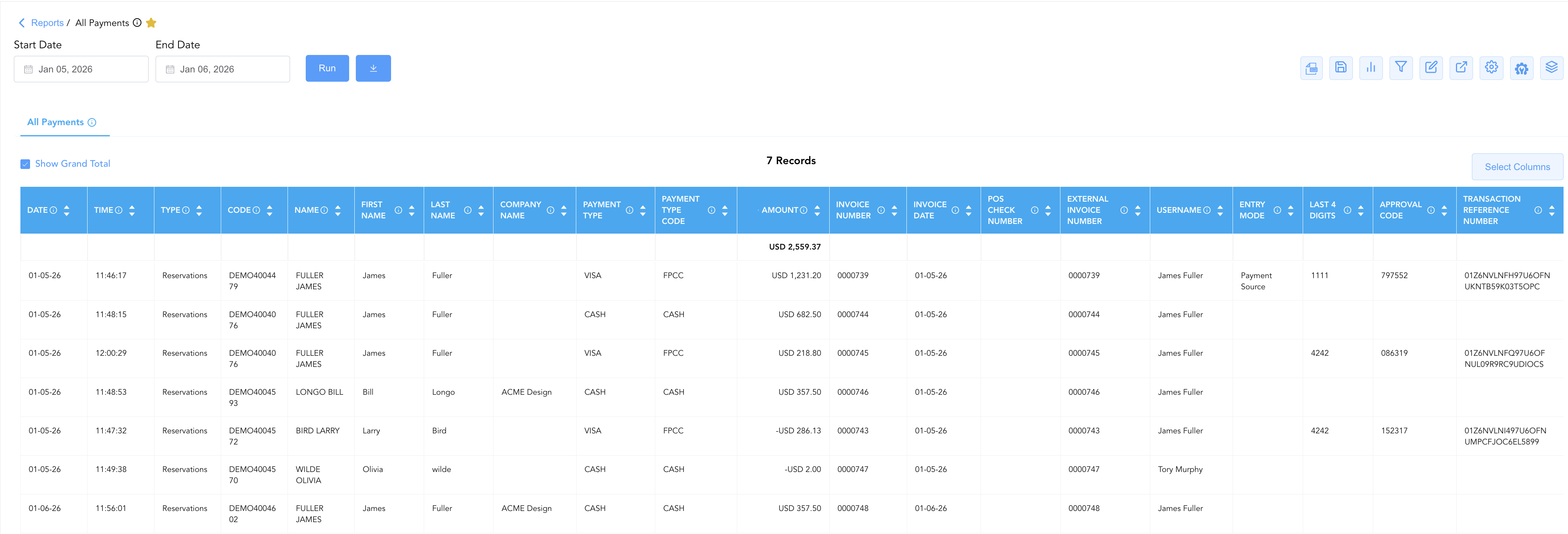
The All Payments Report is a primary transaction audit and cash governance tool within the 💳 Payments & Transactions and ⚖️ Ledgers & Trial Balance modules. Designed for complete payment transparency and gateway reconciliation, it logs every monetary tender processed across the property during a selected operational date range in a unified, single-table ledger.
By capturing detailed transaction metadata—including account category types (Type), card tokens (Last 4 Digits), gateway approvals (Approval Code, Transaction Reference Number), cashier attributions (Username), and corporate billing linkages (Company Name, GL Account Code)—this report empowers controllers and night auditors to audit cashier shifts, verify credit card processing gateway deposits, and reconcile ledger postings with zero variance.
Key Capabilities
-
Unified Single-Table Ledger: Consolidates all property-wide payment receipts into a single comprehensive transaction view.
-
Complete Gateway & Token Traceability: Captures exact authorization tokens (Approval Code, Transaction Reference Number, External Transaction Number) and card brand identifiers (Last 4 Digits, Entry Mode) for merchant processing defense.
-
Cross-Departmental Financial Routing: Maps every payment directly to its assigned General Ledger code (GL Account Code), cost center (Cost Centre), and cashier account (Username).
Report Views & Functional Breakdown (Categorical Perspectives)
While the All Payments Report presents data in a single unified table, finance teams can dynamically group and analyze transactions across four primary account categories:
┌────────────────────────────────────────────────────────────────────────┐
│                        ALL PAYMENTS REPORT                             │
├────────────────────────────────────────────────────────────────────────┤
│                       Single Transaction Ledger                        │
├──────────────────────────┬──────────────────────────┬──────────────────┤
│ • Reservations           │ • Company Accounts       │ • House Accounts │
│   (Transient Stays)      │   (AR Direct Bill)       │   (Non-Guest)    │
├──────────────────────────┴──────────────────────────┴──────────────────┤
│ • Groups (Convention Master Blocks)                                    │
└────────────────────────────────────────────────────────────────────────┘
1. Reservations Category
Encompasses all payment tenders collected for transient guest stays, mapping confirmation numbers, guest names, card tokens, and gateway approval codes.
-
Primary Use: Reconciling front desk cashier drops, auditing guest credit card authorizations, and investigating credit card chargebacks.
-
Key Metrics: Date, Time, Type (
Reservations), Code (Confirmation Number), Name, Payment Type, Payment Type Code, Last 4 Digits, Amount, Entry Mode, Username, Approval Code, Transaction Reference Number.
2. Company Accounts Category
Details direct-bill payments, corporate check receipts, and city ledger settlements applied to contracted corporate profiles.
-
Primary Use: Reconciling incoming corporate accounts receivable payments, matching check numbers against city ledger invoices, and auditing B2B settlements.
-
Key Metrics: Date, Time, Type (
Company), Code, Company Name, Payment Type (CHECK,CREDIT CARD,CASH), Payment Type Code, Last 4 Digits, Amount, Username, Remarks.
3. House Accounts Category
Tracks payments, retainer deposits, and administrative settlements posted to internal, permanent, or temporary house accounts.
-
Primary Use: Auditing internal departmental payments, banquet house account settlements, and manager account clearances.
-
Key Metrics: Date, Time, Type (
House Account), Code, House Account Name, Payment Type, Amount, Entry Mode, Username, Approval Code, Transaction Reference Number.
4. Groups Category
Isolates payment transactions, pre-paid event deposits, and wire transfers applied to convention group blocks and master folios.
-
Primary Use: Auditing group block prepayments, verifying catering/event deposit receipts, and reconciling master folio settlements.
-
Key Metrics: Date, Time, Type (
Group), Group Code, Group Name, Company Name, Payment Type, Amount, Username, Approval Code, Transaction Reference Number.
Data Dictionary (Dynamic View Columns)
Customize your default view using the Configure (⚙️) icon on the report page. Below is the full data dictionary representing every column available in this report:
💡 Tax Treatment Note: The Amount field represents Gross Payments Received (Includes Taxes & Fees) applied toward guest, group, house, or company account liabilities.
|
Column Name |
Description |
Data Source / System Mapping |
Includes Taxes & Fees? |
|---|---|---|---|
|
Date |
Official date when the payment transaction was posted. |
Transaction Timestamp |
N/A |
|
Time |
Exact system time when the payment was executed. |
Transaction Timestamp |
N/A |
|
Type |
Account origin classification (Reservations, Company, House Account, Group). |
System Account Engine |
N/A |
|
Code |
Account reference identifier (Confirmation Number, Company Code, House Account Code, Group Code). |
System Master ID |
N/A |
|
Name |
Full guest name, corporate company title, house account name, or event title. |
Master Profile Name |
N/A |
|
First Name / Last Name |
Individual guest first name and last name (for transient bookings). |
|
N/A |
|
External Confirmation Number |
Third-party or CRS confirmation code linked to the reservation. |
Distribution Channel Engine |
N/A |
|
Company Name |
Contracted corporate account name receiving or paying the invoice. |
|
N/A |
|
Payment Type |
Human-readable payment tender description (VISA, MASTER, CASH, CHECK). |
Tender Code Configuration |
N/A |
|
Payment Type Code |
System tender code used to process the transaction (e.g., |
Tender Code Configuration |
N/A |
|
Cost Centre |
Assigned operational department or cost center code for GL routing. |
Chart of Accounts Config |
N/A |
|
GL Account Code |
General ledger asset account code mapped to the payment method. |
Chart of Accounts Config |
N/A |
|
Last 4 Digits |
Masked payment card digits or check reference number. |
Payment Gateway Token |
N/A |
|
Amount |
Gross monetary value collected and applied in the transaction. |
Transaction Ledger Engine |
🟢 Yes |
|
External Invoice Number |
Third-party billing or invoice reference code linked to the payment. |
AR Invoicing Module |
N/A |
|
Invoice Date |
Generation date of the city ledger invoice being settled. |
AR Invoicing Module |
N/A |
|
Invoice Number |
Unique PMS city ledger invoice number receiving the settlement. |
AR Invoicing Module |
N/A |
|
Entry Mode |
Method used to capture card details (Payment Source, Swiped, Keyed, EMV Chip). |
Payment Gateway Interface |
N/A |
|
Username |
User email or staff ID of the employee who processed the payment. |
System Audit Log |
N/A |
|
Remarks |
Explanatory notes or cashier comments entered during payment processing. |
Transaction Notes Field |
N/A |
|
Approval Code |
Payment gateway authorization code generated upon card approval. |
Payment Gateway Response |
N/A |
|
Transaction Reference Number |
Unique gateway transaction token ID used for card batch reconciliation. |
Payment Gateway Response |
N/A |
|
POS Check Number |
Restaurant or outlet point-of-sale check number linked to the charge. |
POS Interface Engine |
N/A |
|
External Transaction Number |
External payment processor or bank reference code. |
External Gateway Logs |
N/A |
Customization & Platform Features
User & Property Preferences
-
Personal Preference: Tailor your individual view by hiding or dragging columns. Your preference saves automatically for future sessions.
-
Property Defaults: System Admins can configure standard default layouts across all property users to streamline operational reporting. To maximize audit efficiency, group the columns into the below logical blocks:
-
Audit Timestamps & Account Context (Cols 1–4):
Date|Time|Type|Code -
Guest & Entity Identifiers (Cols 5–9):
Name|First Name|Last Name|Company Name|External Confirmation Number -
Payment Tender & Accounting Details (Cols 10–13):
Payment Type|Payment Type Code|GL Account Code|Cost Center -
Payment Amount & Settlement (Col 14):
Amount -
Invoice & Reference Metadata (Cols 15–18):
Invoice Number|External Invoice Number|Invoice Date|POS Check Number -
User Attribution & Gateway Metadata (Cols 19–25):
Username|Entry Mode|Last 4 Digits|Approval Code|Transaction Reference Number|External Transaction Number|Remarks
-
Report Toolbar & Quick Actions
Use the top-right toolbar icons on the report page to manage and export your data view:
|
Icon |
Action / Feature |
Description |

|
Knowledge Article |
Opens the knowledge base article to learn how to interpret this report. |

|
Background Export |
Allows users to download up to 365 days of data directly to their computer in CSV format. |

|
Saved Views |
Saves your column filtering, sorting, and highlight preferences so you can easily reload your custom view later without reconfiguring the report. |

|
Bar Chart |
Displays report data in a visual bar chart format. |

|
Filter |
Opens filter controls to isolate specific data within a column based on your selected criteria. |

|
Highlight |
Highlights column values in a designated color based on selected conditions. |

|
Export |
Exports and downloads the report in various formats (Excel, PDF, CSV) for offline analysis or printing. |

|
Configure |
Opens column selection controls to toggle visibility, reorder columns, or hide rows with all zeros. |

|
Additional Configuration |
Provides advanced report configuration and display formatting options to customize data presentation. |

|
Group By |
Summarize and group report data dynamically in real time. |
Interactive Visualizations & Grouping Controls
-
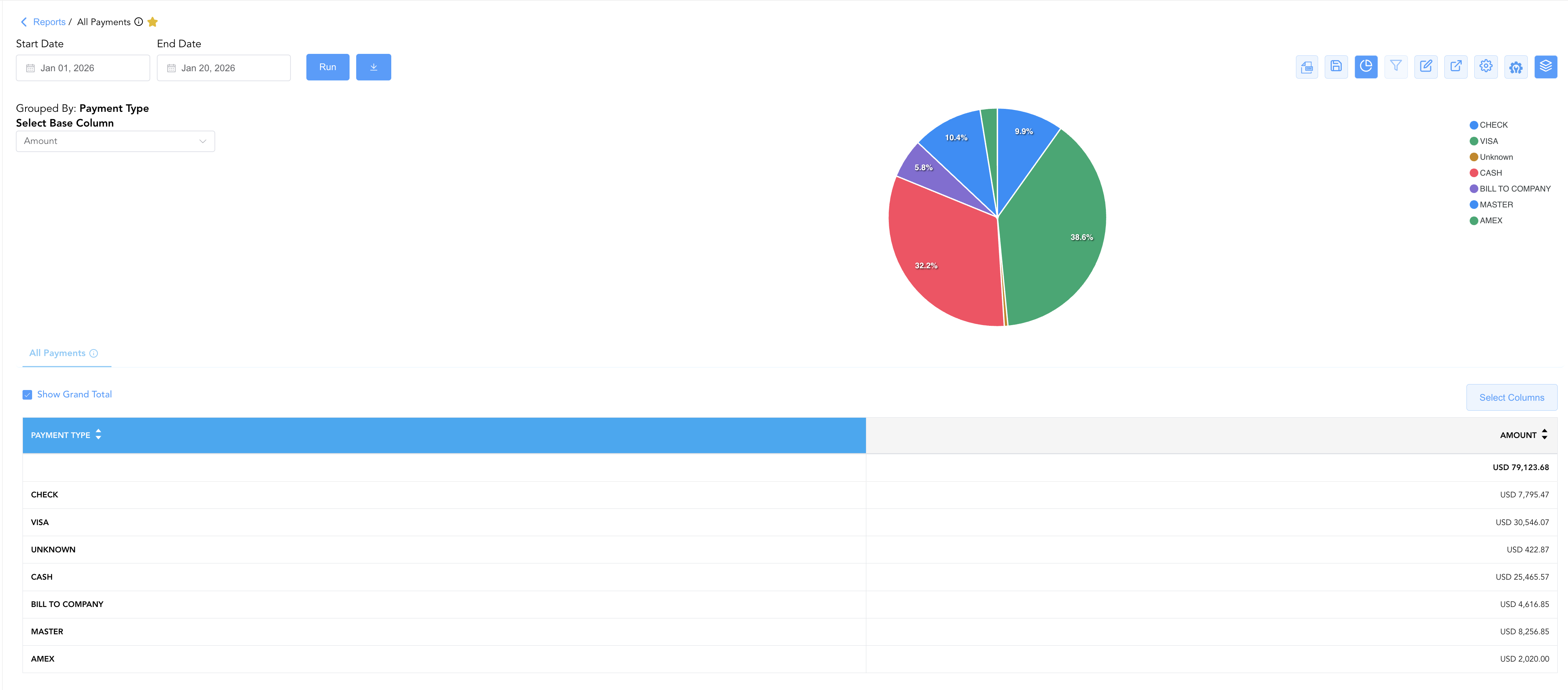
Group By & Pie Chart Visualization: The All Payments report includes an interactive pie chart to analyze tender type performance and collection distributions across your property. Users can group payment entries on the fly by Payment Type to evaluate tender channel distributions. By selecting Amount from the Select Base Column dropdown menu, the chart dynamically renders percentage share breakdowns accompanied by an interactive color-coded payment type legend.
-
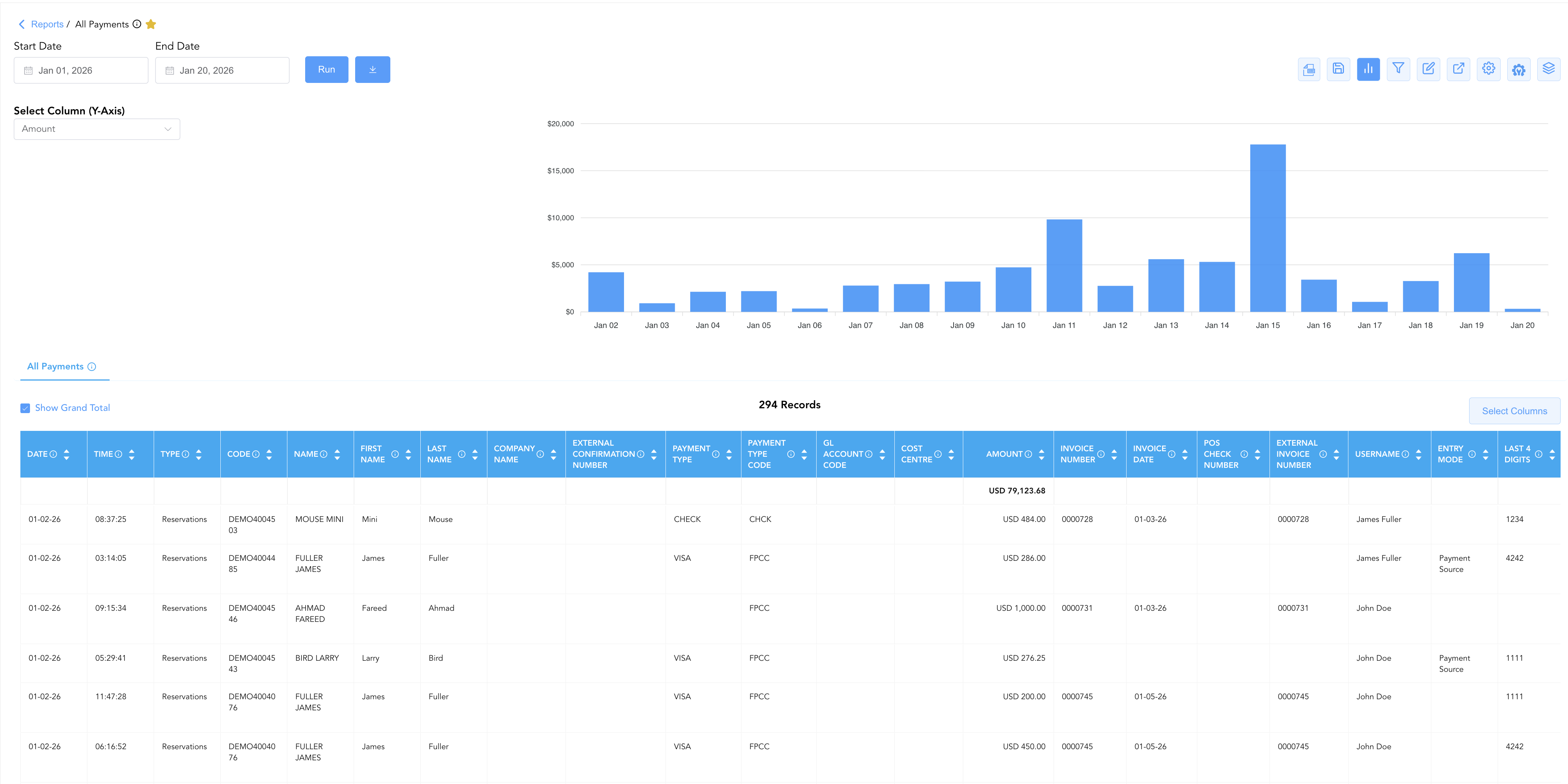
Bar Chart Visualizer: The All Payments report includes an interactive bar chart to help analyze daily payment intake and collection trends over time. By selecting Amount from the Select Column (Y-Axis) dropdown menu, users can visually monitor daily financial totals and processing surges chronologically alongside the detailed payment record grid.
Advanced Controls
-
Exporting & Audit Delivery: Download in Excel or PDF format to support daily cashier drop envelope auditing, merchant gateway batch tie-outs, or night audit documentation.
-
Filtering: Filter data by specific Username, Payment Type, Type, or date ranges.
-
Highlighting (Conditional Formatting): Apply custom rules to automatically highlight high-value payments or manual card entries (Entry Mode = Keyed).
🔗 Related Reports & Next Steps
Within 💳 Payments & Transactions & ⚖️ Ledgers & Trial Balance:
-
Control Report – Audit cashier shift drops, cash drawers, paid-outs, and credit card processing gateway batches.
-
Payment Activity – Technical transaction log focusing specifically on card pre-authorizations and settlement tokens.
-
Day End Summary – Review consolidated daily revenue, tax, payment, and deposit blueprints at business date close.
-
Trial Balance – Translate daily payment receipts into formal General Ledger asset control accounts.
-
Adjustments & Refunds Activity – Track payment refunds, tender reversals, and charge write-offs.
Cross-Pillar Deep Dives:
-
📬 Billing & Receivables (AR): To inspect company check payments applied to city ledger invoices, review Direct Bill Ledger Details or Accounts Receivable Activity.
-
🏛️ Taxes & Expenses: To audit petty cash outlays or employee paid-outs, review Paid Out Activity.
-
📈 Forward Revenue & Analytics: Looking for forward-facing revenue projections or macro performance metrics (like RevPAR or ADR)? Please visit the 📈 Revenue & Analytics reporting hub.