
Revision Date :
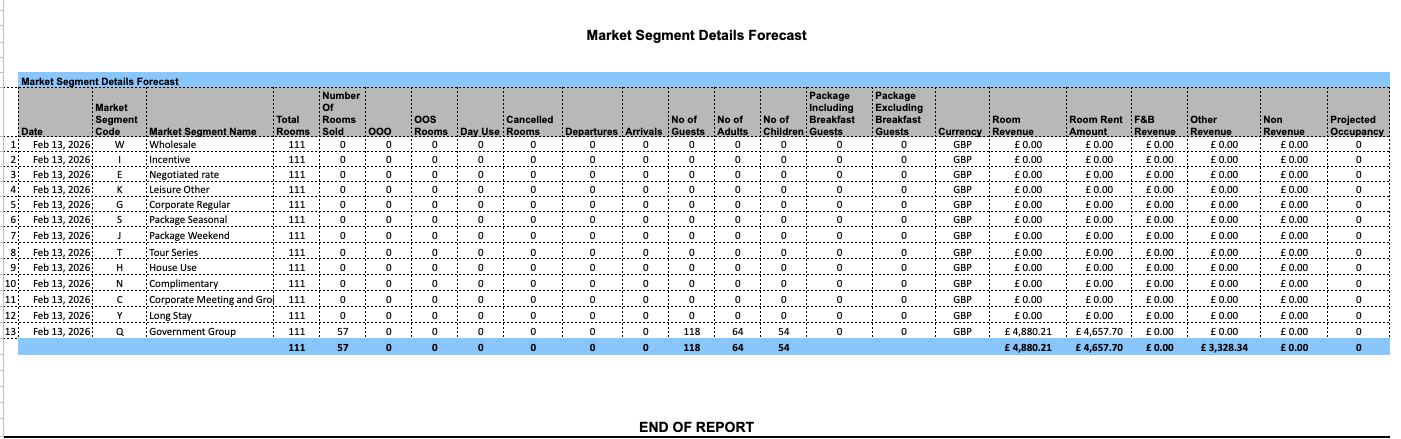
Market Segment Details Forecast
Report Description: The Market Segment Details Forecast report provides statistical information including number of rooms sold, number of guests, adults and children, room revenue, F&B revenue and other revenue by Market Segment Code.
Date Range: The report will render the data for up to 365 days in the future
Available Report Columns for Following Sections:
|
Column Name |
Column Description |
Amount Includes Taxes and Fees |
Calculation |
|
Date |
Date of the associated reservations |
Not Applicable |
Not Applicable |
|
Market Segment Code |
Market segment code associated with the reservation |
Not Applicable |
Not Applicable |
|
Market Segment Name |
Market segment name associated with the reservation |
Not Applicable |
Not Applicable |
|
Total Rooms |
Total number of rooms available in the hotel |
Not Applicable |
Not Applicable |
|
Number of Rooms Sold |
Total number of rooms that have been sold |
Not Applicable |
=sum(rooms sold) |
|
OOO |
Total number of rooms that are currently out of order or unavailable |
Not Applicable |
=sum(out of order) |
|
OOS Rooms |
Total number of rooms that are currently out of service but still available |
Not Applicable |
=sum(out of service) |
|
Day Use |
Number of rooms arriving and departing on the same day for the date being forecasted |
Not Applicable |
=sum(day use) |
|
Canceled Rooms |
Number of canceled rooms on the date being forecasted |
Not Applicable |
=sum(canceled rooms) |
|
Departures |
Number of expected departures on the date being forecasted |
Not Applicable |
=sum(departures) |
|
Arrivals |
Number of expected arrivals on the date being forecasted |
Not Applicable |
=sum(arrivals) |
|
No of Guests |
Total guests expected on the date being forecasted |
Not Applicable |
=sum(adults) + (children) |
|
No of Adults |
Total number of adults expected on the date being forecasted |
Not Applicable |
=sum(adults) |
|
No of Children |
Total number of children expected on the date being forecasted |
Not Applicable |
=sum(children) |
|
Package Including Breakfast Guests |
The count of guests whose booked room rate explicitly includes breakfast as part of their bundled package. |
Not Applicable |
Not Applicable |
|
Package Excluding Breakfast Guests |
The count of guests whose booked room rate covers lodging only, without any breakfast privileges included in the package. |
Not Applicable |
Not Applicable |
|
Currency |
Posted PMS currency |
Not Applicable |
Not Applicable |
|
Room Revenue |
Revenue for the associated date by market segment code |
NO |
=room revenue(ADR) X (rooms sold) |
|
Room Rent Amount |
Revenue associated with the guest's folio for the stay, excluding taxes and ancillary fees. |
Not Applicable |
Not Applicable |
|
F&B Revenue |
F&B Revenue for the associated date by market segment code |
NO |
=sum(F&B revenue) |
|
Other Revenue |
Other Revenue for the associated date by market segment code |
NO |
=sum(other revenue) |
|
Non Revenue |
Items, services, or room postings that do not generate direct income for the hotel, Eg- complimentary stays, internal house use, et. |
Not Applicable |
Not Applicable |
|
Projected Occupancy |
The forecasted available rooms expected to be occupied by guests for a specific future date or period. |
Not Applicable |
Not Applicable |
Misc Report Information:
Available Features:
-
Export: ability to download and save the file into an alternate format.
-
Filter: filter a range of data based on criteria defined by the user.
-
Highlight: also known as conditional formatting is the ability to highlight certain values making them easier to identify.
-
Bar Graph: ability to view Number of Rooms Sold, OOO, OOS Rooms, Day Use, Canceled Rooms, Departures, Arrivals, No of Guests, No of Adults, No of Children, Room Revenue, F&B Revenue and Other Revenue data in a bar chart.
-
Grouping: ability to view the data grouped by: All, Date and Code
-
Pie Chart: ability to view grouped data in a Pie Chart view.
Available Configuration:
-
User Preferences: allows the user to customize their report view by repositioning or removing columns.
-
Property Preferences: allows the property to customize the report view for all users by repositioning or removing columns.
Baseline Configuration:
-
Property Preferences Settings:
-
Following columns to be disabled for initial deployment:
-
Currency
-
Total Rooms
-
-