
Company And Travel Agent Reservations Report Overview
Parent Hub: 🤝 Sales, Groups & Events Reports
Category: 🏢 Corporate Accounts
Target Roles: Directors of Sales, Corporate Account Managers, Travel Agency Relationship Leads, Revenue Managers, General Managers, Hotel Controllers
Key Value: Evaluate commercial production across corporate profiles and travel agencies, compare volume and revenue production, audit cancellation ratios, track Average Daily Rates (ADR), and measure day-use booking activity.
Executive Summary
The Company And Travel Agent Reservations Report is a vital corporate sales dashboard, travel agency production matrix, and reservation volume audit document within the 🏢 Corporate Accounts category of the 🤝 Sales, Groups & Events Reports hub. Designed to deliver clear commercial performance visibility over B2B booking channels, it itemizes reservation volumes, guest demographics, cancellation records, and yield metrics for both corporate clients and travel agency intermediaries.
-
By organizing commercial reservation data into 2 defined report sections: Company and Travel Agent, this report enables sales directors, account managers, and revenue leaders to evaluate direct corporate account production (
Company) separately from third-party travel agency bookings (Travel Agent). It maps account profiles (Company Name) against completed stay counts (Stay Count), cancellation volume (Total Cancellation), guest headcounts (Adults,Child), total room revenue (Revenue), Average Daily Rate (ADR), same-day stay volume (Number of Day Use), and day-use yield (Day Use ADR).
Key Capabilities
-
Two-Section Commercial Channel Structure: Disaggregates corporate account production (
Company) from travel agency booking volume (Travel Agent) to measure channel contribution. -
Volume & Revenue Production Tracking: Combines physical stay counts (
Stay Count) with total net accommodation revenue (Revenue) to evaluate account profitability. -
Average Daily Rate (ADR) & Yield Analysis: Calculates overnight Average Daily Rate (
ADR) alongside day-use yield (Day Use ADR) to ensure corporate rate integrity. -
Cancellation & Attrition Audit: Itemizes cancellation volume (
Total Cancellation) per account profile to identify high-cancellation sources and manage inventory risk. -
Day-Use Booking Isolation: Tracks same-day room usage (
Number of Day Use) and revenue metrics independently from overnight stays.
Report Views & Functional Breakdown
The Company And Travel Agent Reservations Report presents commercial booking data across 2 defined sections:
┌────────────────────────────────────────────────────────────────────────┐
│             COMPANY AND TRAVEL AGENT RESERVATIONS REPORT               │
├────────────────────────────────────────────────────────────────────────┤
│                       2 Defined Report Sections                        │
├──────────────────────────┬──────────────────────────┬──────────────────┤
│ 1. Company Section       │ 2. Travel Agent Section  │                  │
│    (Corporate Accounts)  │    (Travel Agencies)     │                  │
└──────────────────────────┴──────────────────────────┴──────────────────┘
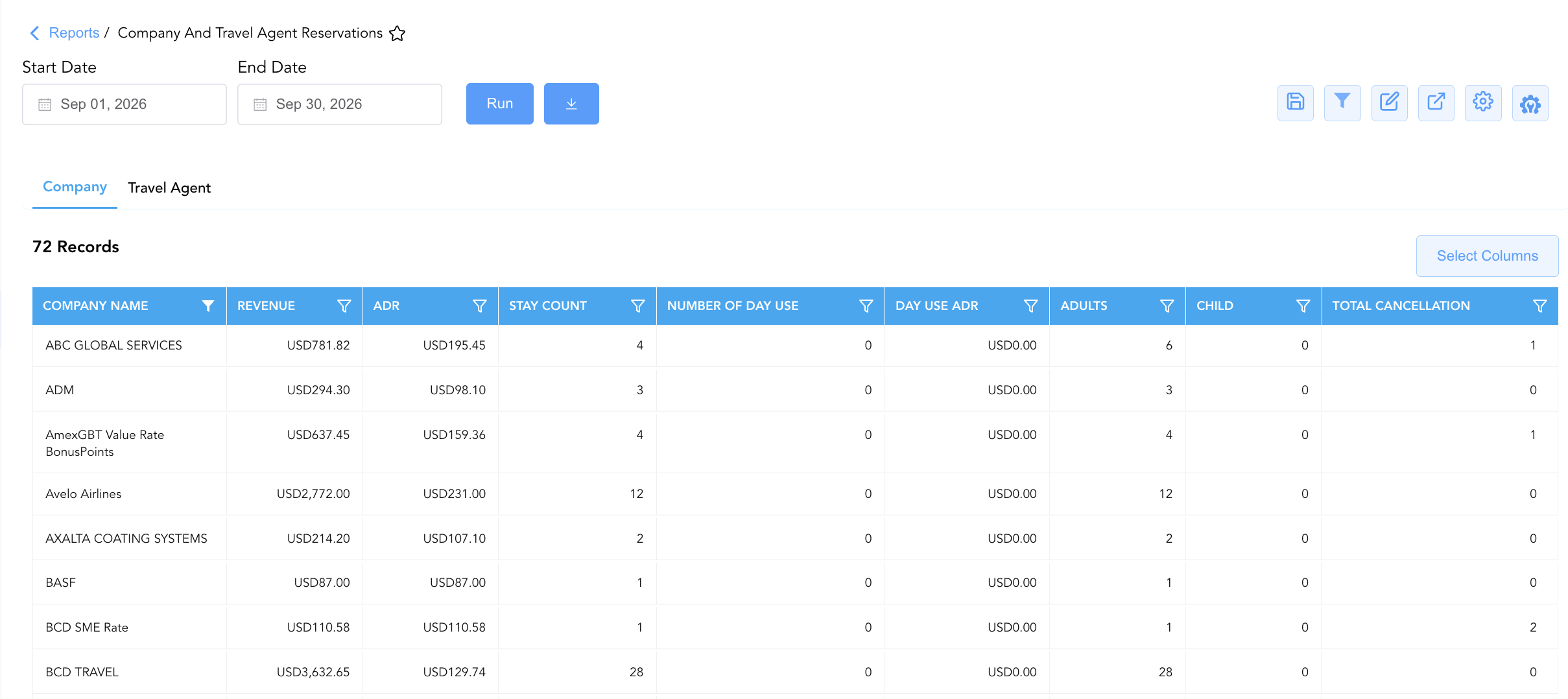
1. Company Section (Corporate Accounts)
Monitors reservation production, revenue generation, cancellations, and ADR across contracted or non-contracted corporate client profiles.
-
Primary Use: Reviewing corporate client production during account performance reviews and auditing corporate rate agreement compliance.
-
Key Metrics: Company Name, Stay Count, Total Cancellation, Adults, Child, Revenue, ADR, Number of Day Use, Day Use ADR.
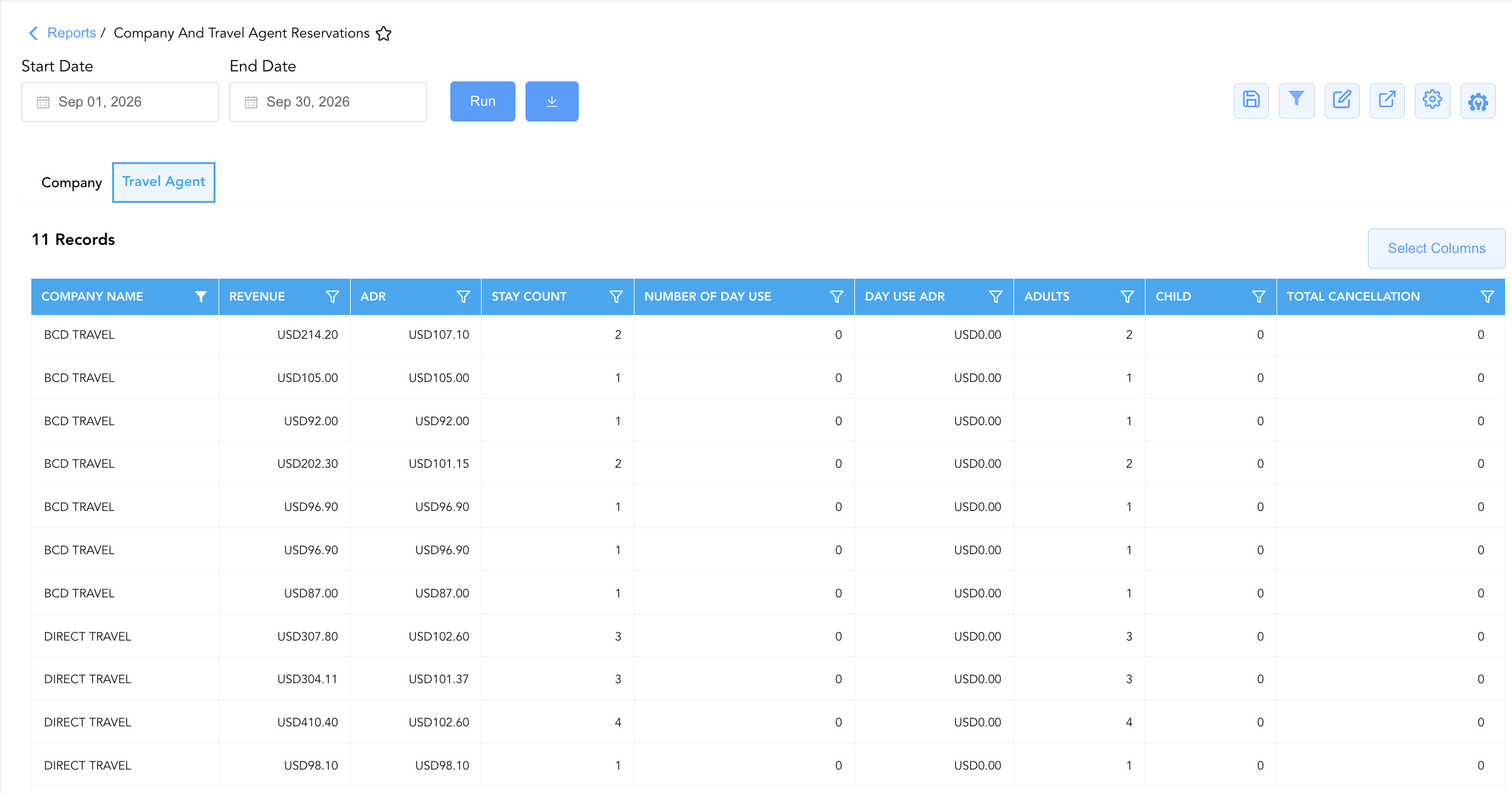
2. Travel Agent Section (Travel Agencies)
Tracks reservation volume, room revenue, and yield metrics generated via global travel agencies and GDS intermediaries.
-
Primary Use: Evaluating travel agency booking volume, auditing commissionable agency production, and identifying top travel agency partners.
-
Key Metrics: Company Name, Stay Count, Total Cancellation, Adults, Child, Revenue, ADR, Number of Day Use, Day Use ADR.
Data Dictionary (Dynamic View Columns)
Customize your default view using the Configure (⚙️) icon on the report page. Below is the full data dictionary representing all 9 unique columns available across the 2 report sections, sorted in alphabetical order by column name:
💰 Financial Posting Logic: All figures in the Revenue column reflect net room revenue generated by the account profile.
|
Column Name |
Section Applicability |
Description |
Data Source / System Mapping |
Includes Taxes & Fees? |
|---|---|---|---|---|
|
ADR |
Both Sections |
Average Daily Rate calculated across overnight room stays (Revenue÷Stay Count). |
Calculated: Net Rate Yield |
🟢 Yes |
|
Adults |
Both Sections |
Total registered adult headcount across reservations linked to the account profile. |
Reservation System > Adult Count |
N/A |
|
Child |
Both Sections |
Total registered child headcount across reservations linked to the account profile. |
Reservation System > Child Count |
N/A |
|
Company Name |
Both Sections |
Name of the corporate account profile (Section 1) or travel agency profile (Section 2). |
Account Master > Profile Name |
N/A |
|
Day Use ADR |
Both Sections |
Average Daily Rate calculated for day-use bookings (Day Use Revenue÷Number of Day Use). |
Calculated: Day-Use Rate Yield |
🟢 Yes |
|
Number of Day Use |
Both Sections |
Total count of day-use (same-day stay) reservations linked to the account. |
Reservation System > Day-Use Count |
N/A |
|
Revenue |
Both Sections |
Total net accommodation revenue generated by the account profile. |
Sales Ledger > Net Room Revenue |
🟢 Yes |
|
Stay Count |
Both Sections |
Total count of completed overnight room stays linked to the account profile. |
Reservation System > Completed Stays |
N/A |
|
Total Cancellation |
Both Sections |
Total count of cancelled reservations associated with the account profile. |
Reservation System > Cancellations |
N/A |
Customization & Platform Features
User & Property Preferences
-
Personal Preference: Tailor your individual view by hiding or dragging columns. Your preferences save automatically for future sessions.
-
Property Defaults: System Admins can configure standard default layouts across all property users to streamline operational reporting. To maximize audit efficiency, group the columns into the below logical blocks:
-
Standardized Optimal Layout (Both Sections)
-
Corporate Entity & Financial Metrics (Cols 1–4):
Company Name|Revenue|ADR|Stay Count -
Day-Use Operations & Revenue (Cols 5–6):
Number of Day Use|Day Use ADR -
Occupancy Headcount & Cancellations (Cols 7–9):
Adults|Child|Total Cancellation
-
-
Report Toolbar & Quick Actions
Use the top-right toolbar icons on the report page to manage and export your data view:
|
Icon |
Action / Feature |
Description |

|
Knowledge Article |
Opens the knowledge base article to learn how to interpret this report. |

|
Saved Views |
Saves your column filtering, sorting, and highlight preferences so you can easily reload your custom view later without reconfiguring the report. |

|
Filter |
Opens filter controls to isolate specific data within a column based on your selected criteria. |

|
Highlight |
Highlights column values in a designated color based on selected conditions. |

|
Export |
Exports and downloads the report in various formats (Excel, PDF, CSV) for offline analysis or printing. |

|
Configure |
Opens column selection controls to toggle visibility, reorder columns, or hide rows with all zeros. |

|
Additional Configuration |
Provides advanced report configuration and display formatting options to customize data presentation. |
Advanced Controls
-
Corporate Account Reviews: Run the report prior to corporate contract renewals to evaluate account room night production (
Stay Count) and rate yield (ADR). -
Filtering: Filter Section 1 or Section 2 by
Total Cancellation > 5to identify accounts exhibiting high cancellation volume. -
Highlighting (Conditional Formatting): Apply custom rules to automatically highlight top revenue accounts (
Revenue > $1,000), high ADR clients, or day-use active accounts.
🔗 Related Reports & Next Steps
Within 🤝 Sales, Groups & Events Reports & 🏢 Corporate Accounts:
-
Company Analysis – Monthly and annual corporate account revenue and stay statistics breakdown.
-
Company Accounts – Summary and detailed production breakdown across all active corporate account profiles.
-
Direct Bill Ledger – Detailed transaction ledger tracking direct-bill charges and outstanding corporate balances.
Cross-Pillar Deep Dives:
-
🛎️ Front Desk & Guest Services: Reconcile corporate arrivals with In House Guest Balances to monitor direct-bill credit limits.
-
📊 Financial & Revenue Management: Cross-reference corporate rate revenues (
Revenue) with monthly financial trial balances and booking pace.