
Company Details Report Overview
Parent Hub: 🤝 Sales, Groups & Events Reports
Category: 🏢 Corporate Accounts
Target Roles: Corporate Account Managers, Directors of Sales, Hotel Controllers, Credit & Collections Leads, General Managers
Key Value: Monitor direct-bill corporate account setups, evaluate approved credit thresholds and available balances, track contract terms and billing addresses, and audit active corporate accounts across property operations.
Executive Summary
The Company Details Report (also designated as the Direct Bill Company Details Report) is a fundamental corporate account audit, credit control, and master profile reference document within the 🏢 Corporate Accounts category of the 🤝 Sales, Groups & Events Reports hub. Designed to provide full transparency over direct-bill company setups and commercial credit facilities, it itemizes profile details, contact information, credit limits, current ledger balances, and contract validity terms for all registered corporate clients.
-
By mapping corporate profile identifiers (
Company Name,Account,Status,Account Type) to contact details (Telephone,Email,Contact,Address,City,State,Country,ZIP Code), commercial terms (Rate Plan,Contract Period Start Date,Contract Period End Date,Company Pays,Tax Number), and real-time ledger metrics (Credit Limit,Account balance,Available Credit Limit,Last Invoice Date), this report enables sales managers, credit officers, and hotel controllers to audit direct-bill privileges, monitor credit utilization, verify billing addresses prior to invoicing, and prevent unauthorized credit extensions.
Key Capabilities
-
Master Direct-Bill Profile Audit: Consolidates all registered corporate account profiles into a unified master reference board.
-
Credit Limit & Balance Monitoring: Real-time visibility into authorized credit limits (
Credit Limit), active ledger balances (Account balance), and net available credit (Available Credit Limit). -
Contact & Billing Address Verification: Itemizes corporate contact names (
Contact), phone numbers (Telephone), emails (Email), and physical billing addresses (Address,City,State,ZIP Code) to ensure prompt invoice delivery. -
Contract & Rate Terms Tracking: Tracks contract validity windows (
Contract Period Start Date,Contract Period End Date), attached rate codes (Rate Plan), and direct-bill authorization flags (Company Pays).
Important Note: For properties operating on Single Image Inventory (SII) connectivity, contract validity windows (
Contract Period Start Date,Contract Period End Date) and negotiated rate codes (Rate Plan) are managed centrally and synchronized directly from the Central Reservation System (CRS) connection, as the PMS does not maintain native rate plans or contract periods under SII integration.
-
Billing Recency & Invoicing Audit: Displays the most recent statement date (
Last Invoice Date) to track account billing cycles and age direct-bill balances.
Report Views & Functional Breakdown
The Company Details Report presents corporate profile and credit data in a unified single-table master matrix supporting three primary operational perspectives:
┌────────────────────────────────────────────────────────────────────────┐
│                      COMPANY DETAILS REPORT                            │
├────────────────────────────────────────────────────────────────────────┤
│                         Unified Matrix View                            │
├──────────────────────────┬──────────────────────────┬──────────────────┤
│ 1. Profile Identity &    │ 2. Contact & Billing     │ 3. Credit Limit  │
│    Contract Terms        │    Address Information   │    & Balance Audit
└──────────────────────────┴──────────────────────────┴──────────────────┘
1. Profile Identity & Contract Terms
Monitors corporate account names, account IDs, profile status, account classifications, rate codes, and contract validity dates.
-
Primary Use: Verifying active corporate account standing and auditing contract expiration dates during sales renewals.
-
Key Metrics: Company Name, Account, Status, Account Type, Rate Plan, Contract Period Start Date, Contract Period End Date, Company Pays.
2. Contact & Billing Address Information
Tracks designated primary account contacts, phone numbers, email addresses, and physical mailing addresses.
-
Primary Use: Retrieving billing details for direct-bill invoice dispatch and contacting corporate travel managers regarding account inquiries.
-
Key Metrics: Contact, Telephone, Email, Address, City, State, Country, ZIP Code, Tax Number.
3. Credit Limit & Balance Audit
Audits authorized credit thresholds, outstanding ledger balances, available direct-bill credit, and last invoicing timestamps.
-
Primary Use: Monitoring credit threshold compliance, preventing over-limit room charges, and managing accounts receivable risk.
-
Key Metrics: Credit Limit, Account balance, Available Credit Limit, Last Invoice Date, Company Name.
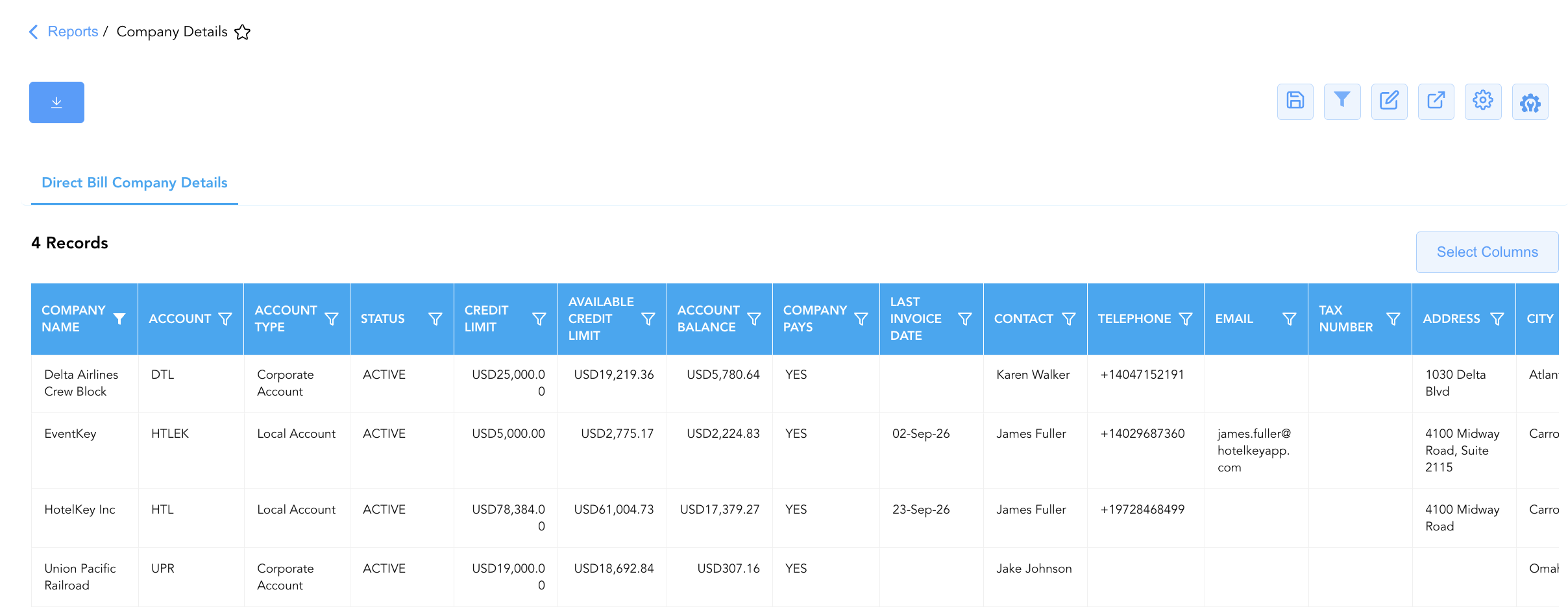
Data Dictionary (Dynamic View Columns)
Customize your default view using the Configure (⚙️) icon on the report page. Below is the full data dictionary representing all 21 columns available in this report, sorted in alphabetical order by column name:
💰 Financial Posting Logic: Figures in
Account balancereflect net unpaid direct-bill charges posted to the corporate account ledger.Available Credit Limitis dynamically calculated as Credit Limit - Account balance.
|
Column Name |
Description |
Data Source / System Mapping |
Includes Taxes & Fees? |
|
Account |
Alphanumeric code or account ID assigned to the company profile (e.g., |
Corporate Profile > Account ID |
N/A |
|
Account balance |
Current outstanding ledger balance owed by the corporate account. |
Corporate Ledger > Balance |
🟢 Yes |
|
Account Type |
Classification of the account profile (e.g., |
Corporate Profile > Account Type |
N/A |
|
Address |
Physical street address of the corporate client or agency office. |
Corporate Profile > Street Address |
N/A |
|
Available Credit Limit |
Remaining credit facility available for direct-bill postings (Credit Limit - Account balance). |
Calculated: Net Credit Line |
🟢 Yes |
|
City |
Municipality or city location of the corporate account office. |
Corporate Profile > City |
N/A |
|
Company Name |
Official business name of the corporate account profile. |
Corporate Profile > Company Name |
N/A |
|
Company Pays |
Indicator flag denoting whether direct-bill postings are authorized for company settlement (e.g., |
Corporate Profile > Direct Bill Flag |
N/A |
|
Contact |
Full name of the designated primary corporate account contact person. |
Corporate Profile > Contact Name |
N/A |
|
Contract Period End Date |
Expiration date of the active corporate rate agreement or direct-bill credit terms. |
Corporate Profile > End Date |
N/A |
|
Contract Period Start Date |
Effective start date of the corporate rate agreement or direct-bill credit terms. |
Corporate Profile > Start Date |
N/A |
|
Country |
Country code or name for the corporate account billing address (e.g., |
Corporate Profile > Country |
N/A |
|
Credit Limit |
Maximum direct-bill credit threshold authorized for the corporate account. |
Corporate Profile > Credit Line |
Yes |
|
|
Primary email contact address for corporate account invoicing and correspondence. |
Corporate Profile > Email |
N/A |
|
Last Invoice Date |
Calendar date on which the most recent direct-bill statement or invoice was generated. |
Billing Engine > Last Statement Date |
N/A |
|
Rate Plan |
Contracted rate code linked to the corporate account profile. |
Corporate Profile > Attached Rate |
N/A |
|
State |
State or province code for the corporate account billing address (e.g., |
Corporate Profile > State |
N/A |
|
Status |
Operational status of the corporate account profile (e.g., |
Corporate Profile > Profile Status |
N/A |
|
Tax Number |
Corporate tax registration number or tax-exempt ID on file. |
Corporate Profile > Tax ID |
N/A |
|
Telephone |
Primary contact telephone number for the corporate account. |
Corporate Profile > Phone Number |
N/A |
|
ZIP Code |
Postal ZIP or postal code for the corporate account billing address. |
Corporate Profile > ZIP Code |
N/A |
Customization & Platform Features
User & Property Preferences
-
Personal Preference: Tailor your individual view by hiding or dragging columns. Your preferences save automatically for future sessions.
-
Property Defaults: System Admins can configure standard default layouts across all property users to streamline operational reporting. To maximize audit efficiency, group the columns into the below logical blocks:
-
Corporate Entity Identifiers & Account Status (Cols 1–4):
Company Name|Account|Account Type|Status -
Credit Limits & Outstanding Financials (Cols 5–8):
Credit Limit|Available Credit Limit|Account balance|Company Pays -
Contract Terms & Invoicing Audit (Cols 9–12):
Rate Plan|Contract Period Start Date|Contract Period End Date|Last Invoice Date -
Contact Information & Tax Attributes (Cols 13–16):
Contact|Telephone|Email|Tax Number -
Physical Billing Address (Cols 17–21):
Address|City|State|ZIP Code|Country
-
Report Toolbar & Quick Actions
Use the top-right toolbar icons on the report page to manage and export your data view:
|
Icon |
Action / Feature |
Description |

|
Knowledge Article |
Opens the knowledge base article to learn how to interpret this report. |

|
Saved Views |
Saves your column filtering, sorting, and highlight preferences so you can easily reload your custom view later without reconfiguring the report. |

|
Filter |
Opens filter controls to isolate specific data within a column based on your selected criteria. |

|
Highlight |
Highlights column values in a designated color based on selected conditions. |

|
Export |
Exports and downloads the report in various formats (Excel, PDF, CSV) for offline analysis or printing. |

|
Configure |
Opens column selection controls to toggle visibility, reorder columns, or hide rows with all zeros. |

|
Additional Configuration |
Provides advanced report configuration and display formatting options to customize data presentation. |
Advanced Controls
-
Credit Limit Risk Audits: Filter data by
Available Credit Limit < 0to generate an immediate list of accounts exceeding direct-bill credit thresholds for the credit manager. -
Invoicing Recency Audit: Filter by
Last Invoice Dateto identify direct-bill accounts requiring statement generation or billing follow-up. -
Highlighting (Conditional Formatting): Apply custom rules to automatically highlight high credit limit accounts (
Credit Limit > $20,000), over-limit balances, or missing contact phone numbers.
🔗 Related Reports & Next Steps
Within 🤝 Sales, Groups & Events Reports & 🏢 Corporate Accounts:
-
Company Analysis – Monthly and annual corporate account revenue and stay statistics breakdown.
-
Company And Travel Agent Reservations – Comprehensive volume, revenue, and ADR production matrix across corporate clients and travel agencies.
-
Direct Bill Ledger Details – Detailed transaction ledger tracking direct-bill charges, payments, and outstanding balances for corporate accounts.
Cross-Pillar Deep Dives:
-
🛎️ Front Desk & Guest Services: Cross-reference active corporate credit limits with In House Guest Balances to prevent unauthorized direct-bill check-ins.
-
📊 Financial & Accounts Receivable: Reconcile total corporate account balances (
Account balance) against monthly Accounts Receivable Invoice Aging and Direct Bill Aging.