
Group Activity Report Overview
Parent Hub: 🤝 Sales, Groups & Events Reports
Category: 👥 Group Block
Target Roles: Group Sales Managers, Directors of Sales, Catering & Event Managers, Revenue Managers, Hotel Controllers, General Managers
Key Value: Monitor real-time group block pick-up and activity, track physical room night fulfillment, analyze group-generated lodging and ancillary revenues, audit Average Daily Rate (ADR) performance, and evaluate group block financial contributions across property operations.
Executive Summary
The Group Activity Report is an essential group sales management, block pick-up audit, and revenue tracking document within the 👥 Group Block category of the 🤝 Sales, Groups & Events Reports hub. Designed to provide comprehensive daily visibility into active, arriving, and departing group contracts, it itemizes both operational stay statistics and financial revenue production associated with group blocks over specified date windows.
-
By organizing group block data into 2 defined report sections: Statistics and Revenue, this report enables sales directors, event managers, and revenue leaders to separate physical room movement counters (
Statistics) from monetary financial postings (Revenue). It correlates master block profiles (Group Number,Group Name,Group Code) and contractual rate settings (Rate Code,Market Code,Local Market Code,Billing Type,Contracted Rooms,Authorized Rooms) with operational stay metrics (Arrivals,In House,Departures,Number Of Rooms,No Show,Cancelled,Number of Guests,Room Nights) and financial revenue streams (Room Revenue,ADR,Food And Beverage Revenue,Misc Revenue,Meeting Room,Total Revenue).
Key Capabilities
-
Two-Section Operational & Financial Structure: Separates physical room pick-up statistics (
Statistics) from monetary revenue generation (Revenue) for comprehensive group block auditing. -
Group Block Movement & Pick-Up Audit: Tracks daily group check-ins (
Arrivals), active stayovers (In House), check-outs (Departures), room night totals (Room Nights), and total guest headcounts (Number of Guests). -
Attrition & Cancellation Management: Itemizes unfulfilled group reservations (
No Show,Cancelled) to calculate block slippage and enforce contractual wash or attrition penalties. -
Multi-Departmental Revenue Tracking: Captures net lodging charges (
Room Revenue), banquets/catering spend (Food And Beverage Revenue), function space rentals (Meeting Room), and ancillary postings (Misc Revenue) to calculate overall group financial yield (Total Revenue). -
Contractual Benchmark Alignment: Evaluates actual picked-up rooms against agreed block allocations (
Contracted Rooms,Authorized Rooms) and tracks attached account profiles (Company Name,Travel Agent).
Report Views & Functional Breakdown
The Group Activity Report presents group block performance data across 2 defined sections:
┌────────────────────────────────────────────────────────────────────────┐
│                        GROUP ACTIVITY REPORT                           │
├────────────────────────────────────────────────────────────────────────┤
│                       2 Defined Report Sections                        │
├──────────────────────────┬──────────────────────────┬──────────────────┤
│ 1. Statistics Section    │ 2. Revenue Section       │                  │
│    (Operational Pick-Up) │    (Financial Yields)    │                  │
└──────────────────────────┴──────────────────────────┴──────────────────┘
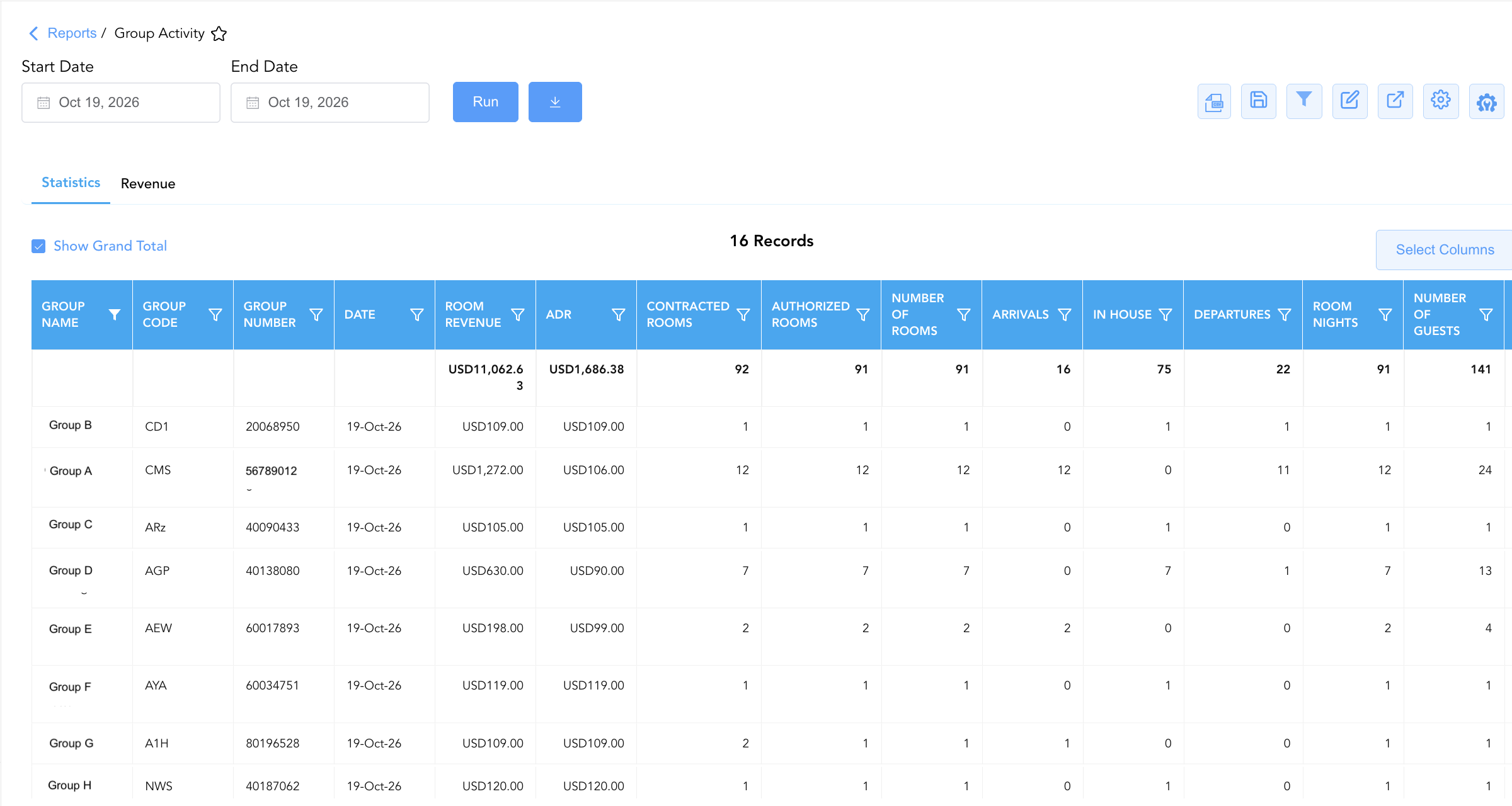
1. Statistics Section (Operational Pick-Up)
Monitors physical room night pick-up, guest movements, cancellation counters, market segment codes, and contracted block limits for active group blocks on each calendar date.
-
Primary Use: Tracking group block room pick-up velocity, monitoring daily group check-ins/check-outs, and auditing block attrition.
-
Key Metrics: Date, Group Number, Group Name, Group Code, Arrivals, In House, Departures, Number Of Rooms, No Show, Cancelled, Number of Guests, Room Nights, Rate Code, Market Code, Local Market Code.
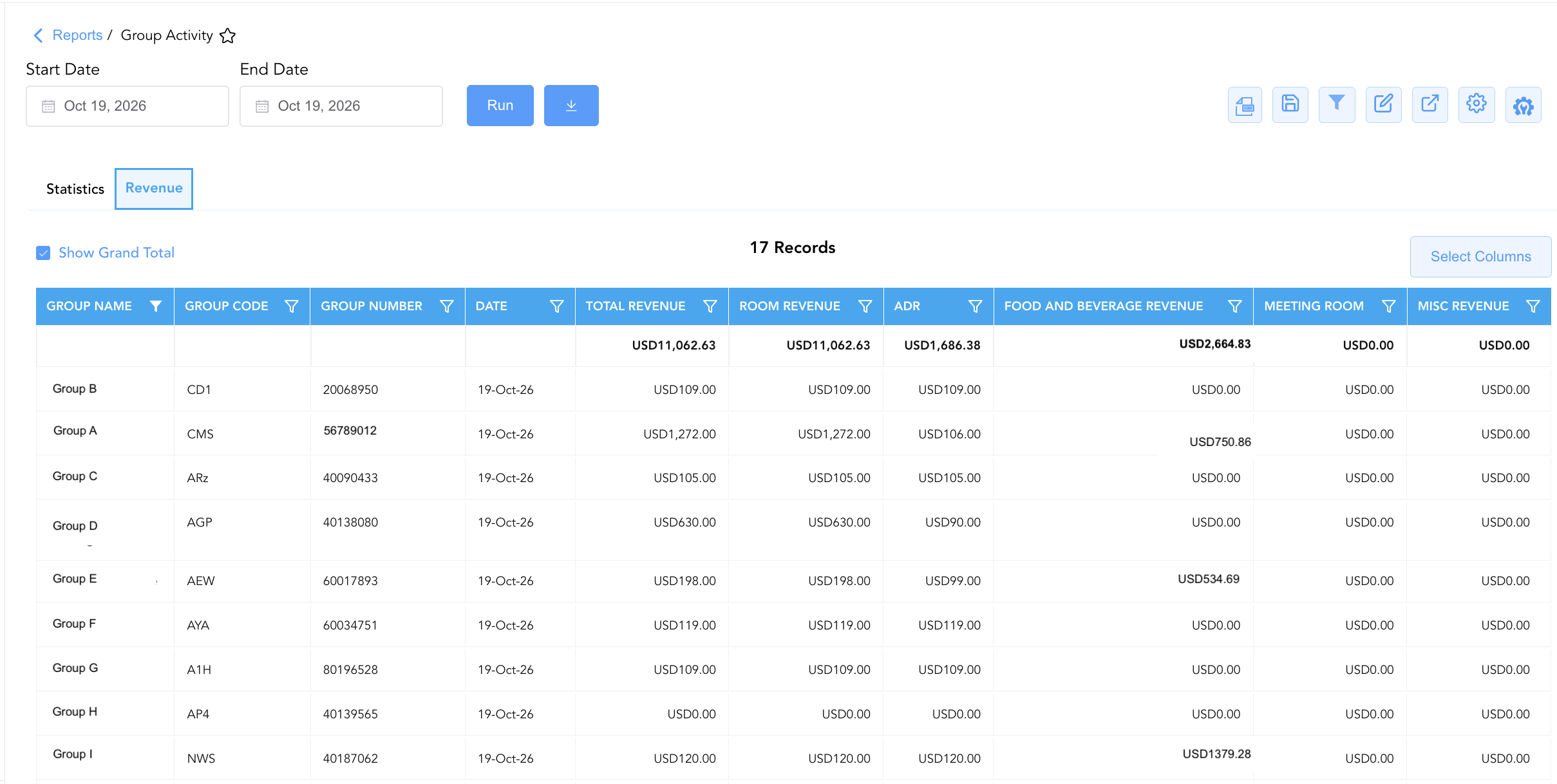
2. Revenue Section (Financial Yields)
Tracks net lodging revenue, Average Daily Rate, banquet/catering revenue, meeting room rentals, and total gross financial yield generated by group blocks on each calendar date.
-
Primary Use: Evaluating group financial contributions, auditing catering and function space revenue, and measuring overall group ADR.
-
Key Metrics: Date, Group Number, Group Name, Group Code, Room Revenue, ADR, Food And Beverage Revenue, Misc Revenue, Meeting Room, Total Revenue.
Data Dictionary (Dynamic View Columns)
Customize your default view using the Configure (⚙️) icon on the report page. Below is the full data dictionary representing all 26 unique columns available across the 2 report sections, sorted in alphabetical order by column name:
💰 Financial Posting Logic: Figures in
Room Revenue,Food And Beverage Revenue,Misc Revenue,Meeting Room, andTotal Revenuereflect net charges posted to group master folios or individual group attendee folios.ADRis dynamically calculated as Room Revenue ÷ Room Nights.
|
Column Name |
Section Applicability |
Description |
Data Source / System Mapping |
Includes Taxes & Fees? |
|
ADR |
Both Sections |
Calculated Average Daily Rate for the group block on the specified date (Room Revenue ÷ Room Nights). |
Calculated: Net Group Yield |
❌ No |
|
Arrivals |
Section 1 |
Numerical count of group block guest check-ins occurring on the specified date. |
Group Res Engine > Arrivals |
N/A |
|
Authorized Rooms |
Section 1 |
Maximum upper threshold of guest rooms authorized for pick-up under the group block agreement. |
Group Block Master > Authorized Cutoff |
N/A |
|
Billing Type |
Section 1 |
Method of folio payment and billing settlement configured for the group block (e.g., Master Account, Individual Pays Own, Direct Bill). |
Group Block Master > Settlement Type |
N/A |
|
Cancelled |
Section 1 |
Numerical count of group block reservations cancelled for the specified date. |
Group Res Engine > Cancellations |
N/A |
|
Company Name |
Section 1 |
Name of the corporate company profile associated with the group block (if applicable). |
Account Master > Profile Name |
N/A |
|
Contracted Rooms |
Section 1 |
Agreed count of guest rooms formally contracted for the group block per night. |
Group Block Master > Contracted Commitment |
N/A |
|
Date |
Both Sections |
Calendar date within the group block stay window. |
PMS Calendar > Stay Date |
N/A |
|
Departures |
Section 1 |
Numerical count of group block guest check-outs occurring on the specified date. |
Group Res Engine > Departures |
N/A |
|
Food And Beverage Revenue |
Section 2 |
Total net revenue generated from group banquets, catering, and food/beverage services. |
Sales Ledger > Catering Revenue |
❌ No |
|
Group Code |
Both Sections |
Alphanumeric short block code assigned to identify the group in the PMS/CRS (e.g., |
Group Block Master > Block Code |
N/A |
|
Group Name |
Both Sections |
Official descriptive name of the group or event block (e.g., |
Group Block Master > Block Name |
N/A |
|
Group Number |
Both Sections |
Primary unique master identification number assigned to the group block in the PMS (e.g., |
Group Block Master > Group ID |
N/A |
|
In House |
Section 1 |
Numerical count of active in-house guest rooms occupied under the group block on the target date. |
Group Res Engine > Active Stays |
N/A |
|
Local Market Code |
Section 1 |
Property-defined local market sub-segment classification code attached to the group block (e.g., |
PMS Setup > Local Segment Code |
N/A |
|
Market Code |
Section 1 |
Primary brand or property market segment classification code attached to the group block (e.g., |
PMS Setup > Market Segment Code |
N/A |
|
Meeting Room |
Section 2 |
Total net rental revenue generated from group meeting spaces and event function rooms. |
Sales Ledger > Function Space Revenue |
❌ No |
|
Misc Revenue |
Section 2 |
Total net ancillary revenue posted to the group master or group attendee folios. |
Sales Ledger > Incidental Revenue |
❌ No |
|
No Show |
Section 1 |
Numerical count of unfulfilled no-show reservations under the group block for the target date. |
Group Res Engine > No-Shows |
N/A |
|
Number of Guests |
Section 1 |
Total registered guest headcount occupying rooms under the group block. |
Group Res Engine > Guest Headcount |
N/A |
|
Number Of Rooms |
Section 1 |
Total count of physical rooms occupied or picked up by the group on the specified date. |
Group Block Engine > Occupied Rooms |
N/A |
|
Rate Code |
Section 1 |
Alphanumeric rate plan code linked to the group block agreement (e.g., |
Group Block Master > Rate Plan |
N/A |
|
Room Nights |
Section 1 |
Total cumulative physical room nights picked up or occupied by the group on the target date. |
Group Block Engine > Picked Up Nights |
N/A |
|
Room Revenue |
Both Sections |
Total net lodging revenue generated by the group block on the specified date. |
Sales Ledger > Net Group Lodging |
❌ No |
|
Total Revenue |
Section 2 |
Total cumulative financial yield generated across all group revenue categories (Room Revenue + Food And Beverage Revenue + Misc Revenue + Meeting Room). |
Calculated: Net Group Total |
❌ No |
|
Travel Agent |
Section 1 |
Name of the travel agency or intermediary profile linked to the group booking (if applicable). |
Travel Agency Profile > Company Name |
N/A |
Customization & Platform Features
User & Property Preferences
-
Personal Preference: Tailor your individual view by hiding or dragging columns. Your preferences save automatically for future sessions.
-
Property Defaults: System Admins can configure standard default layouts across all property users to streamline operational reporting. To maximize audit efficiency, group the columns into the below logical blocks:
-
Section 1: Statistics
-
Group Identity & Primary Revenue (Cols 1–6):
Group Name|Group Code|Group Number|Date|Room Revenue|ADR -
Contract Commitment & Pick-up (Cols 7–9):
Contracted Rooms|Authorized Rooms|Number Of Rooms -
Guest Movement & Occupancy Status (Cols 10–15):
Arrivals|In House|Departures|Room Nights|Number of Guests|Billing Type -
Exception Counts (Cols 16–17):
Cancelled|No Show -
Segment & Rate Codes (Cols 18–20):
Rate Code|Market Code|Local Market Code -
Associated Account Metadata (Cols 21–22):
Company Name|Travel Agent
-
-
Section 2: Revenue
-
Group Identity & Combined Revenue (Cols 1–5):
Group Name|Group Code|Group Number|Date|Total Revenue -
Room Revenue & Rate Performance (Cols 6–7):
Room Revenue|ADR -
Ancillary Revenue Breakdown (Cols 8–10):
Food And Beverage Revenue|Meeting Room|Misc Revenue
-
-
Report Toolbar & Quick Actions
Use the top-right toolbar icons on the report page to manage and export your data view:
|
Icon |
Action / Feature |
Description |

|
Knowledge Article |
Opens the knowledge base article to learn how to interpret this report. |

|
Background Export |
Allows users to download up to 365 days of data directly to their computer in CSV format. |

|
Saved Views |
Saves your column filtering, sorting, and highlight preferences so you can easily reload your custom view later without reconfiguring the report. |

|
Filter |
Opens filter controls to isolate specific data within a column based on your selected criteria. |

|
Highlight |
Highlights column values in a designated color based on selected conditions. |

|
Export |
Exports and downloads the report in various formats (Excel, PDF, CSV) for offline analysis or printing. |

|
Configure |
Opens column selection controls to toggle visibility, reorder columns, or hide rows with all zeros. |

|
Additional Configuration |
Provides advanced report configuration and display formatting options to customize data presentation. |
Advanced Controls
-
Group Attrition & Wash Audits: Compare picked-up room nights (
Room Nights) against contracted commitments (Contracted Rooms) to identify groups failing to meet minimum pick-up thresholds. -
Filtering: Filter Section 1 or Section 2 by specific
Group Codevalues to track daily activity for a specific convention or tour group. -
Highlighting (Conditional Formatting): Apply custom rules to automatically highlight high-volume group blocks (
Room Nights > 20), groups with high cancellation counts (Cancelled > 5), or top-revenue group stays.
🔗 Related Reports & Next Steps
Within 🤝 Sales, Groups & Events Reports & 👥 Group Block:
-
Group Rooming List – Detailed attendee reservation list associated with active group blocks.
-
Group Ledger Report – Financial transaction ledger tracking master account charges, payments, and outstanding balances.
-
Group Reservation Details – Audit group block wash, review net versus gross revenue yield, evaluate shoulder dates, and verify master billing setup.
Cross-Pillar Deep Dives:
-
🛎️ Front Desk & Guest Services: Reconcile group arrivals (
Arrivals) with Today's Guests and Arrivals List to ensure smooth group check-in processing. -
📊 Financial & Food & Beverage Management: Cross-reference catering revenue (
Food And Beverage Revenue) and meeting room rentals (Meeting Room) with monthly financial trial balances and revenue summary.