
Revision Date:
Report Description: The Accounting Setup Details report provides visibility on charge type and payment type details (e.g., code, category, tax info, GL/project codes) for the selected property.
Date Range: single date up to 365 days in the past
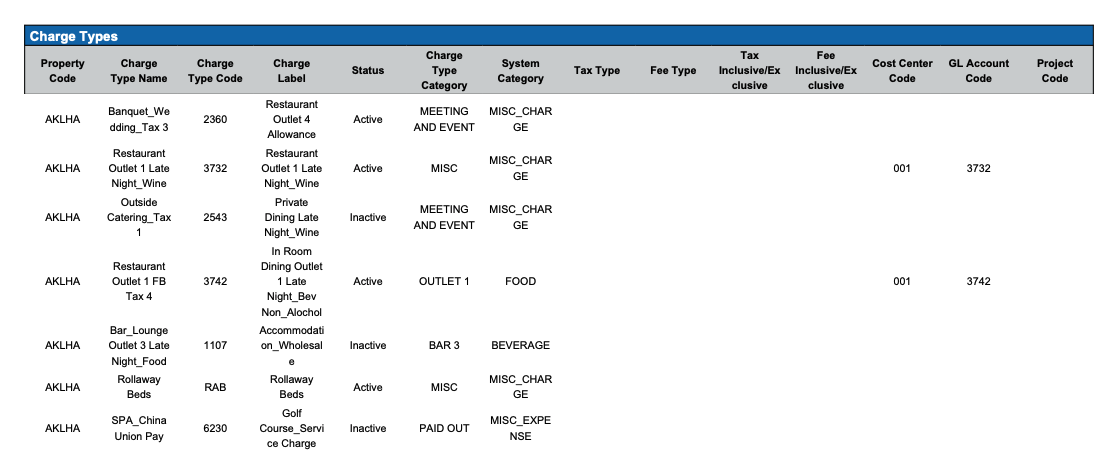
Charge Types Section : Shows charge type details such as, code, category, tax info, GL/project codes for the property.
Available Report Columns for above Sections:
|
Column Name |
Column Description |
Amount Includes Taxes and Fees |
Calculation |
|
Property Code |
Unique identifier for the property |
Not Applicable |
Not Applicable |
|
Charge Type Name |
The different types of financial transactions or charges that occurred during the date range |
Not Applicable |
Not Applicable |
|
Charge Type Code |
The unique identifier associated with the charge type name |
Not Applicable |
Not Applicable |
|
Charge Label |
Name of charge as it appears on reservation folio |
Not Applicable |
Not Applicable |
|
Status |
Active or Not Active |
Not Applicable |
Not Applicable |
|
Charge Type Category |
The classifications under which various charges are grouped. (Example Categories include: Room Rent, MISC, Room Service, Transportation, etc.) |
Not Applicable |
Not Applicable |
|
System Category |
Misc, Revenue, Non Revenue, etc. |
Not Applicable |
Not Applicable |
|
Tax Type |
E.g., VAT, GST, City Tax, State Tax et. |
Not Applicable |
Not Applicable |
|
Fee Type |
Food & Beverage, Misc, Lodging, etc |
Not Applicable |
Not Applicable |
|
Tax Inclusive/Exclusive |
Tax is Inclusive or Exclusive. |
Not Applicable |
Not Applicable |
|
Fee Inclusive/Exclusive |
Fee is Inclusive or Exclusive. |
Not Applicabl |
Not Applicable |
|
Cost Center Code |
Code for the associated cost center |
Not Applicable |
Not Applicable |
|
GL Account Code |
General Ledger Account number |
Not Applicable |
Not Applicable |
|
Project Code |
Not Applicable |
Not Applicable |
Not Applicable |
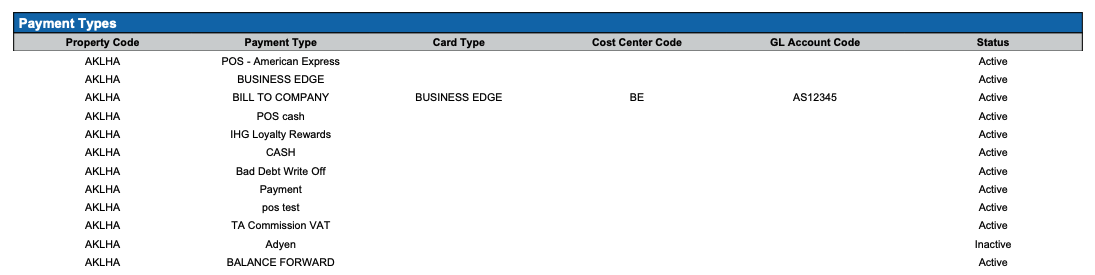
Payment Types Section
Shows integrated payment type mappings with relevant financial codes
Available Report Columns for above Sections:
|
Column Name |
Column Description |
Amount Includes Taxes and Fees |
Calculation |
|
Property Code |
Unique identifier for the property |
Not Applicable |
Not Applicable |
|
Payment Type |
Type of payment made |
Not Applicable |
Not Applicable |
|
Card Type |
Payment processing network of the card. Common types to select from include Visa, Mastercard, American Express, or Discover |
Not Applicable |
Not Applicable |
|
Cost Center Code |
Code for the associated cost center |
Not Applicable |
Not Applicable |
|
GL Account Code |
General Ledger Account number |
Not Applicable |
Not Applicable |
|
Status |
Categorizes Payment Type if Active or Not Active |
Not Applicable |
Not Applicable |
Misc Report Information:
Available Features:
-
Export: ability to download and save the file into an alternate format.
-
Filter: filter a range of data based on criteria defined by the user.
-
Highlight: also known as conditional formatting is the ability to highlight certain values making them easier to identify.
Available Configuration:
-
User Preferences: allows the user to customize their report view by repositioning or removing columns.
-
Property Preferences: allows the property to customize the report view for all users by repositioning or removing columns.
Baseline Configuration:
-
Property Preferences Settings:
-
Following columns to be disabled for initial deployment:
-
Not Applicable
-
-