
Night Audit Logs Report Overview
Parent Hub: ⚙️ System & Administration Reports
Category: 🖥️ System Log Reports
Target Roles: Night Auditors, Front Office Managers, Hotel Controllers, IT Systems Directors, Operations Supervisors, General Managers
Key Value: Complete forensic execution oversight of the daily night audit rollover, auditing automated batch routines, tracking itemized reservation cancellations and no-show processing, verifying payment gateway batch closures, inspecting room and charge postings, and diagnosing step-level system error messages.
Executive Summary
The Night Audit Logs Report is an essential technical governance, operational rollover verification, and batch process diagnostic document within the 🖥️ System Log Reports category of the ⚙️ System & Administration Reports hub. Designed to ensure that property business days close accurately and securely, it maintains an itemized execution log of every automated phase and sub-routine performed during the end-of-day rollover sequence.
-
Centered on automated night audit execution governance, this report pairs overarching process milestones (
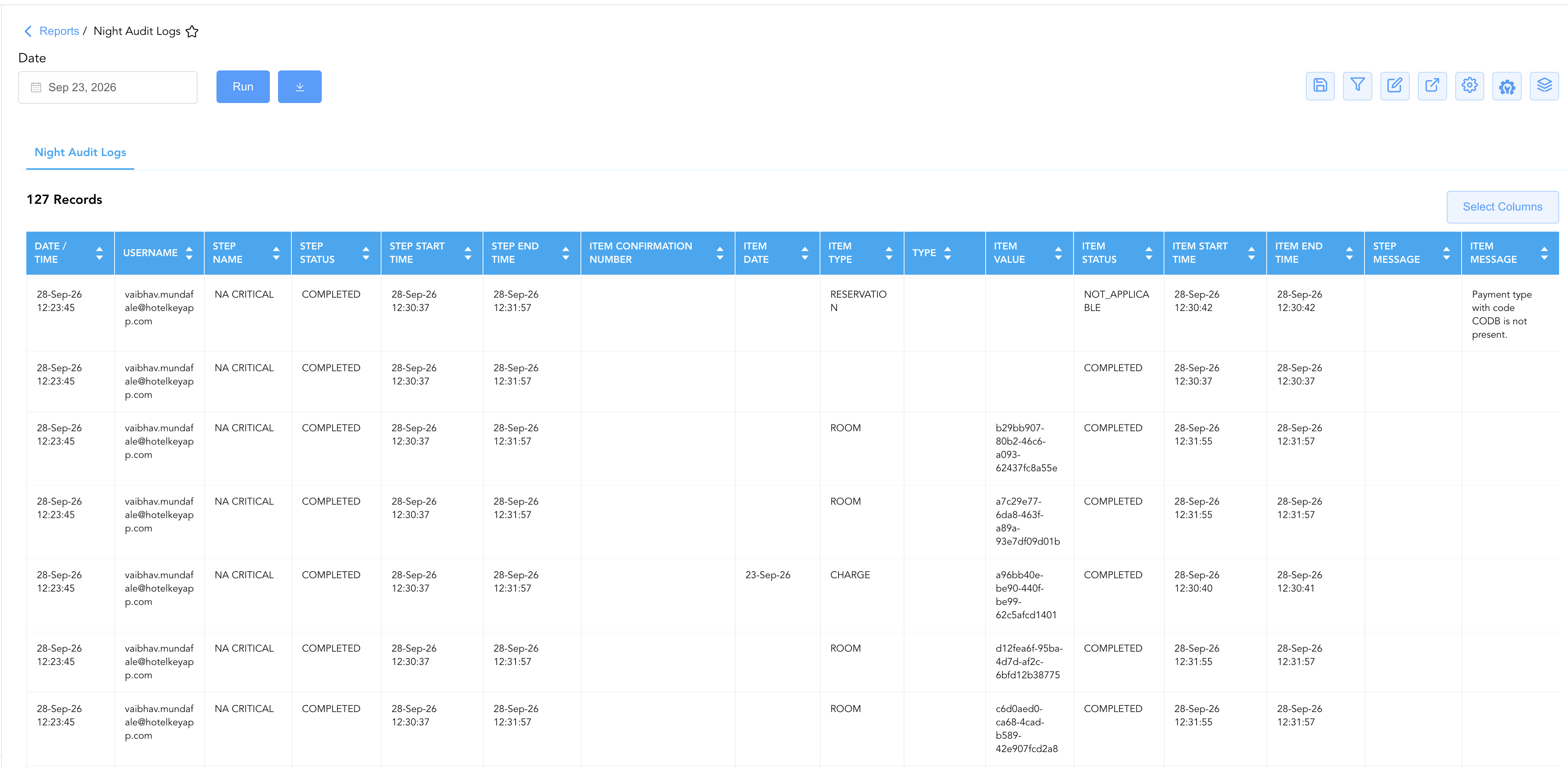
Step Name,Date / Time,Username,Step Start Time,Step End Time,Step Status,Step Message) directly with granular entity processing lines (Item Type,Item Value,Item Start Time,Item End Time,Item Status,Item Message,Item Confirmation Number,Item Date,Type). By capturing batch routines across auto-cancellations (AUTO CANCELLATION), auto-no-shows (AUTO NO SHOW), payment gateway batch closings (BATCH CLOSE), payment captures (CAPTURE PAYMENTS), critical ledger rollovers (NA CRITICAL), and post-audit room charge posting (POST NIGHT AUDIT), this report equips management and IT engineers to audit user accountability, verify financial balance cutoffs, diagnose processing bottlenecks, and resolve failed audit steps.
Key Capabilities
-
End-to-End Rollover Sequence Auditing: Details execution progression across all core automated audit stages, including cancellation of unconfirmed reservations, no-show status transitions, group block cutoffs, credit card pre-authorizations, and room charge postings.
-
Two-Tier Step and Item Traceability: Tracks macro-level phase metrics (
Step Name,Step Status,Step Message) alongside micro-level record outcomes (Item Type,Item Value,Item Status,Item Confirmation Number) to pinpoint the exact reservation, room, or payment record that encountered processing exceptions. -
Execution Timing & Latency Profiling: Measures overall batch durations (
Step Start TimetoStep End Time) and sub-second item processing speeds (Item Start TimetoItem End Time) to assess database performance and identify system lag. -
Payment Gateway Batch Settlement Audit: Captures gateway-level transaction summaries, settlement totals, and electronic transaction counts (
Step MessageunderBATCH CLOSE) to verify credit card terminal balancing. -
User Accountability & Diagnostic Feedback: Records the exact operator credentials (
Username) initiating the rollover alongside system warning messages (Item Message, e.g., missing tender setups or auto-guarantee bypasses).
Report Views & Functional Breakdown
The Night Audit Logs Report presents rollover audit trails in a unified single-table master matrix supporting three primary operational perspectives:
┌────────────────────────────────────────────────────────────────────────┐
│                        NIGHT AUDIT LOGS REPORT                         │
├────────────────────────────────────────────────────────────────────────┤
│                         Unified Matrix View                            │
├──────────────────────────┬──────────────────────────┬──────────────────┤
│ 1. Rollover Header &     │ 2. Batch Routine & Phase │ 3. Entity Detail │
│    Audit Credentials     │    Lifecycle Status      │    & Diagnostics │
└──────────────────────────┴──────────────────────────┴──────────────────┘
1. Rollover Header & Audit Credentials
Monitors overall rollover initiation timestamps, operational dates, and the logged-in auditor credentials executing the rollover.
-
Primary Use: Verifying the execution timestamp of the business day cutoff and confirming auditor shift ownership.
-
Key Metrics: Date / Time, Username, Item Date.
2. Batch Routine & Phase Lifecycle Status
Tracks the sequential progression of automated audit routines, execution start/end timestamps, step completion states, and gateway batch summaries.
-
Primary Use: Ensuring that all prerequisite audit steps (e.g., credit card validations, batch close, room charges) finished successfully before releasing the system to the morning shift.
-
Key Metrics: Step Name, Step Start Time, Step End Time, Step Status, Step Message.
3. Entity Detail & Diagnostics
Itemizes each individual reservation, room inventory record, or transaction handled within the batch routine, detailing UUID values, confirmation IDs, and error/informational messages.
-
Primary Use: Investigating specific reservations converted to no-show, auditing room charges posted during
NA CRITICAL, and diagnosing payment gateway capture warnings. -
Key Metrics: Item Type, Item Value, Item Start Time, Item End Time, Item Status, Item Message, Item Confirmation Number, Type.
Data Dictionary (Dynamic View Columns)
Customize your default view using the Configure (⚙️) icon on the report page. Below is the full data dictionary representing all 16 exact dynamic columns available in this report, sorted in alphabetical order by column name:
ℹ️ Audit Engine Execution Logic: The
Step Statusreflects the operational state of the parent batch routine, whereasItem Statusindicates the result of an individual record. Status values ofCOMPLETEDindicate successful execution, whileNOT_APPLICABLEindicates that a routine was bypassed due to property settings (e.g., auto-guarantee disabled) or absence of eligible records.
|
Column Name |
Description |
Data Source / System Mapping |
Includes Taxes & Fees? |
|---|---|---|---|
|
Date / Time |
Calendar date and execution timestamp when the overall night audit sequence was initiated. |
Night Audit Controller > Initiation Timestamp |
N/A |
|
Item Confirmation Number |
Primary PMS confirmation number of the specific reservation record processed during the audit step. |
Reservation Engine > Confirmation Number |
N/A |
|
Item Date |
Operational business date associated with the entity or transaction being processed by the audit item. |
Night Audit Ledger > Item Processing Date |
N/A |
|
Item End Time |
Exact date and timestamp marking the completion of processing for the specific item. |
Audit Step Sub-routine > Item Complete Time |
N/A |
|
Item Message |
System diagnostic message, exception detail, or informational note logged for the specific entity (e.g., configuration bypass notices or missing payment type alerts). |
Audit Step Sub-routine > Item Diagnostic Log |
N/A |
|
Item Start Time |
Exact date and timestamp marking the commencement of processing for the specific item. |
Audit Step Sub-routine > Item Begin Time |
N/A |
|
Item Status |
Processing outcome of the individual entity within the step (e.g., |
Audit Step Sub-routine > Item Status State |
N/A |
|
Item Type |
Entity category of the individual object being processed (e.g., |
Night Audit Controller > Target Entity Type |
N/A |
|
Item Value |
Internal system unique identifier (UUID) assigned to the specific entity record processed. |
Database Master > Entity Primary UUID |
N/A |
|
Step End Time |
Date and timestamp recording the completion of the entire night audit batch step. |
Night Audit Controller > Step Finish Time |
N/A |
|
Step Message |
Aggregated execution summary, gateway transaction counts, settlement totals, or diagnostic feedback returned for the audit step. |
Payment Gateway / Audit Engine Response |
N/A |
|
Step Name |
Standardized operational phase or functional routine executed during the night audit rollover (e.g., |
Night Audit Controller > Step Routine Name |
N/A |
|
Step Start Time |
Date and timestamp recording the commencement of the entire night audit batch step. |
Night Audit Controller > Step Start Time |
N/A |
|
Step Status |
Overall execution status of the audit routine (e.g., |
Night Audit Controller > Step Lifecycle State |
N/A |
|
Type |
Secondary classification or sub-category code applicable to the audit step or item configuration. |
Audit Ledger > Secondary Classification |
N/A |
|
Username |
System login ID or email address of the night auditor or automated system administrator executing the rollover. |
User Security Master > Operator Username |
N/A |
Customization & Platform Features
User & Property Preferences
-
Personal Preference: Tailor your individual view by hiding or dragging columns. Your preferences save automatically for future sessions.
-
Property Defaults: System Admins can configure standard default layouts across all property users to streamline operational reporting. To maximize audit efficiency, group the columns into the below logical blocks:
-
Audit Execution Anchor & Operator Accountability (Cols 1–2):
Date / Time|Username -
Macro Audit Step Pipeline & Status (Cols 3–6):
Step Name|Step Status|Step Start Time|Step End Time -
Affected Entity & Record Identifiers (Cols 7–11):
Item Confirmation Number|Item Date|Item Type|Type|Item Value -
Micro Item Processing Lifecycle (Cols 12–14):
Item Status|Item Start Time|Item End Time -
System Diagnostics & Audit Messages (Cols 15–16):
Step Message|Item Message
-
Report Toolbar & Quick Actions
Use the top-right toolbar icons on the report page to manage and export your data view:
|
Icon |
Action / Feature |
Description |

|
Knowledge Article |
Opens the knowledge base article to learn how to interpret this report. |

|
Saved Views |
Saves your column filtering, sorting, and highlight preferences so you can easily reload your custom view later without reconfiguring the report. |

|
Filter |
Opens filter controls to isolate specific data within a column based on your selected criteria. |

|
Highlight |
Highlights column values in a designated color based on selected conditions. |

|
Export |
Exports and downloads the report in various formats (Excel, PDF, CSV) for offline analysis or printing. |

|
Configure |
Opens column selection controls to toggle visibility, reorder columns, or hide rows with all zeros. |

|
Additional Configuration |
Provides advanced report configuration and display formatting options to customize data presentation. |

|
Group By |
Summarize and group report data dynamically in real time. |
Interactive Visualizations & Grouping Controls
-
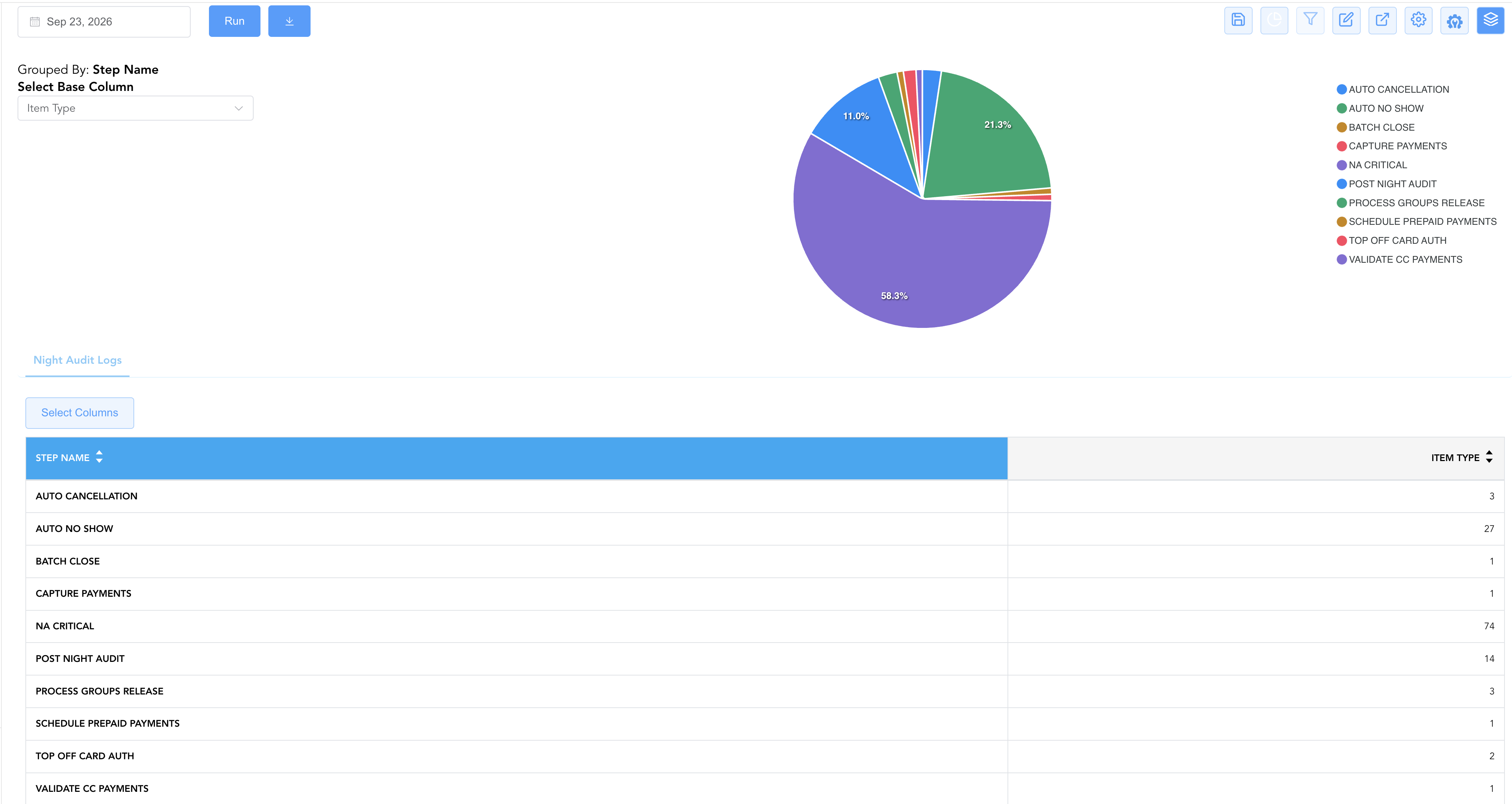
Group By & Pie Chart Visualization: The Night Audit Logs report features an interactive pie chart to help analyze routine system processing volumes and night audit operational phase shares. Users can group audit log records on the fly by Step Name to collapse individual entity line items and evaluate overall phase completion times. By selecting Item Type from the Select Base Column dropdown menu, the chart dynamically renders percentage share breakdowns accompanied by an interactive color-coded legend.
Advanced Controls
-
No-Show & Auto-Cancellation Audit: Filter by
Step Name = AUTO NO SHOWto obtain a list of all guest bookings (Item Confirmation Number) marked as no-show by the system, ensuring appropriate billing or cancellation policies are applied. -
Diagnostic Message Investigation: Filter by non-blank
Item MessageorStep Messageto inspect gateway transaction responses, missing tender code alerts, or disabled configuration triggers. -
Highlighting (Conditional Formatting): Apply custom rules to automatically highlight non-completed phases (
Step Status != COMPLETED), prolonged step runtimes (duration > 60 seconds), or skipped items (Item Status = NOT_APPLICABLE).
🔗 Related Reports & Next Steps
Within ⚙️ System & Administration Reports & 🖥️ System Log Reports:
-
Accounting Setup Details – Two-section configuration master auditing charge types and payment tender methods.
-
Currency Configuration – Foreign exchange setup report tracking configuration and cashier exchange rates.
-
Operator Security – Comprehensive security log tracking user logins, system permissions, role templates, and account statuses.
Cross-Pillar Deep Dives:
-
💳 Financial & Night Audit: Cross-reference
BATCH CLOSEstep totals with All Payments Report and Day End Summary to ensure credit card processor settlement balances match front office ledger totals. -
🛎️ Front Desk Operations: Reconcile
AUTO NO SHOWconfirmation numbers (Item Confirmation Number) against No Show & Late Cancel and Arrivals List to ensure reservation statuses reflect true guest arrival states.