
Operator Security Report Overview
Parent Hub: ⚙️ System & Administration Reports
Category: 👤 User Activity Reports
Target Roles: System Administrators, Hotel Controllers, IT Directors, Front Office Managers, Compliance Officers, General Managers
Key Value: Audit system user permissions, verify primary and secondary security role assignments, monitor user creation and modification histories, track system access activity, identify inactive or dormant user profiles, and enforce least-privilege security policies across hotel staff and third-party interfaces.
Executive Summary
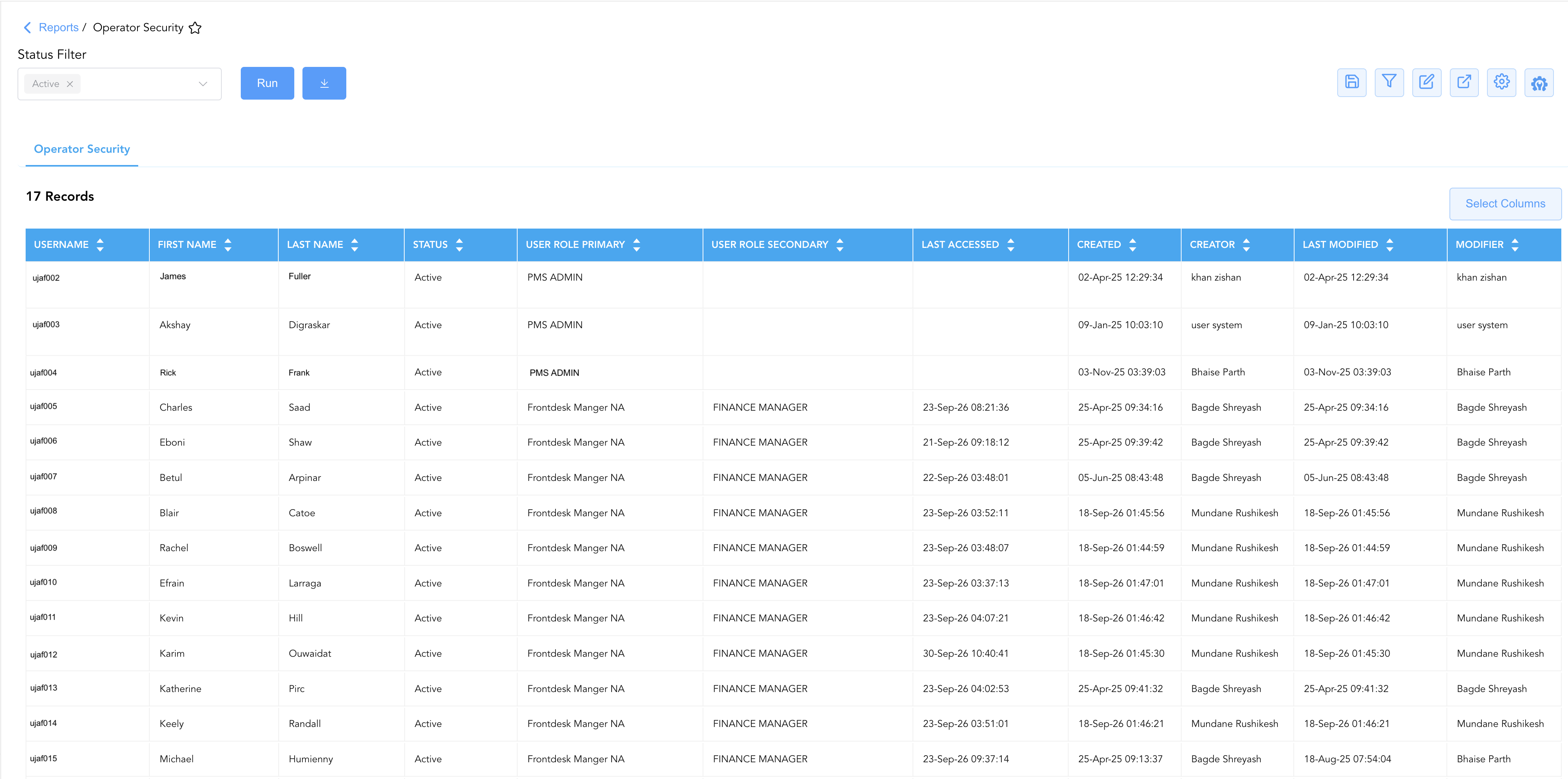
The Operator Security Report is an essential administrative governance, access control audit, and security compliance document within the 👤 User Activity Reports category of the ⚙️ System & Administration Reports hub. Designed to provide management and IT security teams with complete oversight of system access privileges, it itemizes operator credentials, assigned primary and secondary security roles, profile creation and modification audit trails, last login timestamps, and account active statuses across all registered property users.
-
By correlating user account identifiers (
Username,First Name,Last Name) with role-based access control structures (User Role Primary,User Role Secondary), administrative governance metadata (Created,Creator,Last Modified,Modifier), and system interaction milestones (Last Accessed,Status), this report enables property leadership to enforce security compliance, audit administrative delegation, identify dormant user accounts, and prevent unauthorized privilege escalation.
Key Capabilities
-
Role-Based Access Control (RBAC) Governance: Details primary security permissions (
User Role Primary, e.g.,PMS ADMIN,Frontdesk Manger NA,HAPI FNB INTEGRATION) alongside dual-role cross-departmental assignments (User Role Secondary, e.g.,FINANCE MANAGER). -
Administrative Provisioning Audit Trail: Tracks exact profile creation timestamps (
Created) and creating administrators (Creator) alongside modification timestamps (Last Modified) and updating users (Modifier). -
Account Activity & Dormancy Monitoring: Records the most recent login or system access date and time (
Last Accessed) to detect abandoned credentials and enforce automated deprovisioning policies. -
System & Third-Party Integration Audit: Identifies integration service principals, SCIM automated user provisioning pipelines, and API partner connections alongside property staff users.
-
Account Lifecycle Verification: Displays active authorization states (
Status = Active) to ensure disabled, separated, or suspended operators cannot access property data.
Report Views & Functional Breakdown
The Operator Security Report presents operator security and access control parameters in a unified single-table master matrix supporting three primary operational perspectives:
┌────────────────────────────────────────────────────────────────────────┐
│                      OPERATOR SECURITY REPORT                          │
├────────────────────────────────────────────────────────────────────────┤
│                         Unified Matrix View                            │
├──────────────────────────┬──────────────────────────┬──────────────────┤
│ 1. User Identity &       │ 2. Role Assignments &    │ 3. Governance &  │
│    Account Profile       │    Access Privileges     │    Audit History │
└──────────────────────────┴──────────────────────────┴──────────────────┘
1. User Identity & Account Profile
Monitors the unique system username, first name, last name, and account operational status for every registered operator.
-
Primary Use: Reviewing registered staff accounts, verifying user identities, and confirming active authorization states.
-
Key Metrics: Username, First Name, Last Name, Status.
2. Role Assignments & Access Privileges
Tracks assigned primary security roles and optional secondary cross-departmental roles.
-
Primary Use: Verifying that staff members possess appropriate job-related security permissions and preventing unauthorized dual-role assignments.
-
Key Metrics: User Role Primary, User Role Secondary.
3. Governance & Audit History
Audits user provisioning timestamps, administrative creators, profile update timestamps, modifying administrators, and last login dates.
-
Primary Use: Enforcing administrative accountability, auditing account creation policies, and identifying dormant credentials.
-
Key Metrics: Created, Creator, Last Modified, Modifier, Last Accessed.
Data Dictionary (Dynamic View Columns)
Customize your default view using the Configure (⚙️) icon on the report page. Below is the full data dictionary representing all 11 exact dynamic columns available in this report, sorted in alphabetical order by column name:
|
Column Name |
Description |
Data Source / System Mapping |
Includes Taxes & Fees? |
|
Created |
Calendar date and timestamp when the user profile or operator account was originally created in the system. |
User Security Master > Creation Timestamp |
N/A |
|
Creator |
Full name or system username of the administrator who created the operator user profile. |
User Security Master > Created By User |
N/A |
|
First Name |
First name of the staff member, system account, or integration service principal. |
User Profile > First Name |
N/A |
|
Last Accessed |
Most recent date and timestamp recording when the operator account logged in or accessed the property management system. |
Security Audit Log > Last Login Timestamp |
N/A |
|
Last Modified |
Date and timestamp indicating when the operator profile, permissions, or role assignments were most recently updated. |
User Security Master > Update Timestamp |
N/A |
|
Last Name |
Last name (surname) of the staff member, system account, or integration service principal. |
User Profile > Last Name |
N/A |
|
Modifier |
Full name or system username of the administrator who most recently modified the user profile. |
User Security Master > Modified By User |
N/A |
|
Status |
Operational security state of the user account (e.g., |
User Security Master > Account Status |
N/A |
|
User Role Primary |
Primary security access role or permission template assigned to the user (e.g., |
Role Security Master > Primary Role |
N/A |
|
User Role Secondary |
Secondary or supplementary security role assigned to provide additional cross-departmental permissions (e.g., |
Role Security Master > Secondary Role |
N/A |
|
Username |
Unique system login identifier, directory username, or email address used by the operator to authenticate. |
User Security Master > Username |
N/A |
Customization & Platform Features
User & Property Preferences
-
Personal Preference: Tailor your individual view by hiding or dragging columns. Your preferences save automatically for future sessions.
-
Property Defaults: System Admins can configure standard default layouts across all property users to streamline operational reporting. To maximize audit efficiency, group the columns into the below logical blocks:
-
User Identity & Account Status (Cols 1–4):
Username|First Name|Last Name|Status -
Access Control & Role Permissions (Cols 5–6):
User Role Primary|User Role Secondary -
Real-Time Login Activity (Col 7):
Last Accessed -
Creation Audit Metadata (Cols 8–9):
Created|Creator -
Modification Audit Metadata (Cols 10–11):
Last Modified|Modifier
-
Report Toolbar & Quick Actions
Use the top-right toolbar icons on the report page to manage and export your data view:
|
Icon |
Action / Feature |
Description |

|
Knowledge Article |
Opens the knowledge base article to learn how to interpret this report. |

|
Saved Views |
Saves your column filtering, sorting, and highlight preferences so you can easily reload your custom view later without reconfiguring the report. |

|
Filter |
Opens filter controls to isolate specific data within a column based on your selected criteria. |

|
Highlight |
Highlights column values in a designated color based on selected conditions. |

|
Export |
Exports and downloads the report in various formats (Excel, PDF, CSV) for offline analysis or printing. |

|
Configure |
Opens column selection controls to toggle visibility, reorder columns, or hide rows with all zeros. |

|
Additional Configuration |
Provides advanced report configuration and display formatting options to customize data presentation. |
Advanced Controls
-
Dormant Account Auditing: Filter by
Last Accessedto identify operators who have not logged in within the past 30, 60, or 90 days, enabling timely deactivation of separated personnel. -
Dual-Role & Segregation of Duties (SoD) Checks: Filter for accounts holding both front desk management and finance roles (
User Role Secondary = FINANCE MANAGER) to audit segregation of duties compliance. -
Highlighting (Conditional Formatting): Apply custom rules to automatically highlight administrative superuser accounts (
User Role Primary = PMS ADMIN), active accounts with no recorded login activity, or recent security role modifications.
🔗 Related Reports & Next Steps
Within ⚙️ System & Administration Reports & 👤 User Activity Reports:
-
Clerk Activity – Two-section cashiering audit tracking line-item payments and shift tender summaries by clerk.
-
Clerk Shift – Seven-section cashiering audit tracking drawer balances, cash drops, paid-outs, and shift intervals.
-
Daily Activity – Forensic audit trail tracking room moves, stay adjustments, departure date changes, and cancellations.
-
Guest Service Agent Productivit – Two-section front desk operational efficiency report tracking hourly check-in and checkout curves.
-
User Activity – Comprehensive security log tracking user logins, system navigation, and configuration updates.
Cross-Pillar Deep Dives:
-
🔒 Information Security & Compliance: Cross-reference operator security profiles with corporate Active Directory / Single Sign-On (SSO) directories and periodic SOC 2 / PCI-DSS user access review matrices.
-
🛎️ Front Desk Operations: Align active operator profiles with physical front desk shift rosters to ensure only currently scheduled personnel maintain active PMS cashiering and check-in privileges.