
Report Description: This report provides visibility into when and by whom masked credit card details were revealed within the system. It supports security, compliance, and audit requirements by tracking user access to sensitive payment information across reservations, house accounts, and group masters.
Date Range: Current day and up to 365 days in the past
Available Report Columns for Following Sections:
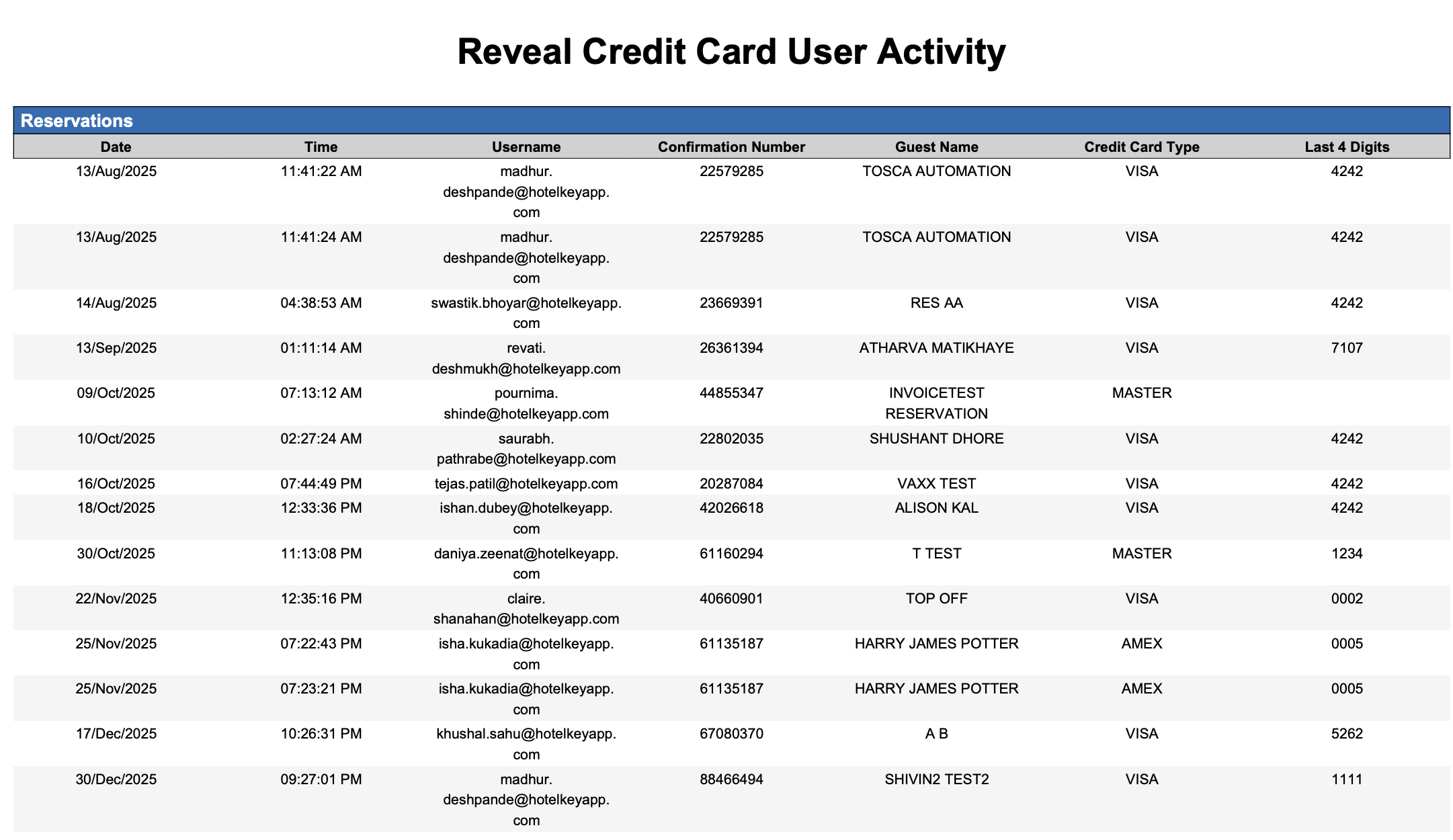
Reservations Section:
This section captures credit card reveal activity performed on individual guest reservations. It helps monitor which users accessed card details for specific bookings, ensuring accountability and traceability at the reservation level.
|
Column Name |
Column Description |
Amount Includes Taxes and Fees |
Calculation |
|
Date |
The calendar date on which the credit card details were revealed. |
Not Applicable |
Not Applicable |
|
Time |
The exact time when the reveal action occurred. |
Not Applicable |
Not Applicable |
|
Username |
The system user who revealed the credit card details. |
Not Applicable |
Not Applicable |
|
Confirmation Number |
The unique reservation identifier linked to the card reveal. |
Not Applicable |
Not Applicable |
|
Guest Name |
The primary guest name associated with the reservation. |
Not Applicable |
Not Applicable |
|
Credit Card Type |
The type of credit card used (e.g., Visa, MasterCard). |
Not Applicable |
Not Applicable |
|
Last 4 Digits |
The last four digits of the revealed credit card number |
Not Applicable |
Not Applicable |
House Accounts Section:
This section records credit card reveal actions related to house accounts. It enables auditing of user access to payment information linked to corporate or internal accounts, ensuring controlled handling of sensitive card data outside individual reservations.
|
Column Name |
Column Description |
Amount Includes Taxes and Fees |
Calculation |
|
Date |
The calendar date on which the credit card details were revealed. |
Not Applicable |
Not Applicable |
|
Time |
The exact time when the reveal action occurred. |
Not Applicable |
Not Applicable |
|
Username |
The system user who revealed the credit card details. |
Not Applicable |
Not Applicable |
|
House Account Code |
The unique reservation identifier linked to the house account. |
Not Applicable |
Not Applicable |
|
House Account Name |
The house account name associated with the reservation. |
Not Applicable |
Not Applicable |
|
Credit Card Type |
The type of credit card used (e.g., Visa, MasterCard). |
Not Applicable |
Not Applicable |
|
Last 4 Digits |
The last four digits of the revealed credit card number |
Not Applicable |
Not Applicable |

Group Master Section:
This section tracks credit card reveal activity associated with Group Master records. It provides oversight on access to payment details used for group billing and settlements, helping ensure compliance and transparency for group-related financial transactions.
|
Column Name |
Column Description |
Amount Includes Taxes and Fees |
Calculation |
|
Date |
The calendar date on which the credit card details were revealed. |
Not Applicable |
Not Applicable |
|
Time |
The exact time when the reveal action occurred. |
Not Applicable |
Not Applicable |
|
User ID |
The system user who revealed the credit card details. |
Not Applicable |
Not Applicable |
|
Group Master Name |
The name of Group Master |
Not Applicable |
Not Applicable |
|
Credit Card Type |
The type of credit card used (e.g., Visa, MasterCard). |
Not Applicable |
Not Applicable |
|
Last 4 Digits |
The last four digits of the revealed credit card number |
Not Applicable |
Not Applicable |
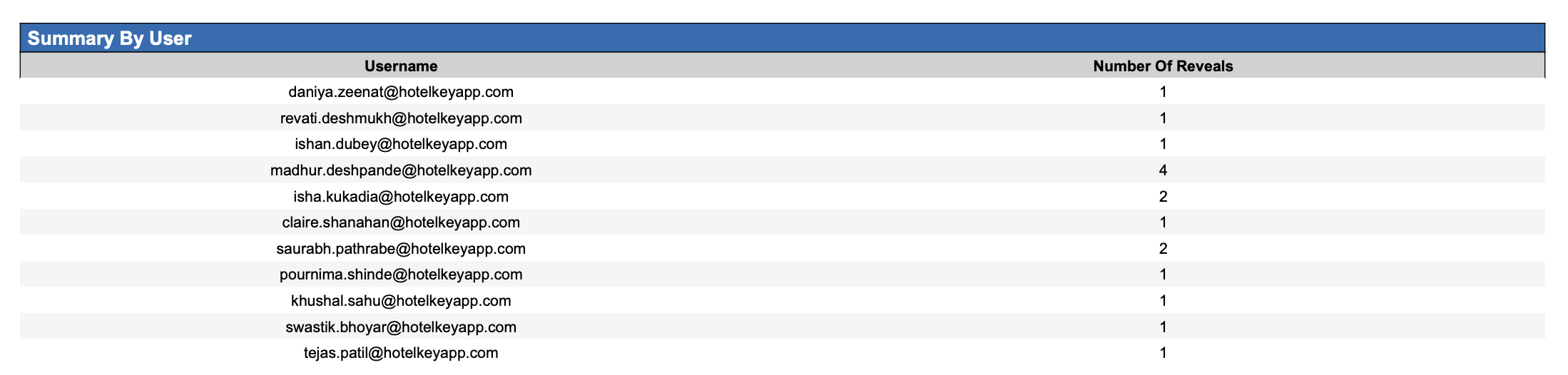
Summary by User Section:
This section provides a consolidated view of credit card reveal activity by user. It helps management quickly assess the volume of sensitive data access per user and identify unusual or excessive reveal behaviour.
|
Column Name |
Column Description |
Amount Includes Taxes and Fees |
Calculation |
|
Username |
The system user who revealed the credit card details. |
Not Applicable |
Not Applicable |
|
Number of Reveals |
The number of times user revealed credit card details |
Not Applicable |
Not Applicable |
Misc Report Information:
Available Features:
-
Export: ability to download and save the file into an alternate format.
-
Filter: filter a range of data based on criteria defined by the user.
-
Highlight: also known as conditional formatting is the ability to highlight certain values making them easier to identify.
Available Configuration:
-
User Preferences: allows the user to customize their report view by repositioning or removing columns.
-
Property Preferences: allows the property to customize the report view for all users by repositioning or removing columns.
Baseline Configuration:
-
Property Preferences Settings:
-
Following columns to be disabled for initial deployment:
-
Not Applicable
-
-