
Clerk Reservation Summary Report Overview
Parent Hub: ⚙️ System & Administration Reports
Category: 👤 User Activity Reports
Target Roles: Front Office Managers, Reservations Managers, Directors of Sales, Hotel Controllers, General Managers
Key Value: Audit individual front office clerk reservation production, benchmark staff sales volume and revenue generation, track average booking yield, monitor reservation cancellations by booking agent, and optimize team scheduling and upselling incentives.
Executive Summary
The Clerk Reservation Summary Report is an essential staff performance audit, reservation sales tracking, and operational productivity document within the 👤 User Activity Reports category of the ⚙️ System & Administration Reports hub. Designed to provide management with transparent oversight of agent-level booking contributions, it aggregates reservation volumes, total lodging earnings, average booking values, and cancellation counts attributed to each staff member or automated system process over specified operating periods.
-
By mapping clerk user account profiles (
Username,First Name,Last Name) to volume production metrics (Total Reservations,Cancelled Reservations) and financial realization indicators (Total Revenue,Avg Revenue per Reservation), this report enables front office leadership to evaluate agent productivity, identify top-performing booking clerks, assess cancellation trends per agent, and support incentive-based upselling programs.
Key Capabilities
-
Agent Reservation Production Tracking: Aggregates the total volume of confirmed guest bookings (
Total Reservations) generated by each individual clerk or automated system user. -
Financial Yield & Contribution Analysis: Measures the net lodging revenue (
Total Revenue) contributed by each front desk agent or reservations clerk. -
Average Reservation Value Benchmarking: Computes the average monetary production per booking (
Avg Revenue per Reservation) to evaluate upselling effectiveness, premium room type conversions, and extended stay captures. -
Cancellation Accountability Audit: Tracks unmaterialized or cancelled bookings (
Cancelled Reservations) created by each agent to identify potential booking errors or guest retention issues. -
Automated vs. Manual Booking Segregation: Differentiates between transactions created by front-line staff members and automated system interfaces (
Username = USER SYSTEM).
Report Views & Functional Breakdown
The Clerk Reservation Summary Report presents agent booking performance in a unified single-table master matrix supporting three primary operational perspectives:
┌────────────────────────────────────────────────────────────────────────┐
│                   CLERK RESERVATION SUMMARY REPORT                     │
├────────────────────────────────────────────────────────────────────────┤
│                         Unified Matrix View                            │
├──────────────────────────┬──────────────────────────┬──────────────────┤
│ 1. Staff Identity &      │ 2. Booking Volume &      │ 3. Commercial    │
│    Operator Profile      │    Cancellation Tracking │    Yield & ADR   │
└──────────────────────────┴──────────────────────────┴──────────────────┘
1. Staff Identity & Operator Profile
Monitors the designated system operator credentials, first name, and surname of each clerk actively creating or modifying reservations.
-
Primary Use: Identifying individual front office agents, reservationists, and automated background system accounts.
-
Key Metrics: Username, First Name, Last Name.
2. Booking Volume & Cancellation Tracking
Measures the net active bookings produced alongside cancelled booking counts.
-
Primary Use: Auditing total booking production and monitoring cancellation rates per agent.
-
Key Metrics: Total Reservations, Cancelled Reservations.
3. Commercial Yield & Revenue Realization
Audits total lodging revenue generation and average booking yield across clerks.
-
Primary Use: Evaluating upselling effectiveness, establishing commission or incentive rewards, and assessing agent revenue contribution.
-
Key Metrics: Total Revenue, Avg Revenue per Reservation, Total Reservations.
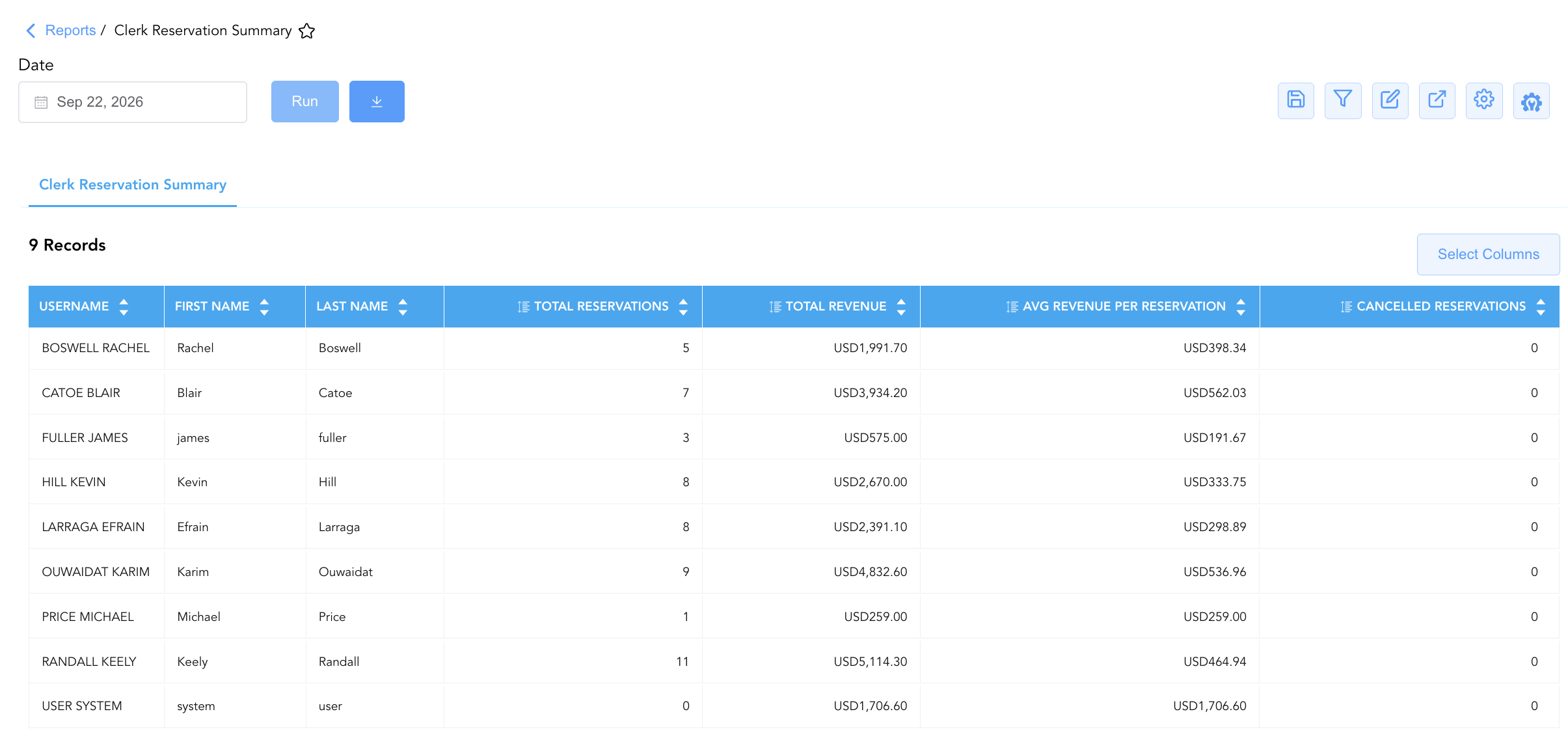
Data Dictionary (Dynamic View Columns)
Customize your default view using the Configure (⚙️) icon on the report page. Below is the full data dictionary representing all 7 exact dynamic columns available in this report, sorted in alphabetical order by column name:
💰 Financial Posting Logic: Figures in
Total RevenueandAvg Revenue per Reservationreflect net lodging and package charges attached to reservations created by the clerk.Avg Revenue per Reservationis dynamically calculated as Total Revenue ÷ Total Reservations (or reflects total revenue when total reservations is zero for interface postings).
|
Column Name |
Description |
Data Source / System Mapping |
Includes Taxes & Fees? |
|
Avg Revenue per Reservation |
Average lodging and package revenue generated per confirmed booking created by the clerk (Total Revenue ÷ Total Reservations). |
Calculated: Average Booking Value |
❌ No |
|
Cancelled Reservations |
Numerical count of reservations originally booked by or associated with the clerk that were subsequently cancelled. |
Reservation Engine > Cancelled Count |
N/A |
|
First Name |
First name of the staff clerk or system agent associated with the booking activity. |
User Master > First Name |
N/A |
|
Last Name |
Last name (surname) of the staff clerk or system agent associated with the booking activity. |
User Master > Last Name |
N/A |
|
Total Reservations |
Total count of active, confirmed reservations created by the clerk during the reporting window. |
Reservation Engine > Confirmed Count |
N/A |
|
Total Revenue |
Total net lodging revenue generated across all reservations booked by the clerk. |
Folio Ledger > Net Room Charges |
❌ No |
|
Username |
Official system username or operator account identifier formatted as LAST FIRST. |
Security Master > Username |
N/A |
Customization & Platform Features
User & Property Preferences
-
Personal Preference: Tailor your individual view by hiding or dragging columns. Your preferences save automatically for future sessions.
-
Property Defaults: System Admins can configure standard default layouts across all property users to streamline operational reporting. To maximize audit efficiency, group the columns into the below logical blocks:
-
Clerk Identification & Profile (Cols 1–3):
Username|First Name|Last Name -
Production Volume & Net Conversion (Col 4):
Total Reservations -
Financial Revenue Contribution & Yield (Cols 5–6):
Total Revenue|Avg Revenue per Reservation -
Reservation Fallout Metric (Col 7):
Cancelled Reservations
-
Report Toolbar & Quick Actions
Use the top-right toolbar icons on the report page to manage and export your data view:
|
Icon |
Action / Feature |
Description |

|
Knowledge Article |
Opens the knowledge base article to learn how to interpret this report. |

|
Saved Views |
Saves your column filtering, sorting, and highlight preferences so you can easily reload your custom view later without reconfiguring the report. |

|
Filter |
Opens filter controls to isolate specific data within a column based on your selected criteria. |

|
Highlight |
Highlights column values in a designated color based on selected conditions. |

|
Export |
Exports and downloads the report in various formats (Excel, PDF, CSV) for offline analysis or printing. |

|
Configure |
Opens column selection controls to toggle visibility, reorder columns, or hide rows with all zeros. |

|
Additional Configuration |
Provides advanced report configuration and display formatting options to customize data presentation. |
Advanced Controls
-
Staff Incentive & Upselling Audits: Compare
Avg Revenue per Reservationacross agents to measure upselling effectiveness and reward staff members driving premium rate captures. -
Cancellation Trend Analysis: Review
Cancelled Reservationsto detect training gaps, booking errors, or test bookings requiring cleanup. -
Highlighting (Conditional Formatting): Apply custom rules to automatically highlight top revenue performers (
Total Revenue > $3,000), agents with high cancellation counts, or high average booking values (Avg Revenue per Reservation > $500).
🔗 Related Reports & Next Steps
Within ⚙️ System & Administration Reports & 👤 User Activity Reports:
-
Clerk Activity – Two-section cashiering audit tracking line-item payments and shift tender summaries by clerk.
-
User Activity Report – Comprehensive security log tracking user logins, system navigation, and configuration updates.
-
Clerk Shift – Payment information, deposit drop information, shift details and paid out summary.
Cross-Pillar Deep Dives:
-
🏢 Corporate Accounts: Cross-reference clerk reservation volume with Company And Travel Agent Reservations to track direct corporate bookings handled by front desk staff.
-
👥 Group Block: Cross-reference clerk production with Group Reservation Details to track agent pickups against group block allocations.