
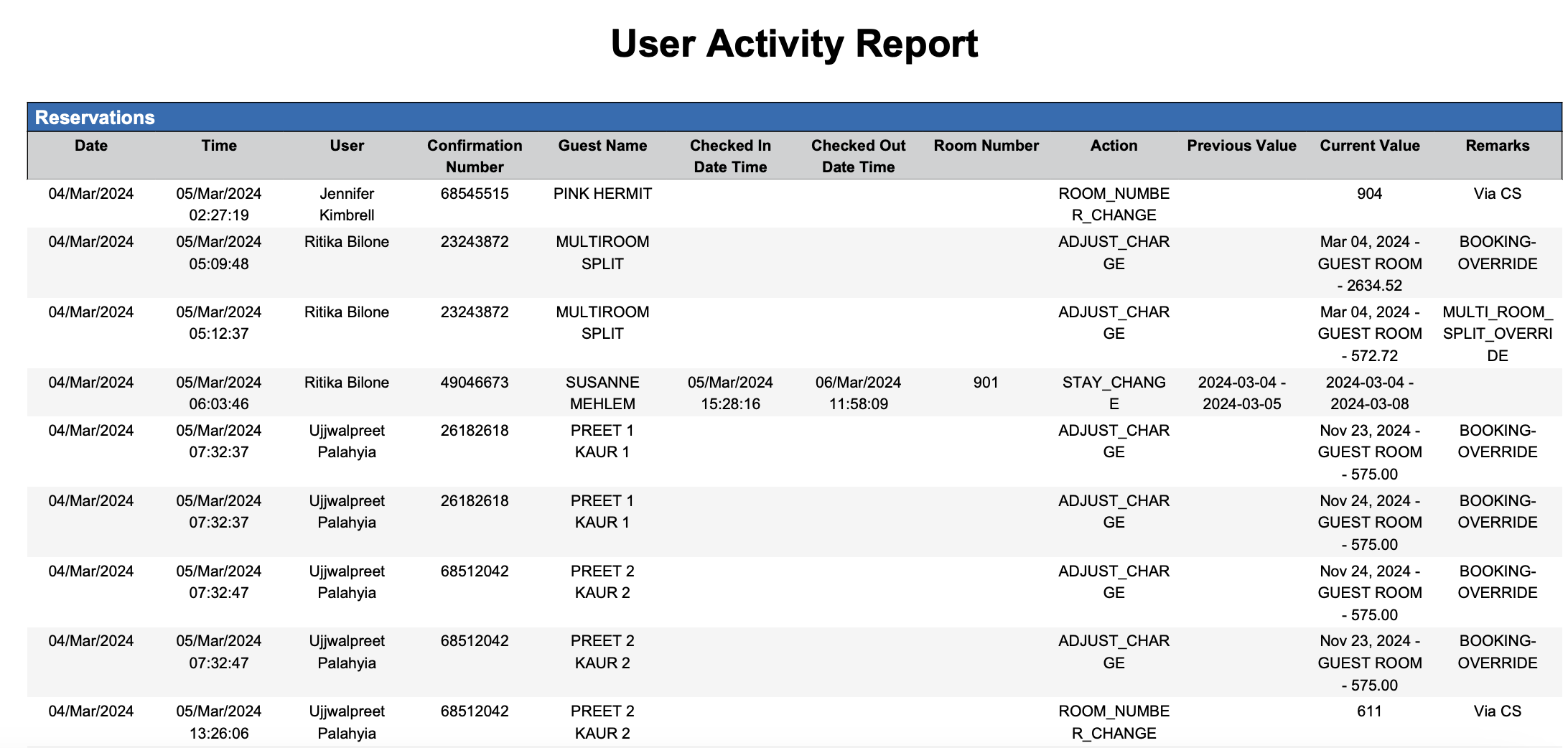
User Activity Report .ng
Report Description: A user activity report is a comprehensive log that tracks and summarises the actions performed by users. It provides administrators with visibility into login history, file access, and resource usage to enhance security monitoring and operational efficiency.
Date Range: Single date up to 365 days in the past
Action Type : Displays action items in dropdown like
Stay Change
Room Number Change
Rate Code Change
Misc Charge Edit
Adjust Charge
Cancel Reservations
Refund Payment
Cancel Payment
Check Out Date Change
Discount
Reverse Charge
Available Report Columns for Following Sections:
Column Name | Column Description | Amount Includes Taxes and Fees | Calculation |
Date | Date for which the activity is needed | Not Applicable | Not Applicable |
Time | Time for which the forecast is needed | Not Applicable | Not Applicable |
User | Username of the user who performed the activity | Not Applicable | Not Applicable |
Confirmation Number | Unique identifier for the reservation confirmation | Not Applicable | Not Applicable |
Guest Name | Name of the primary guest on the reservation | Not Applicable | Not Applicable |
Checked In Date Time | Check In Date & Time of the reservation | Not Applicable | Not Applicable |
Checked Out Date Time | Check Out Date & Time of the reservation | Not Applicable | Not Applicable |
Room Number | Room Number of the reservation | Not Applicable | Not Applicable |
Action | Displays the action taken on the reservation | Not Applicable | Not Applicable |
Previous Value | Previous Status of the reservation | Not Applicable | Not Applicable |
Current Value | Current Status of the reservation post the activity | Not Applicable | Not Applicable |
Remarks | Displays the remarks | Not Applicable | Not Applicable |
Misc Report Information:
Available Features:
Export: ability to download and save the file into an alternate format.
Filter: filter a range of data based on criteria defined by the user.
Highlight: also known as conditional formatting is the ability to highlight certain values making them easier to identify.
Available Configuration:
User Preferences: allows the user to customize their report view by repositioning or removing columns.
Property Preferences: allows the property to customize the report view for all users by repositioning or removing columns.
Baseline Configuration:
Property Preferences Settings:
Following columns to be disabled for initial deployment:
Not Applicable