
Daily Activity Report Overview
Parent Hub: ⚙️ System & Administration Reports
Category: 👤 User Activity Reports
Target Roles: Front Office Managers, Night Auditors, Rooms Operations Directors, System Administrators, Hotel Controllers, General Managers
Key Value: Forensic audit trail of daily front desk operational modifications, tracking room moves, stay date adjustments, departure extensions, reservation cancellations, and operator user accountability across all active bookings.
Executive Summary
The Daily Activity Report is an essential front desk audit, change management, and operational security document within the 👤 User Activity Reports category of the ⚙️ System & Administration Reports hub. Designed to provide complete visibility over front-line reservation updates committed throughout the operating day, it captures chronological transaction timestamps, acting staff members, guest booking references, assigned room numbers, specific modification categories, and exact field value transformations.
-
By logging the precise operational change (
Action, includingROOM_NUMBER_CHANGE,STAY_CHANGE,CHECKOUT_DATE_CHANGE, andCANCEL_RESERVATION) along with the prior setting (Previous Value) and new setting (Current Value), this report enables management to monitor room moves, evaluate early arrivals and extended stays, verify cancellations, audit staff user compliance (User), and detect unauthorized reservation alterations.
Key Capabilities
-
Comprehensive Front Desk Audit Trail: Captures real-time operational modifications committed to guest reservations with exact execution dates (
Date) and timestamps (Time). -
Staff User Accountability: Traces each transaction directly to the logged-in clerk, supervisor, or manager (
User) who authorized and performed the update. -
Room Assignment & Move Tracking: Monitors room assignment changes (
Action = ROOM_NUMBER_CHANGE) across assigned room numbers (Room Number), logging previous room allocations against newly assigned rooms to maintain housekeeping and front desk room status alignment. -
Stay Dates & Extension Auditing: Details overall stay window revisions (
Action = STAY_CHANGE) and departure date postponements (Action = CHECKOUT_DATE_CHANGE), comparing original departure dates (Previous Value) against updated stay durations (Current Value). -
Reservation Cancellation Oversight: Itemizes cancelled bookings (
Action = CANCEL_RESERVATION), logging the reservation hold state change (e.g., fromHOLDtoCANCELLED) to support cancellation fee enforcement and audit booking attrition.
Report Views & Functional Breakdown
The Daily Activity Report presents operational modification entries in a unified single-table master matrix supporting three primary operational perspectives:
┌────────────────────────────────────────────────────────────────────────┐
│                        DAILY ACTIVITY REPORT                           │
├────────────────────────────────────────────────────────────────────────┤
│                         Unified Matrix View                            │
├──────────────────────────┬──────────────────────────┬──────────────────┤
│ 1. Audit Stamp & User    │ 2. Reservation & Room    │ 3. Action Delta  │
│    Credentials           │    Assignment Context    │    & Audit Value │
└──────────────────────────┴──────────────────────────┴──────────────────┘
1. Audit Stamp & User Credentials
Monitors the exact execution timestamp and user credentials responsible for committing changes to the PMS database.
-
Primary Use: Establishing the chronological sequence of front desk transactions and verifying operator ownership for shift-end audits.
-
Key Metrics: Date, Time, User.
2. Reservation & Room Assignment Context
Connects the operational action to the specific guest reservation and assigned room physical inventory.
-
Primary Use: Identifying the guest booking impacted by the operational change and checking current room allocations.
-
Key Metrics: Confirmation Number, Room Number.
3. Action Delta & Audit Value
Captures the operational action category and provides before-and-after data comparisons alongside operator remarks.
-
Primary Use: Evaluating the operational nature and business impact of the modification (e.g., room reassignment, date extension, or cancellation).
-
Key Metrics: Action, Previous Value, Current Value, Remarks.
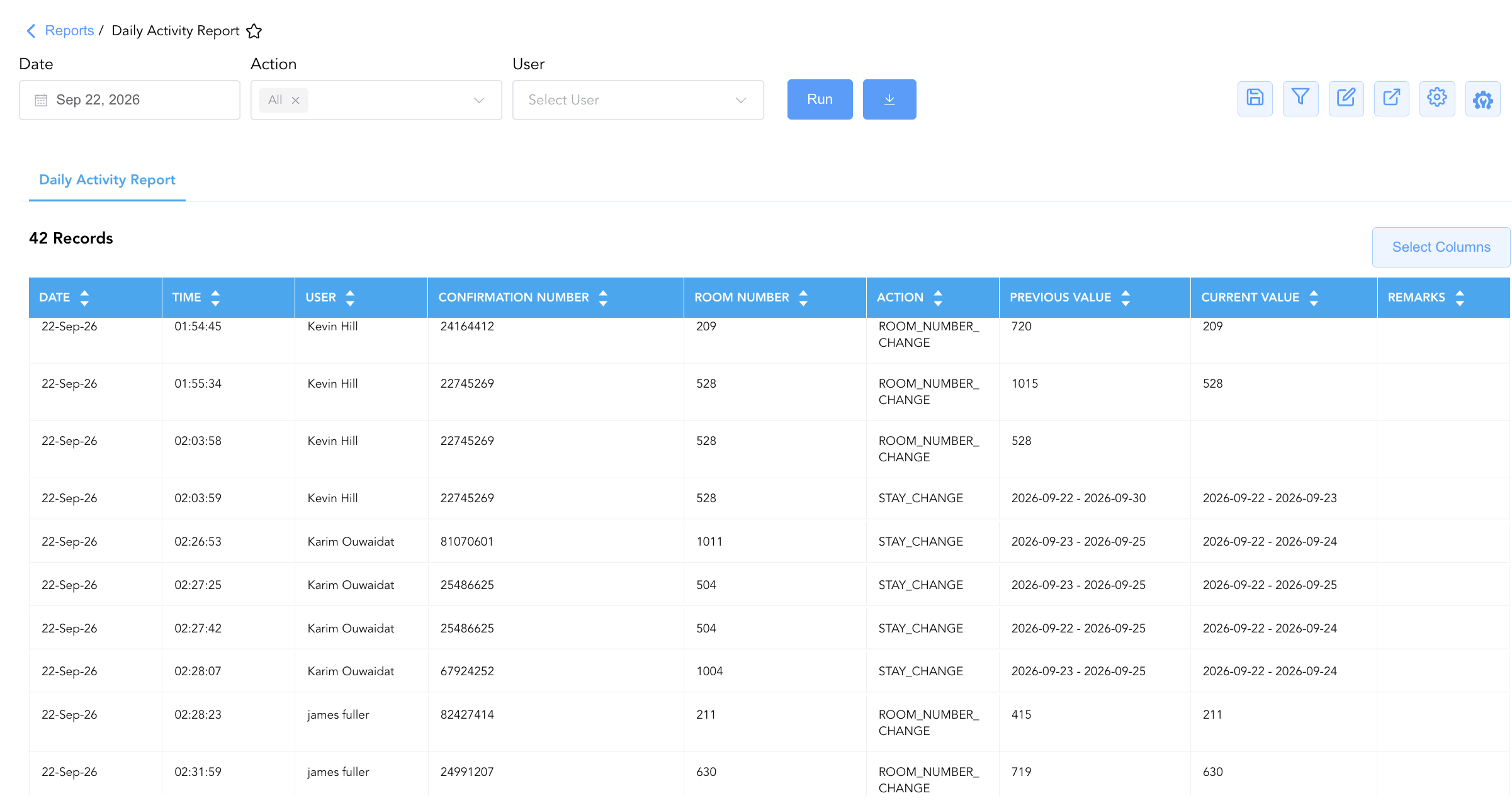
Data Dictionary (Dynamic View Columns)
Customize your default view using the Configure (⚙️) icon on the report page. Below is the full data dictionary representing all 9 exact dynamic columns available in this report, sorted in alphabetical order by column name:
|
Column Name |
Description |
Data Source / System Mapping |
Includes Taxes & Fees? |
|
Action |
Type of operational modification performed on the reservation (e.g., |
System Audit Log > Action Type |
N/A |
|
Confirmation Number |
Primary unique system confirmation number assigned to the guest reservation. |
Reservation Engine > Confirmation ID |
N/A |
|
Current Value |
New or updated setting committed to the reservation record following the action (e.g., new stay date range, revised departure date, or updated status). |
System Audit Log > New Field Value |
N/A |
|
Date |
Calendar date on which the front desk operational transaction was performed and recorded in the audit log. |
System Audit Log > Transaction Date |
N/A |
|
Previous Value |
Historical data value of the field prior to the modification committed by the user (e.g., previous room assignment, original stay dates, original departure date, or prior status). |
System Audit Log > Old Field Value |
N/A |
|
Remarks |
Operational notes, reasons for change, or clerk comments entered at the time of modification. |
Reservation Audit > Operator Notes |
N/A |
|
Room Number |
Physical guest room number assigned to the reservation at the time of the operational activity. |
PMS Room Master > Room Assigned |
N/A |
|
Time |
Exact time of day (hours, minutes, seconds) when the transaction was committed in the system. |
System Audit Log > Timestamp |
N/A |
|
User |
Full name or system login ID of the front office clerk or manager who executed the modification. |
User Security Master > Username |
N/A |
Customization & Platform Features
User & Property Preferences
-
Personal Preference: Tailor your individual view by hiding or dragging columns. Your preferences save automatically for future sessions.
-
Property Defaults: System Admins can configure standard default layouts across all property users to streamline operational reporting. To maximize audit efficiency, group the columns into the below logical blocks:
-
Audit Timestamp & User Accountability (Cols 1–3):
Date|Time|User -
Reservation & Room Entity Identifiers (Cols 4–5):
Confirmation Number|Room Number -
Operational Action & Audit Diff Tracking (Cols 6–8):
Action|Previous Value|Current Value -
Audit Documentation & Explanatory Context (Col 9):
Remarks
-
Report Toolbar & Quick Actions
Use the top-right toolbar icons on the report page to manage and export your data view:
|
Icon |
Action / Feature |
Description |

|
Knowledge Article |
Opens the knowledge base article to learn how to interpret this report. |

|
Saved Views |
Saves your column filtering, sorting, and highlight preferences so you can easily reload your custom view later without reconfiguring the report. |

|
Filter |
Opens filter controls to isolate specific data within a column based on your selected criteria. |

|
Highlight |
Highlights column values in a designated color based on selected conditions. |

|
Export |
Exports and downloads the report in various formats (Excel, PDF, CSV) for offline analysis or printing. |

|
Configure |
Opens column selection controls to toggle visibility, reorder columns, or hide rows with all zeros. |

|
Additional Configuration |
Provides advanced report configuration and display formatting options to customize data presentation. |
Advanced Controls
-
Room Move Verification: Filter by
Action = ROOM_NUMBER_CHANGEduring shift handover to ensure housekeeping has updated room status boards and physical room keys reflect current allocations. -
Departure Extension Reconciliation: Filter by
Action = CHECKOUT_DATE_CHANGEto verify that stay extensions have valid credit card pre-authorizations or billing guarantees. -
Highlighting (Conditional Formatting): Apply custom rules to automatically highlight cancellations (
Action = CANCEL_RESERVATION), same-day room reassignments, or off-hours modifications.
🔗 Related Reports & Next Steps
Within ⚙️ System & Administration Reports & 👤 User Activity Reports:
-
Clerk Activity – Two-section cashiering audit tracking line-item payments and shift tender summaries by clerk.
-
Clerk Reservation Summary – Staff performance audit tracking booking volume, lodging revenue yield, and cancellations by clerk.
-
Clerk Shift – Seven-section cashiering audit tracking drawer balances, cash drops, paid-outs, and shift intervals.
-
Guest Service Agent Productivity – Two-section front desk operational efficiency report tracking hourly check-in and checkout curves.
-
User Activity – Comprehensive security log tracking user logins, system navigation, and configuration updates.
Cross-Pillar Deep Dives:
-
🛎️ Front Desk & Guest Services: Cross-reference room changes (
Action = ROOM_NUMBER_CHANGE) with Room Move Activity and Departures List to coordinate guest key reassignment and luggage transfers. -
🧹 Rooms & Facilities: Align room moves and stay adjustments with Housekeeping Sheet and Room Status History to prevent service miscommunications on occupied dirty rooms.