
Currency Configuration Report Overview
Parent Hub: ⚙️ System & Administration Reports
Category: 🖥️ System Log Reports
Target Roles: Hotel Controllers, Directors of Finance, Income Auditors, System Administrators, Front Office Managers, General Managers
Key Value: Audit multi-currency exchange rate configurations, track baseline configuration rates versus cashier exchange rates, verify active currency status, and monitor timestamped audit trails for currency updates across property management operations.
Executive Summary
The Currency Configuration Report is an essential financial control, foreign exchange (FX) governance, and system setup auditing document within the 🖥️ System Log Reports category of the ⚙️ System & Administration Reports hub. Designed to deliver complete administrative transparency over multi-currency parameters, it maintains a master record of all supported foreign currencies, configured system conversion multipliers, front desk cashier exchange rates, operational activation states, and administrative modification histories.
-
By pairing master currency identifiers (
Currency Code,Currency Name) with dual-tier exchange rate settings (Currency Configuration Rate,Currency Exchange Rate), activation indicators (Currency Configuration Rate Active,Currency Exchange Rate Active), and chronological maintenance timestamps (Currency Configuration Rate Last Update Date,Currency Configuration Rate Last Update Time,Currency Exchange Rate Last Update Date,Currency Exchange Rate Last Update Time), this report enables finance leaders to verify currency conversion accuracy, prevent foreign exchange settlement discrepancies, ensure parity between back-office accounting rates and front desk cashiering rates, and maintain full compliance with corporate financial audit standards.
Key Capabilities
-
Dual-Tier Rate Tracking: Separates core system accounting conversion rates (
Currency Configuration Rate) from front office cashiering transaction rates (Currency Exchange Rate) to support operational rate differentials and service spread margins. -
Activation Status Oversight: Audits whether specific currency rates are actively enabled for PMS transactions (
Currency Configuration Rate Active,Currency Exchange Rate Active), preventing unauthorized or obsolete currencies from being tendered. -
Foreign Exchange Audit Trail: Logs the exact calendar date and time of the most recent rate adjustments (
Last Update Date,Last Update Time) for both configuration and exchange rate engines. -
Multi-Currency Portfolio Governance: Catalogs official ISO currency symbols (
Currency Code, e.g., CAD, EUR, GBP) alongside descriptive commercial labels (Currency Name, e.g.,Canadian Dollar Exchange (FROM CAD to USD)) to ensure clarity across front office and accounting teams. -
Settlement & Ledger Reconciliation Support: Serves as the authoritative system baseline for verifying foreign currency exchange calculations performed in cashier shift reports and general ledger currency postings.
Report Views & Functional Breakdown
The Currency Configuration Report presents foreign exchange setup parameters in a unified single-table master matrix supporting three primary operational perspectives:
┌────────────────────────────────────────────────────────────────────────┐
│                   CURRENCY CONFIGURATION REPORT                        │
├────────────────────────────────────────────────────────────────────────┤
│                         Unified Matrix View                            │
├──────────────────────────┬──────────────────────────┬──────────────────┤
│ 1. Currency Master &     │ 2. System Configuration  │ 3. Cashier FX    │
│    Identifier Setup      │    Rate & Status         │    Exchange Rate │
└──────────────────────────┴──────────────────────────┴──────────────────┘
1. Currency Master & Identifier Setup
Monitors the official currency code and descriptive conversion label configured in the property management system.
-
Primary Use: Verifying active foreign currency mappings, conversion pairings (e.g., from source currency to property base currency), and naming conventions.
-
Key Metrics: Currency Code, Currency Name.
2. System Configuration Rate & Status
Tracks the underlying system accounting rate, active flag, and last administrative modification timestamps.
-
Primary Use: Auditing the baseline accounting conversion multiplier used for system valuations, reporting conversions, and financial ledger interfaces.
-
Key Metrics: Currency Configuration Rate, Currency Configuration Rate Active, Currency Configuration Rate Last Update Date, Currency Configuration Rate Last Update Time.
3. Cashier FX Exchange Rate & Maintenance
Audits the operational exchange rate applied at front desk terminals during guest currency conversions and foreign tender payments.
-
Primary Use: Ensuring front desk exchange rates reflect current market rates or corporate daily buy/sell sheets and auditing recent rate updates.
-
Key Metrics: Currency Exchange Rate, Currency Exchange Rate Active, Currency Exchange Rate Last Update Date, Currency Exchange Rate Last Update Time.
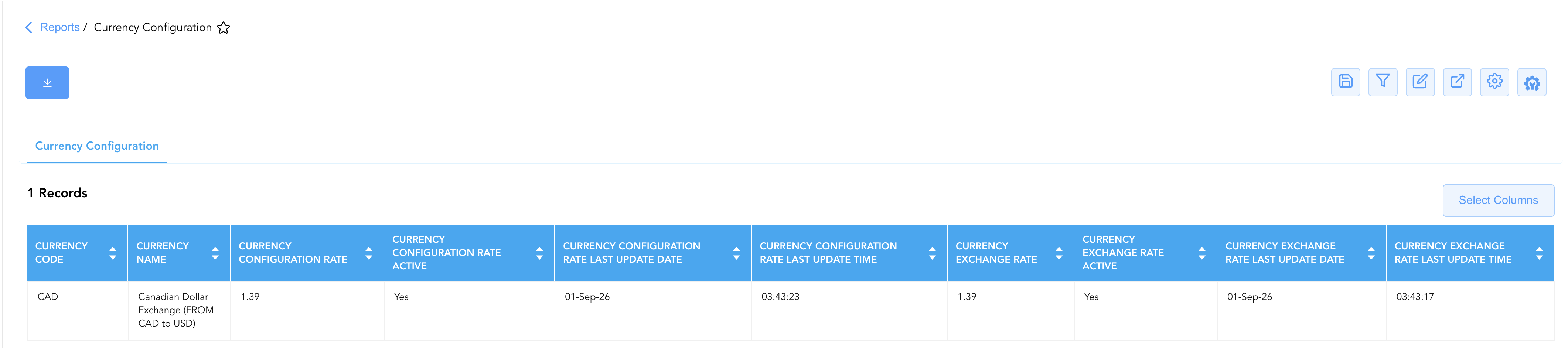
Data Dictionary (Dynamic View Columns)
Customize your default view using the Configure (⚙️) icon on the report page. Below is the full data dictionary representing all 10 exact dynamic columns available in this report, sorted in alphabetical order by column name:
💰 Financial & FX Conversion Logic: The
Currency Configuration Raterepresents the baseline accounting multiplier applied for system-level currency translation, while theCurrency Exchange Raterepresents the operational rate used at cashiering stations when exchanging foreign cash or settling guest folios. Converted values are calculated as Source Amount x Exchange Rate (or divided, depending on base currency pairing definition).
|
Column Name |
Description |
Data Source / System Mapping |
Includes Taxes & Fees? |
|
Currency Code |
Standard international 3-letter currency code representing the foreign currency (e.g., |
Currency Master > ISO Currency Code |
N/A |
|
Currency Configuration Rate |
Baseline system accounting conversion rate configured for translating the foreign currency into the property's operating base currency. |
Currency Setup > Accounting Base Rate |
N/A |
|
Currency Configuration Rate Active |
Indicates whether the baseline system configuration rate is currently active and available for financial system processes ( |
Currency Setup > Config Rate Status |
N/A |
|
Currency Configuration Rate Last Update Date |
Calendar date on which the system configuration rate was most recently modified or confirmed in the system setup. |
System Audit Trail > Config Date Modified |
N/A |
|
Currency Configuration Rate Last Update Time |
Exact time of day (hours, minutes, seconds) when the system configuration rate was most recently updated. |
System Audit Trail > Config Time Modified |
N/A |
|
Currency Exchange Rate |
Operational transaction exchange rate applied at front desk terminals when performing foreign currency exchanges or accepting foreign tenders. |
FX Exchange Master > Cashier Rate |
N/A |
|
Currency Exchange Rate Active |
Indicates whether the operational cashier exchange rate is currently active and eligible for front desk cashiering transactions ( |
FX Exchange Master > Exchange Rate Status |
N/A |
|
Currency Exchange Rate Last Update Date |
Calendar date on which the front desk cashier exchange rate was most recently updated. |
System Audit Trail > Exchange Date Modified |
N/A |
|
Currency Exchange Rate Last Update Time |
Exact time of day (hours, minutes, seconds) when the front desk cashier exchange rate was most recently updated. |
System Audit Trail > Exchange Time Modified |
N/A |
|
Currency Name |
Full descriptive commercial title and conversion direction label assigned to the currency setup (e.g., |
Currency Master > Currency Description |
N/A |
Customization & Platform Features
User & Property Preferences
-
Personal Preference: Tailor your individual view by hiding or dragging columns. Your preferences save automatically for future sessions.
-
Property Defaults: System Admins can configure standard default layouts across all property users to streamline operational reporting. To maximize audit efficiency, group the columns into the below logical blocks:
-
Currency Master Identifiers (Cols 1–2):
Currency Code|Currency Name -
System Configuration Rate & Audit Tracking (Cols 3–6):
Currency Configuration Rate|Currency Configuration Rate Active|Currency Configuration Rate Last Update Date|Currency Configuration Rate Last Update Time -
Operational Cashiering Exchange Rate & Audit Tracking (Cols 7–10):
Currency Exchange Rate|Currency Exchange Rate Active|Currency Exchange Rate Last Update Date|Currency Exchange Rate Last Update Time
-
Report Toolbar & Quick Actions
Use the top-right toolbar icons on the report page to manage and export your data view:
|
Icon |
Action / Feature |
Description |

|
Knowledge Article |
Opens the knowledge base article to learn how to interpret this report. |

|
Saved Views |
Saves your column filtering, sorting, and highlight preferences so you can easily reload your custom view later without reconfiguring the report. |

|
Filter |
Opens filter controls to isolate specific data within a column based on your selected criteria. |

|
Highlight |
Highlights column values in a designated color based on selected conditions. |

|
Export |
Exports and downloads the report in various formats (Excel, PDF, CSV) for offline analysis or printing. |

|
Configure |
Opens column selection controls to toggle visibility, reorder columns, or hide rows with all zeros. |

|
Additional Configuration |
Provides advanced report configuration and display formatting options to customize data presentation. |
Advanced Controls
-
Rate Parity & Spread Auditing: Compare
Currency Configuration Ratedirectly againstCurrency Exchange Rateto verify foreign currency exchange fee margins or ensure that accounting valuations match cashiering collections. -
Stale Rate Detection: Review
Currency Exchange Rate Last Update Dateto identify exchange rates that have not been updated within scheduled operational intervals (e.g., daily or weekly FX review schedules). -
Highlighting (Conditional Formatting): Apply custom rules to automatically highlight inactive currency rates (
Active = No), rates updated outside standard operating hours, or currencies where configuration and exchange rates diverge.
🔗 Related Reports & Next Steps
Within ⚙️ System & Administration Reports & 🖥️ System Log Reports:
-
Accounting Setup Details – Master chart of accounts configuration tracking charge types, transaction codes, and payment tenders.
-
Operator Security – Comprehensive security log tracking user logins, system permissions, role templates, and account statuses.
Cross-Pillar Deep Dives:
-
👤 User Activity Reports: Cross-reference operational exchange rates (
Currency Exchange Rate) with the Currency Exchange Summary section of the Clerk Shift Report to verify conversion rates applied to guest transactions. -
💳 Financial & Night Audit: Reconcile foreign exchange gains and losses across the Daily Revenue Summary and Clerk Shift against configured currency rate schedules.