
Sub Charge Type Report Overview
Parent Hub: 📈 Revenue & Analytics
Category: 📊 Performance Summaries
Target Roles: Directors of Revenue Management, General Managers, Directors of Finance & Controllers, Retail/Market Managers, Outlet Supervisors
Key Value: Audit itemized sub-charge product performance, track retail and sundry outlet product sales, evaluate parent charge code rollup accuracy, and analyze gross vs. adjusted net earnings across daily, monthly, and annual comparative periods.
Executive Summary
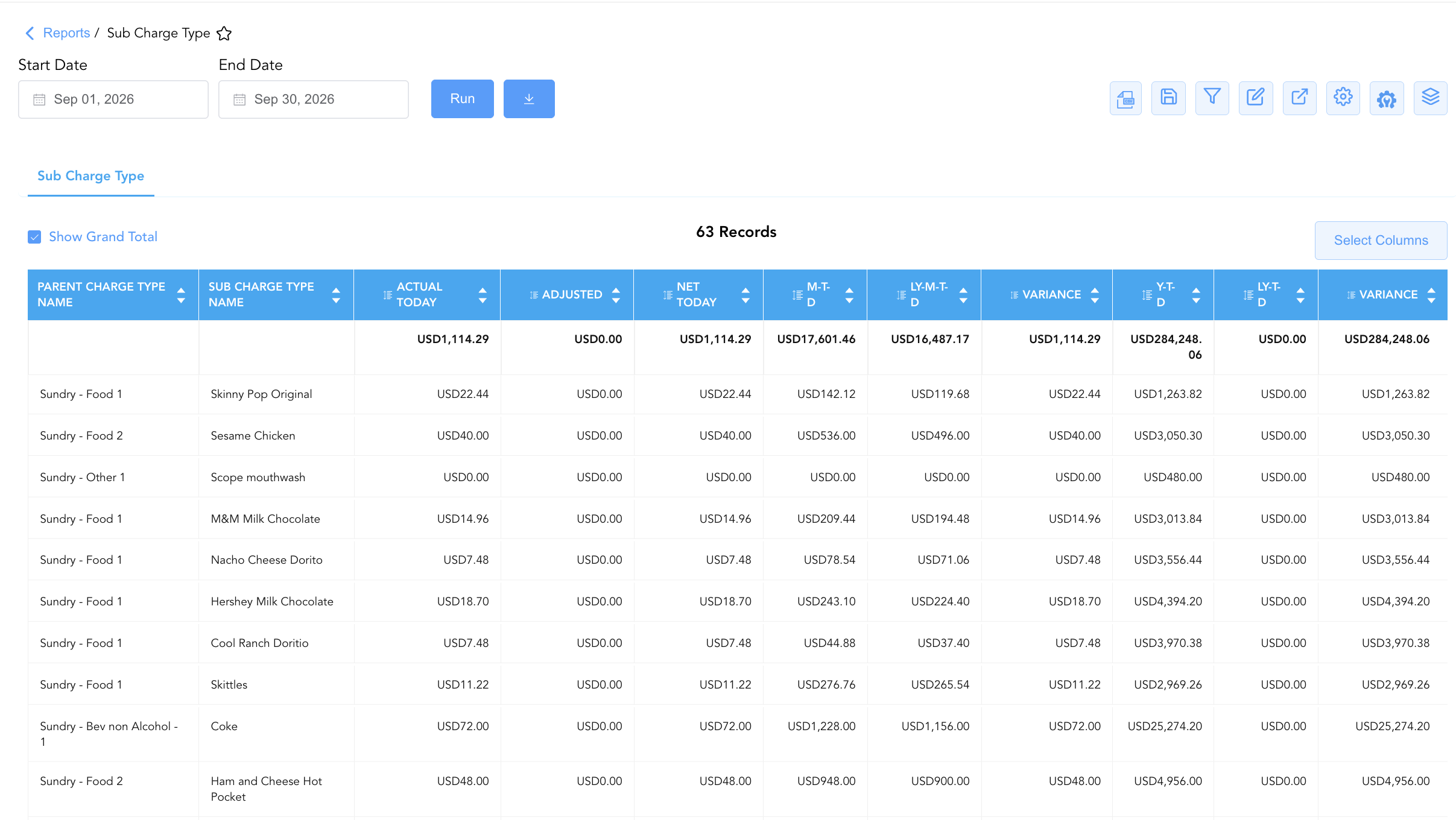
The Sub Charge Type Report is a primary ancillary revenue audit and itemized product performance document within the 📊 Performance Summaries category of the 📈 Revenue & Analytics hub. Designed to provide detailed sub-item level financial visibility, it tracks individual product sales—such as retail market items, packaged snacks, non-alcoholic beverages, sundries, and personal care products—mapped directly under their parent posting charge codes.
By pairing itemized product definitions (Sub Charge Type name) with parent ledger categories (Parent Charge Type name like Sundry - Food 1, Sundry - Food 2, Sundry - Bev non Alcohol - 1, Sundry - Other 1) and comparative financial performance metrics (Actual Today, Adjusted, Net Today, M-T-D, LY-M-T-D, Variance, Y-T-D, LY-T-D), this report enables controllers, retail managers, and revenue analysts to evaluate retail inventory movement, audit price adjustments or allowances, and monitor sub-item revenue contributions to overall property yield.
Key Capabilities
-
Itemized Sub-Charge Product Tracking: Logs individual product revenue postings (e.g., Skinny Pop, Coke, Dasani, Hot Pockets, Deodorant, Over-the-Counter Medications).
-
Parent Charge Code Hierarchy Audit: Maps every individual sub-charge item directly to its master general ledger parent category (Sundry - Food 1, Sundry - Food 2, Sundry - Bev non Alcohol - 1, Sundry - Other 1).
-
Adjustment & Net Realization Analysis: Tracks gross daily earnings (Actual Today), manual price adjustments/allowances (Adjusted), and net realized income (Net Today).
-
Comparative Multi-Period Variance Governance: Benchmarks current daily performance alongside Month-to-Date (M-T-D) and Year-to-Date (Y-T-D) totals, calculating exact variances against historical prior-year benchmarks (LY-M-T-D, LY-T-D, Variance).
Report Views & Functional Breakdown
The Sub Charge Type Report presents itemized sub-charge financial data in a unified single-table ledger that supports three key analytical perspectives:
┌────────────────────────────────────────────────────────────────────────┐
│                        SUB CHARGE TYPE REPORT                          │
├────────────────────────────────────────────────────────────────────────┤
│                         Unified Matrix View                            │
├──────────────────────────┬──────────────────────────┬──────────────────┤
│ 1. Product Item & Parent │ 2. Daily Realization &   │ 3. Multi-Period  │
│    Hierarchy Audit       │    Adjustment Control    │    Variance Pace │
└──────────────────────────┴──────────────────────────┴──────────────────┘
1. Product Item & Parent Hierarchy Audit
Audits individual retail product descriptions and verifies parent general ledger account classifications.
-
Primary Use: Verifying sub-charge item setups (
Sub Charge Type name), auditing revenue routing to parent GL categories (Parent Charge Type name), and evaluating product category sales distributions (e.g., snacks vs. beverages vs. sundries). -
Key Metrics: Sub Charge Type name, Parent Charge Type name.
2. Daily Realization & Adjustment Control
Monitors daily gross sales, manual posting adjustments, and net earned revenue per product item.
-
Primary Use: Tracking daily retail sales volume (
Actual Today), auditing employee discounts or return allowances (Adjusted), and verifying net daily revenue realization (Net Today). -
Key Metrics: Sub Charge Type name, Actual Today, Adjusted, Net Today.
3. Multi-Period Variance Pace
Measures Month-to-Date and Year-to-Date sales volume while benchmarking performance against historical prior-year levels.
-
Primary Use: Evaluating retail inventory turnover across monthly (
M-T-D) and annual (Y-T-D) cycles, measuring year-over-year revenue growth (Variance), and identifying top-performing market SKUs. -
Key Metrics: M-T-D, LY-M-T-D, Variance, Y-T-D, LY-T-D.
Data Dictionary (Dynamic View Columns)
Customize your default view using the Configure (⚙️) icon on the report page. Below is the full data dictionary representing every column available in this report:
💡 Monetary Treatment Note: All monetary values (Actual Today, Adjusted, Net Today, M-T-D, Y-T-D) represent Gross Financial Amounts (Includes Taxes & Fees) unless configured as net base revenue items. Net Today is calculated as Net Today = Actual Today - Adjusted. Variance is calculated as Variance = Current Period - Prior Year Period.
|
Column Name |
Description |
Data Source / System Mapping |
Includes Taxes & Fees? |
|
Sub Charge Type name |
Specific title of the itemized sub-charge product or SKU (e.g., Skinny Pop Original, Coke, Dasani, Snickers, Nyquil, Toothbrush). |
Sub-Charge Master Setup |
N/A |
|
Parent Charge Type name |
Master general ledger posting category under which the sub-item is grouped (e.g., Sundry - Food 1, Sundry - Food 2, Sundry - Bev non Alcohol - 1, Sundry - Other 1). |
Parent Charge Type Setup |
N/A |
|
Actual Today |
Gross monetary revenue posted for the sub-charge item on the current business date. |
POS / Market Ledger Engine |
🟢 Yes |
|
Adjusted |
Dollar value of manual adjustments, allowances, or returns applied to the sub-charge item today. |
Adjustment Ledger Engine |
🟢 Yes |
|
Net Today |
Net realized revenue earned for the sub-charge item today ( |
|
🟢 Yes |
|
M-T-D |
Cumulative Month-to-Date revenue posted for the sub-charge item. |
M-T-D Ledger Engine |
🟢 Yes |
|
LY-M-T-D |
Historical Month-to-Date revenue posted for the sub-charge item during the same month last year. |
Historical Ledger Engine |
🟢 Yes |
|
Variance |
Monetary difference between current Month-to-Date revenue and prior-year Month-to-Date revenue ( |
|
🟢 Yes |
|
Y-T-D |
Cumulative Year-to-Date revenue posted for the sub-charge item. |
Y-T-D Ledger Engine |
🟢 Yes |
|
LY-T-D |
Historical Year-to-Date revenue posted for the sub-charge item during the same timeframe last year. |
Historical Ledger Engine |
🟢 Yes |
|
Variance (YTD) |
Monetary difference between current Year-to-Date revenue and prior-year Year-to-Date revenue ( |
|
🟢 Yes |
Customization & Platform Features
User & Property Preferences
-
Personal Preference: Tailor your individual view by hiding or dragging columns. Your preferences save automatically for future sessions.
-
Property Defaults: System Admins can configure standard default layouts across all property users to streamline operational reporting. To maximize audit efficiency, group the columns into the below logical blocks:
-
Charge Item Classification (Cols 1–2):
Parent Charge Type name|Sub Charge Type name -
Daily Posting & Adjustment Flow (Cols 3–5):
Actual Today|Adjusted|Net Today -
Month-To-Date Comparative Performance (Cols 6–8):
M-T-D|LY-M-T-D|Variance -
Year-To-Date Comparative Performance (Cols 9–11):
Y-T-D|LY-T-D|Variance
-
Report Toolbar & Quick Actions
Use the top-right toolbar icons on the report page to manage and export your data view:
|
Icon |
Action / Feature |
Description |

|
Knowledge Article |
Opens the knowledge base article to learn how to interpret this report. |

|
Background Export |
Allows users to download up to 365 days of data directly to their computer in CSV format. |

|
Saved Views |
Saves your column filtering, sorting, and highlight preferences so you can easily reload your custom view later without reconfiguring the report. |

|
Filter |
Opens filter controls to isolate specific data within a column based on your selected criteria. |

|
Highlight |
Highlights column values in a designated color based on selected conditions. |

|
Export |
Exports and downloads the report in various formats (Excel, PDF, CSV) for offline analysis or printing. |

|
Configure |
Opens column selection controls to toggle visibility, reorder columns, or hide rows with all zeros. |

|
Additional Configuration |
Provides advanced report configuration and display formatting options to customize data presentation. |

|
Group By |
Summarize and group report data dynamically in real time. |
Interactive Visualizations & Grouping Controls
-
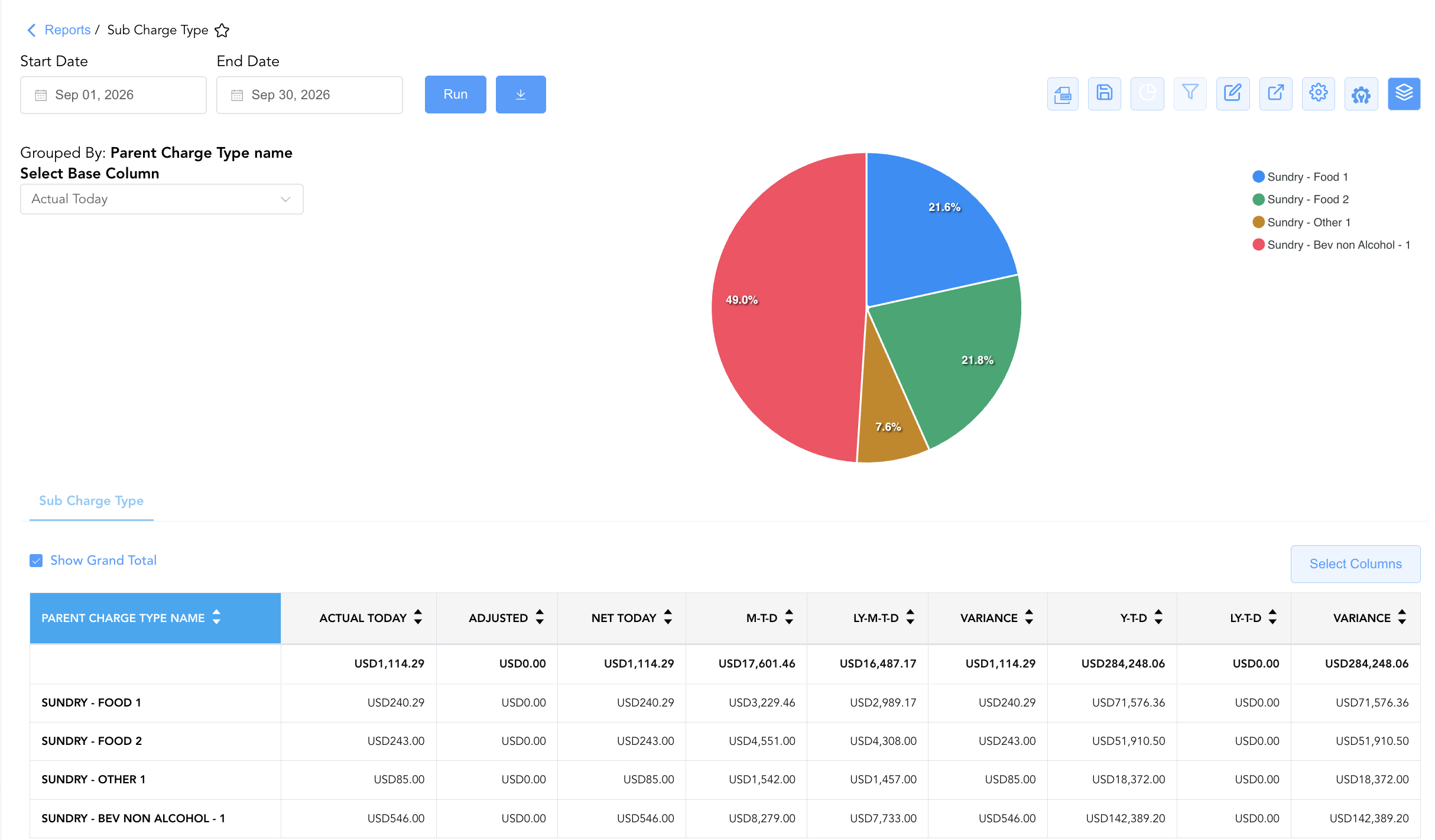
Group By & Pie Chart Visualization: The Sub Charge Type report features an interactive pie chart to help analyze financial distribution across product categories. Users can group sub-charge records on the fly by Parent Charge Type name (Sundry - Food 1, Sundry - Bev non Alcohol - 1, Sundry - Other 1) to evaluate departmental product line contributions. By selecting a metric from the Select Base Column dropdown—such as Actual Today, M-T-D, Y-T-D, or Variance—the chart dynamically displays percentage share breakdowns alongside an interactive color-coded legend.
Advanced Controls
-
Exporting & Inventory Auditing: Download in Excel or PDF format to support retail inventory stock reordering, cost-of-goods-sold (COGS) reconciliations, and outlet yield reviews.
-
Filtering: Filter data by specific Parent Charge Type name or isolate items with active daily sales (
Actual Today > $0.00). -
Highlighting (Conditional Formatting): Apply custom rules to automatically highlight top-selling SKUs, high adjustment values (
Adjusted > $0.00), or items experiencing negative year-over-year growth.
🔗 Related Reports & Next Steps
Within 📈 Revenue & Analytics & 📊 Performance Summaries:
-
Revenue Summary – Review daily property-wide revenue postings, gross vs. net revenue realizations, and itemized tax accruals.
-
Net Revenue – Review daily property-wide net revenue realizations across primary operational charge categories.
-
Add-On Revenue – Review itemized non-room add-on product sales, purchase touchpoints (Booking Time vs. On Demand), and fulfillment dates.
Cross-Pillar Deep Dives:
-
⚖️ Ledgers & Trial Balance: Reconcile retail and sundry charge code revenue totals against General Ledger control accounts in Trial Balance or Day End Summary.
-
💳 Payments & Transactions: To inspect specific POS and front desk market transaction payments, review All Transactions.