
Hotel Statistics Report Overview
Parent Hub: 📈 Revenue & Analytics
Category: 📊 Performance Summaries
Target Roles: General Managers, Directors of Revenue Management, Directors of Finance & Controllers, Asset Managers, Operations Executives
Key Value: Provide a comprehensive 360-degree daily operational, financial, and forecasting overview by tracking physical room counts, occupancy ratios, rate yields, itemized revenue streams, tax/fee collections, payment tender drops, guest demographics, daily booking activity, and forward-looking forecast metrics across comparative timeframes.
Executive Summary
The Hotel Statistics Report is the primary, master operational and financial performance intelligence document within the 📊 Performance Summaries category of the 📈 Revenue & Analytics hub. Designed for executive board briefings, daily morning management reviews, and general ledger reconciliation, it consolidates every key performance indicator across the property into a single, highly structured daily briefing document.
By organizing property data across 12 explicit operational sections (Room Statistics, Performance Statistics, Revenue Performance, Revenue Statistics, Taxes, Fee, Payments, Guest Statistics, Guest Performance Statistics, Today's Activity, Forecast Guest Statistics, and Forecast Performance Statistics), this report bridges physical room counts with monetary revenue streams, cashier tender collections, guest demographic ratios, real-time booking velocity, and forward 31-day forecast curves. Every metric is evaluated across live daily performance (Actual Today), Month-to-Date (M-T-D), and Year-to-Date (Y-T-D) periods, benchmarking each against historical prior-year equivalents (LY-M-T-D, LY-T-D) for complete operational governance.
Key Capabilities
-
12-Section Master Operational Governance: Consolidates room inventory counts, occupancy ratios, rate yields, line-item revenue streams, tax/fee accruals, payment tenders, guest demographics, reservation activity, and forward projections into one master ledger.
-
Multi-Period Comparative Benchmarking: Tracks live daily figures (Actual Today) alongside Month-to-Date (M-T-D) and Year-to-Date (Y-T-D) totals, comparing each directly against historical prior-year benchmarks (LY-M-T-D, LY-T-D).
-
Complete Revenue & Ledger Split: Itemizes taxable vs. exempt room revenue, taxable vs. exempt other revenue, and line-item miscellaneous departmental posting revenues.
-
Tax, Fee & Payment Reconciliation: Details statutory tax collections (CITY TAX, STATE TAX, VAT), surcharge fees, and settled payment tender drops (CASH, CHECK, AMEX, MASTER, VISA, BILL TO COMPANY).
-
Real-Time Activity & Forward Forecast: Tracks daily booking pace (New Bookings, Walk-Ins, Cancellations, No Shows) alongside forward-looking guest arrival and occupancy projections (Tomorrows Arrivals, 7-Day Occupancy, 31-Day Occupancy).
Report Views & Functional Breakdown (All 12 Sections)
The Hotel Statistics Report presents property performance across 12 structured operational sections:
┌────────────────────────────────────────────────────────────────────────┐
│                        HOTEL STATISTICS REPORT                         │
├──────────────────────────┬──────────────────────────┬──────────────────┤
│ 1. Room Statistics       │ 2. Performance Statistics│ 3. Revenue Perf. │
├──────────────────────────┼──────────────────────────┼──────────────────┤
│ 4. Revenue Statistics    │ 5. Taxes                 │ 6. Fee           │
├──────────────────────────┼──────────────────────────┼──────────────────┤
│ 7. Payments              │ 8. Guest Statistics      │ 9. Guest Perf.   │
├──────────────────────────┼──────────────────────────┼──────────────────┤
│ 10. Today's Activity     │ 11. Forecast Guest Stats │ 12. Forecast Perf│
└──────────────────────────┴──────────────────────────┴──────────────────┘
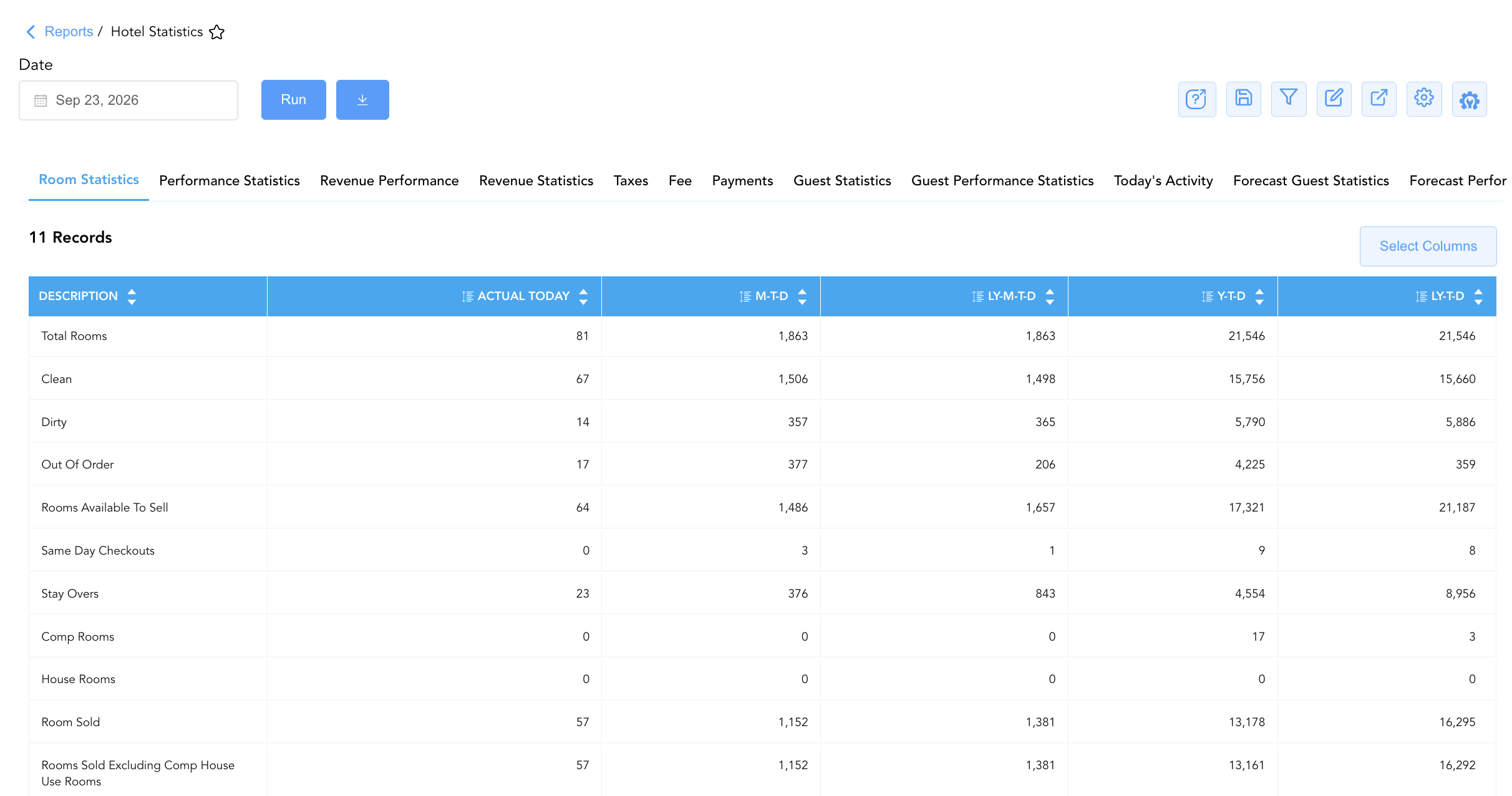
1. Room Statistics
Itemizes physical room inventory allocations, housekeeping room cleaning statuses, and stayover/checkout counts.
-
Primary Use: Auditing available physical inventory, out-of-order room counts (Out Of Order), clean/dirty room splits (Clean, Dirty), rooms available to sell (Rooms Available To Sell), complimentary stays (Comp Rooms), house use rooms (House Rooms), and total rooms sold (Room Sold).
-
Key Metrics: Total Rooms, Clean, Dirty, Out Of Order, Rooms Available To Sell, Same Day Checkouts, Stay Overs, Comp Rooms, House Rooms, Room Sold, Rooms Sold Excluding Comp House Use Rooms.
2. Performance Statistics
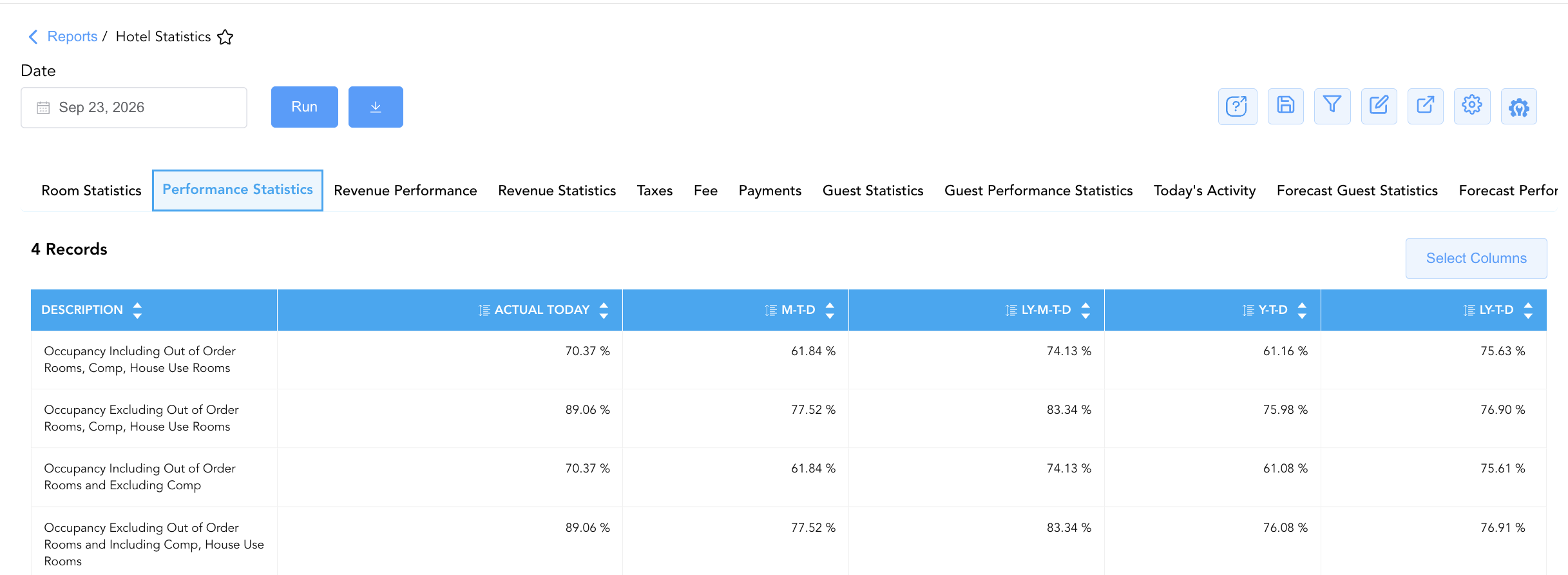
Evaluates property occupancy ratios across multiple calculation methodologies.
-
Primary Use: Analyzing capacity utilization while including or excluding Out of Order, Complimentary, and House Use inventory.
-
Key Metrics: Occupancy Including Out of Order Rooms Comp House Use Rooms, Occupancy Excluding Out of Order Rooms Comp House Use Rooms, Occupancy Including Out of Order Rooms and Excluding Comp, Occupancy Excluding Out of Order Rooms and Including Comp House Use Rooms.
3. Revenue Performance
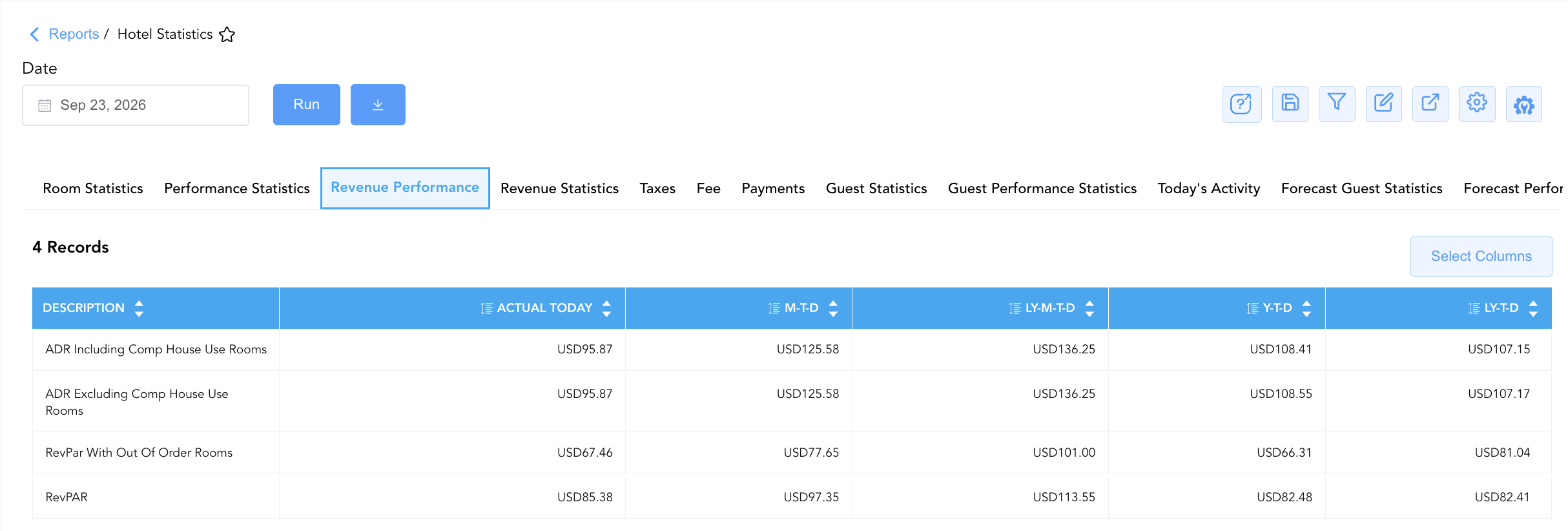
Monitors core industry yield performance indicators and Average Daily Rates.
-
Primary Use: Evaluating rate yield efficiency (ADR), Revenue Per Available Room (RevPAR), and RevPAR adjusted for Out-of-Order rooms (RevPar With Out Of Order Rooms).
-
Key Metrics: ADR Including Comp House Use Rooms, ADR Excluding Comp House Use Rooms, RevPar With Out Of Order Rooms, RevPAR.
4. Revenue Statistics
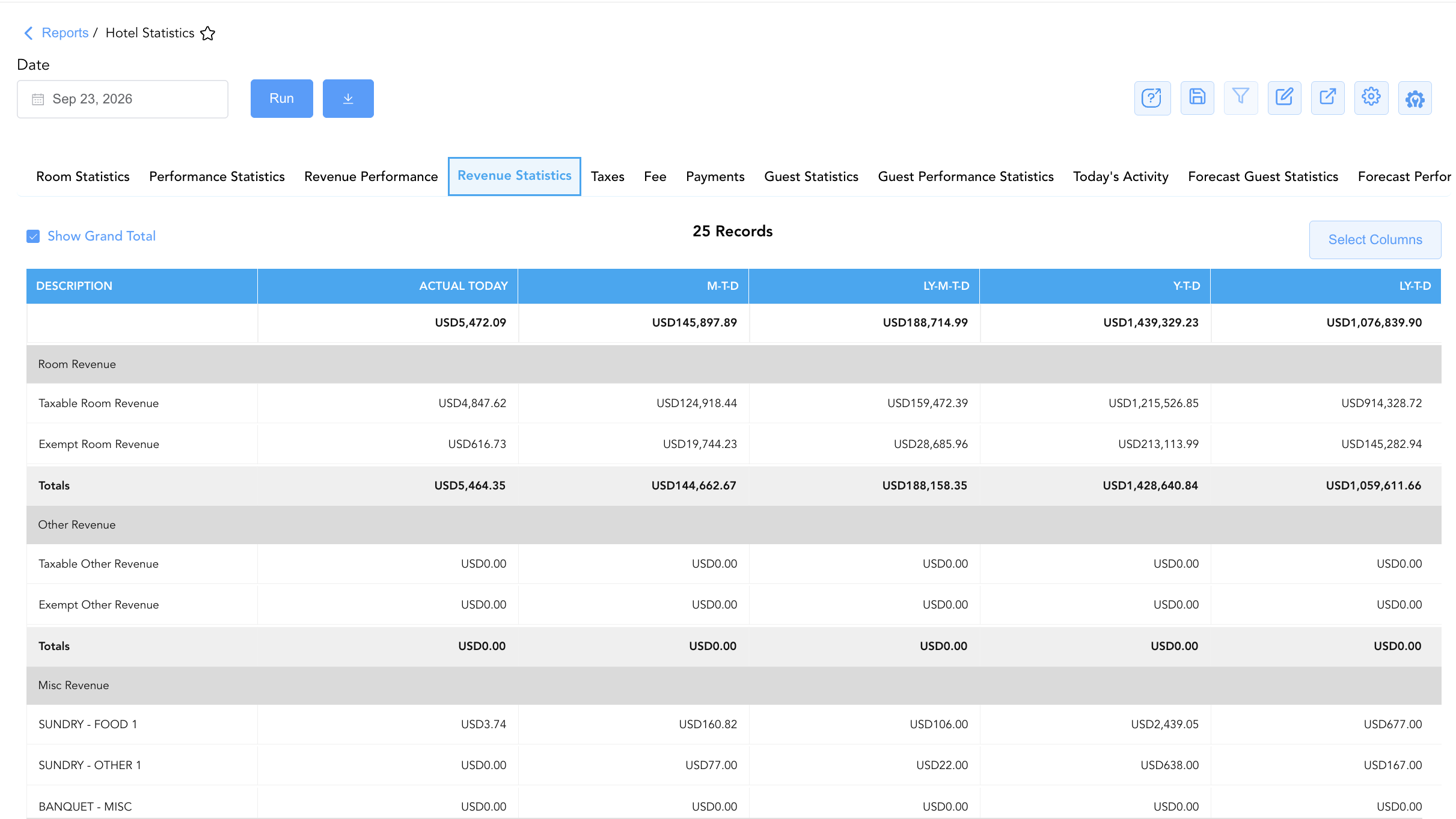
Details line-item monetary revenue generation across room revenue, other revenue, and miscellaneous departmental posting codes.
-
Primary Use: Auditing taxable vs. exempt room revenue (Taxable Room Revenue, Exempt Room Revenue), other revenue, and itemized miscellaneous charge code postings across outlets, parking, and services.
-
Key Metrics: Taxable Room Revenue, Exempt Room Revenue, Taxable Other Revenue, Exempt Other Revenue, itemized Misc Revenue codes (Food & Beverage, Business Centre, Transportation, Parking, Laundry).
5. Taxes
Tracks statutory municipal, state, and value-added tax collections.
-
Primary Use: Auditing daily statutory tax accruals and tax-exempt revenue write-offs across city, state, and VAT tax jurisdictions.
-
Key Metrics: Taxable Taxes and Exempted Taxes (e.g., City Tax, State Tax, VAT, etc.)
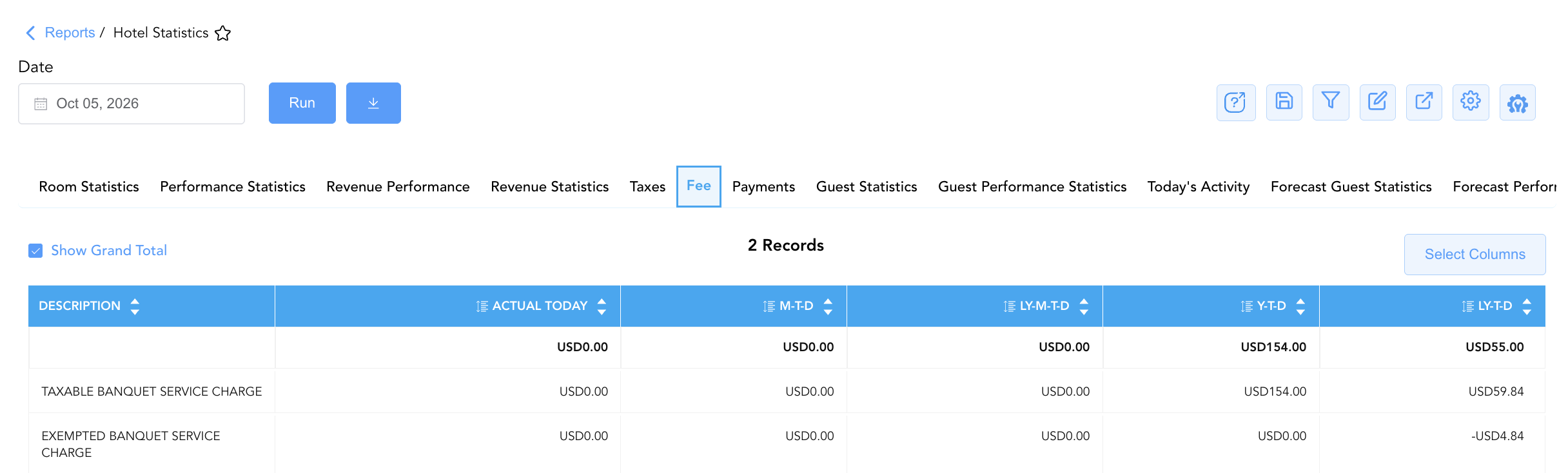
6. Fee
Monitors property surcharge fees, resort fees, and mandatory service charge collections.
-
Primary Use: Tracking non-tax surcharge fee collections.
-
Key Metrics: Fee Description totals across Actual Today, M-T-D, LY-M-T-D, Y-T-D, and LY-T-D.
7. Payments
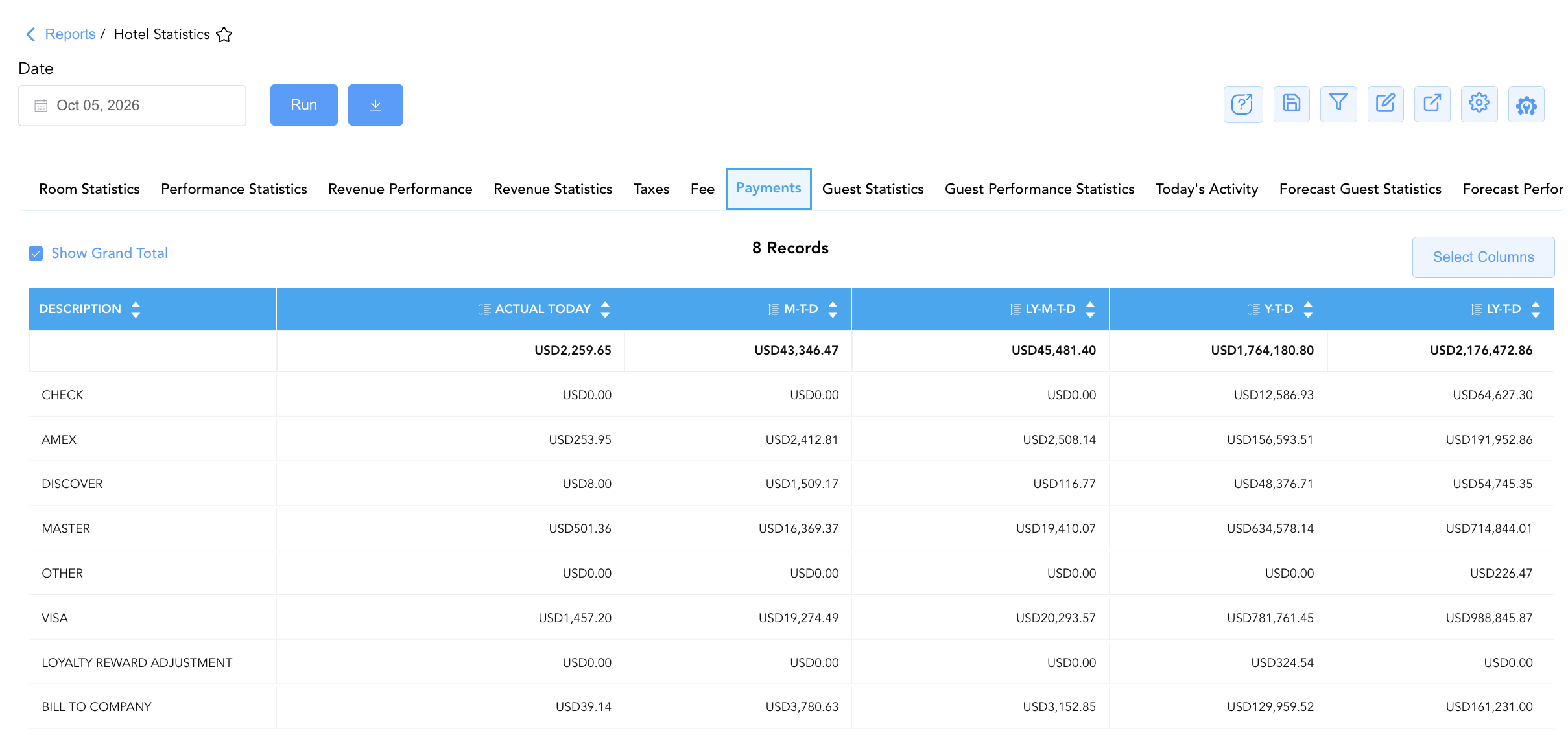
Details settled cashier payment drops, credit card network receipts, and AR transfers.
-
Primary Use: Reconciling front desk cash drawer drops (CASH), check deposits (CHECK), credit card brand network settlements (AMEX, MASTER, VISA), write-offs, and city ledger direct-bill transfers (BILL TO COMPANY).
-
Key Metrics: Payment types displayed in this section are based on individual property configuration. (e.g., Check, Amex, Discover, Master, Other, Visa, Loyalty Reward Adjustment, Bill to Company, etc.)
8. Guest Statistics
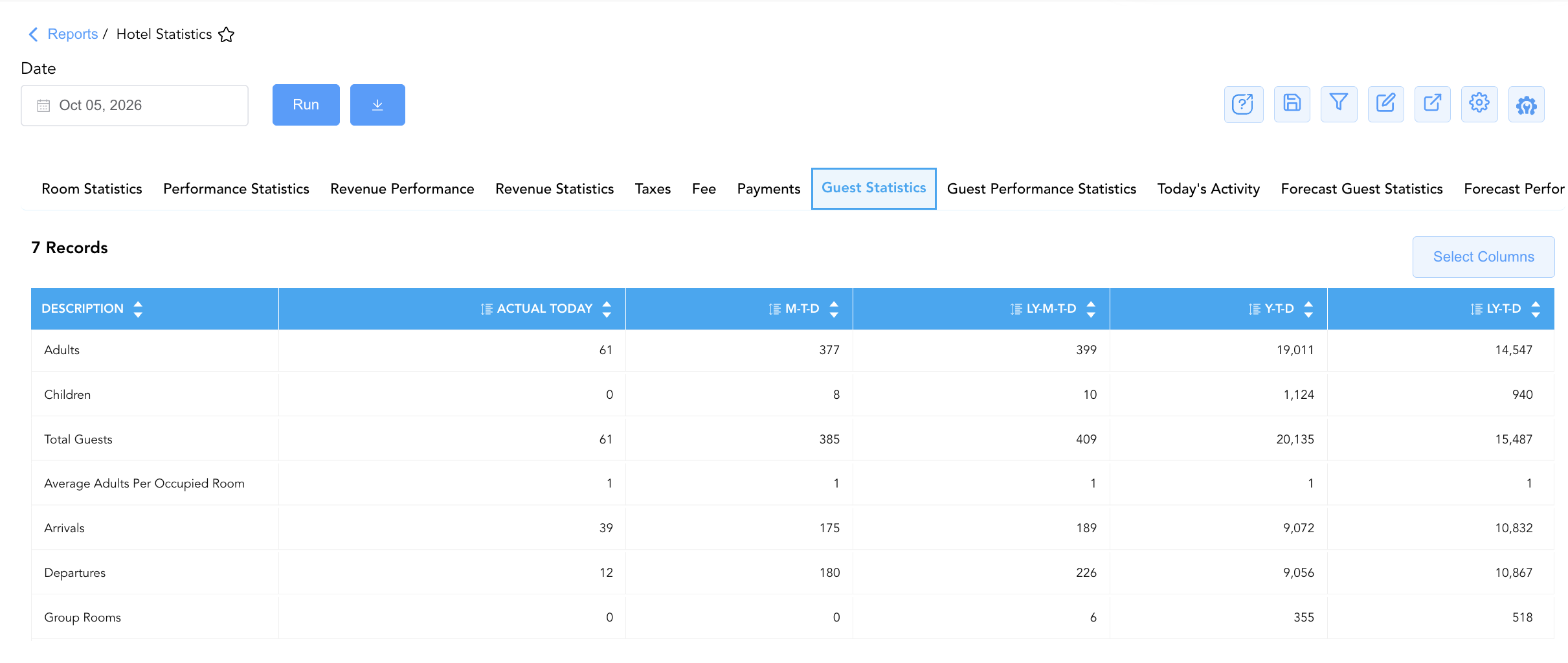
Tracks guest occupant headcounts, guest demographics, and room assignment ratios.
-
Primary Use: Auditing registered adult and child headcounts (Adults, Children, Total Guests), average adults per occupied room (Average Adults Per Occupied Room), daily arrivals/departures, and group room counts (Group Rooms).
-
Key Metrics: Adults, Children, Total Guests, Average Adults Per Occupied Room, Arrivals, Departures, Group Rooms.
9. Guest Performance Statistics
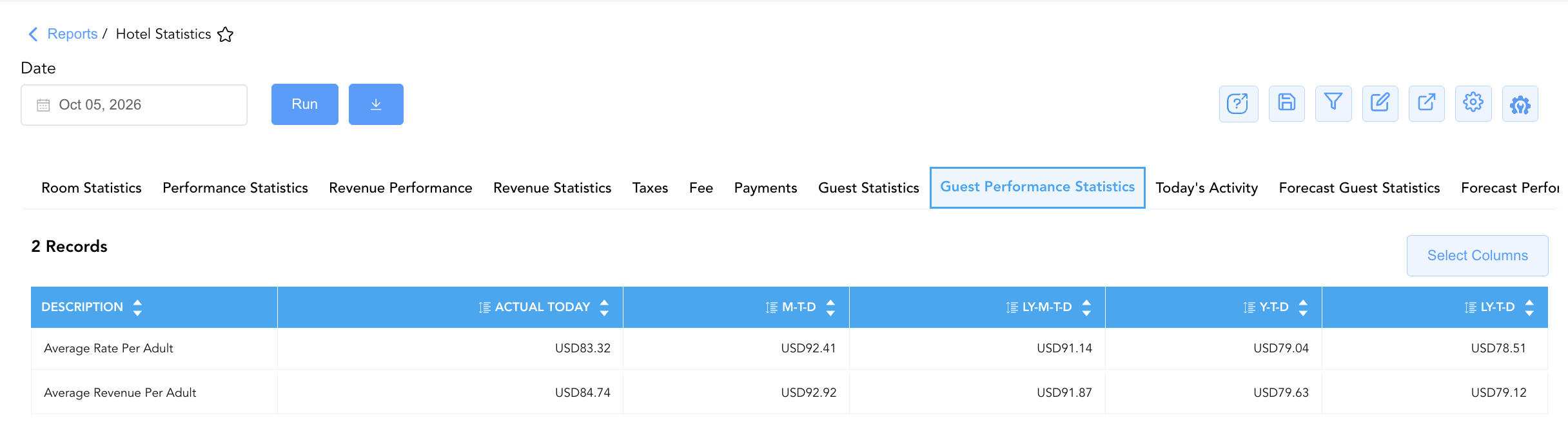
Evaluates revenue generation metrics on a per-guest headcount basis.
-
Primary Use: Measuring guest spend efficiency per registered adult occupant.
-
Key Metrics: Average Rate Per Adult, Average Revenue Per Adult.
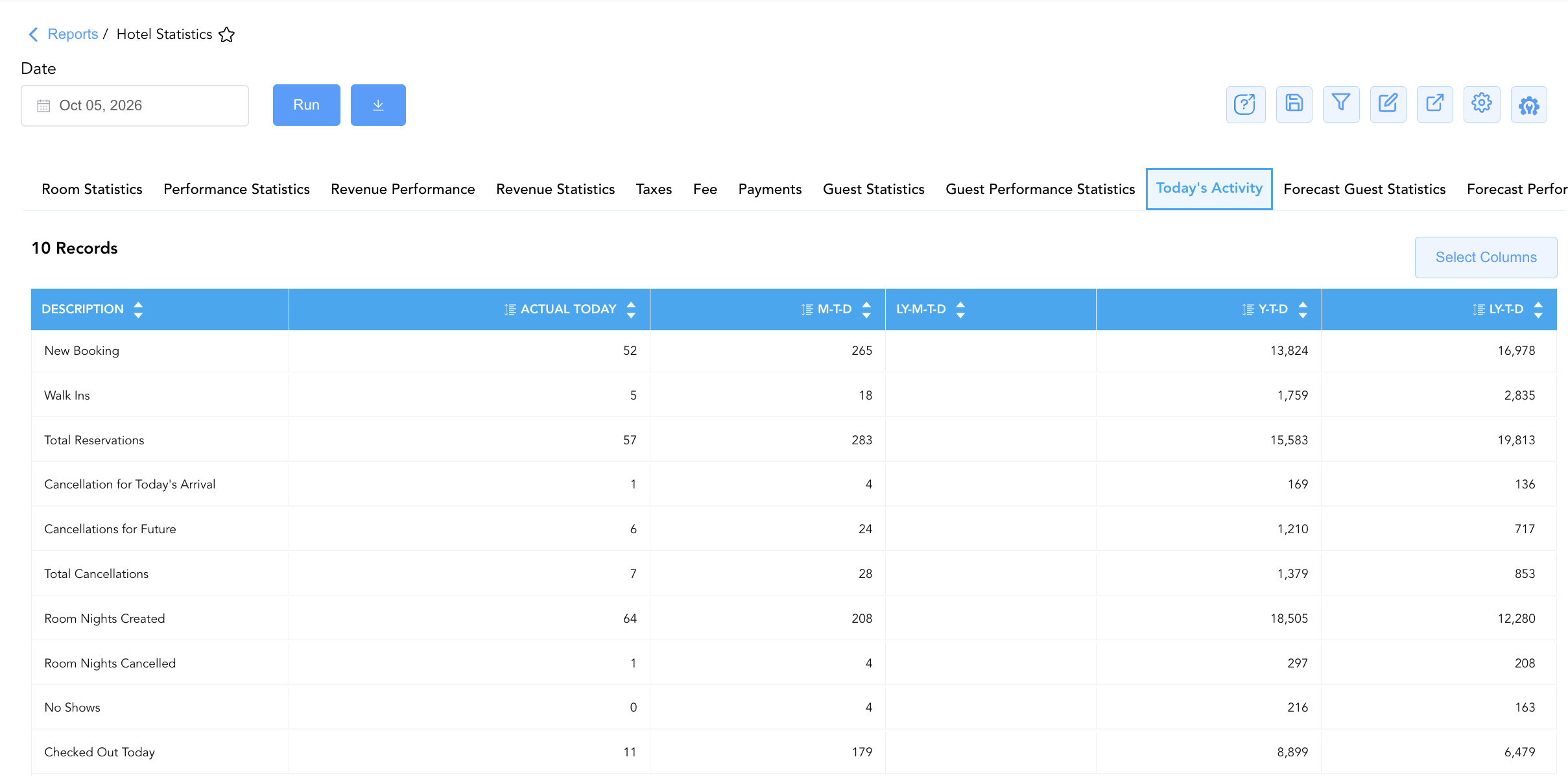
10. Today's Activity
Logs real-time reservation creation velocity, walk-ins, cancellations, and non-arrivals occurring on the current business date.
-
Primary Use: Monitoring daily booking pace (New Booking, Walk Ins, Total Reservations), same-day/future cancellations (Total Cancellations), room nights created/cancelled, no-shows (No Shows), and check-outs finalized today.
-
Key Metrics: New Booking, Walk Ins, Total Reservations, Cancellation for Today's Arrival, Cancellations for Future, Total Cancellations, Room Nights Created, Room Nights Cancelled, No Shows, Checked Out Today.
11. Forecast Guest Statistics
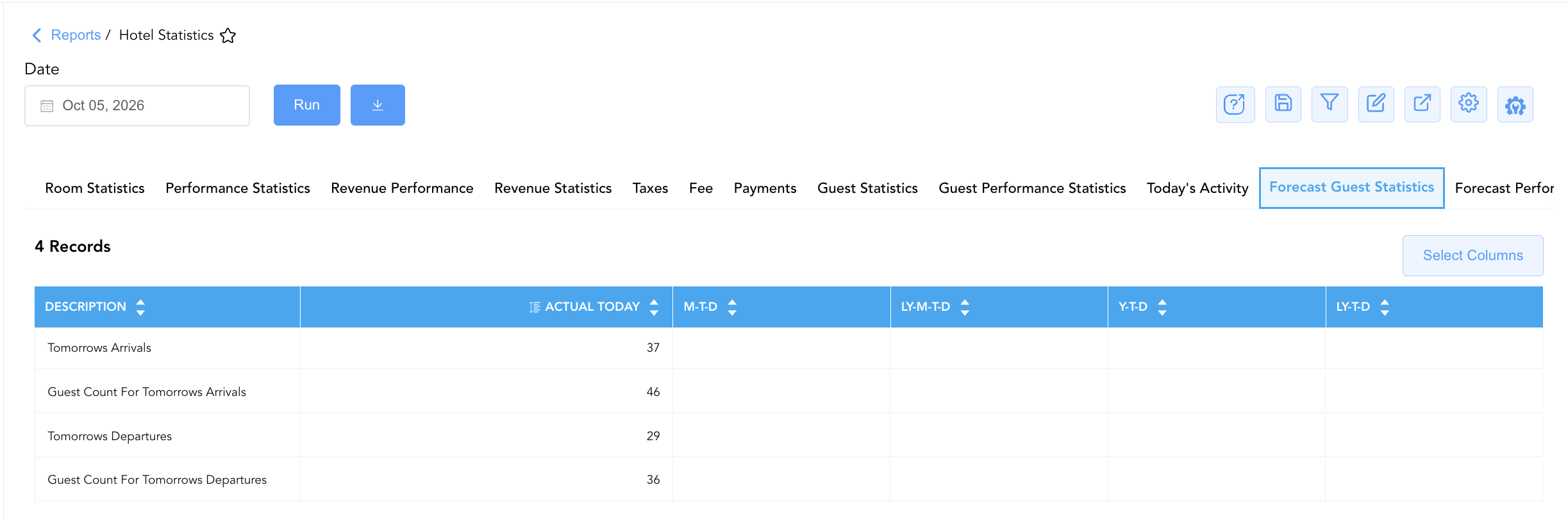
Provides short-term forward projections for upcoming guest arrivals and departures.
-
Primary Use: Preparing front desk and housekeeping staffing schedules based on tomorrow's expected guest movements.
-
Key Metrics: Tomorrows Arrivals, Guest Count For Tomorrows Arrivals, Tomorrows Departures, Guest Count For Tomorrows Departures. 💡 Note: Prior-year metrics are excluded because this section displays forecasted vs. consumed (actual) performance.
12. Forecast Performance Statistics
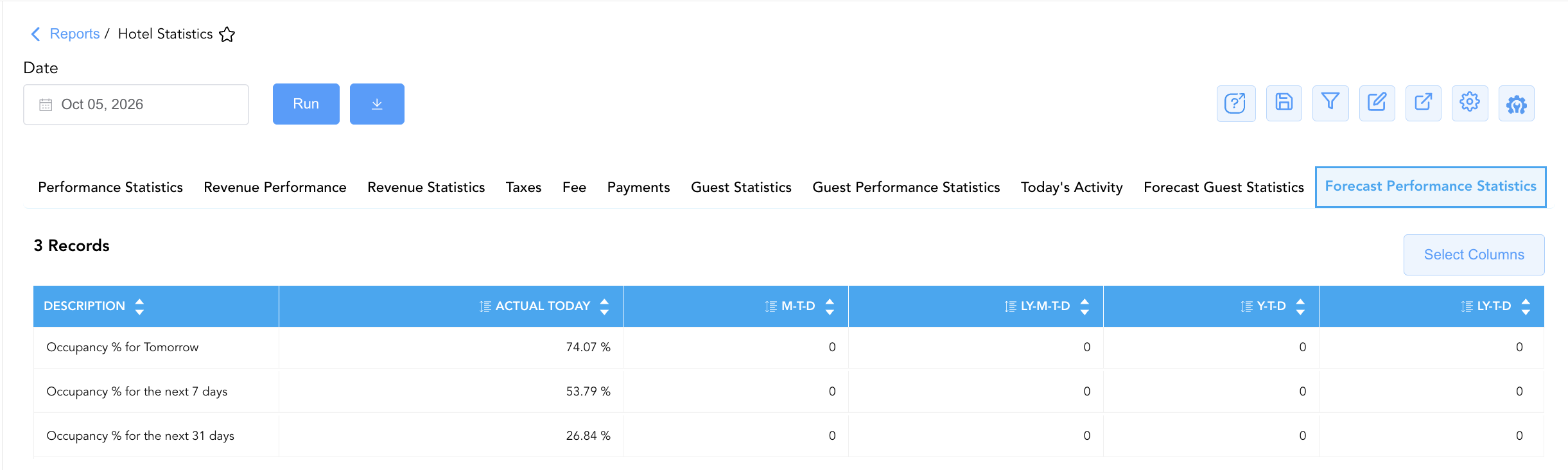
Projects forward occupancy percentages across short, medium, and 31-day booking horizons.
-
Primary Use: Evaluating forward booking pace and property capacity utilization for revenue management pricing adjustments.
-
Key Metrics: Occupancy % for Tomorrow, Occupancy % for the next 7 days, Occupancy % for the next 31 days. 💡 Note: Prior-year metrics are excluded because this section displays forecasted vs. consumed (actual) performance.
Data Dictionary (Dynamic View Columns Across All 12 Sections)
Customize your default view using the Configure (⚙️) icon on the report page. Below is the full data dictionary representing every column available across all 12 sections of this report:
💡 Monetary & Rate Calculation Note: Revenue metrics represent Gross Base Financial Values (Excludes Taxes & Fees) unless explicitly stated in dedicated tax/fee sections. Occupancy percentages are rendered as decimal ratios (e.g.,
0.2784= 27.84%).
|
Column Name |
Section(s) Where Column Appears |
Description |
Data Source / System Mapping |
Includes Taxes & Fees? |
|
Description / Room Revenue |
All Sections |
Specific operational metric title, revenue line item, tax rule, payment tender, or forecast parameter name. |
System Metric Master |
N/A |
|
Actual Today |
All Sections |
Live operational count, financial amount, or percentage recorded for the current business date. |
Real-Time Ledger Engine |
❌ No (Base Revenue) |
|
M-T-D |
All Sections |
Cumulative Month-to-Date total or weighted average for the active month. |
M-T-D Ledger Engine |
❌ No (Base Revenue) |
|
LY-M-T-D |
All Sections |
Historical cumulative Month-to-Date total recorded during the same month last year. |
Historical Ledger Engine |
❌ No (Base Revenue) |
|
Y-T-D |
All Sections |
Cumulative Year-to-Date total or weighted average for the current calendar year. |
Y-T-D Ledger Engine |
❌ No (Base Revenue) |
|
LY-T-D |
All Sections |
Historical cumulative Year-to-Date total recorded during the same timeframe last year. |
Historical Ledger Engine |
❌ No (Base Revenue) |
Customization & Platform Features
User & Property Preferences
-
Personal Preference: Tailor your individual view by hiding or dragging columns. Your preferences save automatically for future sessions.
-
Property Defaults: System Admins can configure standard default layouts across all property users to streamline operational reporting. To maximize audit efficiency, group the columns into the below logical blocks:
-
All 12 Sections:
-
Description / Line Item|Actual Today|M-T-D|Y-T-D|LY-M-T-D|LY-T-D
-
-
Report Toolbar & Quick Actions
Use the top-right toolbar icons on the report page to manage and export your data view:
|
Icon |
Action / Feature |
Description |

|
Knowledge Article |
Opens the knowledge base article to learn how to interpret this report. |

|
Saved Views |
Saves your column filtering, sorting, and highlight preferences so you can easily reload your custom view later without reconfiguring the report. |

|
Filter |
Opens filter controls to isolate specific data within a column based on your selected criteria. |

|
Highlight |
Highlights column values in a designated color based on selected conditions. |

|
Export |
Exports and downloads the report in various formats (Excel, PDF, CSV) for offline analysis or printing. |

|
Configure |
Opens column selection controls to toggle visibility, reorder columns, or hide rows with all zeros. |

|
Additional Configuration |
Provides advanced report configuration and display formatting options to customize data presentation. |
Advanced Controls
-
Exporting & Executive Briefings: Download in Excel or PDF format to support morning operational stand-ups, owner board meetings, and regional management reporting.
-
Filtering: Filter data by specific date ranges or operational sub-categories.
-
Highlighting (Conditional Formatting): Apply custom rules to automatically highlight negative YoY revenue growth or high out-of-order room inventory flags.
🔗 Related Reports & Next Steps
Within 📈 Revenue & Analytics & 📊 Performance Summaries:
-
General Manager Report – Review property-wide macro statistics, total room revenues, ADR, and RevPAR performance.
-
Daily Revenue Summary – Deep dive into daily line-item room, tax, fee, and outlet revenue breakdowns.
-
Market Segment Summary – Analyze how room revenue and ADR performance vary across retail, corporate, group, and OTA segments.
Cross-Pillar Deep Dives:
-
⚖️ Ledgers & Trial Balance: To reconcile total room and extra revenues against General Ledger control accounts, review Trial Balance or Day End Summary.
-
💳 Payments & Transactions: To inspect cashier tender drops and credit card network settlements, review Payments Summary or Settlement By Payment Type.