
Market Segment Overview Report
Parent Hub: 📈 Revenue & Analytics
Category: 🥧 Market & Segmentation
Target Roles: Directors of Revenue Management, General Managers, Directors of Sales, Financial Controllers, Asset Managers, Revenue Analysts
Key Value: Evaluate multi-period commercial market mix yield, benchmark daily versus cumulative MTD and YTD market performance, track occupancy and RevPAR contribution share, and optimize pricing strategies across commercial market segments.
Executive Summary
The Market Segment Overview Report is an executive-level market mix audit and commercial performance document within the 🥧 Market & Segmentation category of the 📈 Revenue & Analytics hub. Designed to deliver consolidated multi-period market intelligence, it aggregates room night production, occupant headcounts, gross revenue generation, rate yield, and contribution share across all primary commercial market segments.
By organizing market performance across three structured operational time horizons (Today, MTD, and YTD), this report maps market segment setup classifications (e.g., CORPORATE MEETING AND GROUPS, CORPORATE REGULAR, LEISURE GROUP, LEISURE OTHER, DISCOUNT AND TRANSIENT DISCOUNT) to essential financial and volume metrics (Revenue, Stays, Adults, Children, Total Guests, ADR, Occupancy Contribution, RevPAR Contribution). This enables revenue managers, sales directors, and executive leadership to evaluate market mix profitability across daily, monthly, and annual cycles, monitor segment capacity penetration, and refine market pricing strategies.
Key Capabilities
-
Three-Horizon Timeframe Governance: Provides dedicated operational sections comparing same-day realizations (Today) alongside cumulative Month-to-Date (MTD) and Year-to-Date (YTD) benchmarks.
-
Commercial Segment Mix Unbundling: Itemizes room nights sold (Stays), guest headcounts (Adults, Children, Total Guests), and gross accommodation revenue (Revenue) across major commercial market classifications.
-
Rate Yield & Average Daily Rate Benchmarking: Tracks Average Daily Rate (ADR) realized per market segment across daily, MTD, and YTD periods to monitor rate integrity and prevent dilution.
-
Occupancy & RevPAR Contribution Share: Calculates each market segment's proportional share of overall property physical capacity (Occupancy Contribution) and dollar yield (RevPAR Contribution).
Report Views & Functional Breakdown (All 3 Sections)
The Market Segment Overview Report presents commercial market performance across three structured operational sections:
┌────────────────────────────────────────────────────────────────────────┐
│                   MARKET SEGMENT OVERVIEW REPORT                       │
├────────────────────────────────────────────────────────────────────────┤
│ 1. Today Section                                                       │
│    (Same-Day Realizations, Guest Demographics, & Daily Segment Mix)    │
├────────────────────────────────────────────────────────────────────────┤
│ 2. Month-to-Date (MTD) Section                                         │
│    (Cumulative Monthly Volume, Revenue, ADR, & Contribution Share)    │
├────────────────────────────────────────────────────────────────────────┤
│ 3. Year-to-Date (YTD) Section                                          │
│    (Annual Cumulative Market Mix Performance & Long-Term Penetration)  │
└────────────────────────────────────────────────────────────────────────┘
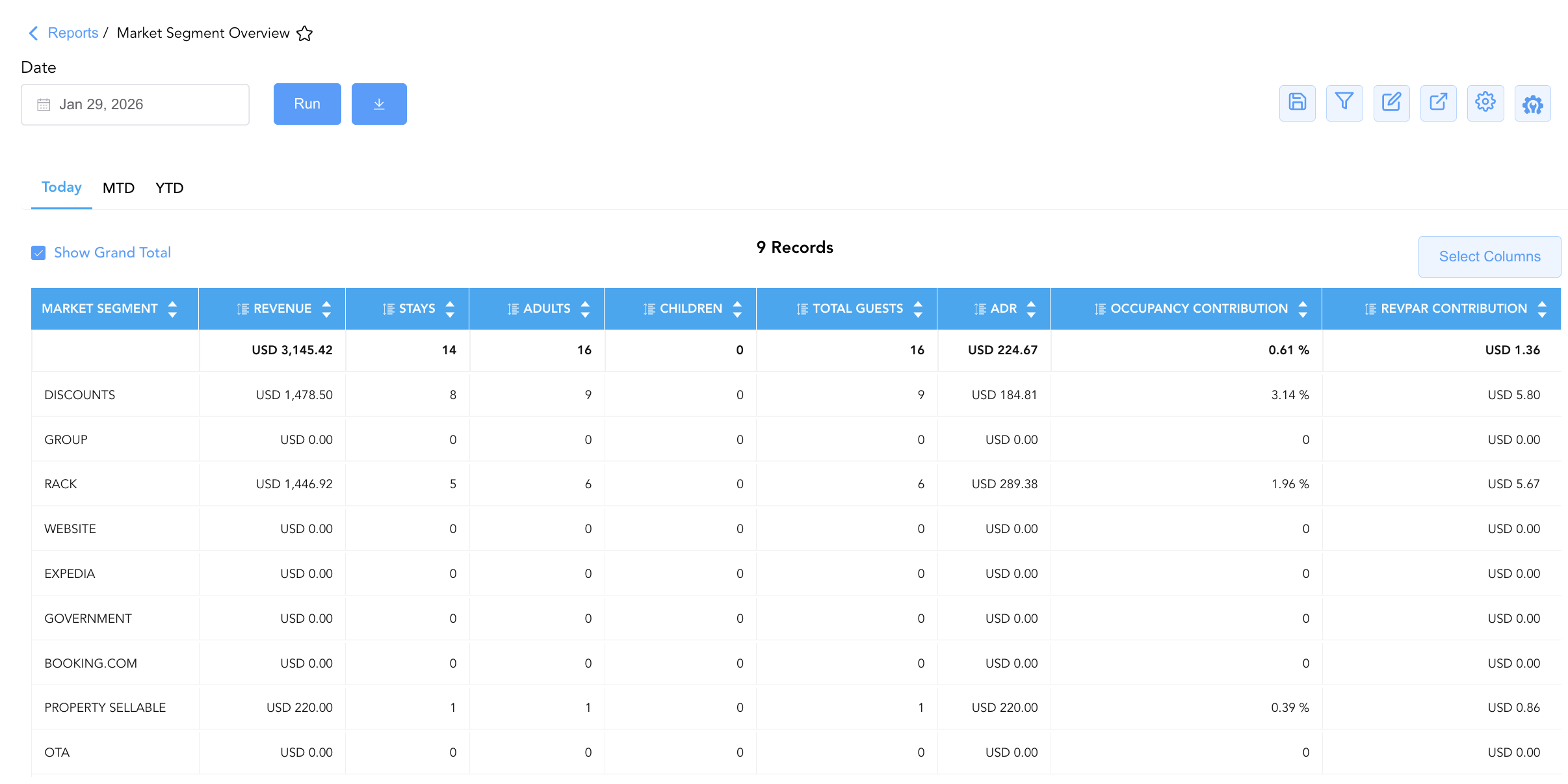
1. Today
Logs same-day room night production, registered occupant headcounts, rate yield, and contribution share for each active market segment on the reporting business date.
-
Primary Use: Evaluating daily market mix profitability, auditing single-day guest headcounts (
Adults,Children,Total Guests), verifying daily segment rate realization (ADR), and measuring same-day capacity contribution. -
Key Metrics: Market Segment, Revenue, Stays, Adults, Children, Total Guests, ADR, Occupancy Contribution, RevPAR Contribution.
2. MTD (Month-to-Date)
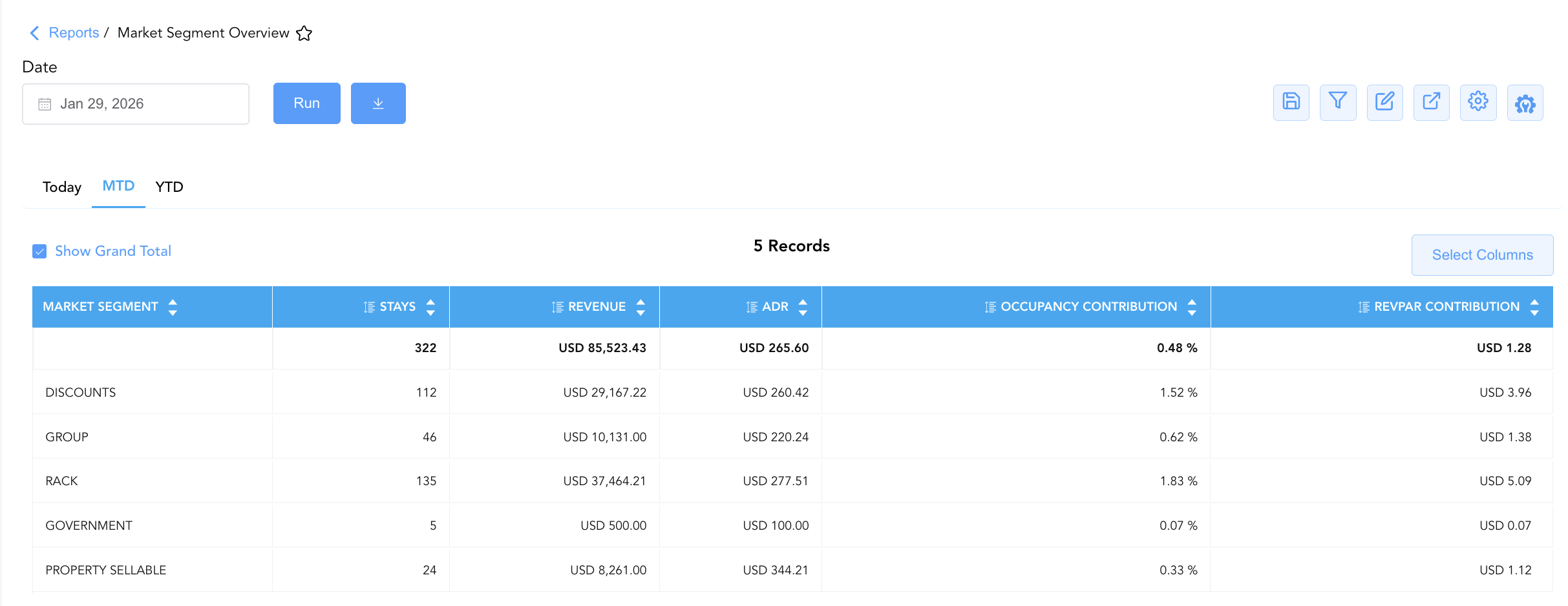
Aggregates cumulative room night production, gross revenue generation, Average Daily Rate, and contribution share for the active operating month.
-
Primary Use: Tracking monthly market segment demand pace (
Stays), evaluating month-to-date revenue growth (Revenue), assessing segment rate yield (ADR), and measuring monthly market penetration. -
Key Metrics: Market Segment, Revenue, Stays, ADR, Occupancy Contribution, RevPAR Contribution.
3. YTD (Year-to-Date)
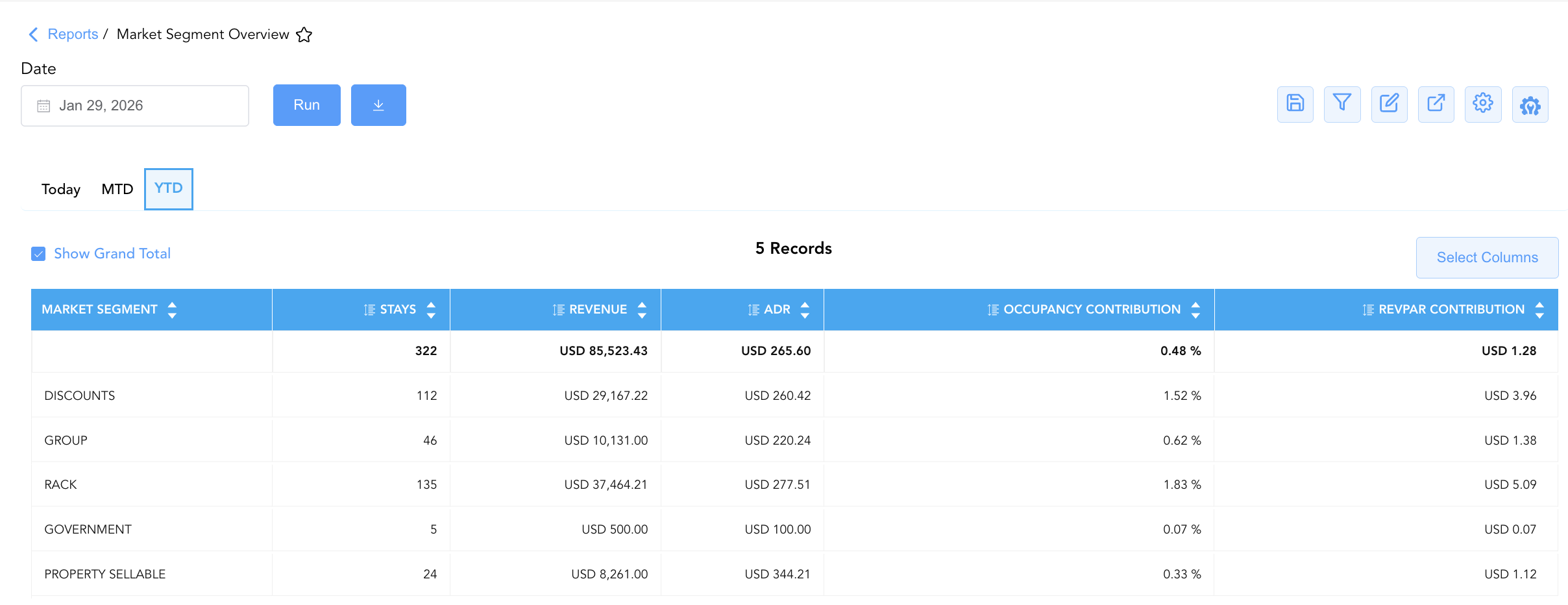
Provides an executive annual rollup of cumulative room night volume, gross revenue earnings, rate yield, and contribution share across the operating year.
-
Primary Use: Assessing long-term commercial market mix performance, evaluating annual corporate/group contract production, benchmarking YTD segment ADR, and supporting annual sales budget preparation.
-
Key Metrics: Market Segment, Revenue, Stays, ADR, Occupancy Contribution, RevPAR Contribution.
Data Dictionary (Dynamic View Columns Across All 3 Sections)
Customize your default view using the Configure (⚙️) icon on the report page. Below is the full data dictionary representing every column available across all three sections of this report:
💡 Monetary & Rate Calculation Note: All monetary values (Revenue, ADR, RevPAR Contribution) represent Gross Base Room Revenue (Excludes Taxes & Fees). ADR is calculated as ADR = Revenue ÷ Stays. Occupancy Contribution is rendered as a decimal ratio (e.g.,
0.1321= 13.21%).
|
Column Name |
Section(s) Where Column Appears |
Description |
Data Source / System Mapping |
Includes Taxes & Fees? |
|
Market Segment |
All 3 Sections |
Full description of the commercial market segment classification (e.g., CORPORATE MEETING AND GROUPS, CORPORATE REGULAR, LEISURE GROUP, LEISURE OTHER, DISCOUNT AND TRANSIENT DISCOUNT). |
Market Segment Setup Master |
N/A |
|
Revenue |
All 3 Sections |
Gross base room revenue generated by the market segment for the corresponding period (Today, MTD, YTD). |
|
❌ No |
|
Stays |
All 3 Sections |
Total physical room nights sold and occupied by the market segment during the period. |
|
N/A |
|
Adults |
Today |
Total registered adult guests occupying rooms in the market segment on the business date. |
|
N/A |
|
Children |
Today |
Total registered child guests occupying rooms in the market segment on the business date. |
|
N/A |
|
Total Guests |
Today |
Total registered guest occupant headcount within the segment ( |
|
N/A |
|
ADR |
All 3 Sections |
Realized Average Daily Rate earned per occupied room night in the segment ( |
|
❌ No |
|
Occupancy Contribution |
All 3 Sections |
Proportional share of total property physical capacity occupied by the segment ( |
|
N/A |
|
RevPAR Contribution |
All 3 Sections |
Revenue Per Available Room yield contributed specifically by the segment ( |
|
❌ No |
Customization & Platform Features
User & Property Preferences
-
Personal Preference: Tailor your individual view by hiding or dragging columns. Your preferences save automatically for future sessions.
-
Property Defaults: System Admins can configure standard default layouts across all property users to streamline operational reporting. To maximize audit efficiency, group the columns into the below logical blocks:
-
Section 1 Today:
-
Segment Anchor (Col 1):
Market Segment -
Volume & Demographics (Cols 2–5):
Stays|Adults|Children|Total Guests -
Revenue Stream (Col 6):
Revenue -
Rate Yield & Contribution Metrics (Cols 7–9):
ADR|Occupancy Contribution|RevPAR Contribution
-
-
Section 2: MTD
-
Segment Anchor (Col 1):
Market Segment -
Volume & Revenue (Cols 2–3):
Stays|Revenue -
Rate Yield & Contribution Metrics (Cols 4–6):
ADR|Occupancy Contribution|RevPAR Contribution
-
-
Section 3: YTD
-
Segment Anchor (Col 1):
Market Segment -
Volume & Revenue (Cols 2–3):
Stays|Revenue -
Rate Yield & Contribution Metrics (Cols 4–6):
ADR|Occupancy Contribution|RevPAR Contribution
-
-
Report Toolbar & Quick Actions
Use the top-right toolbar icons on the report page to manage and export your data view:
|
Icon |
Action / Feature |
Description |

|
Knowledge Article |
Opens the knowledge base article to learn how to interpret this report. |

|
Saved Views |
Saves your column filtering, sorting, and highlight preferences so you can easily reload your custom view later without reconfiguring the report. |

|
Filter |
Opens filter controls to isolate specific data within a column based on your selected criteria. |

|
Highlight |
Highlights column values in a designated color based on selected conditions. |

|
Export |
Exports and downloads the report in various formats (Excel, PDF, CSV) for offline analysis or printing. |

|
Configure |
Opens column selection controls to toggle visibility, reorder columns, or hide rows with all zeros. |

|
Additional Configuration |
Provides advanced report configuration and display formatting options to customize data presentation. |
Advanced Controls
-
Exporting & Mix Strategy Analysis: Download in Excel or PDF format to support monthly revenue strategy reviews, owner financial reporting, and commercial market mix optimization.
-
Filtering: Filter data by specific market segments or date ranges.
-
Highlighting (Conditional Formatting): Apply custom rules to automatically highlight high-performing market segments or segments experiencing rate dilution.
🔗 Related Reports & Next Steps
Within 📈 Revenue & Analytics & 🥧 Market & Segmentation:
-
Market Segment Details – Dual-section report combining a daily market summary with itemized guest folio transaction details.
-
Market Segment Details Forecast – Forward-looking demand intelligence report projecting market segment room nights, guest movements, and revenues.
-
Local Market Segment – Summary-level view tracking daily revenue, stays, ADR, and RevPAR contribution by local market segment.
Cross-Pillar Deep Dives:
-
⚖️ Ledgers & Trial Balance: Reconcile room revenue realizations against General Ledger control accounts in Trial Balance or Day End Summary.
-
💳 Payments & Transactions: To inspect specific guest payments and folio charges driving market segment revenue, review All Transactions.