
ZIP Code Report Overview
Parent Hub: 📈 Revenue & Analytics
Category: 🥧 Market & Segmentation
Target Roles: Directors of Sales & Marketing, Directors of Revenue Management, General Managers, Regional Marketing Managers, Market Research Analysts
Key Value: Evaluate geographic guest feeder markets at the postal code level, analyze room night production by geographic origin, identify high-volume source postal regions, and optimize targeted regional marketing and sales distribution strategies.
Executive Summary
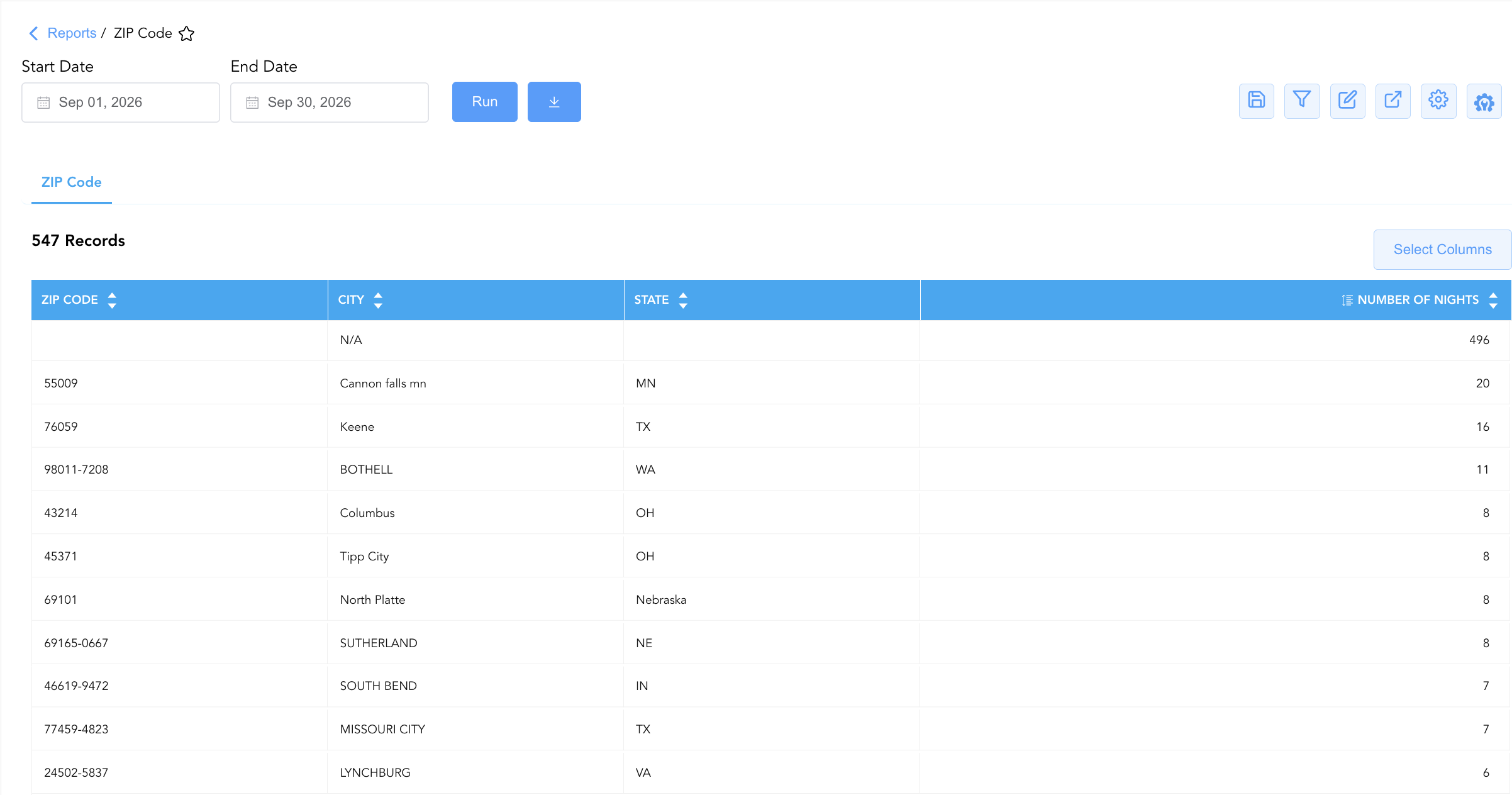
The ZIP Code Report is a primary localized geographic segmentation and feeder market analysis document within the 🥧 Market & Segmentation category of the 📈 Revenue & Analytics hub. Designed to deliver high-resolution spatial intelligence based on guest profile address data, it aggregates room night stays (Number Of Nights) by postal designation (ZIP Code / Postal Code), municipal area (City), and state/province (State).
-
By mapping postal profile attributes (ZIP Code, City, State) to stay volume metrics (Number Of Nights), this report enables sales directors, revenue managers, and marketing teams to identify top regional feeder markets, audit guest profile capture completeness (including unassigned postal code production), optimize drive-market advertising spend, and align targeted regional promotional campaigns.
Key Capabilities
-
Granular Feeder Market Audit: Itemizes stay volume (Number Of Nights) down to 5-digit ZIP codes, ZIP+4 extended designations, and international postal formats (e.g., Canadian FSA codes).
-
Geographic Profile Standardization: Pairs postal codes with registered municipal titles (City) and state or provincial jurisdictions (State) for localized market analysis.
-
Unassigned Profile Tracking: Isolates stays with blank or missing postal code profiles to monitor front desk address capture compliance and data quality.
-
Volume-Based Feeder Ranking: Ranks source postal regions by total occupied nights to evaluate primary, secondary, and long-tail feeder markets.
Report Views & Functional Breakdown
The ZIP Code Report presents localized geographic demand in a unified single-table ledger that supports three key analytical perspectives:
┌────────────────────────────────────────────────────────────────────────┐
│                      ZIP CODE REPORT                                   │
├────────────────────────────────────────────────────────────────────────┤
│                         Unified Matrix View                            │
├──────────────────────────┬──────────────────────────┬──────────────────┤
│ 1. Primary Feeder        │ 2. Regional City & State │ 3. Profile Data  │
│    Postal Rankings       │    Geographic Clusters   │    Completeness  │
└──────────────────────────┴──────────────────────────┴──────────────────┘
1. Primary Feeder Postal Rankings
Monitors room night stay production generated by specific postal/ZIP codes across the reported date range.
-
Primary Use: Identifying top-producing postal codes, ranking key drive-market feeder zones, and measuring localized campaign ROI.
-
Key Metrics: ZIP Code, Number Of Nights, City, State.
2. Regional City & State Geographic Clusters
Aggregates postal production up to municipal and state levels to evaluate broader regional market penetration.
-
Primary Use: Assessing state-by-state and city-wide feeder volume, evaluating regional drive-market demand shifts, and planning regional sales trips.
-
Key Metrics: City, State, ZIP Code, Number Of Nights.
3. Profile Data Completeness
Isolates stays associated with missing or blank ZIP code records to monitor front desk check-in data capture protocols.
-
Primary Use: Auditing unassigned postal code records (blank ZIP Code entries), enforcing address collection standards during check-in, and improving marketing database integrity.
-
Key Metrics: ZIP Code (Blank/Unassigned), Number Of Nights.
Data Dictionary (Dynamic View Columns)
Customize your default view using the Configure (⚙️) icon on the report page. Below is the full data dictionary representing every column available in this report:
💡 Volume & Address Mapping Note: Number Of Nights represents cumulative physical room nights occupied by guests originating from the designated postal code during the selected date range.
|
Column Name |
Description |
Data Source / System Mapping |
Includes Taxes & Fees? |
|---|---|---|---|
|
ZIP Code |
Official postal code or ZIP code assigned to the guest profile (e.g., 55009, 76059, 98011-7208, N5X 2C1, or Blank). |
Guest Profile > Postal / ZIP Code |
N/A |
|
Number Of Nights |
Total physical room nights / stays occupied by guests originating from the postal code during the date range. |
SUM(Occupied Room Nights by ZIP) |
N/A |
|
City |
Registered municipality or city title associated with the guest profile postal code (e.g., Cannon falls, Keene, Bothell). |
Guest Profile > City Title |
N/A |
|
State |
Official state, province, or territorial jurisdiction associated with the guest profile (e.g., MN, TX, WA, NE, ON). |
Guest Profile > State / Province |
N/A |
Customization & Platform Features
User & Property Preferences
-
Personal Preference: Tailor your individual view by hiding or dragging columns. Your preferences save automatically for future sessions.
-
Property Defaults: System Admins can configure standard default layouts across all property users to streamline operational reporting. To maximize audit efficiency, group the columns into the below logical blocks.
-
Geographic Identification (Cols 1–3):
Zip Code|City|State -
Guest Headcount Metrics (Col 4):
Guest Count -
Length of Stay Metrics (Col 5):
Number Of Nights
-
Report Toolbar & Quick Actions
Use the top-right toolbar icons on the report page to manage and export your data view:
|
Icon |
Action / Feature |
Description |

|
Knowledge Article |
Opens the knowledge base article to learn how to interpret this report. |

|
Saved Views |
Saves your column filtering, sorting, and highlight preferences so you can easily reload your custom view later without reconfiguring the report. |

|
Filter |
Opens filter controls to isolate specific data within a column based on your selected criteria. |

|
Highlight |
Highlights column values in a designated color based on selected conditions. |

|
Export |
Exports and downloads the report in various formats (Excel, PDF, CSV) for offline analysis or printing. |

|
Configure |
Opens column selection controls to toggle visibility, reorder columns, or hide rows with all zeros. |

|
Additional Configuration |
Provides advanced report configuration and display formatting options to customize data presentation. |
Advanced Controls
-
Exporting & Market Strategy Analysis: Download in Excel or PDF format to support regional sales strategy meetings, direct mail marketing campaigns, and drive-market advertising reviews.
-
Filtering: Filter data by specific State, City, or ZIP Code, or isolate unassigned profile entries (blank ZIP Code).
-
Highlighting (Conditional Formatting): Apply custom rules to automatically highlight high-volume feeder postal codes or flag unassigned profile totals.
🔗 Related Reports & Next Steps
Within 📈 Revenue & Analytics & 🥧 Market & Segmentation:
-
Revenue by Guest Country – Geographical revenue segmentation mapping gross room revenue, room nights, and ADR yield by guest nationality.
-
Nationality – Detailed guest occupant headcount breakdown and demographic profiling by country of origin.
-
Tourism Report – Demographic guest traffic segmentation tracking Domestic and Outbound visitor counts and length of stay.
-
Market Segment Overview – Executive-level report tracking daily, MTD, and YTD market segment performance and contribution share.
Cross-Pillar Deep Dives:
-
⚖️ Ledgers & Trial Balance: Reconcile overall room night production against General Ledger control accounts in Trial Balance or Day End Summary.
-
💳 Payments & Transactions: Inspect transaction settlements associated with regional guest stays in Settlement By Payment Type.