
Revision Date:
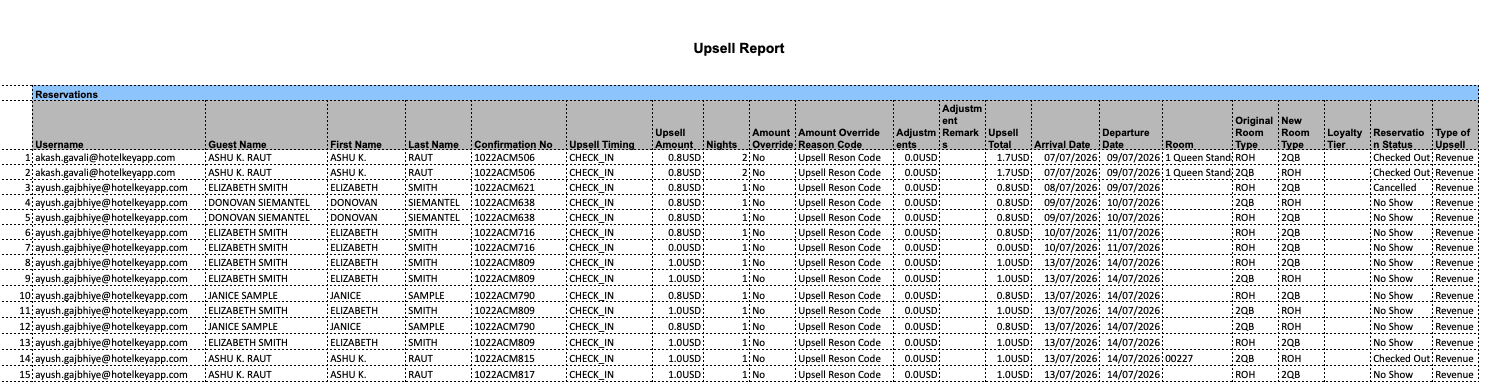
Report Description: This Report tracks revenue and performance generated from upselling — offering guests a better room, package, or add-on than what they originally booked, usually for an additional charge.
Date Range: Upto 31 days in past .
Available Report Columns for the Report:
|
Column Name |
Column Description |
Amount Includes Taxes and Fees |
Calculation |
|
Username |
The staff member/agent who processed the upsell. |
Not Available |
Not Available |
|
Guest Name |
Full name of the guest who was upsold. |
Not Available |
Not Available |
|
First Name |
Guest's first name. |
Not Available |
Not Available |
|
Last Name |
Guest's last name. |
Not Available |
Not Available |
|
Confirmation No |
The reservation's unique confirmation/booking number. |
Not Available |
Not Available |
|
Upsell Timing |
When the upsell was offered/accepted (e.g., pre-arrival, at check-in). |
Not Available |
Not Available |
|
Upsell Amount |
The additional revenue generated from the upsell. |
Not Available |
Not Available |
|
Amount Override |
Indicates if the standard upsell amount was manually changed by staff. |
Not Available |
Not Available |
|
Nights |
Number of nights the upsell (e.g., upgraded room) applies to. |
Not Available |
Not Available |
|
Adjustment |
Any manual change made to the upsell charge. |
Not Available |
Not Available |
|
Adjustment Remarks |
Notes/reason explaining why the adjustment was made. |
Not Available |
Not Available |
|
Arrival Date |
Guest's check-in date. |
Not Available |
Not Available |
|
Departure Date |
Guest's check-out date. |
Not Available |
Not Available |
|
Room |
The room number assigned to the guest. |
Not Available |
Not Available |
|
Original Room Type |
The room type the guest initially booked. |
Not Available |
Not Available |
|
New Room Type |
The upgraded room type the guest was moved to. |
Not Available |
Not Available |
|
Loyalty Tier |
The guest's loyalty program membership level. |
Not Available |
Not Available |
|
Reservation Status |
Current status of the reservation (e.g., confirmed, checked-in, checked-out). |
Not Available |
Not Available |
|
Type of Upsell |
Category of the upsell offered (e.g., room upgrade, package, early check-in). |
Not Available |
Not Available |
Misc Report Information:
Available Features:
-
Export: ability to download and save the file into an alternate format.
-
Filter: filter a range of data based on criteria defined by the user.
-
Highlight: also known as conditional formatting is the ability to highlight certain values making them easier to identify.
Available Configuration:
-
User Preferences: allows the user to customize their report view by repositioning or removing columns.
-
Property Preferences: allows the property to customize the report view for all users by repositioning or removing columns.
Baseline Configuration:
-
Property Preferences Settings:
-
Following columns to be disabled for initial deployment:
-
Not Applicable
-
-