
Direct Bill Reconciliation Report Overview
Parent Hub: 💰 Finance & Accounting Reports
Category: 📬 Billing & Receivables (AR)
Target Roles: Directors of Finance & Controllers, Accounting Managers & Clerks, Group Rooms Coordinators
Key Value: Streamline corporate and group invoicing by giving accounting teams complete line-item stay visibility, comparing total charges directly against total payments to spot payment gaps and finalize direct bills with confidence.
Executive Summary
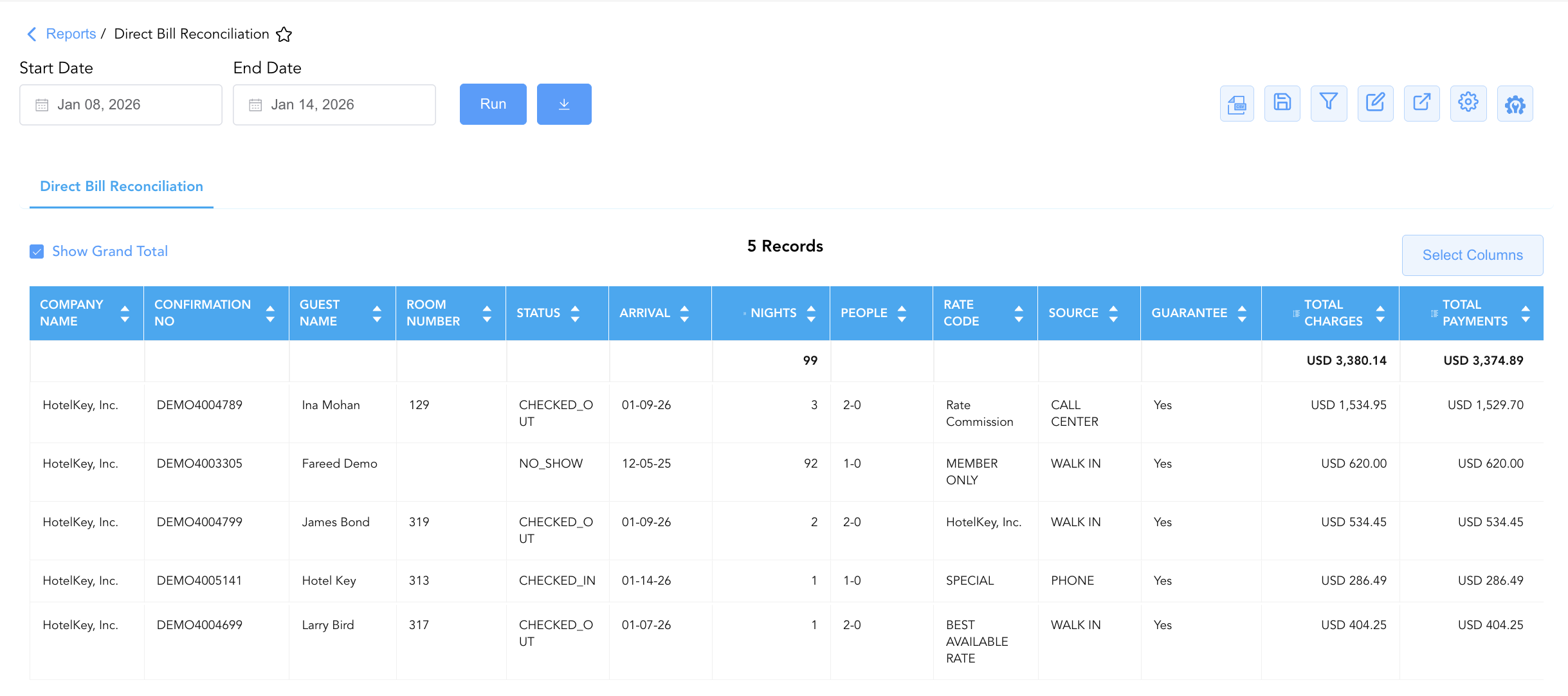
The Direct Bill Reconciliation Report is a key operational audit tool within the 📬 Billing & Receivables (AR) module. Designed for end-to-end corporate and group account reconciliation, it provides complete visibility into individual stay itineraries billed to corporate accounts or group master folios.
By pairing comprehensive stay details (Arrival, Nights, Room Number, Rate Code, Guarantee status) directly alongside real-time ledger figures (Total Charges vs. Total Payments), this report enables controllers, night auditors, and accounting leads to quickly spot payment discrepancies, verify guarantee terms, audit no-show/cancellation charges, and finalize direct-bill invoicing prior to transfer.
Key Capabilities
-
Stay & Billing Reconciliation: Compares Total Charges directly against Total Payments for every corporate or group reservation to calculate real-time net balances.
-
Guarantee & Booking Verification: Audits booking channels (Source), rate plans (Rate Code), and guarantee states (Guarantee: Yes/No) for corporate policy compliance.
-
Multi-Segment Coverage: Accommodates both transient corporate guest bookings and structured group block accounts (Group No / Group Name).
Report Views & Functional Breakdown
The Direct Bill Reconciliation Report presents transaction data across three core analytical perspectives:
┌────────────────────────────────────────────────────────────────────────┐
│                   DIRECT BILL RECONCILIATION REPORT                    │
├──────────────────────────┬──────────────────────────┬──────────────────┤
│ 1. Direct Bill Account   │ 2. Billing & Charge      │ 3. Guarantee &   │
│    Ledger                │    Reconciliation        │    Reservation   │
│                          │                          │    Audit         │
└──────────────────────────┴──────────────────────────┴──────────────────┘
1. Direct Bill Account Ledger
Aggregates stays by corporate client and group master account, providing a clean overview of guest names, room assignments, and reservation codes.
-
Primary Use: Grouping corporate billings by account name to verify guest stay rosters before generating final client invoice packages.
-
Key Metrics: Company Name, Group No, Group Name, Confirmation No, Guest Name, Room Number.
2. Billing & Charge Reconciliation
Cross-references cumulative folio charges against payments and posted deposits to highlight unsettled amounts or credit balances.
-
Primary Use: Spotting payment gaps, auditing total room charges against posted tender, and reconciling net balances.
-
Key Metrics: Total Charges, Total Payments, Nights, Status (
CHECKED_IN,CHECKED_OUT,NO_SHOW,CANCELLED).
3. Guarantee & Reservation Audit
Evaluates booking origin, rate code applications, occupancy counts, and payment guarantee flags for corporate compliance.
-
Primary Use: Enforcing direct-bill guarantee terms, auditing rate eligibility, and investigating no-show billing exceptions.
-
Key Metrics: Rate Code, Source, Arrival Date, Nights, People (Adults-Children), Guarantee (Yes/No).
Data Dictionary (Dynamic View Columns)
Customize your default view using the Configure (⚙️) icon on the report page. Below is the full data dictionary available for this report:
💡 Tax Treatment Note: Total Charges and Total Payments represent Gross Amounts (Includes Taxes and Fees) billed to the guest or group folio.
|
Column Name |
Description |
Data Source / System Mapping |
Includes Taxes & Fees? |
|
Company Name |
Name of the contracted corporate entity receiving the direct bill. |
|
N/A |
|
Confirmation No |
Unique confirmation number assigned to the individual guest reservation. |
System Reservation ID |
N/A |
|
Group No |
Unique master identifier code assigned to the group block. |
|
N/A |
|
Guest Name |
Primary guest full name assigned to the reservation. |
|
N/A |
|
Group Name |
Name of the group or event block tied to the reservation. |
|
N/A |
|
Room Number |
Assigned physical guest room number during the stay. |
|
N/A |
|
Rate Code |
Rate code or pricing structure applied to the reservation. |
|
N/A |
|
Source |
Channel through which the booking was created (e.g., |
|
N/A |
|
Arrival |
Scheduled check-in date for the reservation. |
|
N/A |
|
Nights |
Total duration of the stay in calendar nights. |
|
N/A |
|
People |
Guest occupancy ratio formatted as |
|
N/A |
|
Guarantee |
Indicates if the stay is backed by a corporate guarantee ( |
|
N/A |
|
Total Charges |
Total cumulative gross charges posted to the folio. |
|
🟢 Yes |
|
Total Payments |
Total cumulative payments, credits, or deposits applied to the folio. |
|
🟢 Yes |
|
Status |
Current state of the stay ( |
Reservation System State |
N/A |
Customization & Platform Features
User & Property Preferences
-
Personal Preference: Tailor your individual view by hiding or dragging columns. Your preference saves automatically for future sessions.
-
Property Defaults: System Admins can configure standard default layouts across all property users to streamline operational reporting. To maximize audit efficiency, group the columns into 4 logical blocks:
-
Direct Bill & Account Context (Cols 1–3):
Company Name|Group Name|Group No -
Reservation & Guest Identifiers (Cols 4–7):
Confirmation No|Guest Name|Room No|Status -
Stay & Booking Details (Cols 8–13):
Arrival|Nights|People|Rate Code|Source|Guarantee -
Financial Reconciliation (Cols 14–15):
Total Charges|Total Payments
-
Report Toolbar & Quick Actions
Use the top-right toolbar icons on the report page to manage and export your data view:
|
Icon |
Action / Feature |
Description |

|
Knowledge Article |
Opens the knowledge base article to learn how to interpret this report. |

|
Background Export |
Allows users to download up to 365 days of data directly to their computer in CSV format. |

|
Saved Views |
Saves your column filtering, sorting, and highlight preferences so you can easily reload your custom view later without reconfiguring the report. |

|
Filter |
Opens filter controls to isolate specific data within a column based on your selected criteria. |

|
Highlight |
Highlights column values in a designated color based on selected conditions. |

|
Export |
Exports and downloads the report in various formats (Excel, PDF, CSV) for offline analysis or printing. |

|
Configure |
Opens column selection controls to toggle visibility, reorder columns, or hide rows with all zeros. |

|
Additional Configuration |
Provides advanced report configuration and display formatting options to customize data presentation. |
Advanced Controls
-
Exporting & Report Distribution: Download in Excel or PDF format to attach supporting stay documentation to outgoing client invoices.
-
Filtering: Filter data by specific Company Name, Status (
NO_SHOW,CHECKED_OUT), or date ranges. -
Highlighting (Conditional Formatting): Apply custom rules to automatically highlight reservations where
Total Charges ≠ Total Paymentsor non-guaranteed direct-bill stays.
🔗 Related Reports & Next Steps
Within 📬 Billing & Receivables (AR):
-
Accounts Receivable Activity – Audit detailed line-item transactions hitting the city ledger.
-
AR Invoice Aging – Categorize open invoice balances across 30-day time bands.
-
Direct Bill Aging – Segment corporate debt across AR, Invoices, and Settlements.
-
Customer Statement – Generate client-facing statements with invoice details and bank info.
-
Invoice Details – Detailed lifecycle tracking of every generated invoice.
Cross-Pillar Deep Dives:
-
⚖️ Ledgers & Trial Balance: To verify master folio setup and routing before check-out, cross-reference In House Guest Folio Balances or Group Ledger.
-
💳 Payments & Transactions: To inspect direct-bill payment settlements, review Payment Activity.
-
📈 Forward Revenue & Analytics: Looking for forward-facing revenue projections or macro performance metrics (like RevPAR or ADR)? Please visit the 📈 Revenue & Analytics reporting hub.