
Tax Summary Report Overview
Parent Hub: 💰 Finance & Accounting Reports
Category: 🏛️ Taxes & Expenses
Target Roles: Directors of Finance & Controllers, Night Auditors, Accounting Managers & Clerks, Tax Compliance Officers
Key Value: Ensure statutory tax compliance and general ledger reconciliation by tracking daily gross tax postings, manual tax adjustments, tax exemption write-offs, and final net tax liabilities across all active property tax codes.
Executive Summary
The Tax Summary Report is a primary financial control and tax audit tool within the 🏛️ Taxes & Expenses category of the 💰 Finance & Accounting Reports suite. Designed for night audit balancing and daily tax liability tracking, it provides a daily audit trail of all tax accruals, adjustments, and exemptions processed across the property.
By breaking down daily financial activity by tax classification (Tax Type), day of the week (Day Of Week), and transaction state (Total Tax, Tax Adjusted, Exempted, Net), this report enables controllers and night auditors to verify daily tax calculations, audit non-taxable guest exemptions, reconcile tax liability general ledger accounts, and prepare monthly municipal/state tax filings.
Key Capabilities
-
Daily Tax Liability Tracking: Summarizes gross tax accruals and net tax liabilities on a day-by-day business date basis.
-
Exemption & Adjustment Auditing: Separates general posting tax adjustments (Tax Adjusted) from verified tax-exempt guest write-offs (Exempted).
-
Multi-Tax Code Breakdown: Itemizes financial activity across all active property tax definitions (e.g., CITY TAX, STATE TAX, OCCUPANCY TAX, SERVICE CHARGE, VAT).
Report Views & Functional Breakdown
The Tax Summary Report presents tax accrual and adjustment data in a daily ledger structure that supports three core analytical perspectives:
┌────────────────────────────────────────────────────────────────────────┐
│                          TAX SUMMARY REPORT                            │
├────────────────────────────────────────────────────────────────────────┤
│                         Daily Summary Ledger                           │
├──────────────────────────┬──────────────────────────┬──────────────────┤
│ 1. Daily Tax Generation  │ 2. Tax Adjustments &     │ 3. Tax Exemption │
│    & Postings            │    Reversals Audit       │    & Net Liability│
└──────────────────────────┴──────────────────────────┴──────────────────┘
1. Daily Tax Generation & Postings
Tracks gross tax amounts accrued across guest folios, group masters, and house accounts during daily posting runs.
-
Primary Use: Verifying daily gross tax accruals against room revenue and incidental charge posting logs.
-
Key Metrics: Date, Day Of Week, Tax Type, Total Tax.
2. Tax Adjustments & Reversals Audit
Monitors total negative or positive tax adjustments processed due to rate corrections, folio transfers, or posting write-offs.
-
Primary Use: Auditing daily tax reversals and ensuring that charge write-offs correctly reverse corresponding tax liabilities.
-
Key Metrics: Date, Tax Type, Total Tax, Tax Adjusted, Net.
3. Tax Exemption & Net Liability Audit
Isolates tax amounts exempted for qualified tax-exempt guests or organizations and calculates final net tax liabilities.
-
Primary Use: Reconciling tax exemption certificates against exempted totals and determining final tax payable balances for government filings.
-
Key Metrics: Date, Tax Type, Tax Adjusted, Exempted, Net.
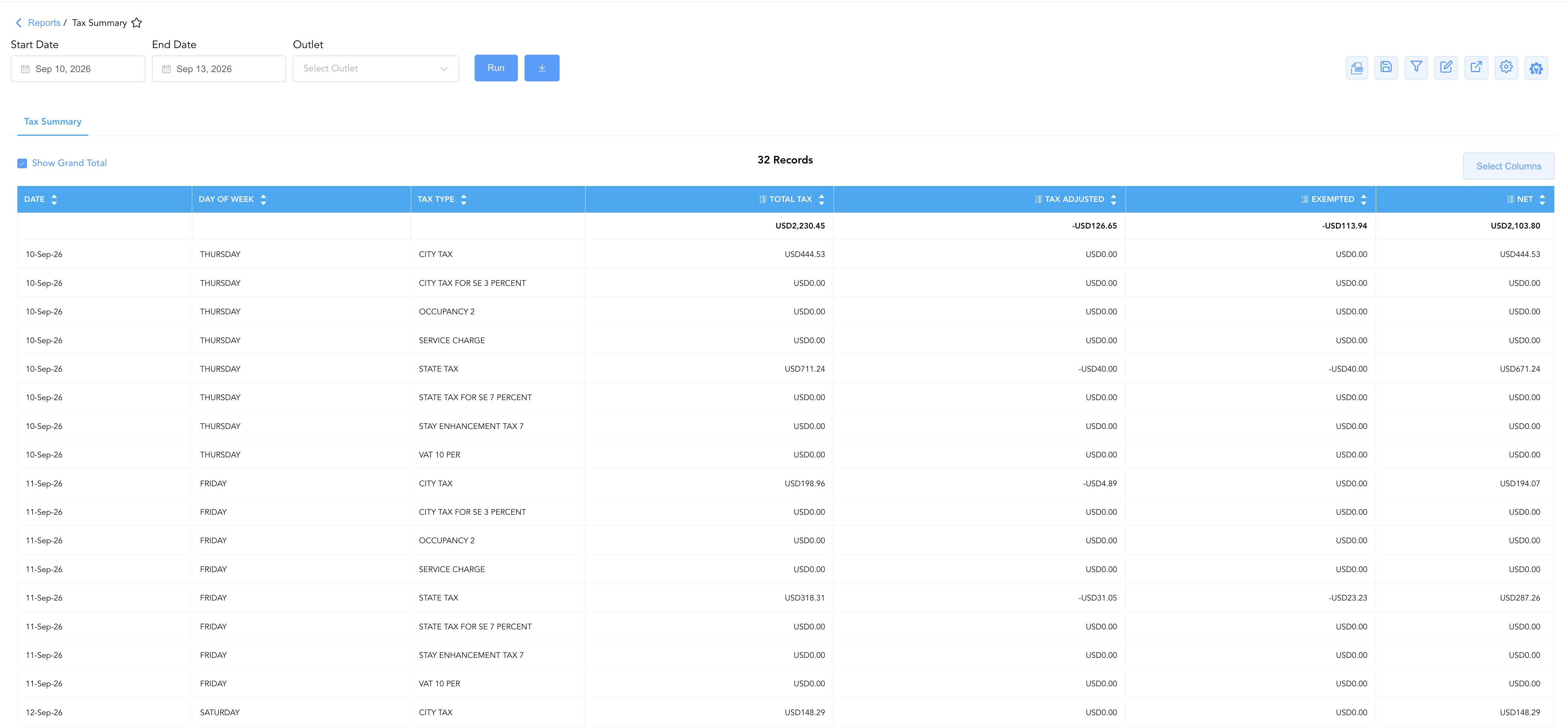
Data Dictionary (Dynamic View Columns)
Customize your default view using the Configure (⚙️) icon on the report page. Below is the full data dictionary representing every column available in this report:
💡 Tax & Net Calculation Note: Net represents final net tax liabilities calculated as Net = Total Tax + Tax Adjusted (where Tax Adjusted is expressed as a negative value for reversals and write-offs). Exempted indicates the portion of tax adjustments attributed specifically to verified guest/group tax exemptions.
|
Column Name |
Description |
Data Source / System Mapping |
Includes Taxes & Fees? |
|
Date |
Official business date for which tax accruals and adjustments are summarized. |
System Business Date |
N/A |
|
Day Of Week |
Calendar day of the week corresponding to the business date (e.g., |
System Calendar Engine |
N/A |
|
Tax Type |
Official title of the statutory or municipal tax rule (e.g., CITY TAX, STATE TAX, SERVICE CHARGE). |
Tax Engine Configuration |
N/A |
|
Total Tax |
Gross statutory tax amount posted during the business day prior to adjustments or exemptions. |
|
🟢 Yes |
|
Tax Adjusted |
Total tax adjustments, rate corrections, and reversals applied during the business day. |
|
🟢 Yes |
|
Exempted |
Total tax amount waived specifically due to applied guest or group tax exemption status. |
|
🟢 Yes |
|
Net |
Final net tax liability accrued for the business date ( |
|
🟢 Yes |
Customization & Platform Features
User & Property Preferences
-
Personal Preference: Tailor your individual view by hiding or dragging columns. Your preferences save automatically for future sessions.
-
Property Defaults: System Admins can configure standard default layouts across all property users to streamline operational reporting. To maximize audit efficiency, group the columns into the below logical blocks:
-
Audit Timeline & Tax Classification (Cols 1–3):
Date|Day Of Week|Tax Type -
Tax Movements & Deductions (Cols 4–6):
Total Tax|Tax Adjusted|Exempted -
Net Tax Settlement (Col 7):
Net
-
Report Toolbar & Quick Actions
Use the top-right toolbar icons on the report page to manage and export your data view:
|
Icon |
Action / Feature |
Description |

|
Knowledge Article |
Opens the knowledge base article to learn how to interpret this report. |

|
Background Export |
Allows users to download up to 365 days of data directly to their computer in CSV format. |

|
Saved Views |
Saves your column filtering, sorting, and highlight preferences so you can easily reload your custom view later without reconfiguring the report. |

|
Filter |
Opens filter controls to isolate specific data within a column based on your selected criteria. |

|
Highlight |
Highlights column values in a designated color based on selected conditions. |

|
Export |
Exports and downloads the report in various formats (Excel, PDF, CSV) for offline analysis or printing. |

|
Configure |
Opens column selection controls to toggle visibility, reorder columns, or hide rows with all zeros. |

|
Additional Configuration |
Provides advanced report configuration and display formatting options to customize data presentation. |
Advanced Controls
-
Exporting & Tax Filing Delivery: Download in Excel or PDF format to support monthly state/city tax remittance filings and accounting audit documentation.
-
Filtering: Filter data by specific Tax Type, date ranges, or non-zero Exempted tax values.
-
Highlighting (Conditional Formatting): Apply custom rules to automatically highlight high-value tax adjustments or significant tax exemption write-offs.
🔗 Related Reports & Next Steps
Within 🏛️ Taxes & Expenses:
-
Active Taxes & Charge Types – Review active property tax definitions, percentage rates, flat fee rules, and charge code tax mappings.
-
Tax Report – Audit individual tax-exempt guest stays, tax exemption organization IDs, and exemption certificates.
Cross-Pillar Deep Dives:
-
⚖️ Ledgers & Trial Balance: To verify how net tax liabilities post into general ledger control accounts during night audit close, review Trial Balance or Day End Summary.
-
💳 Payments & Transactions: To audit specific line-item transaction write-offs driving tax adjustments, cross-reference Adjustments & Refunds Activity.