
Revised Date:
The primary purpose of the No Show & Late Cancel Report is revenue recovery. It serves as a daily action list for the Front Office and Finance teams to identify guests who either failed to arrive on their check-in date (No Show) or canceled their reservation after the hotel's penalty deadline (Late Cancel).
By clearly isolating these bookings, the hotel can enforce its cancellation policies, process penalty fees, and accurately account for lost or recovered revenue.
When a guest does not show up or cancels at the last minute, the hotel loses the opportunity to sell that room to someone else. This report acts as a safeguard against that revenue leakage by organising the data needed to take action:
-
Revenue Capture: It provides a consolidated list of reservations that need to have a "No Show Fee" or "Late Cancellation Fee" (typically one night's room and tax) posted and charged to the guaranteed credit card on file.
-
Inventory Management: For No Shows, it prompts the Front Desk or Night Auditor to officially change the reservation status in the system. This crucial step releases the physical room back into the hotel's available inventory for the remainder of the stay, allowing you to resell it.
-
Chargeback Defense: The report creates a clear, timestamped paper trail. If a guest later disputes a penalty charge with their credit card company, the hotel can use this data to prove that the cancellation occurred outside the agreed-upon policy window.
Date Range: This report is available for the past 365 days.
Available Report Columns for Following Sections:
|
Column Name |
Column Description |
Amount Includes Taxes and Fees |
Calculation |
|
Confirmation Number |
Unique identifier for the reservation confirmation |
Not Applicable |
Not Applicable |
|
Last Name |
The surname of the primary guest registered to the reservation. |
Not Applicable |
Not Applicable |
|
First Name |
The given name of the primary guest registered to the reservation. |
Not Applicable |
Not Applicable |
|
Company |
The corporate entity or local business associated with the guest's stay tied to a negotiated rate. |
Not Applicable |
Not Applicable |
|
Arrival |
The scheduled date the guest will check into the hotel. |
Not Applicable |
Not Applicable |
|
Departure |
The scheduled date the guest will check out of the hotel. |
Not Applicable |
Not Applicable |
|
Nights |
The total number of consecutive overnight stays booked for the reservation. |
Not Applicable |
Not Applicable |
|
Amount |
The total monetary value of the reservation including the room rate, taxes et. |
Applicable |
Not Applicable |
|
Reservation Status |
The current stage of the booking (e.g., Booked, In-House, Checked-Out, Canceled, No-Show). |
Not Applicable |
Not Applicable |
|
No Show Date |
The specific calendar date a reservation is marked as a "No Show" after the guest fails to arrive or check in on their scheduled arrival day. |
Not Applicable |
Not Applicable |
|
Cancellation Date |
The exact calendar date a guest or agent cancels a reservation, officially removing it from the active arrival inventory. |
Not Applicable |
Not Applicable |
|
Payment Status |
The current standing of the guest folio balance, indicating if it is fully paid, partially paid, or pending. |
Not Applicable |
Not Applicable |
|
Reservation Sub Status |
A secondary classification providing more specific detail about the main status (e.g., "Late Cancel" under a "Canceled" status). |
Not Applicable |
Not Applicable |
|
User |
The specific hotel employee who created, modified, or processed the reservation. |
Not Applicable |
Not Applicable |
|
Waive Remarks |
Documented notes explaining the specific reason a penalty, fee, or rate difference was forgiven or overridden by staff. |
Not Applicable |
Not Applicable |
|
Stay Remarks |
General notes or special requests attached to the booking regarding the guest's preferences or needs during their visit. |
Not Applicable |
Not Applicable |
|
Linked Reservations |
Other bookings connected to this one, often used for families occupying multiple rooms or back-to-back stays. |
Not Applicable |
Not Applicable |
|
Booking Source |
The general channel or platform through which the reservation originated (e.g., Hotel Website, OTA, GDS, Walk-in). |
Not Applicable |
Not Applicable |
|
Source Code |
Identifies the source of reservation. |
Not Applicable |
Not Applicable |
|
Rate Plan |
The specific pricing structure, bundled packages, and selling rules applied to a reservation. |
Not Applicable |
Not Applicable |
|
Purpose of Visit |
The primary reason for a guest's stay (such as Business, Leisure, or Group Event), used to track travel segments and demographic behavior. |
Not Applicable |
Not Applicable |
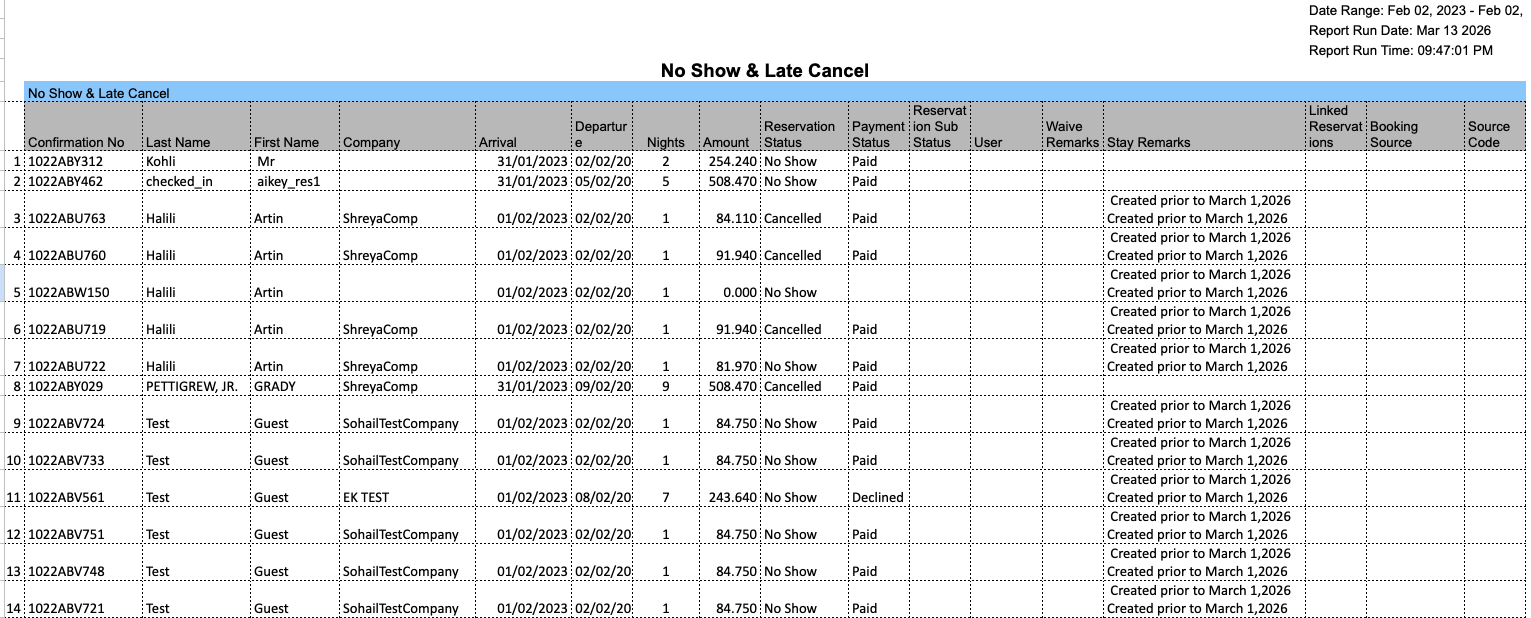
Misc Report Information:
Available Features:
-
Export: ability to download and save the file into an alternate format.
-
Filter: filter a range of data based on criteria defined by the user.
-
Highlight: also known as conditional formatting is the ability to highlight certain values making them easier to identify.
Available Configuration:
-
User Preferences: allows the user to customize their report view by repositioning or removing columns.
-
Property Preferences: allows the property to customize the report view for all users by repositioning or removing columns.
Baseline Configuration:
-
Property Preferences Settings:
-
Following columns to be disabled for initial deployment:
-
VIP Guest
-
Guest Tier
-
Virtual CC
-
Local First Name
-
Local Last Name
-
Make and Model
-
License Plate
-
PO Number
-
-