
Cancelled Reservation
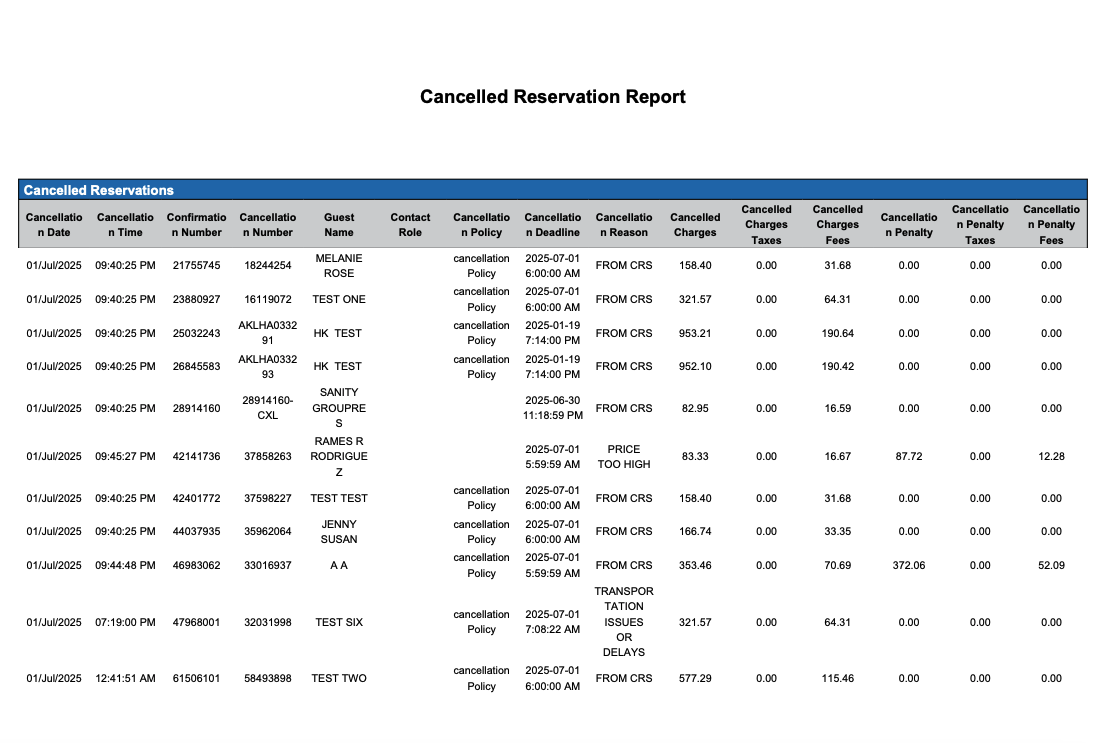
Report Description: The Cancelled Reservation Report provides a list of all reservations, individual and group, that are marked as canceled. The report includes details such as confirmation number, last name, first name, group name, arrival date, departure date, total nights, amount, and canceled date, cancel policy, penalties and fees associated with the cancellation.
Date Range: This report can render the data for up to 94 days in the past
Cancelled Reservations Section
Available Report Columns for Following Sections:
|
Column Name |
Column Description |
Amount Includes Taxes and Fees |
Calculation |
|
Cancellation Date |
Date the reservation was canceled |
Not Applicable |
Not Applicable |
|
Cancellation Time |
Time at the reservation was canceled |
Not Applicable |
Not Applicable |
|
Confirmation Number |
Unique identifier for the reservation confirmation |
Not Applicable |
Not Applicable |
|
Cancellation Number |
Unique identifier for the reservation cancellation |
Not Applicable |
Not Applicable |
|
Group Number |
Unique identifier for the group master reservation |
Not Applicable |
Not Applicable |
|
Billing Type |
Type of billing for the group master reservation (Individual, Full Coverage, Room Only, Custom) |
Not Applicable |
Not Applicable |
|
Guest Name |
First and Last name of the guest associated with the reservation |
Not Applicable |
Not Applicable |
|
Contact Role |
Role of the contact person |
Not Applicable |
Not Applicable |
|
Loyalty Number |
Loyalty account of the guest |
Not Applicable |
Not Applicable |
|
Source |
Information on the source of the reservation (e.g. direct booking, OTA) |
Not Applicable |
Not Applicable |
|
Rate Plan |
Rate plan associated with the reservation; important for resource allocation and revenue management |
Not Applicable |
Not Applicable |
|
Room Type |
Room type associated with the reservation |
Not Applicable |
Not Applicable |
|
Arrival Date |
Date when the guest was scheduled to arrive |
Not Applicable |
Not Applicable |
|
Number of Nights |
Total number of nights for the reservation |
Not Applicable |
=sum(number of nights) |
|
Guarantee Method |
Method used to guarantee the reservation |
Not Applicable |
Not Applicable |
|
Cancelation Policy |
outline the conditions under which a guest can cancel a reservation without penalty or with a partial or full refund |
Not Applicable |
Not Applicable |
|
Cancelation Deadline |
the last possible date/time which a guest can cancel a reservation without penalty or with a partial or full refund |
Not Applicable |
Not Applicable |
|
Cancelation Reason |
reason for the cancellation |
Not Applicable |
Not Applicable |
|
Cancelled Charges |
Amount of any charges associated with the cancellation |
Not Applicable |
=sum(canceled charges) |
|
Cancelled Charges Taxes |
Amount of any taxes associated with the cancellation |
Not Applicable |
=sum(canceled charges taxes) |
|
Cancelled Charges Fees |
Amount of any fees associated with the cancellation |
Not Applicable |
=sum(canceled charges fees) |
|
Cancellation Penalty |
Amount of any penalties associated with the cancellation |
Not Applicable |
=sum(canceled penalties) |
|
Cancellation Penalty Taxes |
Amount of any penalty taxes associated with the cancellation |
Not Applicable |
=sum(canceled penalties taxes) |
|
Cancellation Penalty Fees |
Amount of any penalty fees associated with the cancellation |
Not Applicable |
=sum(canceled penalties fees) |
Cancelled Groups Section
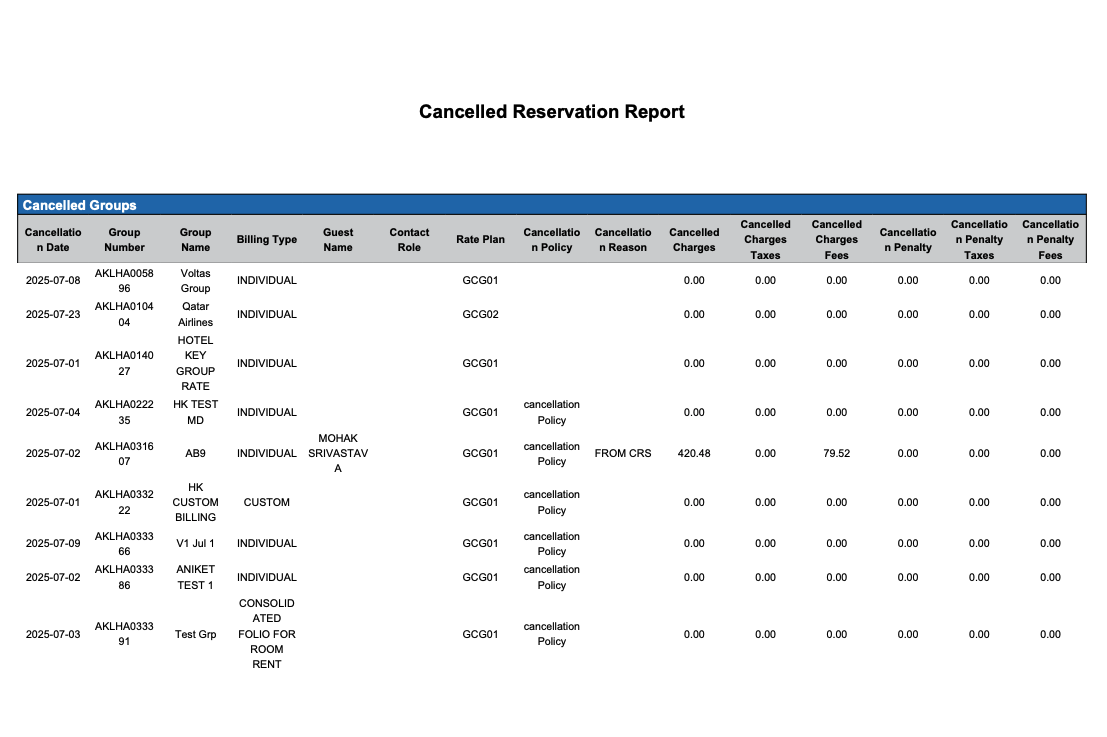
Available Report Columns for Following Sections:
|
Column Name |
Column Description |
Amount Includes Taxes and Fees |
Calculation |
|
Cancellation Date |
Date the group master was canceled |
Not Applicable |
Not Applicable |
|
Group Number |
Unique identifier for the group master reservation |
Not Applicable |
Not Applicable |
|
Group Name |
Name of the Group Master |
Not Applicable |
Not Applicable |
|
Billing Type |
Type of billing for the group master reservation (Individual, Full Coverage, Room Only, Custom) |
Not Applicable |
Not Applicable |
|
Confirmation Number |
Unique identifier for the group master confirmation |
Not Applicable |
Not Applicable |
|
Cancellation Number |
Unique identifier for the group master cancellation |
Not Applicable |
Not Applicable |
|
Guest Name |
Contact person for the group |
Not Applicable |
Not Applicable |
|
Contact Role |
Role of the contact person |
Not Applicable |
Not Applicable |
|
Source |
Information on the source of the reservation |
Not Applicable |
Not Applicable |
|
Rate Plan |
Rate plan associated with the group reservation; important for resource allocation and revenue management |
Not Applicable |
Not Applicable |
|
Arrival Date |
Date when the group master was scheduled to arrive |
Not Applicable |
Not Applicable |
|
Number of Nights |
Total number of nights for the group master reservation |
Not Applicable |
=sum(number of nights) |
|
Guarantee Method |
Method used to guarantee the group master reservation |
Not Applicable |
Not Applicable |
|
Cancellation Policy |
Outlines the conditions under which a group master can be cancelled without penalty or with a partial or full refund |
Not Applicable |
Not Applicable |
|
Cancellation Reason |
Reason for cancellation, if applicable |
Not Applicable |
Not Applicable |
|
Cancelled Charges |
Total amount of charges that were cancelled |
Not Applicable |
=sum(canceled charges) |
|
Cancelled Charges Taxes |
Amount of any taxes associated with the cancellation |
Not Applicable |
=sum(canceled charges taxes) |
|
Cancelled Charges Fees |
Amount of any fees associated with the cancellation |
Not Applicable |
=sum(canceled charges fees) |
|
Cancellation Penalty |
Amount of penalty charges that were charges for cancellation |
Not Applicable |
=sum(canceled penalties) |
|
Cancellation Penalty Taxes |
Amount of any taxes associated with the cancellation |
Not Applicable |
=sum(canceled penalties taxes) |
|
Cancellation Penalty Fees |
Amount of any fees associated with the cancellation |
Not Applicable |
=sum(canceled penalties fees) |
Misc Report Information:
Available Features:
-
Export: ability to download and save the file into an alternate format.
-
Filter: filter a range of data based on criteria defined by the user.
-
Highlight: also known as conditional formatting is the ability to highlight certain values making them easier to identify.
Available Configuration:
-
User Preferences: allows the user to customize their report view by repositioning or removing columns.
-
Property Preferences: allows the property to customize the report view for all users by repositioning or removing columns.