Target Roles: Accounts Receivable Managers, Credit Managers, Finance Directors, Night Auditors, General Managers
Last Updated:
Executive Overview
The Collection Notes tab in HotelKey PMS centralizes accounts receivable tracking, overdue balance communications, and credit recovery actions for company direct-bill accounts. Finance and credit teams can log specific invoice follow-ups, record third-party debt collection agency assignments, link client communications, and track overdue payment statuses without altering underlying accounting balances. By maintaining a centralized, auditable ledger of collection efforts, properties improve recovery rates on aging balances and maintain a full audit trail for credit management.
Configuration Guide: Adding a Collection Note to a Company Account
System Navigation Path
Dashboard > Select Company > Edit Account > Collection Notes
Step
Action
Platform Guidance & Operational Details
Identify Overdue Account
On the AR Dashboard Company List, select the target corporate account (e.g., HotelKey, Inc.).
Opens the company profile displaying total balance, credit limit, and aging cards.
Review Aging Invoices
Open the Open Invoices tab, click the Age column header to sort descending, and note the targeted overdue invoice number (e.g., #1747742624, Age 470 days, Date Oct 17, 2024).
Identifies specific past-due invoice details, billing dates, and balances requiring collection intervention.
Access Edit Account
In the corporate header card, click the white Edit Account button (with pencil icon).
Launches the multi-tab corporate configuration console.
Open Collection Notes
In the top horizontal navigation bar, click the Collection Notes tab.
Navigates to the collection records interface displaying the notes ledger and filter controls.
Initiate Add Note
Click the blue Add Note button in the upper-right corner of the tab.
Launches the Add Note modal dialog.
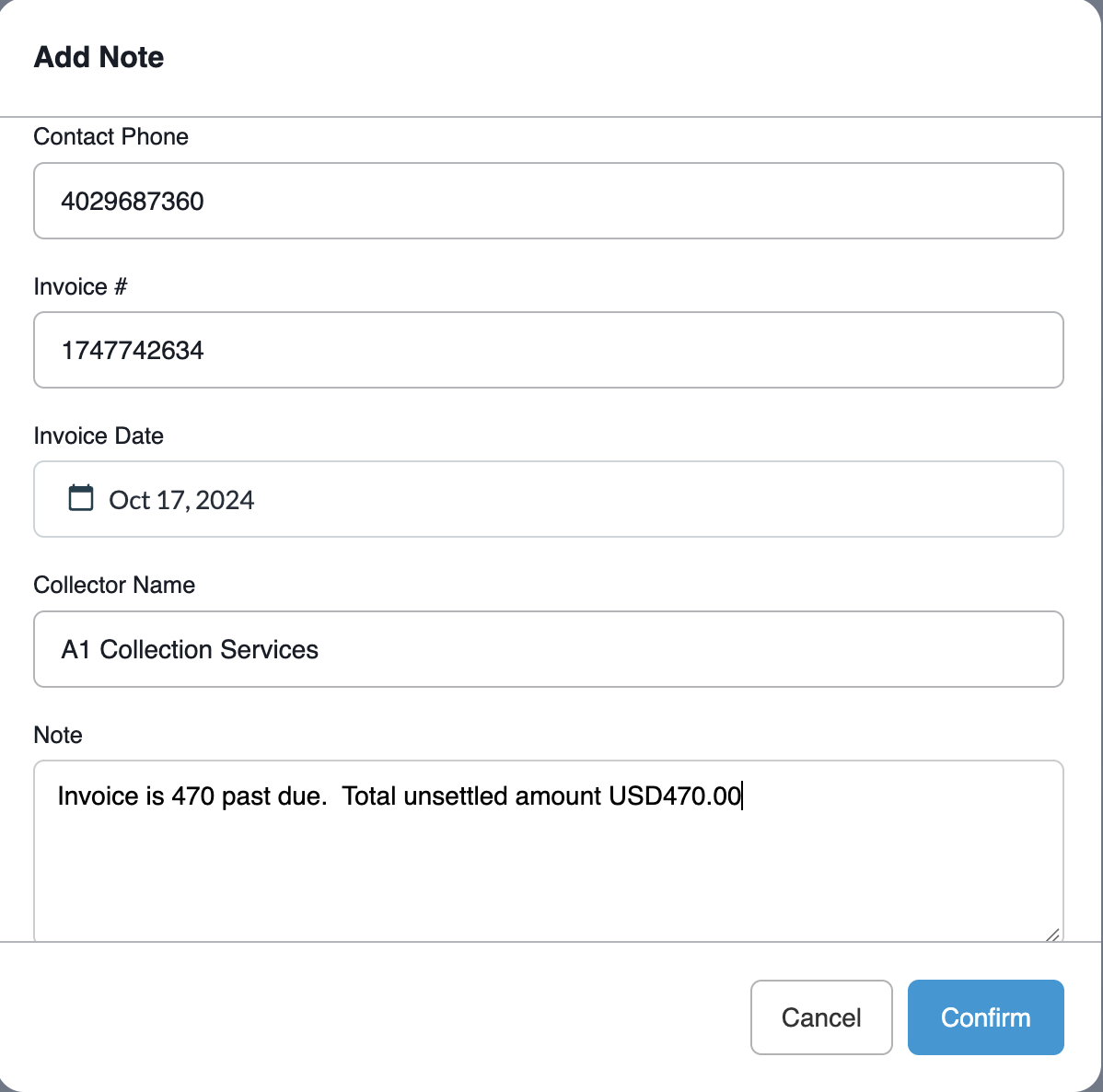
Populate Contact & Invoice Data
Enter Contact Name, Contact Email, Contact Phone, Invoice #, and select the Invoice Date using the calendar picker.
Associates the collection record with specific customer contacts and the corresponding billing invoice.
Add Collector & Action Remarks
Enter the Collector Name (e.g., internal collector or agency like A1 Collection Services) and type comprehensive audit remarks into the Note text area.
Documents collection agency assignment, days past due, and targeted balance amounts.
Save & Commit
Click the blue Confirm button in the bottom-right corner of the modal.
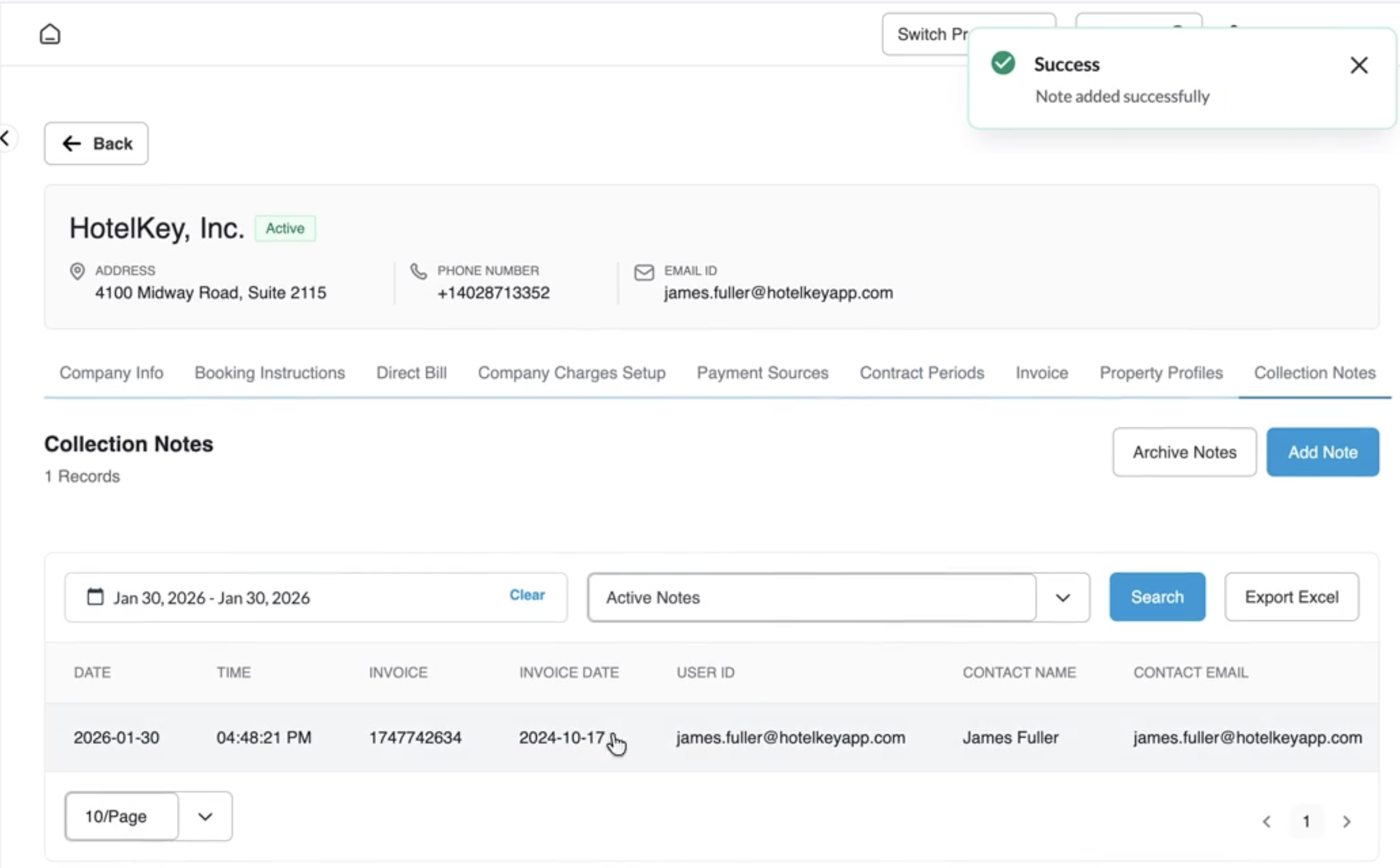
Validates entries, displays a green notification banner (Success: Note added successfully), and updates the collection records table.
📷 VISUAL CALLOUT:
Open Invoices Aging Sort & Collection Notes Navigation
Collection Notes Walkthrough
Detailed Modal & Screen Field Breakdown
1. Add Note Modal Fields
Contact Name*: Required text entry capturing the full name of the primary corporate accounting or billing representative contacted (e.g., James Fuller).
Contact Email*: Required text entry validating client email syntax (enforces real-time format validation, prompting "This field must be a valid email address" if incomplete).
Contact Phone*: Required field capturing the telephone number of the representative contacted (e.g., 4026987360).
Invoice #: Alphanumeric identifier linking the collection action directly to the specific outstanding AR invoice (e.g., 1747742624).
Invoice Date: Interactive calendar date picker to establish the formal issuance date of the linked invoice (e.g., Oct 17, 2024).
Collector Name: Identifies the internal accounts receivable staff member or external agency handling debt recovery (e.g., A1 Collection Services).
Note: Freeform narrative box capturing operational and legal collection remarks (e.g., "Invoice is 470 days past due. Amount outstanding $594.95 transferred to collection partner for recovery").
Modal Actions:
Cancel: Discards inputs and closes the modal without creating a record.
Confirm: Commits the note to the company's permanent collection history.
📷 VISUAL CALLOUT:
Add Note Modal Interface
Modal window displaying entered contact credentials, linked invoice number (1747742624), selected Invoice Date (Oct 17, 2024), Collector Name (A1 Collection Services), and detailed note text before confirming.
Add Note Modal Interface
2. Collection Notes Dashboard & Ledger Controls
Active Notes Filter: Dropdown allowing users to toggle between Active Notes and archived collection records.
Date Range Filter: Start Date and End Date range pickers (with Clear option) to inspect collection actions executed within specific auditing windows.
Search Field: Keyword search query box to locate notes by contact name, collector, or invoice number.
Export Excel Button: Downloads the collection activity log into a structured spreadsheet format for external reporting.
Archive Notes Button: Moves resolved or historical collection logs out of the active view.
Ledger Data Columns:
Date / Time: Timestamp of when the collection action was recorded.
Invoice: Clickable link displaying the referenced AR invoice number.
Invoice Date: Original generation date of the associated invoice.
User ID: System login email of the user who logged the entry.
Contact Name / Contact Email / Contact Phone: Primary debtor contact information on file at the time of communication.
Collector Name: Designated staff collector or external collection agency.
📷 VISUAL CALLOUT:
Published Collection Notes Ledger & Confirmation Banner
Screen capture displaying the green Success: Note added successfully toast banner, with the newly published collection note row showing timestamp, invoice number, and contact details.
Published Collection Notes Ledger & Confirmation Banner
Operational Best Practices
Cross-Reference Invoice Age: Prior to logging collection actions, cross-reference the Open Invoices tab and sort by Age descending to prioritize accounts exceeding 90+ or 120+ days past due.
Auditing Third-Party Hand-Offs: When engaging external collection agencies, always specify the agency name in the Collector Name field and include the outstanding balance and hand-off terms in the Note field.
Exporting Collection Logs: Utilize the Export Excel feature to generate documentation for senior leadership, legal counsel, or financial auditors reviewing bad-debt write-offs and recovery efforts.