In HotelKey PMS, open direct-bill statements can be updated to include additional unbilled guest folios and charges without voiding and re-creating the entire invoice. Using the Modify Invoice feature on the Invoice Details console, accounting teams can append unbilled receivables from the company ledger directly onto an existing open invoice via the Add Line Items utility. Adding line items automatically recalculates the invoice's total billed and open balances, consolidates stay charges into a single statement for corporate clients, and purges the appended line items from the unbilled Accounts Receivable ledger.
Configuration Guide: Adding Line Items to an Open Invoice
System Navigation Path
Dashboard > Select Company > Open Invoices > Select Invoice > Modify Invoice > Add Line Items
Step
Action
Platform Guidance & Operational Details
Access Corporate File
From the AR Dashboard Company List, click on the target corporate profile link (HotelKey Inc).
Loads the company profile displaying header credit metrics, balances, aging summary cards, and ledger sub-tabs.
Navigate to Open Invoices
In the horizontal sub-tab bar, click Open Invoices.
Displays all finalized, outstanding corporate statements awaiting full or partial settlement.
Select Target Invoice
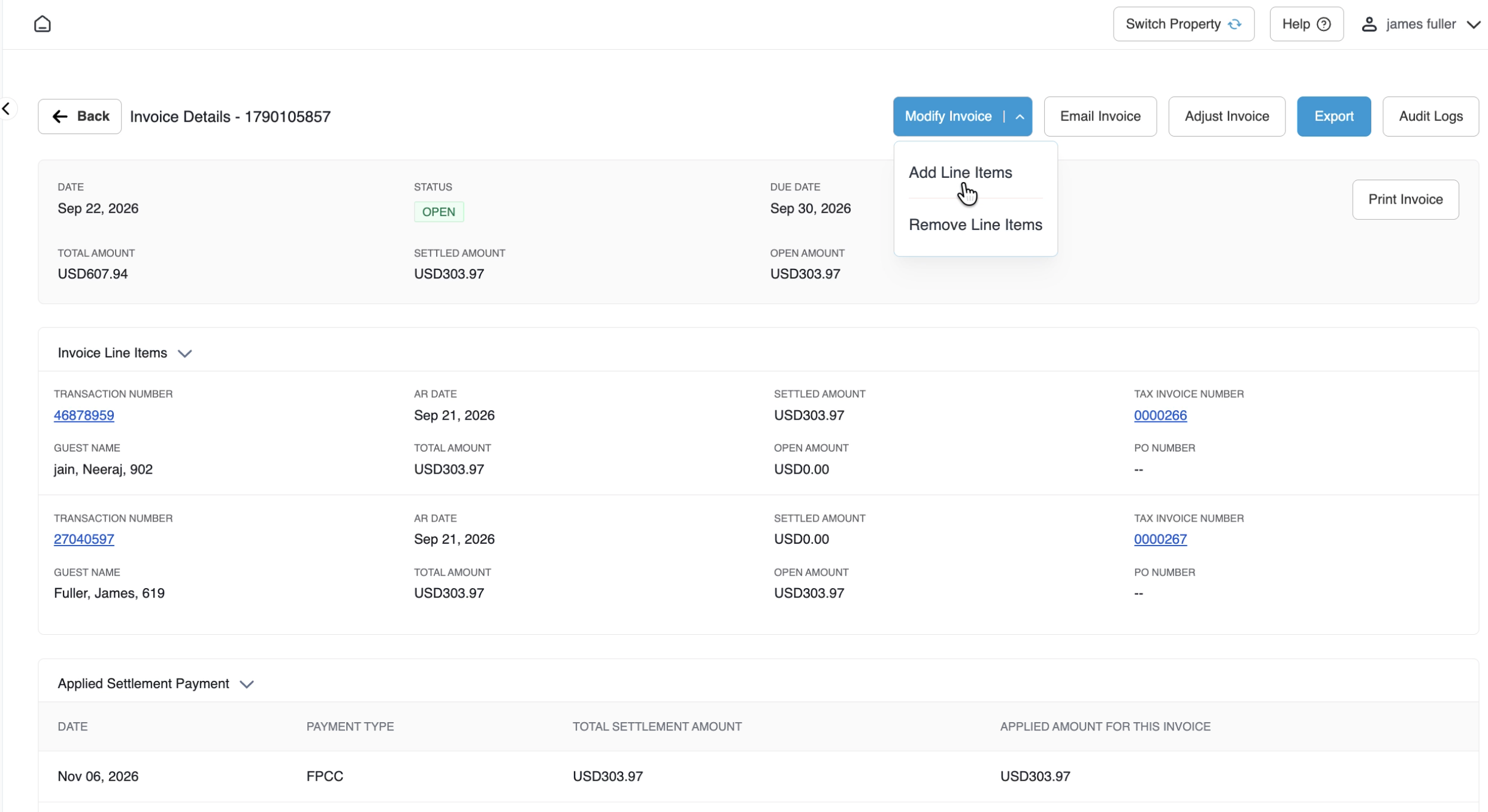
Click directly on the target invoice row (e.g., AR Invoice #1790105857, Total Amount USD 607.94, Settled USD 303.97, Open USD 303.97).
Opens the Invoice Details console showing the invoice status (OPEN), due date, balance metrics, line items, and applied settlements.
Open Modify Invoice Menu
In the top-right action bar next to Email Invoice, click the blue Modify Invoice button.
Displays the action dropdown options: Add Line Items and Remove Line Items.
Select Add Line Items
Click Add Line Items from the dropdown menu.
Launches the Add Line Items modal displaying all unbilled charges currently available in the company's Accounts Receivable ledger.
Select Line Item to Add
Locate the unbilled transaction using the name search or table grid, and select its checkbox (e.g., Heidi Wooding, Date Sep 20, 2026, Amount USD 281.37, Transaction # 41085044).
Stages the selected unbilled line item for inclusion on the open statement.
Save Staged Line Item
Click the blue Save button in the lower-right corner of the modal.
Opens the confirmation prompt: "Are you sure you want to add this line item?"
Confirm Addition
In the confirmation dialog, click Yes.
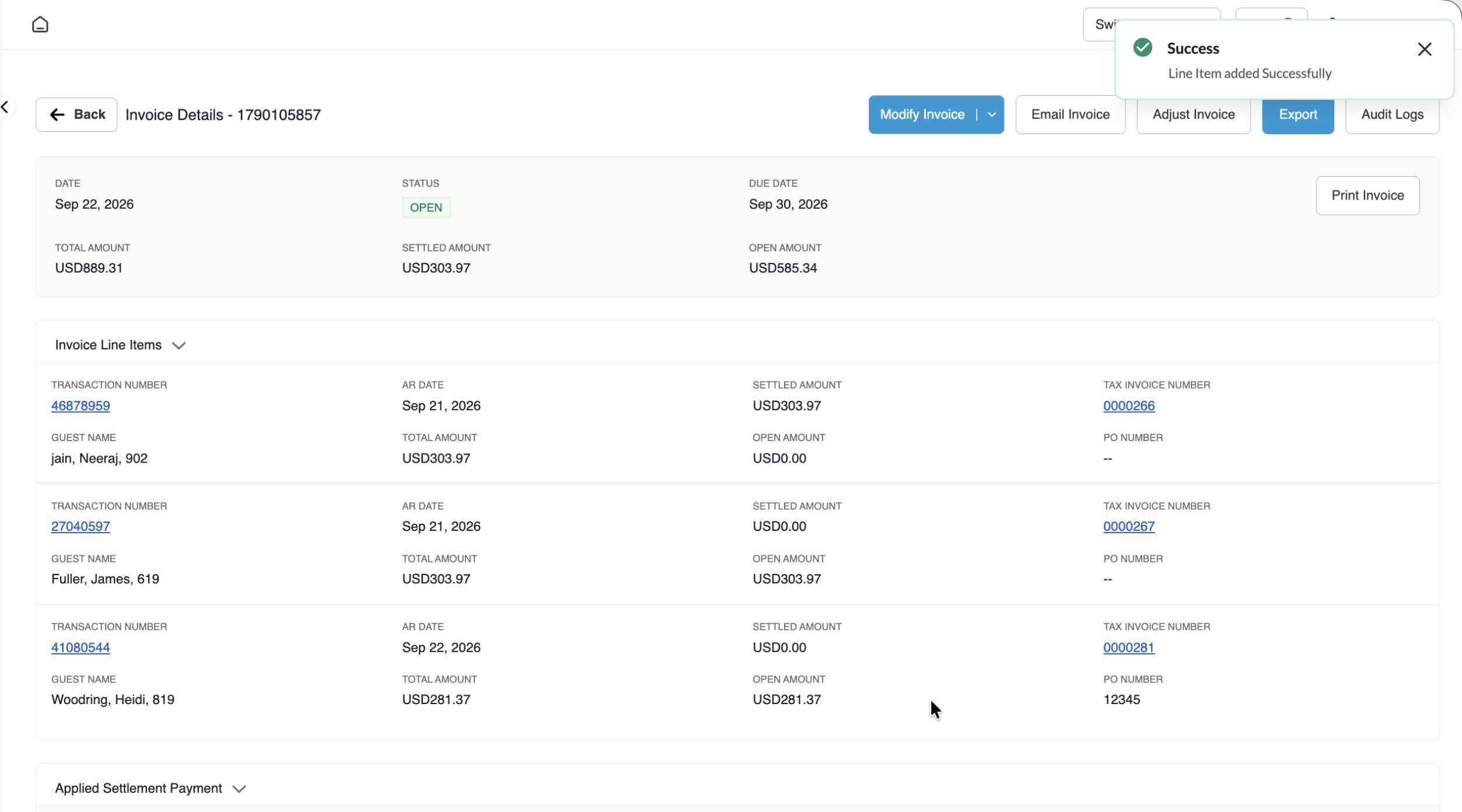
Commits the addition, displays a green notification banner (Success: Line added Successfully), and updates the invoice view.
Verify Invoice Recalculation
Review the updated invoice header metrics and the Invoice Line Items grid.
Confirms that Billed Amount increases from USD 607.94 to USD 889.31, Open Amount increases from USD 303.97 to USD 585.34, and the new guest record (Wooding, Heidi, 819) is appended to the statement.
📷 VISUAL CALLOUT:
Invoice Details Action Bar & Modify Invoice Dropdown
Invoice Details console for Invoice #1790105857 highlighting the blue Modify Invoice button expanded to show Add Line Items and Remove Line Items options.
Invoice Details Screen
Detailed Screen & Modal Field Breakdown
1. Invoice Details Console (Pre-Modification)
Invoice Header Metadata:
Invoice Number: Unique system invoice ID (e.g., 1790105857).
Date: Original invoice compilation date (Sep 22, 2026).
Status: Current lifecycle state (OPEN in green badge).
Due Date: Contracted payment deadline (Sep 30, 2026).
Billed Amount: Current gross value across line items prior to modification (USD 607.94).
Settled Amount: Total remittances previously applied (USD 303.97).
Open Amount: Outstanding unpaid balance (USD 303.97).
Top Action Bar Utilities:
Modify Invoice: Dropdown providing Add Line Items and Remove Line Items.
Email Invoice: Transmits the updated billing statement to corporate contacts.
Adjust Invoice: Opens credit/debit adjustments on invoice balances.
Export: Downloads line-item statements into external spreadsheet formats.
Audit Logs: Chronological system record of line item additions, removals, and balance updates.
Print Invoice: Prepares the formatted invoice document for printing.
📷 VISUAL CALLOUT:
Add Line Items Modal & Confirmation Dialog
Modifying Direct Bill Invoice: Adding Line Item Modal
2. Add Line Items Modal Parameters
Name Search Filter: Text box allowing operators to filter unbilled transactions by guest or account name (Enter Name).
Search / Refresh Trigger: Magnifying glass search button to execute real-time filtering across unbilled ledger records.
Unbilled Transactions Table Columns:
Selection Checkbox: Single or multi-item selection controls to select line items for import.
Name: Guest name or transfer description (e.g., Woodring, Heidi, Jain, etc.).
Date: Charge posting date (e.g., Sep 20, 2026).
Folio Bill Number: System folio bill identifier (e.g., 0000281).
Fiscal / Tax Invoice Number: Compliance reference number (e.g., 0000281).
Amount: Transaction monetary value (e.g., USD 281.37).
Transaction #: Reservation folio transaction ID (e.g., 41085044).
Modal Action Buttons:
Cancel: Closes modal without altering the invoice.
Save: Submits selected line items and advances to the confirmation prompt.
3. Confirmation Dialog Parameters
Confirmation Prompt:"Are you sure you want to add this line item?"
Execution Buttons:
Cancel: Discards staging and returns to the modal table.
Yes: Commits the line item to the invoice and updates balances.
📷 VISUAL CALLOUT:
Recalculated Invoice Details Console & Appended Line Item
Updated Invoice Details screen showing the green toast notification (Success: Line added Successfully), Billed Amount increased to USD 889.31, Open Amount increased to USD 585.34, and the newly appended line item for Heidi Woodring in Room 819.
Recalculated Invoice Details with Appended Line Item
Financial & System Impact Post-Addition
Following the addition of a line item to an open direct-bill invoice, HotelKey PMS applies the following automated updates:
Invoice Balance Recalculation:
Billed Amount: Increases by the exact value of the added charge (e.g., increasing from USD 607.94 by USD 2811.37 to USD 889.31).
Open Amount: Automatically recalculates upward to reflect the newly added liability (e.g., increasing from USD 303.97 to USD 585.34).
Line Item Table Expansion:
The newly attached charge appears under Invoice Line Items, detailing:
Transaction Number:41085044
Stay Date:Sep 20, 2026
Guest Name:Woodring, Heidi, 819
Total Amount:USD 281.37
Settled Amount:USD 0.00
Open Amount:USD 281.37
Tax Invoice Number:0000281
Unbilled Accounts Receivable Ledger Removal:
The transaction is purged from the unbilled Account Receivable tab, preventing duplicate invoicing.
Audit Trail Tracking:
The addition is permanently recorded in the invoice's Audit Logs, capturing the exact timestamp, executing user ID, appended transaction number, and updated balance metrics.