In HotelKey PMS, when corporate clients submit partial remittances or request specific dollar distributions across multiple line items within a consolidated direct-bill invoice, finance teams can manually customize the exact settlement amount applied to each individual charge. Rather than accepting default line-item totals or de-selecting entire stay folios, operators can utilize the editable Invoice Details allocation fields in Step 2 of the Apply Payment wizard. This granular control allows properties to distribute payments according to client remittance instructions, clear allocation boundary errors (Allocated Amount cannot be greater than balance amount), maintain accurate remaining balances on partially paid open invoices, and preserve unapplied funds for subsequent settlements.
From the AR Dashboard Company List, click on the target corporate profile link (HotelKey Inc).
Loads the corporate account profile displaying header credit metrics, balances, aging summary cards, and ledger sub-tabs.
Navigate to Payments
In the horizontal sub-tab bar below the aging KPI summary cards, click Payments & Expenses.
Displays recorded payment transactions, settlement methods, unapplied amounts, and payment action controls.
Open Unapplied Payment
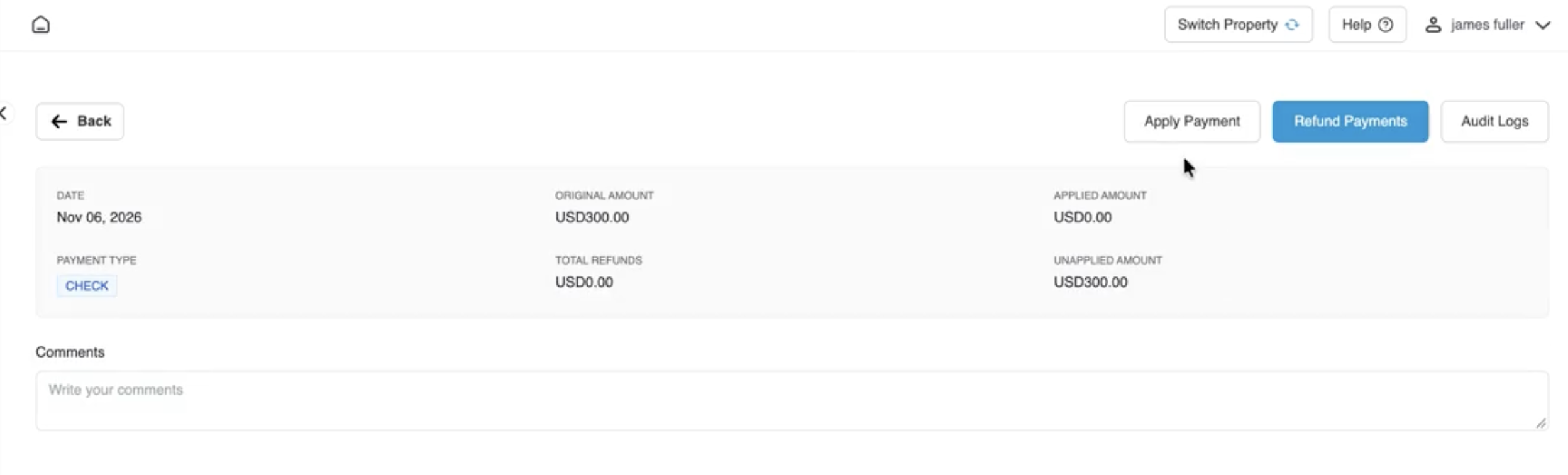
Click directly on the payment row containing unapplied funds (Check payment of USD 300.00 dated Nov 06, 2026).
Opens the detailed payment transaction console displaying the original amount (USD 300.00), applied amount (USD 0.00), and unapplied balance (USD 300.00).
Initiate Apply Payment
In the upper-right action bar next to Refund Payments, click the white Apply Payment button.
Launches the 3-step payment allocation modal on Step 1: Select Invoices.
Step 1: Select Target Invoice
Select the checkbox next to the open multi-line invoice (AR Invoice #1790105859, Open Amount USD 687.04).
Stages the invoice for allocation. Click the blue Next button.
Step 2: Review Over-Allocation Warning
In the Invoice Allocations screen, note the summary:
Selected Invoice Balance Amount: USD 687.04
Original Payment Amount: USD 300.00
Net Payment Available to Apply: USD 300.00
Amount Left to be Used: -USD -387.04
Allocated Amount cannot be greater than balance amount: USD 300.00.
The invoice's total open balance exceeds available payment funds, disabling the Next button until allocations are brought within bounds.
Access Editable Amount Fields
Scroll horizontally or locate the editable currency input fields under the Invoice Details column beside each line item (initially populated with USD343.52 and USD343.52).
Enables granular, line-by-line custom dollar distribution across individual transactions.
Enter Custom Partial Amounts
Click into the Invoice Details field for Line 1 (Wooding, Woodring, 333) and enter USD 100.00. Then, click into Line 2 (Fuller, James, 330) and enter USD 200.00.
Recalculates total allocated funds in real time, bringing Amount Left to be Used to USD 200.00, clearing the red error banner, and enabling the blue Next button. Click Next.
Step 3: Review Confirmation
Verify the Settlement Amount header (USD 300.00), target invoice number (1790105859), issue date (Sep 22, 2026), and projected Invoice Balance (After Confirm) of USD 387.04.
Summarizes the exact partial settlement breakdown across transactions 22748303 (USD 100.00) and 63054469 (USD 200.00).
10. Commit Allocation
Click the blue Confirm & Close button in the lower-right corner.
Commits the customized allocations, displays a green notification banner (Success: Saved Successfully), and updates the payment transaction console.
11. Audit Payment & Invoice Records
On the payment console, verify updated Applied Amount (USD 300.00) and Unapplied Amount (USD 0.00). Click the View button next to the invoice row.
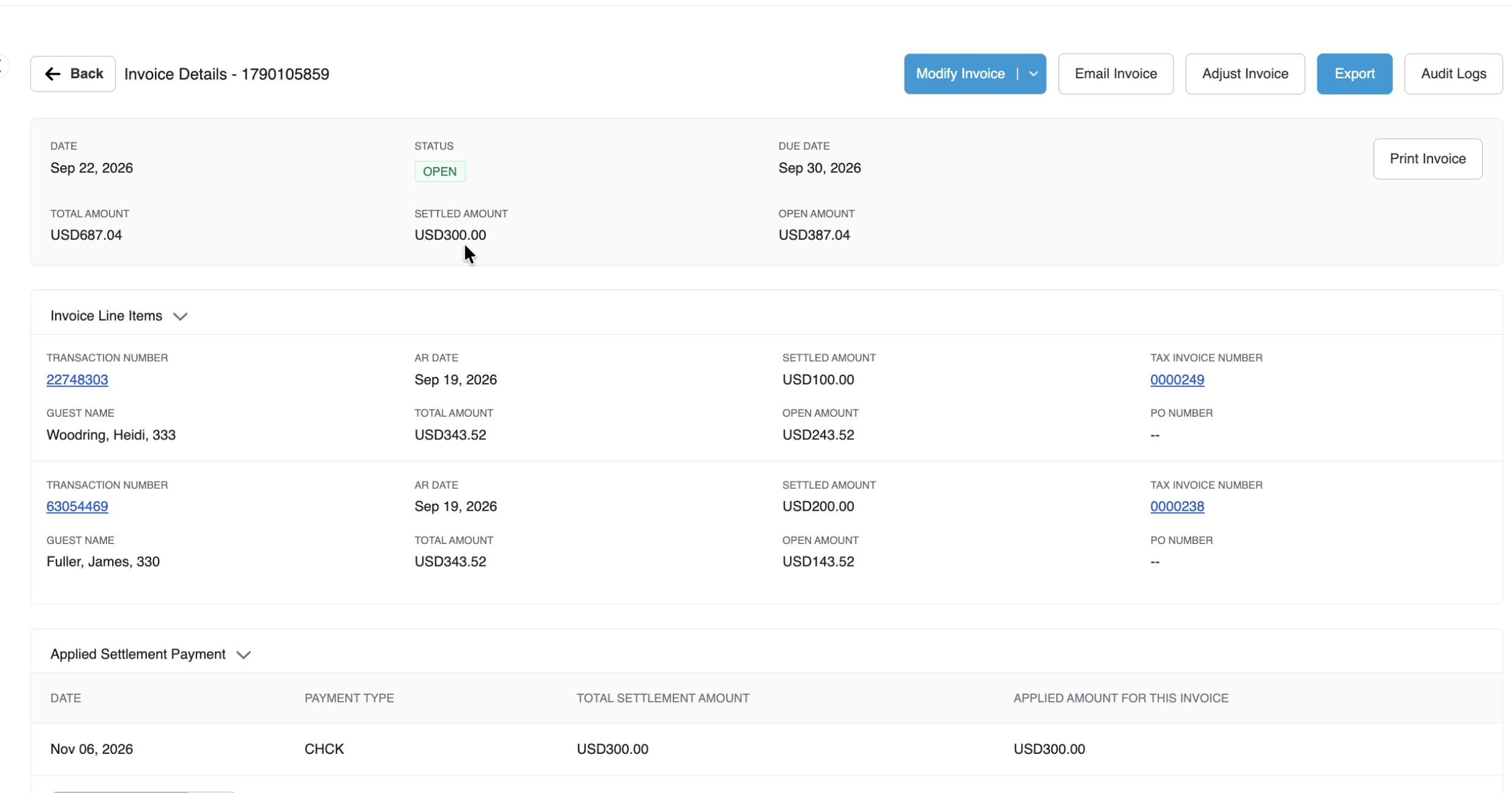
Confirms the invoice remains in OPEN status, with an updated Settled Amount (USD 300.00), reduced Open Amount (USD 3,87.04), and applied payment details.
Payment record screen displaying Payment Type (CHECK), Original Amount (USD 300.00), Unapplied Amount (USD 300.00), and a highlighted callout on the white Apply Payment button in the top action bar.
Payment Transaction Console
Detailed Allocation Wizard Step Breakdown
Step 1: Select Invoices
Invoice Number Search Field: Targeted search box enabling quick lookup by entering a specific AR invoice number.
Auto Apply Button: Automatically distributes available payment funds across oldest open invoices based on chronological aging.
Total Invoice Amount Indicator: Displays the aggregate open balance across all unpaid invoices listed (USD 2,890.37).
Target Invoice Selection Grid:
Checkbox: Selected next to AR Invoice #1790105859.
Guest Name / Details: Lists associated guest stays and room assignments (Woodring, Heidi, 333; Fuller, James, 303).
AR Invoice Number: Unique system invoice ID (1790105859).
Selected Invoice Balance Amount: Total balance of all checked transactions staged in Step 1 (USD 687.04).
Original Payment Amount: Full incoming remittance value (USD 300.00).
Net Payment Available to Apply: Total available unapplied funds from the payment instrument (USD 300.00).
Amount Left to be Used: Real-time calculation representing unapplied funds remaining after deduction (Net Payment Available - Total Custom Allocations).
Validation Alert & Resolution:
Initially, because Selected Invoice Balance Amount (USD 687.04) > Net Payment Available to Apply (USD 300.00), Amount Left to be Used displays -USD 387.04.
The system highlights the negative figure in red and displays:
Allocated Amount cannot be greater than balance amount: -USD 300.00.
Line-Item Custom Allocation Controls:
Line Item 1:Wooding, Heidi, 333 | Transaction #: 22748303 | Stay Date: Sep 19, 2026 | Original Amount: USD 343.52 | Open Amount: USD 343.52.
Invoice Details Input: Manually edited from USD 3043.52 to USD 100.00.
Line Item 2:Fuller, James, 303 | Transaction #: 63054469 | Stay Date: Sep 19, 2026 | Original Amount: USD 343.52 | Open Amount: USD 343.52.
Invoice Details Input: Manually edited from USD 343.52 to USD 200.00.
Reconciled Balance Result: Total allocated amount equals USD 300.00. Amount Left to be Used updates to USD 0.00, clearing the error banner and activating the blue Next button.
Step 3: Confirmation
Settlement Amount Header: Displays the confirmed total monetary credit applied in this session (USD 300.00).
Confirmation Summary Grid:
Invoice Number & Date: Displays target invoice and compilation date (1790105859 / Sep 22, 2026).
Invoice Balance (After Confirm): Projected open balance remaining on the statement post-application (USD 3,87.04).
Line-Item Settlement Breakdown:
Confirmation # 22748303: Original Amount USD 3,43.52 | Open Amount USD 343.52 | Settlement Amount: USD 100.00.
Confirmation # 63054469: Original Amount USD 343.52 | Open Amount USD 343.52 | Settlement Amount: USD 200.00.
Modal Action Controls:
Previous: Returns to Step 2 to revise custom amount entries.
Cancel: Discards all staged allocations without modifying balances.
Confirm & Close: Commits the customized allocations across accounting ledgers.
📷 VISUAL CALLOUT:
Updated Invoice Details Console
The updated Invoice Details console showing the invoice remaining in status OPEN, with Open Amount reduced to USD 387.04 and applied payment details.
Financial & System Impact Post-Allocation
Following confirmation of custom line-item allocations, HotelKey PMS automatically executes the following updates:
Payment Record Recalculation:
Applied Amount: Increases by the custom settlement total to USD 300.00.
Unapplied Amount: Decreases by the allocated amount to USD 0.00, retaining the remaining credit on the payment for future settlements.
Invoice Details Table: Generates an audit row showing linked guest names (Woodring, Heidi, 333; Fuller, James, 303), AR invoice number (1790105859), tax numbers (0000249, 0000238), transaction IDs (22748303, 63054469), and total allocated amount (USD 300.00), alongside View and Cancel Settlement action buttons.
Invoice State & Balance Retention:
Because an unpaid balance remains (USD 387.04), the invoice remains in OPEN status (green badge) and stays visible under the Open Invoices tab.
The invoice's Settled Amount updates to USD 300.00, and the Open Amount reduces to USD 387.04 (out of total billed USD 687.04).
Under Invoice Line Items, the individual transactions reflect their respective split adjustments:
Woodring, Heidi, 333 (Transaction #22748303): Settled Amount updates to USD 100.00; Open Amount reduces to USD 243.52.
Fuller, James, 303 (Transaction #63054469): Settled Amount updates to USD 200.00; Open Amount reduces to USD 143.52.
Under Applied Settlement Payment, a permanent payment audit row displays:
Date:Nov 06, 2026
Payment Type:CHECK
Total Settlement Amount:USD 300.00
Applied for this Invoice:USD 300.00
Allocation Cancellation / Reversal: If custom amounts were entered incorrectly, operators can click the red Cancel Settlement button (or check the line item and click Cancel Selected Allocations) on the payment console to unlink the payment, restoring the full invoice balance and returning the USD 300.00 back to unapplied credit.