Target Roles: Accounts Receivable Managers, Credit Managers, Finance Directors, Night Auditors, System Administrators
Last Updated:
Executive Overview
In HotelKey PMS, charges transferred to direct billing are occasionally assigned to the incorrect corporate account profile during front desk check-in or checkout. The Transfer AR utility allows finance and accounting teams to seamlessly reallocate unbilled receivable line items from one company account to another. Once transferred, the originating company's balance decreases, the destination company's ledger updates immediately, and the transaction is audited with an automated narrative note reflecting its origin.
Dashboard > Select Source Company > Account Receivable > Actions > Transfer AR
Step
Action
Platform Guidance & Operational Details
Access Source Profile
In the AR Dashboard Company List, click the account link for the company holding the misplaced charge (e.g., HotelKey Inc).
Opens the source company account profile, displaying header credit metrics and unbilled receivables.
Locate Target Item
On the Account Receivable tab, locate the line-item transaction to transfer (e.g., Guest Mukund Mohan, Transaction #44210334, Amount $686.85).
Confirm guest details, transaction number, and receivable amount before proceeding.
Initiate Transfer Mode
Click the blue Actions button in the upper-right corner of the table and select Transfer AR.
Enables multi-selection mode, displaying checkboxes next to each unbilled receivable and updating header controls with Cancel and Transfer AR (0).
Select Transaction
Select the checkbox next to the line item (or multiple items) to reassign.
The header button dynamically updates to reflect the selection count (e.g., Transfer AR (1)).
Open Transfer Modal
Click the blue Transfer AR (X) button in the upper-right corner.
Launches the Transfer AR confirmation modal.
Select Destination Account
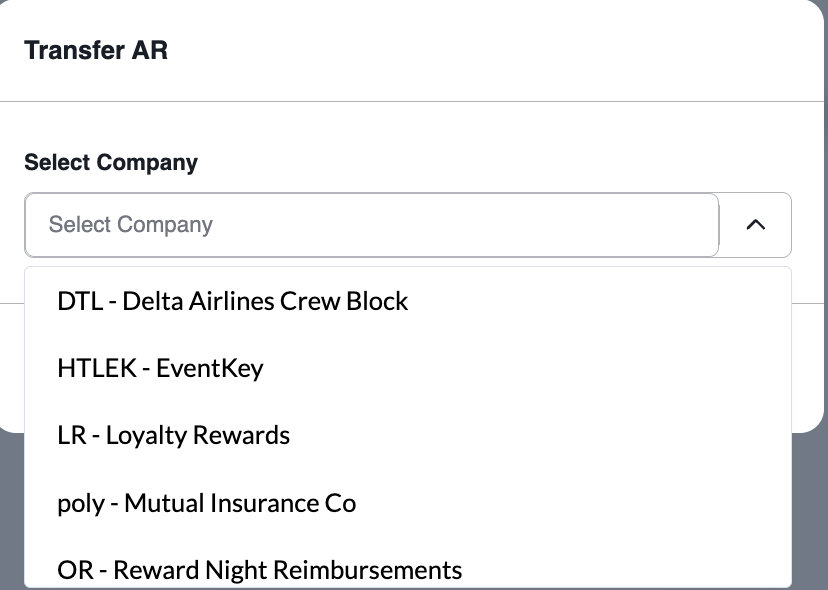
Click the Select Company dropdown and choose the recipient direct-bill profile (e.g., HTLEK - EventKey).
Designates the corporate ledger that will assume the financial liability.
Confirm Reallocation
Click the blue Confirm button in the modal.
Processes the transfer, displays a green notification banner (Success: Saved Successfully), and removes the line item from the source ledger.
Audit Destination Ledger
Return to the Dashboard via Back, scroll down the Company List, and open the destination profile (e.g., EventKey).
Verifies that the transferred transaction appears under Account Receivable with an updated audit note (Transferred from Company HotelKey Inc).
📷 VISUAL CALLOUT:
Transfer AR Utility
Reallocate unbilled receivable line items from one company account to another.
Transfer AR Walkthrough
Detailed Modal & Screen Field Breakdown
1. Account Receivable Actions Menu
Actions Dropdown:
Transfer AR: Initiates checkbox selection to move unbilled guest stay folios to another corporate account.
Email Customer Statement: Opens statement distribution controls to email unbilled transaction logs directly to client contacts.
Export AR: Downloads active unbilled receivables to spreadsheet or data formats.
Selection Mode Action Controls:
Cancel Button: Exits selection mode without altering receivables.
Transfer AR (Count): Context-aware action button displaying the total number of transactions staged for reallocation.
📷 VISUAL CALLOUT:
Transfer AR Modal & Target Company Selector
Modal window displaying the Select Company dropdown open, highlighting destination accounts such as DTL - Delta Airlines Crew Block and HTLEK - EventKey.
Transfer AR Company Selector Screen
2. Transfer AR Modal Parameters
Select Company Dropdown: Searchable list of all active corporate profiles. Displays both account codes and titles (e.g., HTLEK - EventKey, DTL - Delta Airlines Crew Block, poly - Mutual Insurance Co).
Cancel Button: Closes the modal and returns to the source table without executing changes.
Confirm Button: Commits the transfer in system memory, recalculating balances for both entities simultaneously.
Financial Impact & Audit Trail
Executing an AR transfer triggers automated financial and audit adjustments across both corporate profiles:
Source Account Relief:
The selected transaction is immediately purged from the source company's Account Receivable ledger.
The source account's Total Balance and Account Receivable KPI cards decrease by the transferred monetary amount (e.g., reducing from $14,637.00 down to $13,950.15).
Destination Account Assumption:
The destination company's Total Balance and Account Receivable KPI cards increase by the transferred amount (e.g., increasing from $2,302.80 up to $2,911.68).
A new unbilled transaction row is created on the destination profile's Account Receivable tab.
Automated Audit Narrative:
The system modifies the Guest column description on the destination ledger to read:
Transferred from Company <Source Company Name> (e.g., Transferred from Company HotelKey Inc).
System audit trails log the user name, timestamp, originating company code, and target company code for monthly accounting reconciliations.