In HotelKey PMS, when an unapplied corporate payment (such as a credit card settlement or bank remittance) is insufficient to cover the aggregate balance of multiple line items within an open direct-bill invoice, accounting teams can apply a partial payment allocation. Through the 3-step Apply Payment wizard under Payments & Expenses, the system performs real-time balance calculations. If the total balance of selected invoice line items exceeds the available payment, the platform flags a boundary validation warning: Allocated Amount cannot be greater than balance amount: -USD [X.XX]. Operators can resolve this by de-selecting specific line items to match the exact available funds, settling eligible charges while leaving partially paid invoices in Open status with accurately reduced remaining balances.
Configuration Guide: Allocating a Partial Payment to an Open Invoice
On the Accounts Receivable Dashboard, locate the Company List and click the target corporate profile link (HotelKey Inc).
Loads the company profile displaying active credit metrics, balances, aging summary cards, and ledger sub-tabs.
Navigate to Payments
In the horizontal sub-tab bar below the aging KPI summary cards, click Payments & Expenses.
Renders recorded payment transactions, payment types, unapplied balances, and action controls.
Open Unapplied Payment
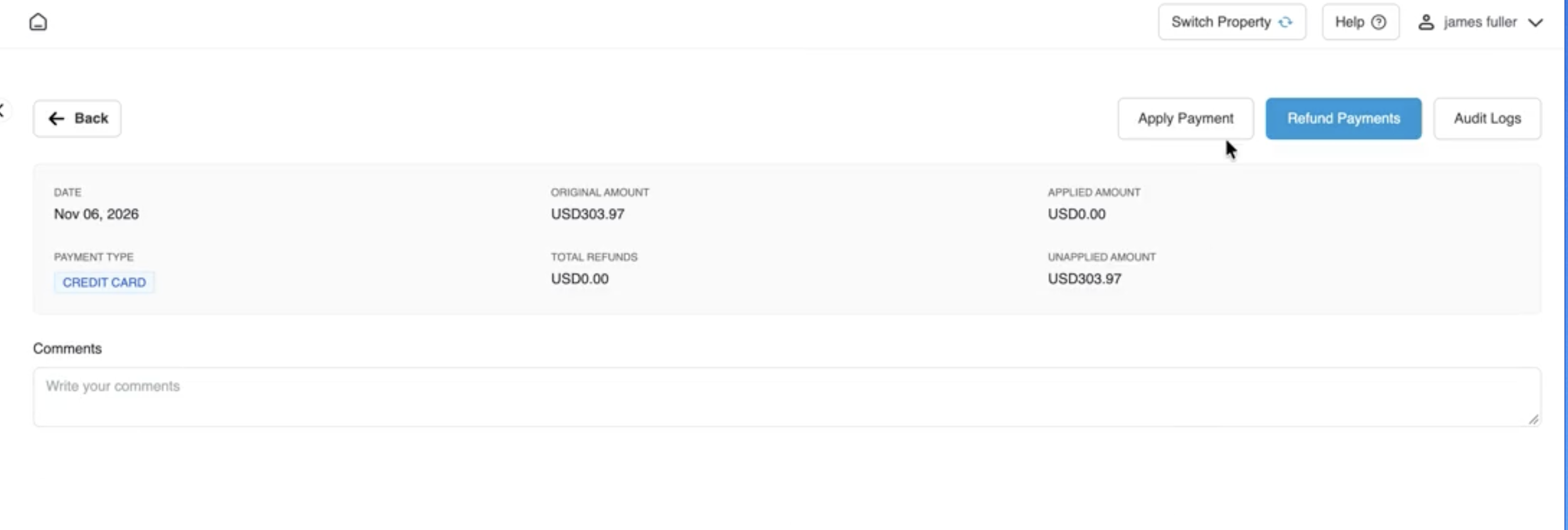
Click directly on the payment row containing unapplied funds (Credit Card payment of USD 303.97 dated Nov 06, 2026).
Opens the detailed payment transaction console displaying the original amount (USD 303.97), applied amount (USD 0.00), and unapplied balance (USD 303.97).
Initiate Apply Payment
In the upper-right action bar next to Refund Payments, click the white Apply Payment button.
Launches the 3-step payment allocation modal on Step 1: Select Invoices.
Step 1: Select Target Invoice
Locate and check the target open invoice in the list: AR Invoice #1790105857 (Original Amount USD 607.94, Open Amount USD 607.94).
Stages the invoice for payment matching. Click the blue Next button.
Step 2: Validate Allocations & Resolve Limits
Review the Invoice Allocations screen. Because the selected invoice contains two line items totaling USD 607.94 against the available payment of USD 303.97, the system displays:
Selected Invoice Balance Amount: USD 607.94
Original Payment Amount: USD 303.97
Net Payment Available to Apply: USD 303.97
Amount Left to be Used: -USD 303.97
Allocated Amount cannot be greater than balance amount: -USD 303.97.
Resolution: Both line items (Jain, Neeraj, 902 for USD 303.97 and Fuller, James, 919 for USD 303.97) are checked by default. Uncheck the master selection box or de-select the checkbox next to Fuller, James, 919, keeping only Jain, Neeraj, 902 (USD 303.97) selected. This brings Amount Left to be Used to exactly USD 0.00 and clears the error. Click Next.
Step 3: Review Confirmation
Review the Settlement Amount header (USD 303.97), Invoice Number 1790105857 (Date: Sep 22, 2026), and projected Invoice Balance (After Confirm) of USD 303.97.
Summarizes the partial settlement transaction covering Confirmation # 40879859 before committing changes to the ledger.
Confirm Settlement
Click the blue Confirm & Close button in the lower-right corner.
Commits the partial allocation, displays a green notification banner (Success: Saved Successfully), and updates the payment transaction console.
Verify Invoice State
On the payment console under Invoice Details, review the allocated line item (Jain, Neeraj, 902, Amount: USD 303.97). Click the View button next to the record.
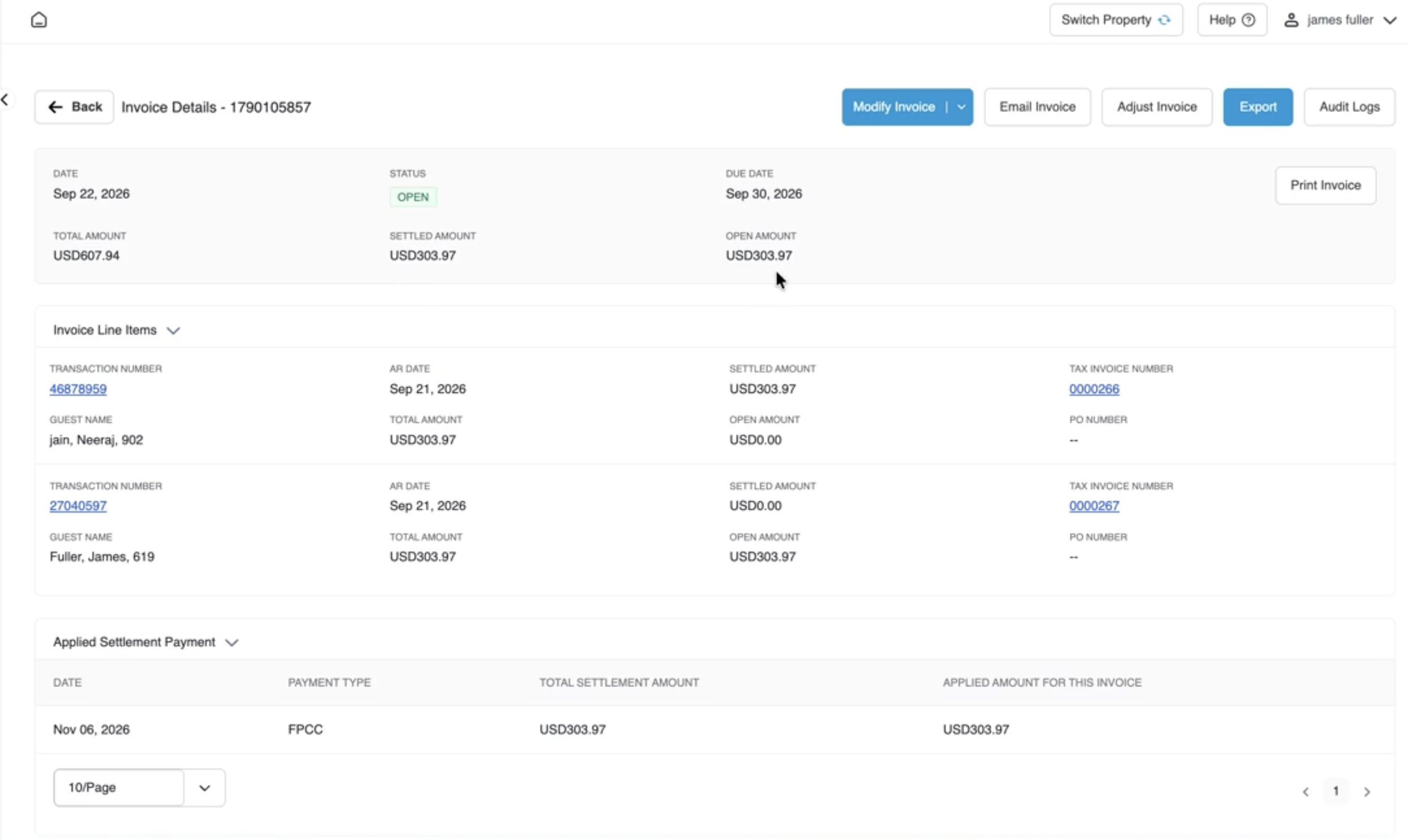
Opens the Invoice Details console showing the invoice remains in OPEN status (green badge), with Total AmountUSD 607.94, updated Settled AmountUSD 303.97, reduced Open AmountUSD 303.97, and the payment recorded under Applied Settlement Payment.
Payment record screen displaying Date (Nov 06, 2026), Payment Type (CREDIT CARD), Original Amount (USD 303.97), Applied Amount (USD 0.00), Unapplied Amount (USD 303.97), and a highlighted callout on the white Apply Payment button.
Selected Invoice Balance Amount:USD 607.94 (sum of both guest charges).
Original Payment Amount:USD 303.97.
Net Payment Available to Apply:USD 303.97.
Amount Left to be Used:-USD 303.97.
Validation Rule & Boundary Error:
Because Selected Invoice Balance Amount (USD 607.94) > Net Payment Available to Apply (USD 303.97), Amount Left to be Used displays -USD 303.97.
The system highlights the negative balance in red and displays the warning:
Allocated Amount cannot be greater than balance amount: -USD 303.97
The blue Next button is disabled until the balance is reconciled.
Line-Item Selection Grid & Resolution:
Line Item 1:Jain, Neeraj, 902 | AR Invoice: 1790105857 | Tax/Fiscal: 0000260 | Transaction #: 40879859 | Stay Date: Sep 22, 2026 | Original Amount: USD 303.97.
Line Item 2:Fuller, James, 919 | AR Invoice: 1790105857 | Tax/Fiscal: 0000267 | Transaction #: 27545597 | Stay Date: Sep 21, 2026 | Original Amount: USD 303.97.
Action Taken: Unchecking the line item for Fuller, James, 919 leaves only Jain, Neeraj, 902 selected at USD 303.97. This adjusts Amount Left to be Used to exactly USD 0.00, removes the error banner, and enables the blue Next button.
Step 3: Confirmation
Settlement Amount Header: Displays the confirmed monetary amount being applied (USD 303.97).
Settlement Details Table:
Invoice Number:1790105857.
Date:Sep 22, 2026.
Invoice Balance (After Confirm): Projected open balance remaining on the invoice post-settlement (USD 303.97).
Confirmation # / Transaction #:40879859.
Original Amount / Open Amount:USD 303.97 / USD 303.97.
Settlement Amount:USD 303.97.
Action Buttons:
Previous: Returns to earlier steps to modify selections.
Cancel: Discards all allocations without modifying balances.
Confirm & Close: Finalizes the partial payment allocation across ledgers.
(Top) Step 3 confirmation modal showing the Settlement Amount (USD 303.97) and projected Invoice Balance (After Confirm) of USD 303.97; (Right) The updated Invoice Details console showing the invoice remaining in status OPEN, with Settled Amount USD 303.97, Open Amount reduced to USD 303.97, and applied payment details.
Confirmation Modal
Invoice Details Reflecting the Applied Settled Amount
Post-Settlement Ledger Status & Lifecycle
Following confirmation of the partial payment allocation, HotelKey PMS applies the following automated updates:
Payment Record Recalculation:
Applied Amount: Updates to USD 303.97.
Unapplied Amount: Reduces to USD 0.00.
Invoice Details Grid: Generates an audit row showing:
Guest Name:Jain, Neeraj, 902
Date:Nov 06, 2026
AR Invoice Number:1790105857
Tax Invoice Number:0000260
Transaction Number:40879859
Amount:USD 303.97
Action Buttons:View (opens invoice record) and Cancel Settlement (reverses allocation).
Partial Invoice State Retention:
Because an unpaid balance of USD 303.97 remains, the invoice remains in OPEN status (green badge) and stays visible under the Open Invoices tab.
The invoice's Settled Amount increases to USD 303.97, and the Open Amount decreases to USD 303.97 (out of total USD 607.94).
Under Invoice Line Items, the line item for Jain, Neeraj, 902 (Transaction #40879859) reflects a Settled Amount of USD 303.97 and an Open Amount of USD 0.00.
Under Applied Settlement Payment, a new audit row displays:
Date:Nov 06, 2026
Payment Type:KPOG
Total Settlement Amount:USD 303.97
Applied for this Invoice:USD 303.97
Reversal / Cancellation Option: If the partial allocation must be undone, clicking the red Cancel Settlement button (or checking the row and clicking Cancel Selected Allocations) on the payment console unlinks the payment, restoring the open invoice balance back to USD 607.94 and returning the USD 303.97 credit to unapplied status.